ChatGPT is a great SEO buddy and can take a lot of work off your plate in your daily SEO tasks.
In this lesson, I'll show you a few useful processes for doing keyword research with ChatGPT and finding topics for your editorial calendar.
Something important to understand before we start:
ChatGPT has no access to real keyword data
Even if you use a current ChatGPT model like GPT-5 or o3, the tool can give you keyword ideas, but it has no direct access to keyword data such as search volume or CPC. For that, you still need SEO tools like SE Ranking, Ahrefs or the Google Keyword Planner.
The tricky part is this:
If you ask ChatGPT for keyword data, it will give you some anyway.
But these numbers are made up and often not even close to accurate, as you can see in the following table:
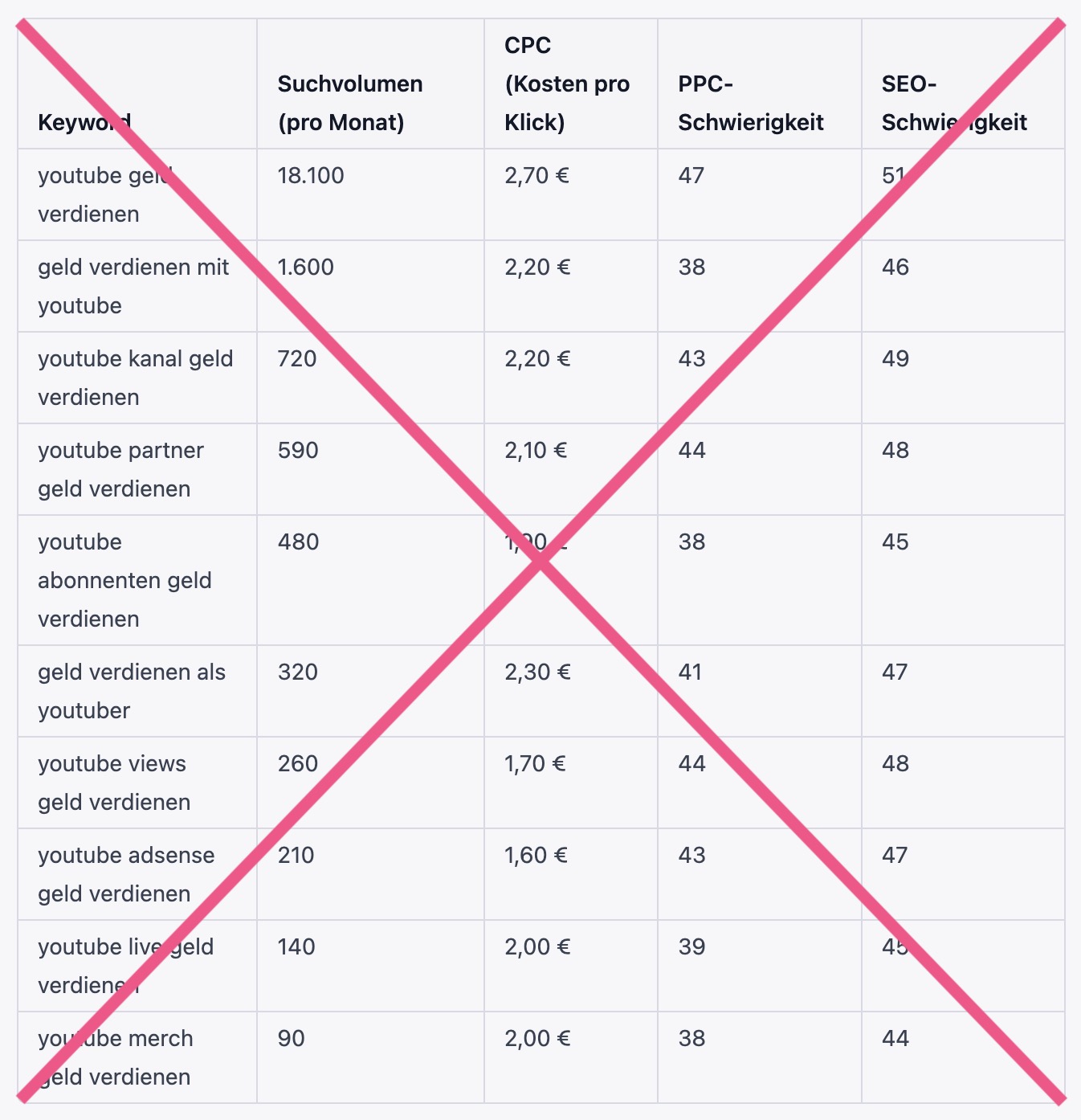
For comparison:
The keyword “youtube geld verdienen” only had a search volume of 1,900 at the time of the query. The keyword “youtube kanal geld verdienen” only had 30.
ChatGPT is somewhat better at determining the search intent of a keyword. Even so, you should check the result here too.
You may have seen a “fancy” list in which ChatGPT categorizes keywords as “informational, commercial, navigational and transactional”. That isn't always 100 % accurate, because ChatGPT has no access to Google-specific data such as the actual ranking of the top 10 results.
However:
Since the end of 2024, ChatGPT has had access to the web through “ChatGPT Search” (also available on the free tier, with limits). So you can use web search to research current content for a keyword. For real SEO workflows such as keyword data, competitor analysis and rank tracking, you still need specialized SEO tools.
And yes: with Custom GPTs (the earlier “plugins” were replaced at the end of 2023) you can extend ChatGPT with additional functions. In the course, you get six GPTs of your own that take over SEO tasks.
You can also upload your own keyword lists to Data Analysis and have them analyzed, which I'll show you in this lesson.
1. Editorial calendar based on a keyword list (without Data Analysis)
To use the following prompt, you first enter a general topic, e.g. “online business”, in SE Ranking under SEO Tools > Keyword Research > Keyword Ideas.
Then you export all keywords by clicking the “Export” button above the list on the right (a CSV file is best, because it can hold more rows):
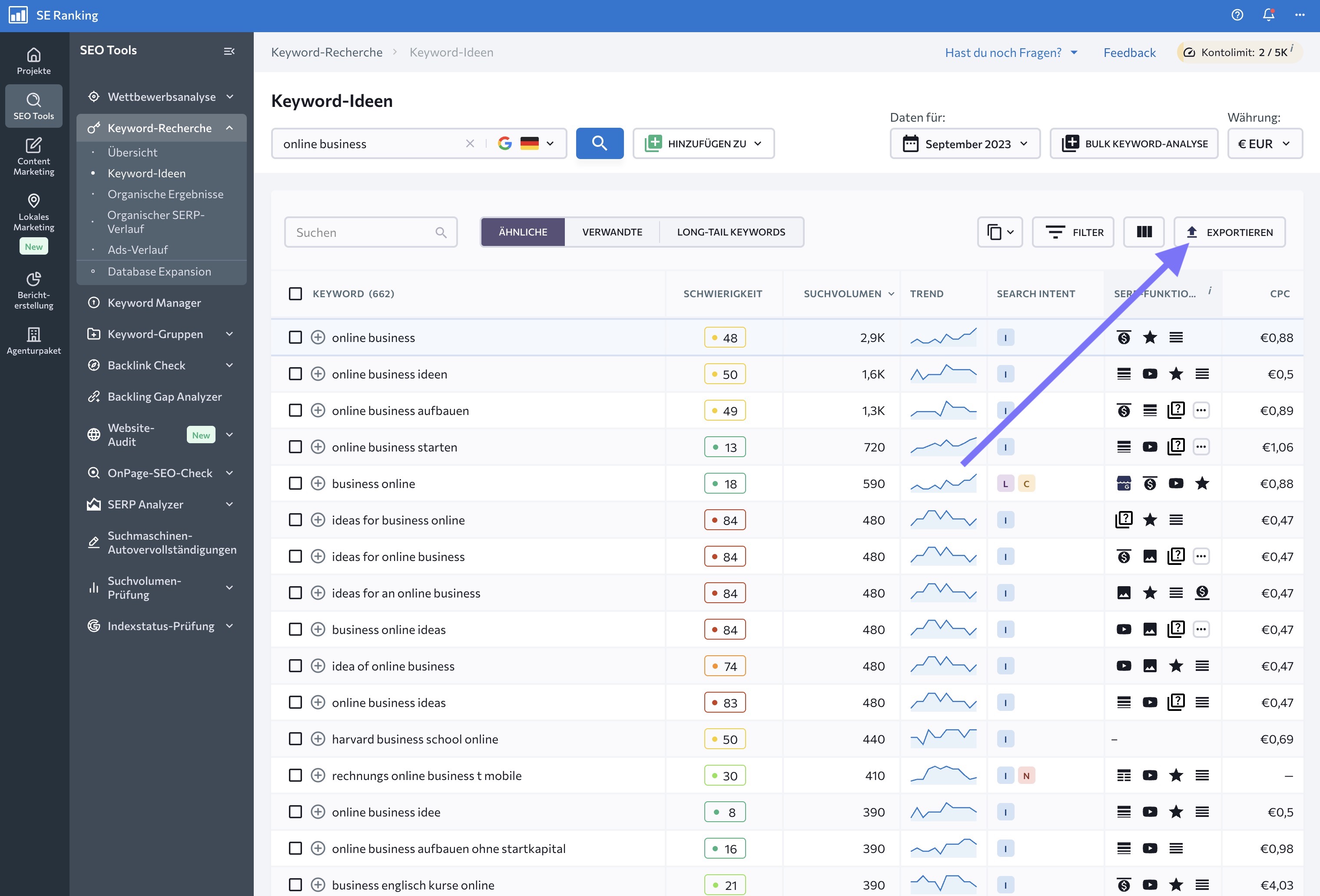
You then open the list in a spreadsheet program of your choice. You paste the columns “Keyword” and “Search volume” into your prompt (you can paste anywhere between 50 and 150 keywords, ideally the ones with the highest search volume).
Tip: You can also jump straight to the next section and use Data Analysis, because there you can simply upload your export file. File uploads now work on the free tier too (with limits), and the limits are higher with ChatGPT Plus.
The prompt looks like this:
Create a tabular editorial calendar for a blog based on the following list of keywords.


The table should have the columns blog article title, keywords, total search volume
and blog article type.


Cluster the keywords semantically. Every blog article should be relevant for every keyword in its assigned cluster:


Keyword Search volume
[Keyword 1] [Search volume 1]
[Keyword 2] [Search volume 2]
[Keyword 3] [Search volume 3]
...
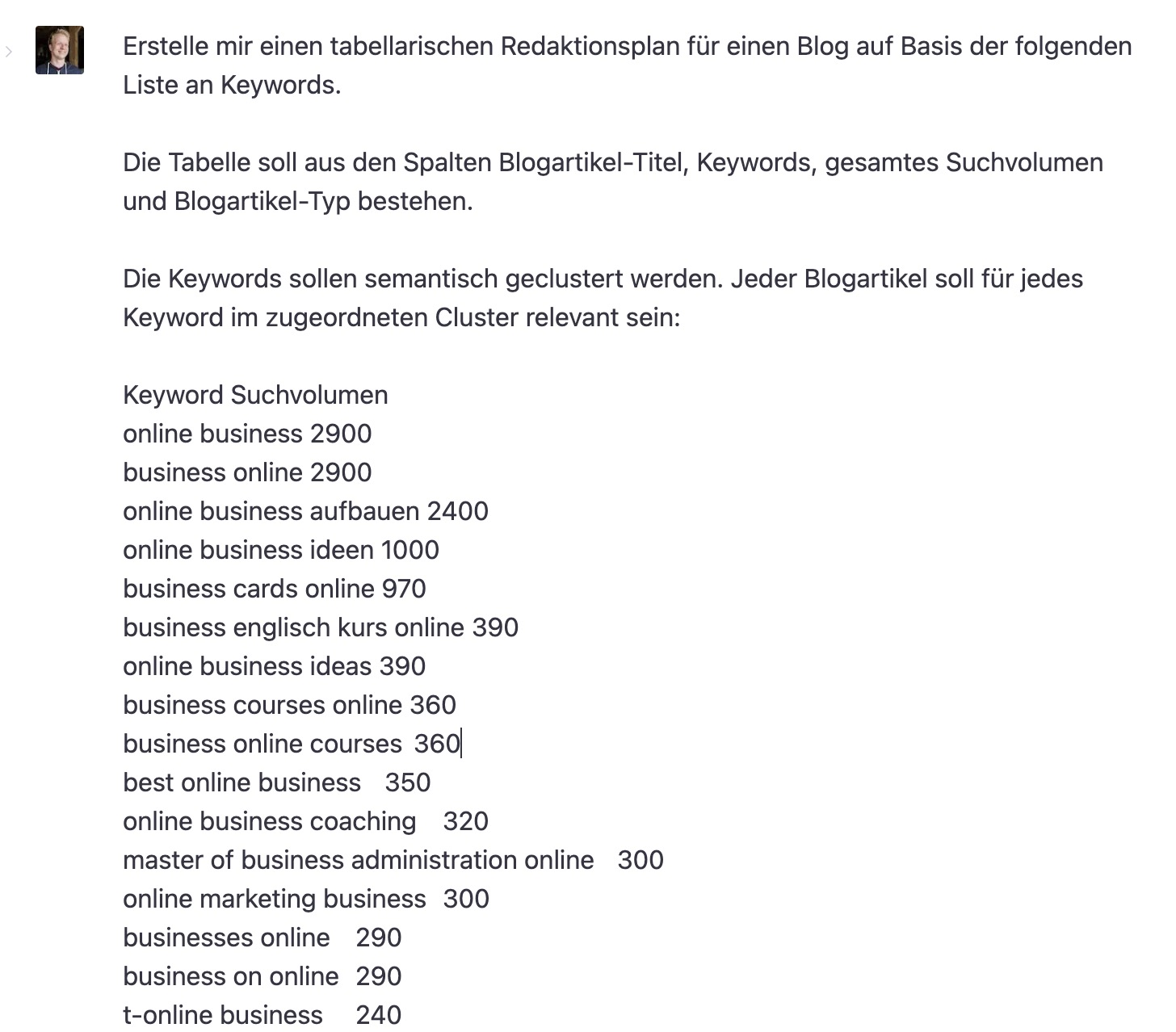
Example input:
Three small tips and notes on this:
- In the prompt, the columns keyword and search volume can also be separated by a comma
- The calculation of a cluster's total search volume can occasionally contain small deviations, but it's accurate in most cases
- You can give very good follow-up commands based on the editorial calendar, e.g. to find more headline ideas for a blog article, or to write introductions or outlines
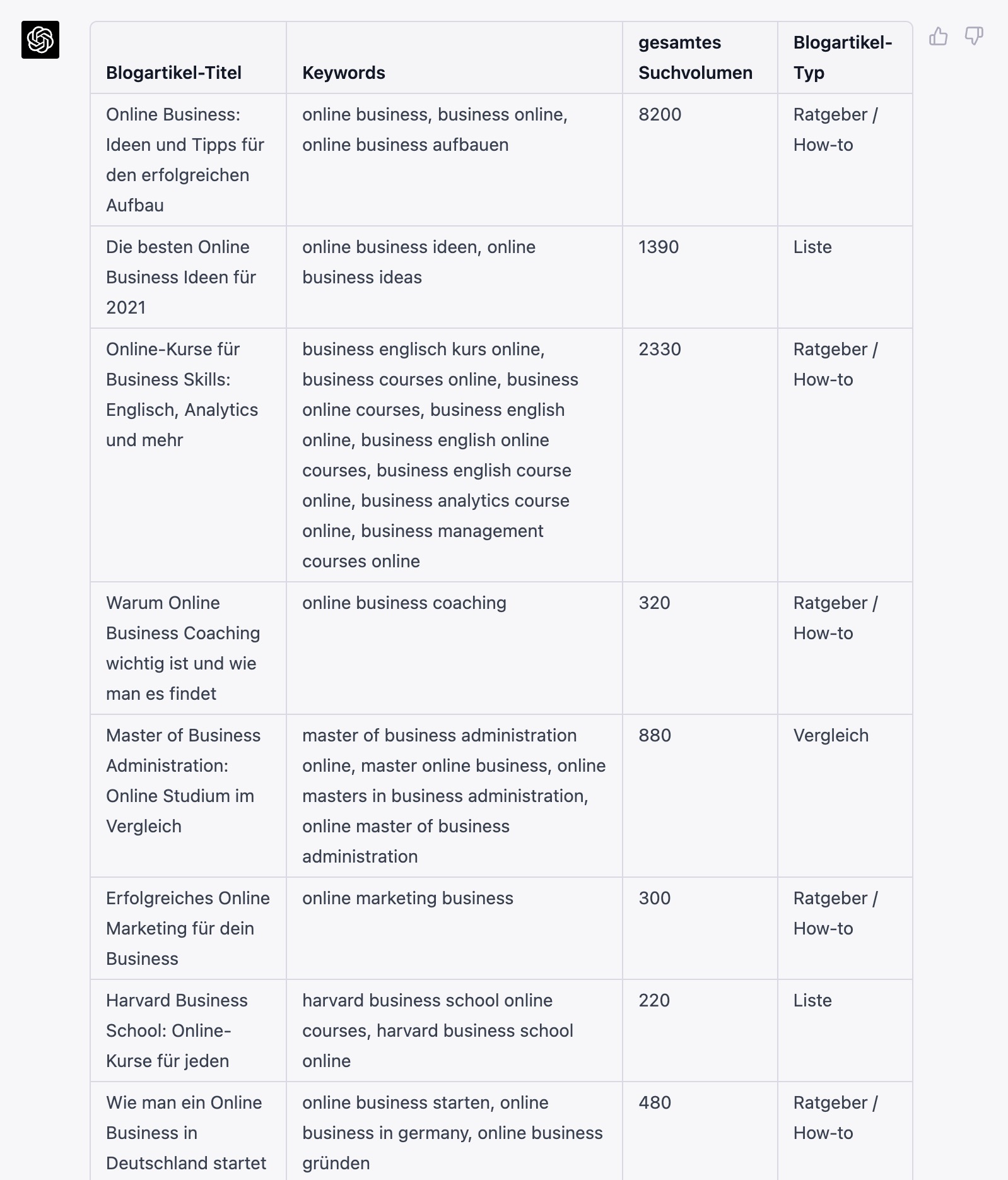
Example output:
2. Editorial calendar based on a keyword list (with Data Analysis)
The approach above works even better if you use “Data Analysis” (formerly “Advanced Data Analysis” or “Code Interpreter”). It is now a standard tool in ChatGPT and available on the free tier (with limits), with higher limits on ChatGPT Plus.
This way you can simply upload your exported keyword list (by clicking the paperclip on the left of the input field):
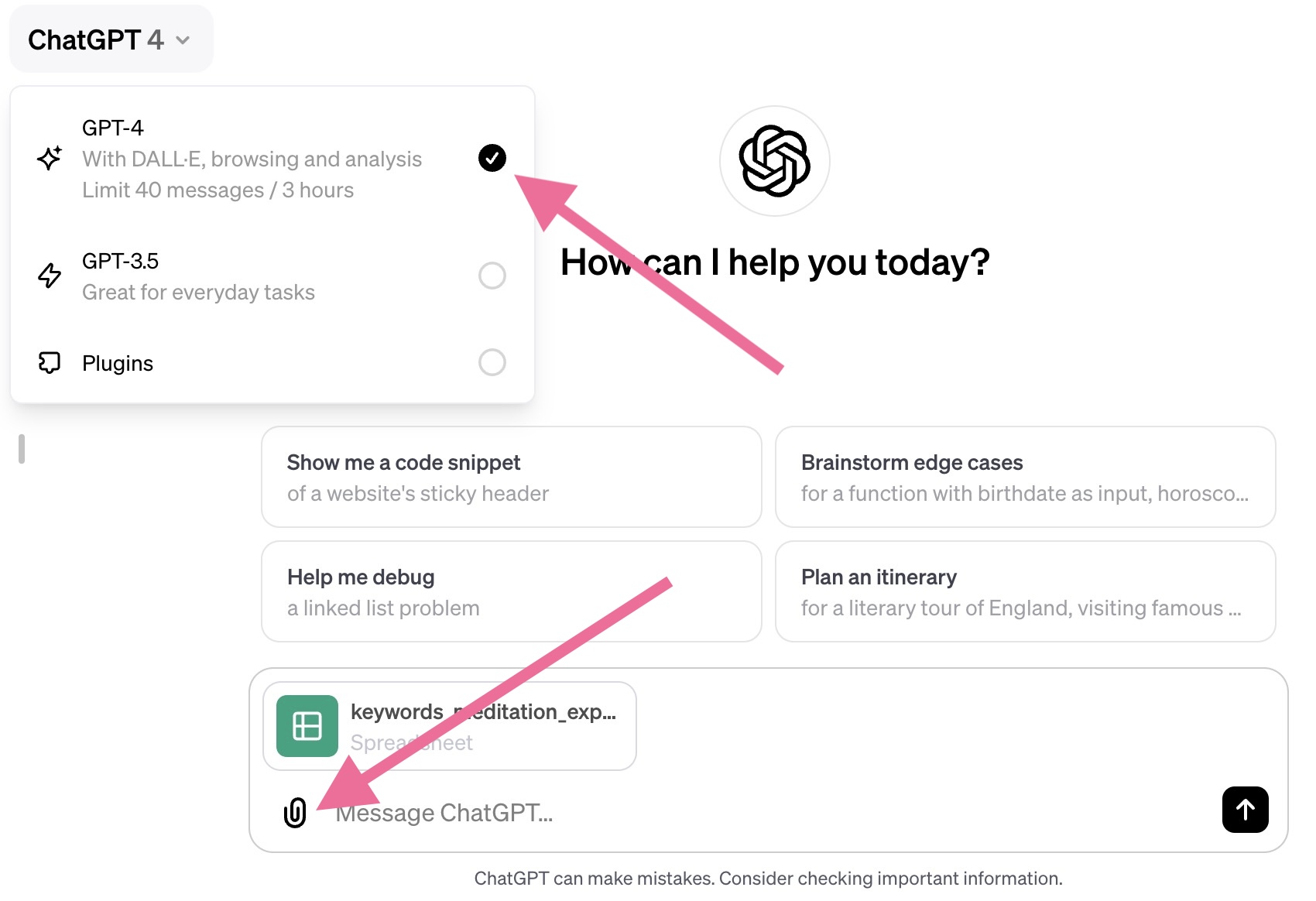
Note on the interface: ChatGPT's interface has changed several times since these screenshots. The model selection and the upload button look a little different today, but the basic steps are the same.
Tip: It can make sense to remove all columns except “Keyword” and “Search volume” before uploading. That way Data Analysis works faster and takes more keywords into account.
The prompt stays the same:
Create a tabular editorial calendar for a blog based on the following list of keywords.


The table should have the columns blog article title, keywords, total search volume and blog article type.


Cluster the keywords semantically. Every blog article should be relevant for every keyword in its assigned cluster.
You may have to follow up a few times to get the result you want:
Please give me more blog article suggestions for my editorial calendar
Please give me the result of your analysis as an XLSX file
Please show me all the keywords contained in the clusters
New Level SEO 2.0 is no longer sold.
Join the waitlist (in German) and you'll hear when there is a new New Level SEO offer.
To the waitlist