
Core Web Vitals have officially been a ranking factor in Google Search since June 2021.
They are meant to help evaluate the user experience of a website better.
The problem:
Core Web Vitals are a technical topic. And Google itself has offered little help on it in German so far.
That's why I created this comprehensive guide to Core Web Vitals.
Here you'll learn, among other things:
- What Core Web Vitals are
- How important they are as a ranking factor (and whether it's worth optimizing for them)
- What the hell all those acronyms actually mean (FID, CLS, LCP, FCP, TTFB, etc.)
- Core Web Vitals measure loading time, interactivity, and layout stability (LCP, INP, CLS) and only evaluate real user data. 75% of your measurements have to be in the green to pass the test.
- Since March 2024, INP (Interaction to Next Paint) has replaced the old FID value and measures not just the first interaction but the worst one during a session.
- With the 30-point checklist, recommended WordPress plugins, and concrete optimization tips, you optimize images, scripts, and server responses to get better LCP, INP, and CLS values.
1. What are Core Web Vitals?
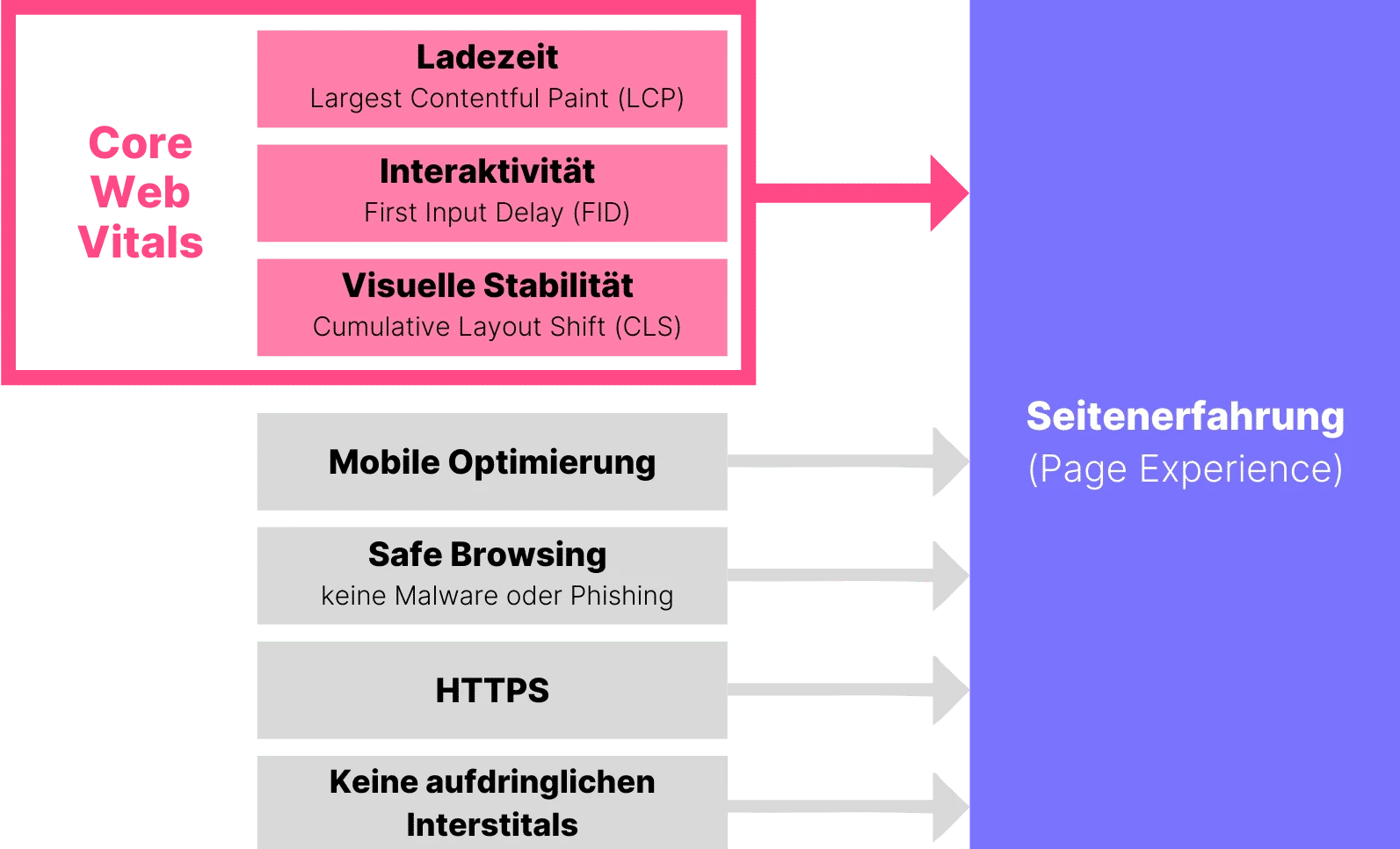
Core Web Vitals consist of the following three metrics:
- Largest Contentful Paint (LCP): LCP measures how long the largest element of a web page (in the area that is visible first) takes to load, which evaluates the “perceived loading time” of a web page. Target: under 2.5 seconds.
- Interaction to Next Paint (INP): INP measures how quickly a web page responds to user interactions (clicks, taps, keyboard input). Unlike the former FID value, INP captures not just the first interaction but the worst interaction during the entire session. Target: under 200 milliseconds.
- Cumulative Layout Shift (CLS): CLS measures how much the page layout shifts while loading and thus evaluates the visual stability of a web page. Target: under 0.1.
As a ranking factor, they join several existing factors for evaluating page experience, such as mobile-friendliness or HTTPS:
When were Core Web Vitals introduced?
Core Web Vitals were originally supposed to become a ranking factor for Google Search starting in May 2021 as part of the Page Experience update.
In April 2021, however, Google announced that it would give publishers more time to adapt and roll out the update only in mid-June. The rollout was completed on September 2, 2021.
2. Core Web Vitals as a ranking factor
Core Web Vitals are a ranking factor confirmed by Google (and there aren't that many of those, or at least not many that are this measurable).
But please don't make the mistake of overrating them.
Before you start optimizing, you should know the following about them:
1. Core Web Vitals won't be a big deal (for now)
There is currently little to suggest that Core Web Vitals have a big direct impact on rankings.
For example, Gary Illyes from Google emphasized in September 2020 on Reddit, that Core Web Vitals have nothing to do with the quality and relevance of search results and would therefore most likely never become the most important ranking factor:
Like any other search engine, Google works hard to surface the highest quality and most relevant results for users’ queries. CWV has nothing to do with either of those, not even remotely, so it’s extremely unlikely that CWV would ever become “the primary factor for Organic Traffic”. That’s not to say you can ignore CWV, though.
A help document on Core Web Vitals in Google Search Central backs up Illyes's statement. According to it, Core Web Vitals are more of a tiebreaker:
Although user-friendliness is important, when ranking, Google still mainly takes the information offered into account, even if the user experience is subpar in some respects. Good user-friendliness doesn't mean that relevant content becomes less important. However, when many pages have similarly relevant content, user-friendliness can have a much bigger influence on visibility in Google Search.
You can find similar statements from other Google employees, such as Danny Sullivan, Martin Splitt, or John Mueller.
In case you're wondering:
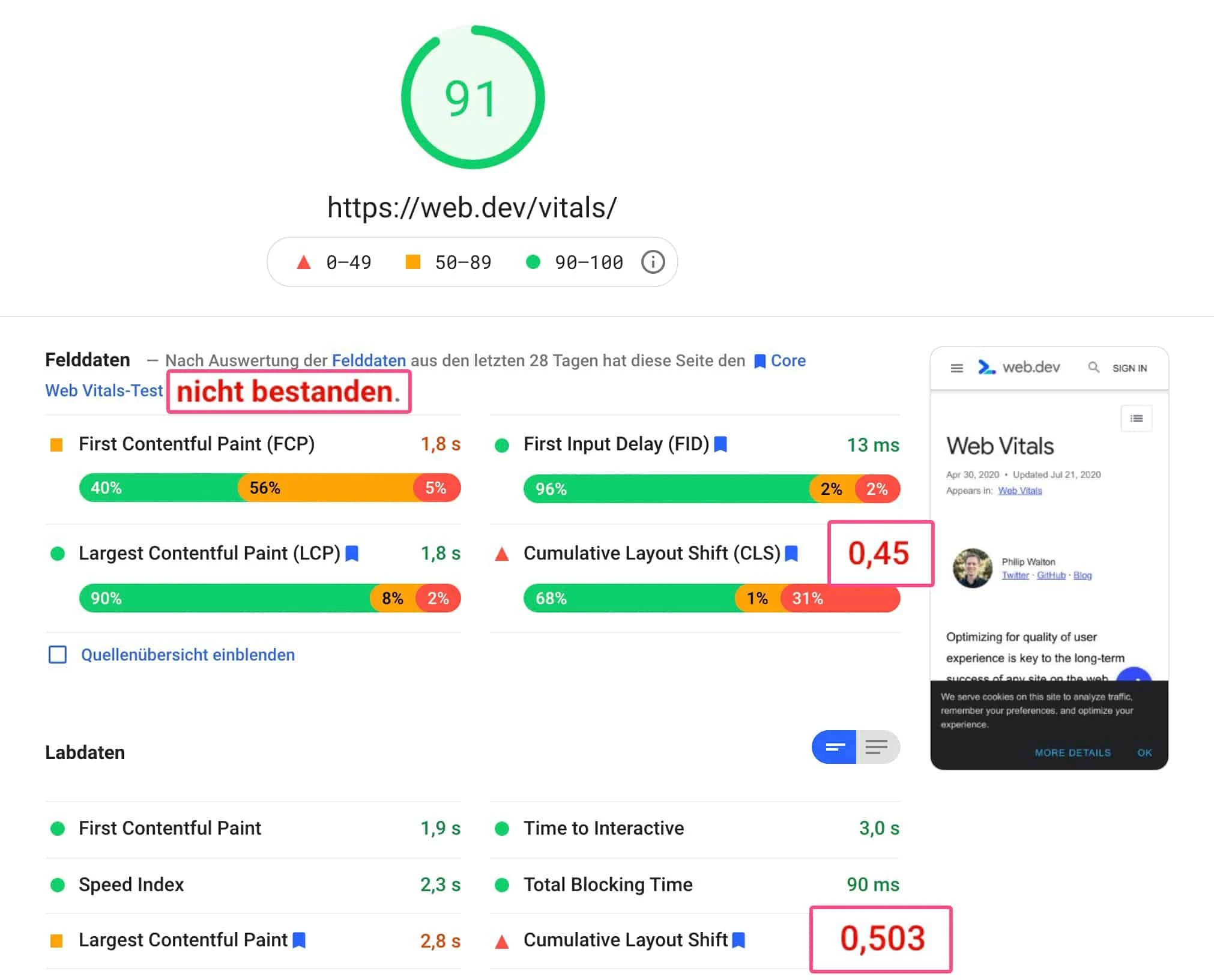
Many of Google's own websites fail the test themselves. That includes the official page on Core Web Vitals, which has a far too high CLS value:
2. Ranking factor for mobile and desktop
Core Web Vitals have been a ranking factor for both mobile and desktop search since February 2022.
Since Google uses mobile-first indexing, you should pay particular attention to your pages passing the Core Web Vitals test on mobile devices. But the desktop values are also taken into account for desktop search queries:
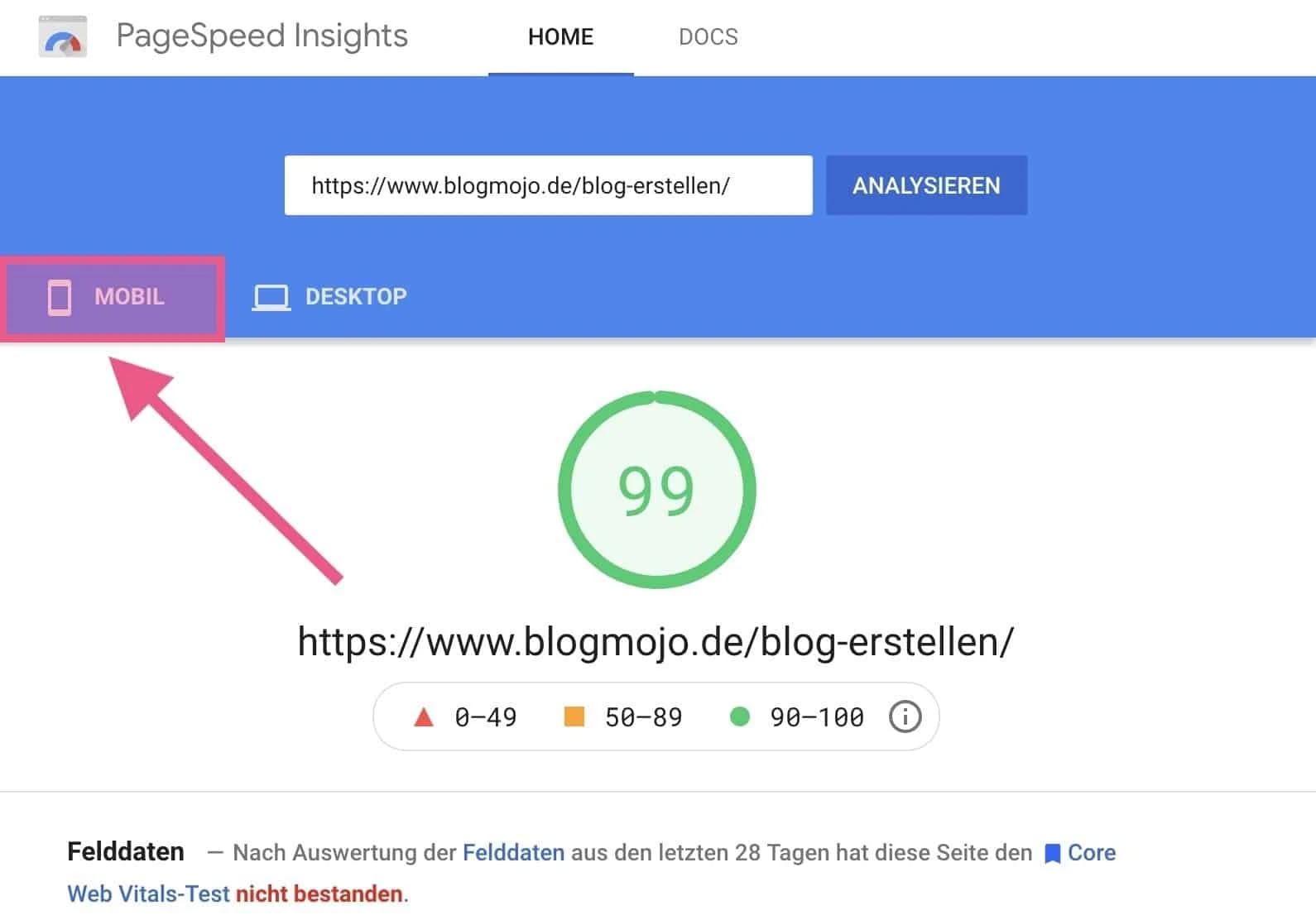
In PageSpeed Insights you can switch between the mobile and desktop view to test both variants. The values often differ significantly, because mobile devices simulate slower processors and network connections.
You can also check the values with our free page speed checker.
3. Passing all three tests gives the biggest ranking boost
The ranking boost from Core Web Vitals is biggest for a page when it meets the thresholds of all three Core Web Vitals (marked in PageSpeed Insights by the blue badge symbol).
According to John Mueller, though, a page can also get a ranking boost if its Core Web Vitals are rated yellow/needs improvement.
Here's an overview of the thresholds:
Metric | Good | Poor | Percentile |
|---|---|---|---|
| LCP | ≤ 2.5 s | > 4 s | 75 |
| INP | ≤ 200 ms | > 500 ms | 75 |
| CLS | ≤ 0.1 | > 0.25 | 75 |
A percentile of 75 means that 3 out of 4 user measurements (so 75%) have to be in the good range for your page to be rated “good” overall for one of the three Core Web Vitals.
By the way, the PageSpeed score (in the green, yellow, or red circle) is irrelevant for Core Web Vitals, even though it is of course a good indicator.
You can have values of 95, 97, or even 100 and still fail the Core Web Vitals test:
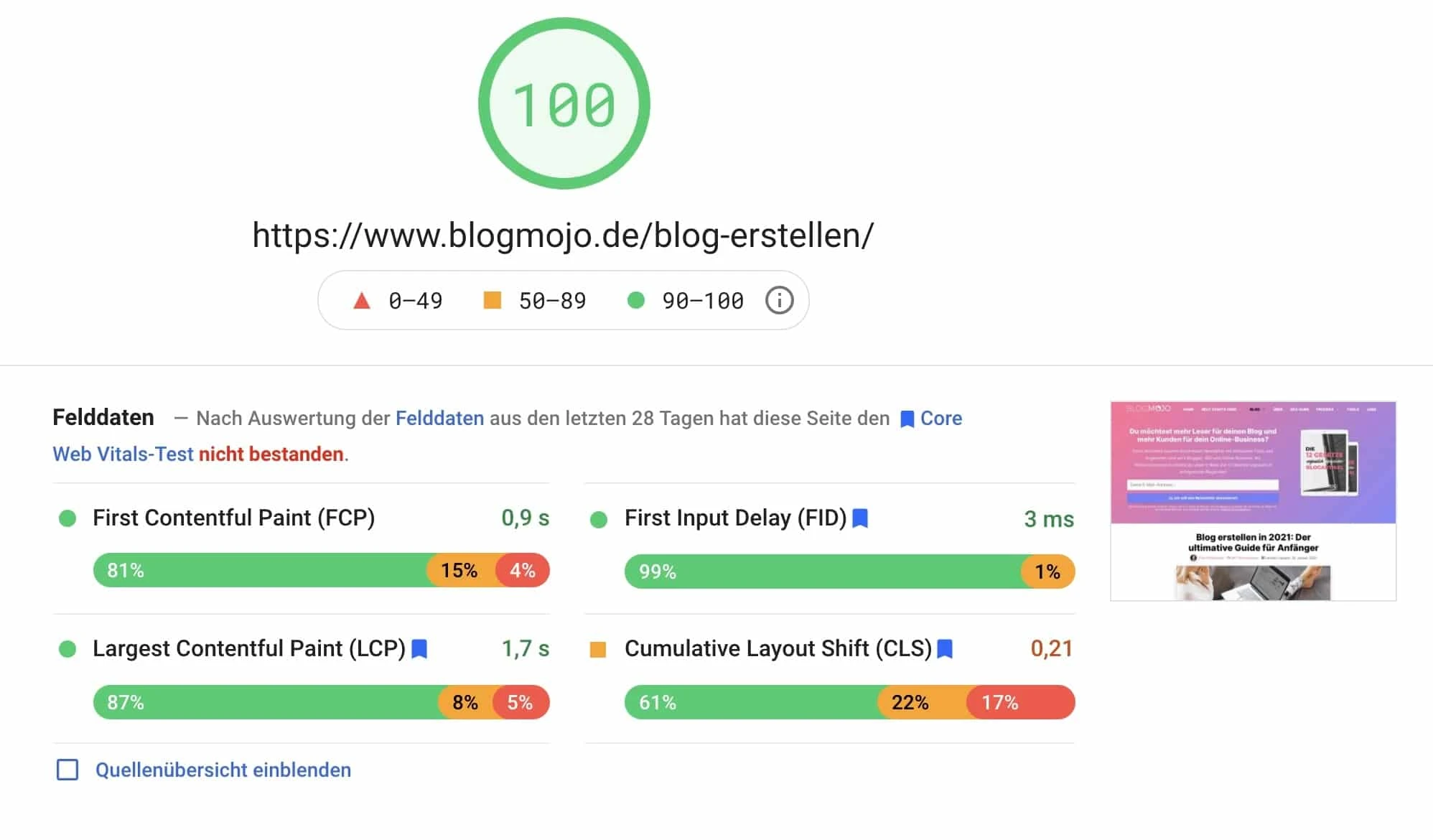
My blog article failed the test because of several layout shifts. However, I was able to eliminate them completely by preloading my self-hosted Google Fonts.
There are two reasons for that:
First, the PageSpeed score isn't calculated from Core Web Vitals (LCP, INP, and CLS) alone, but also from TTI, TBT, SI, and FCP. You can find the exact composition of the score here.
Second, it is calculated exclusively from lab data. But that isn't decisive for Core Web Vitals:
4. Field data counts, not lab data!
Only field data counts for passing the Core Web Vitals test, as you can read on the official page at web.dev:
While all of the Core Web Vitals are, first and foremost, field metrics, many of them are also measurable in the lab.
Field data consists of measurements from real Chrome users, which are collected in the so-called Chrome User Experience Report (CrUX).
The lab data shown to you in PageSpeed Insights or in a Lighthouse test with Chrome DevTools, on the other hand, is measured “under laboratory conditions” and as such is only a limited snapshot, which is why it is only of limited use as a ranking factor.
You can see the field data from CrUX for the last 28 days in PageSpeed Insights:
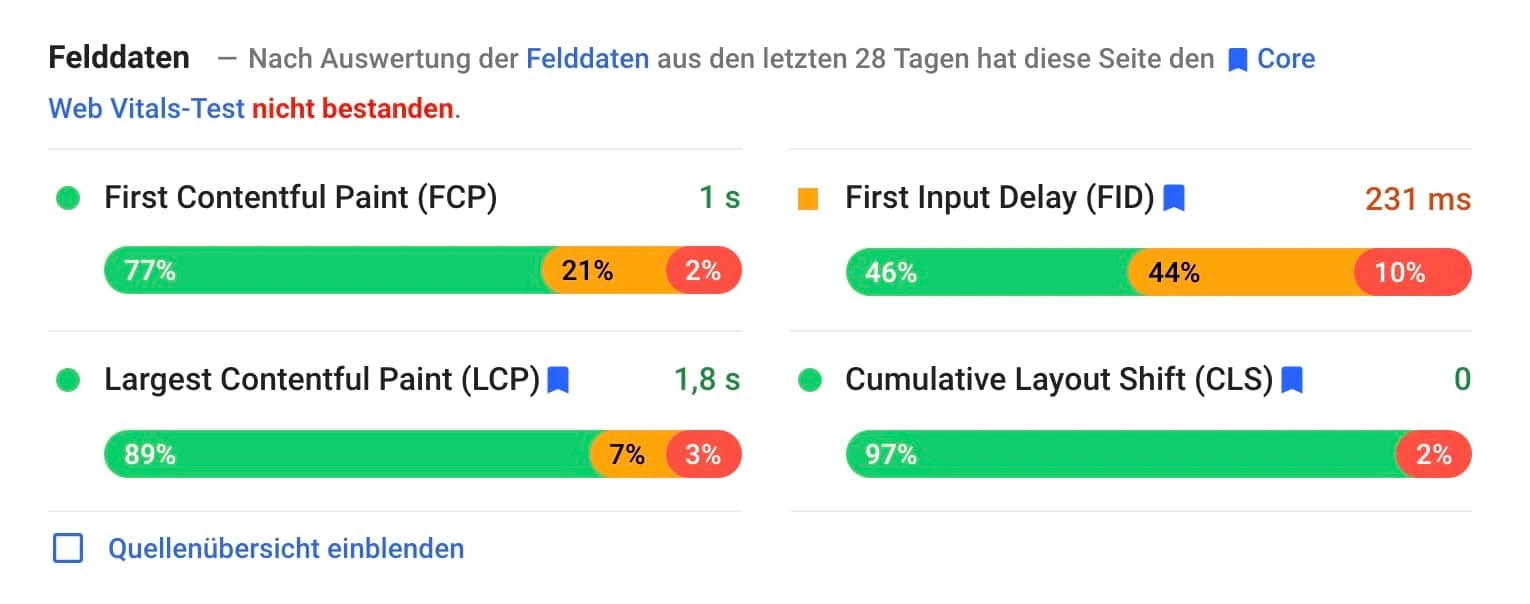
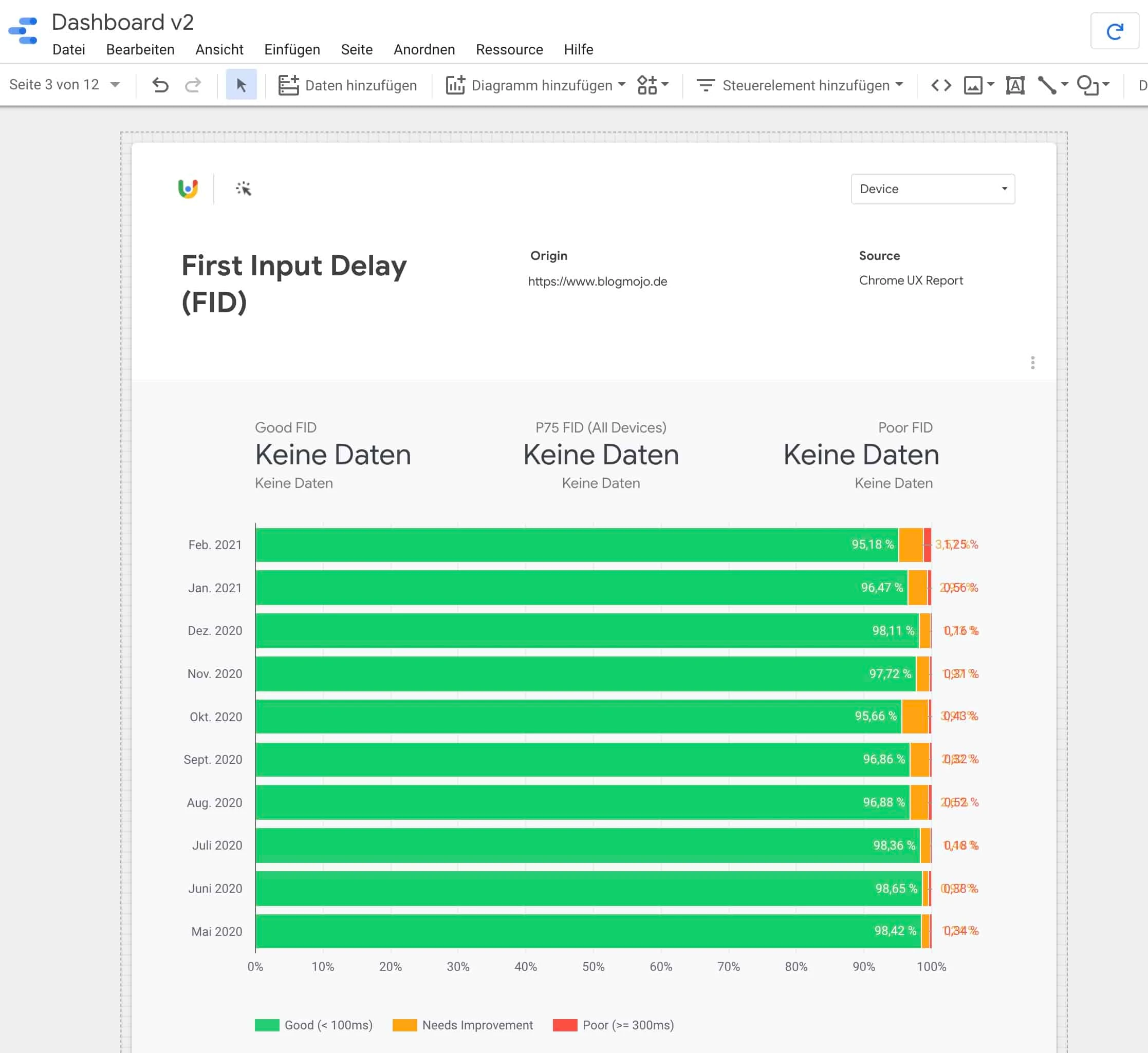
If you want to see CrUX data that goes back further, you can do that with the CrUX Dashboard in Google Data Studio.
With it, I can, for example, have the aggregated data for the aggregated FID of Blogmojo from May 2020 to February 2021 displayed:
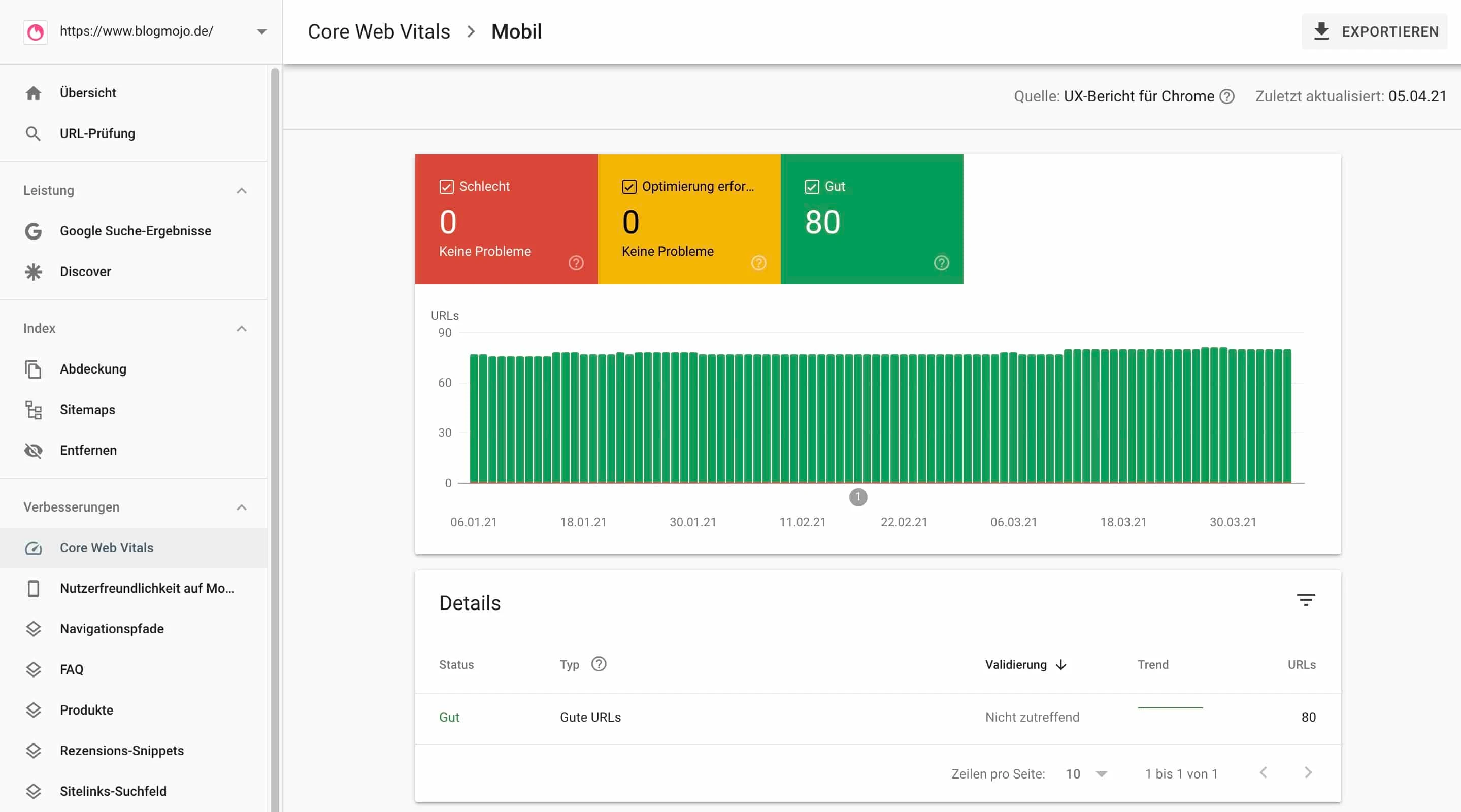
The data from the Core Web Vitals report in Google Search Console also shows field data:
5. Aggregated vs. URL-specific field data
You may have noticed in PageSpeed Insights that not every URL shows field data, only the so-called origin summary:
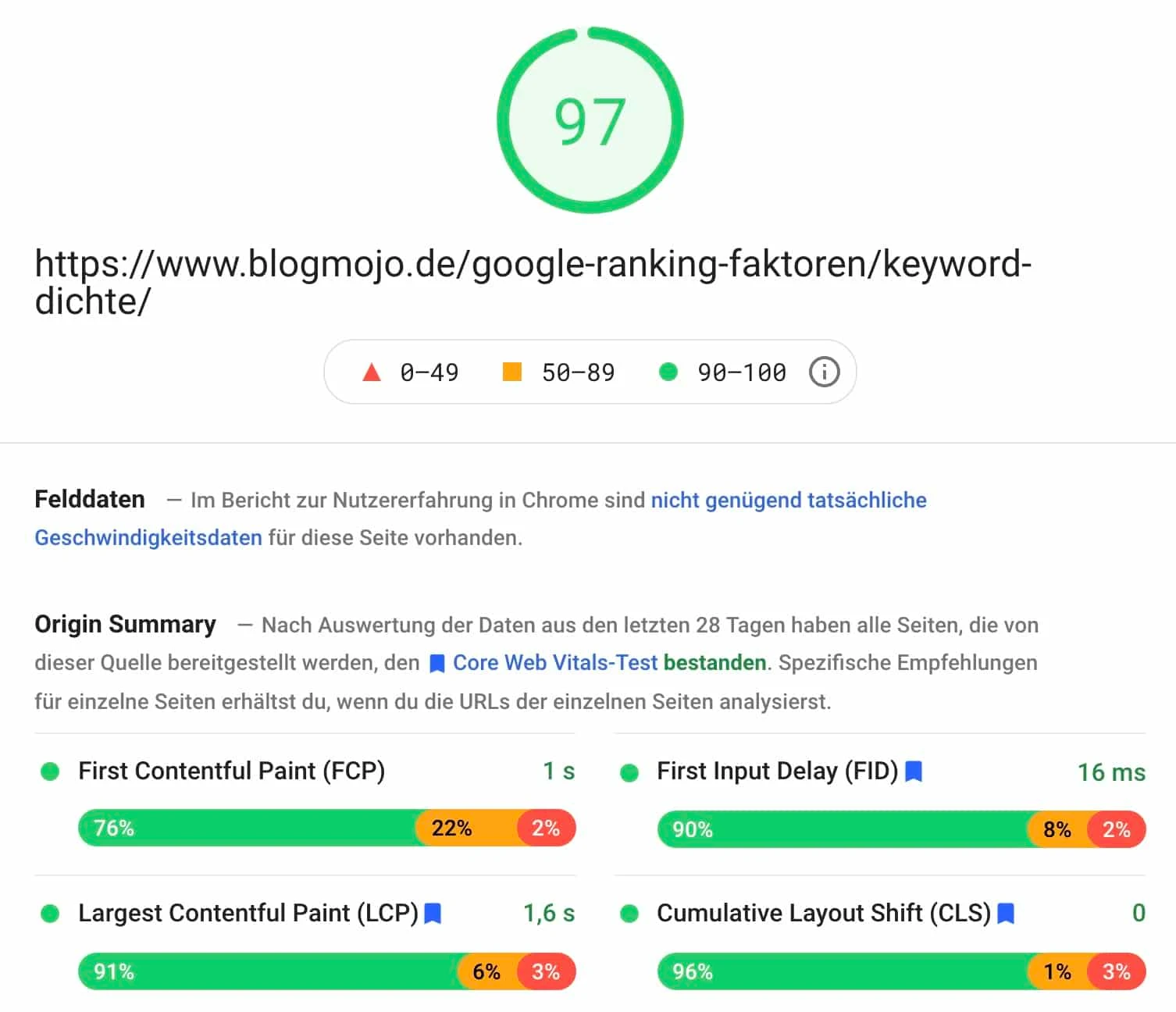
That is a domain-wide average that is shown whenever there isn't enough field data available, meaning a page hasn't been visited by enough Chrome users.
In the Core Web Vitals report in Google Search Console, LCP, INP, and CLS are also shown in aggregated form (split into different URL groups):
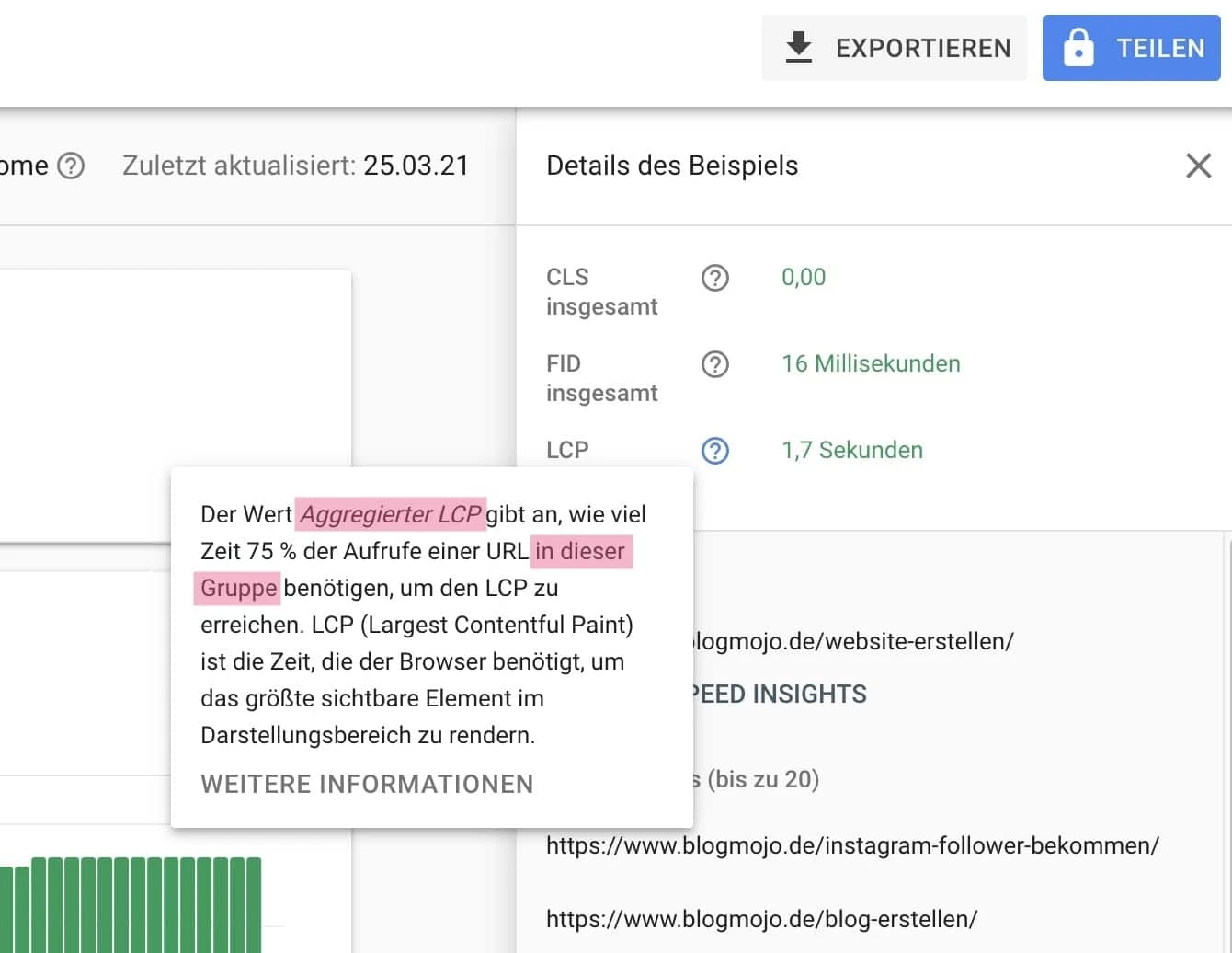
The rule is:
If enough field data could be collected for a URL in the last 28 days, the URL is also evaluated by this URL-specific field data.
Because according to the Core Web Vitals FAQ from December 2020, Core Web Vitals are in principle a page-level ranking factor:
Q: Is Google recommending that all my pages hit these thresholds? What’s the benefit?
A: We recommend that websites use these three thresholds as a guidepost for optimal user experience across all pages. Core Web Vitals thresholds are assessed at the per-page level [...]
However, if not enough field data is available, for example for newly published or rarely visited pages, a page is evaluated, according to the Core Web Vitals FAQ from March 2021, by aggregated data of the associated domain/website, meaning the data you can see in the origin summary:
Q: How is a score calculated for a URL that was recently published, and hasn’t yet generated 28 days of data?
A: Similar to how Search Console reports page experience data, we can employ techniques like grouping pages that are similar and compute scores based on that aggregation. This is applicable to pages that receive little to no traffic, so small sites without field data don't need to be worried.
Which means:
You should optimize all pages on your website, because poorly optimized pages can drag down the well-optimized ones.
3. Is optimizing worth it?
It depends:
If you have few or no rankings in the top 10 so far, you should focus on other things instead, such as link building, keyword research and optimization, and the quality of your content.
If you do have many rankings in the top 10 and you may even operate in a niche with strong competition (finance, web hosting, fitness, online marketing, nutrition, etc.), it can definitely be worth optimizing your Core Web Vitals.
Let's say your page is in 4th place for a keyword with high search volume and high purchase intent, and in terms of E-A-T and relevance it is almost as strong for Google as the page in 3rd place.
Then a small boost from Core Web Vitals could tip the scales in favor of your page and land you in 3rd place. And, depending on the keyword, that can mean a few hundred or even a few thousand euros more revenue per month.
Have you decided to optimize your Core Web Vitals?
Then keep reading and simply tick off each of the following points!
So that you can optimize your pages in a more targeted way, I sorted my checklist by LCP, FID, and CLS and created separate subpages for it (keep in mind that some points overlap between LCP and FID).
4. Recommended WordPress plugins

I've tested many different caching and performance plugins, including Nitropack, Flying Press, and Autoptimize. WP Rocket offers the best overall package, though. With the plugin alone, you can tick off about 80% of all points on the checklist.

With perfmatters you can turn off CSS and JS files you don't need, either globally or on a per-page basis. That helps enormously in slimming down bloated WordPress installations.

With the EWWW Image Optimizer you can compress images and convert them to WebP, which makes them significantly smaller and can improve your LCP. Alternatively, you can also use Imagify or ShortPixel.
5. The 30-point checklist
Here you'll find a checklist with all optimization measures, sorted by priority.
Many measures improve several Core Web Vitals at once. In the “Improves” column you can see which metrics are affected.
Priority | Measure | Improves |
|---|---|---|
| High | Use page caching | LCP |
| High | Preload critical CSS | LCP, CLS |
| High | Add width and height to images | CLS |
| High | Load JavaScript deferred (defer/async) | LCP, INP |
| High | Compress images | LCP |
| High | Use modern image formats (WebP, AVIF) | LCP |
| High | Turn off lazy loading for images above the fold | LCP |
| High | Break up long tasks (< 50 ms) | INP |
| High | Reduce third-party code | LCP, INP |
| High | Remove unnecessary CSS and JavaScript | LCP, INP |
| Medium | Use cache preloading | LCP |
| Medium | Enable text compression (Gzip/Brotli) | LCP, INP |
| Medium | Avoid Flash of Invisible Text (FOIT) | CLS |
| Medium | Avoid Flash of Unstyled Text (FOUT) | CLS |
| Medium | Preconnect to third-party servers | LCP, INP |
| Medium | Avoid an excessive DOM size (< 1,500 elements) | INP |
| Medium | Use HTTP/2 or HTTP/3 | LCP |
| Medium | Minify CSS and JS files | LCP, INP |
| Medium | Deactivate unnecessary plugins | LCP, INP |
| Medium | Use a lean WordPress theme | LCP, INP |
| Low | Lazy load or delete embeds and iframes | CLS |
| Low | Optimize ads (reserve placeholders) | CLS |
| Low | Avoid non-composited animations | CLS |
| Low | Optimize pop-ups and banners | CLS |
| Low | Reduce image quality (70-80%) | LCP |
| Low | Adjust image dimensions to the available space | LCP |
| Low | Regenerate image sizes | LCP |
| Low | Use video formats for animated images | LCP |
| Low | Optimize the server (TTFB < 200 ms) | LCP |
| Low | Optimize event handlers (passive listeners) | INP |
6. News and timeline
Here you'll find the most important developments around Core Web Vitals:
2024-2025
- March 12, 2024: INP officially replaces FID as a Core Web Vital. FID is removed from Google Search Console. Other tools such as PageSpeed Insights offer a 6-month transition period.
- January 31, 2024: Google confirms March 12, 2024 as the official date for the INP launch.
2023
- May 2023 (Google I/O): Google announcesthat INP will replace FID in March 2024. INP is upgraded from “experimental” to “pending”.
- August 8, 2023: API support for the experimental INP field ends.
2022
- End of March 2022: The rollout of the Page Experience update for desktop is complete.
- February 2022: Core Web Vitals become a ranking factor for desktop. The same metrics and thresholds as for mobile now also apply to desktop search queries.
- May 2022: Chrome introduces INP as an experimental metricto enable better measurement of interactivity.
2021
- November 2021: Google announcesthat page experience will also apply to desktop rankings from February 2022.
- September 2, 2021: Google confirms on Twitterthat the rollout of the Page Experience update is complete (including the updates to Top Stories carousels).
- August 6, 2021: According to John Mueller, Core Web Vitals as a ranking factor are not just a “tiebreaker”.
- June 15, 2021: Google confirms on Twitterthat the rollout of the Page Experience update has begun and will be complete by the end of August.
- June 10, 2021: According to the release notes, PageSpeed Insights now also shows field data for LCP, CLS, or FID, even if there is no data yet for one or two of the other Web Vitals.
- May 19, 2021: According to John Mueller, URLs can also get a ranking boost if their Core Web Vitals are yellow/need improvement.
- May 19, 2021: The recalculation of the CLS score announced by Google is not live yet, according to John Mueller.
- May 18, 2021: According to Google, Core Web Vitals will also become a ranking factor for desktop search.
- April 19, 2021: Google introduces a report on page experience in Google Search Console.
- April 19, 2021: Google announcesthat Core Web Vitals will be integrated into the algorithm not from May but only from mid-June.
7. Glossary (the acronyms from hell)
INP, CLS, LCP, FCP, TTFB, and so on?
As you may have noticed, Core Web Vitals (and the general field of speed optimization) come with dozens of technical terms, a great many of them acronyms.
So that you don't despair while reading this guide, I've put together a list of the most important terms and acronyms for you:
above the fold
If something is above the fold on a web page, it is in the area a user sees right when opening the page (without scrolling). Depending on the device, this area can be different sizes.
CLS (Cumulative Layout Shift)
CLS measures how much the page layout shifts while loading and is meant to evaluate the visual stability of a web page.
CPCSS (Critical Path CSS)
CPCSS is the CSS needed to display the content above the fold of a web page.
CruX (Chrome User Experience Report)
In the CruX data on the user experience of websites is collected. Besides LCP, FID, and CLS, that includes other performance data such as TTFB and FCP. The data comes from real users of Google Chrome who sync their browser history with their Google account.
DOM (Document Object Model)
DOM is the branching tree structure of an HTML document. Every HTML element (e.g. <p> or <h1>) is a DOM element (so a branch of the tree) and can be above or below other elements. An excessive DOM size can increase FID.
FCP (First Contentful Paint)
FCP is the time a browser needs to display the first visible element of a web page (e.g. text or an image).
FID (First Input Delay), deprecated
FID measured how long a web page took to respond to a user's first interaction. FID was replaced by INP in March 2024, because INP gives a more comprehensive picture of interactivity.
INP (Interaction to Next Paint)
INP has been one of the three Core Web Vitals since March 2024 and measures how quickly a web page responds to user interactions (clicks, taps, keyboard input). Unlike the former FID, INP measures not just the first but the worst interaction during a session. A good INP value is under 200 milliseconds.
FOIT (Flash of Invisible Text)
FOIT is the phenomenon that text is not visible at all for a short or longer time before a web font (such as Google Fonts) has loaded.
FOUC (Flash of Unstyled Content)
FOUC is the phenomenon that HTML elements first “flash” up without CSS styles (so with the browser's default stylesheet) before the actual styles are loaded. FOUC can accordingly worsen the CLS score.
FOUT (Flash of Unstyled Text)
FOUT is the phenomenon that text that is supposed to be displayed in a web font (e.g. Google Font) first “flashes” up in a locally available default font (e.g. Arial or Times New Roman).
Main thread
In a browser's main thread, most of the important computing processes needed to display a web page are executed. These include layout (calculating how big each HTML element is and where it is placed on the page), paint (setting the individual pixels), and the execution of JavaScript.
LCP (Largest Contentful Paint)
LCP measures how long the largest element of a web page (in the area that is visible first) takes to load, which evaluates the “perceived loading time” of a web page.
Long task
A long task is a JavaScript task with a long execution time (over 50 ms). As long as a long task is active, the browser's main thread is blocked and users can't interact with a web page (scroll, enter text, etc.). Many long tasks on a page can lead to a high FID.
SI (Speed Index)
SI is a metric used by Google to measure the speed of a website. The metric takes into account not just the loading time of a web page but also how the page builds up.
TBT (Total Blocking Time)
TBT is the total time during which the browser's main thread is blocked by a web page's JavaScript. The higher the TBT, the more users have to expect delays when interacting with a web page. A high TBT often goes along with a high INP.
TTFB (Time to First Byte)
Time to First Byte (TTFB) is the time a browser needs to load the first byte of a web page.
TTI (Time to Interactive)
TTI measures how long it takes until a web page is fully interactive (so no more input delays caused by JavaScript are to be expected).
WebP
WebP is a modern image format that was developed by Google and offers better lossy or lossless compression than JPEG or PNG, which results in image files that are 24 to 34% smaller.
8. FAQ
Here you'll find answers to frequently asked questions about Core Web Vitals:
What is the difference between INP and FID?
FID (First Input Delay) was replaced by INP (Interaction to Next Paint) in March 2024. The most important difference: FID only measured the delay on the first user interaction, while INP measures the worst interaction during the entire session.
That means even if your page responds quickly at first but hangs on a click later, it hurts your INP. INP is therefore a stricter and more meaningful indicator of actual interactivity.
Are Core Web Vitals also a ranking factor in other browsers (besides Chrome)?
Yes, Core Web Vitals are a ranking factor in other browsers too. Only Chrome users are measured (through the Chrome User Experience Report), but the ranking effects apply to all search queries, regardless of which browser the searcher uses.
Is there a ranking benefit to beating the thresholds for a “good” score?
No. Whether your LCP is 1,000 ms (well below the threshold) or 2,500 ms (right on the line between good and needs improvement) doesn't matter. What counts is that your Core Web Vitals are in the green.
What's the deal with the 75th percentile?
To pass the Core Web Vitals test, not all field data for LCP, INP, and CLS has to be below the defined threshold, only 75% of it.
For a good LCP, it's enough that the LCP element loaded in under 2.5 seconds for 3 out of 4 users.
Why do my URLs keep jumping from red to yellow to green and so on without me having made any changes?
There can be several reasons: The field data is based on the last 28 days of real user measurements. Fluctuations in traffic and differences in your visitors' devices or network conditions can affect the values. Google also occasionally adjusts its calculation methods.
Why can't I find a certain URL in the Core Web Vitals report in Google Search Console?
Search Console groups URLs with similar issues and only shows representative examples. A URL also needs enough traffic to generate its own field data. For pages with little traffic, the origin summary (the domain-wide average) is used instead.
Are websites that pass the Core Web Vitals test highlighted visually in the search results?
No. Google did test badges for fast pages in 2021 but never rolled them out across the board. Currently there is no visual marker in the search results for pages with good Core Web Vitals.
Why don't you recommend NitroPack?
The concept of cloud-based performance optimization is certainly interesting. However, NitroPack often has problems with CLS, especially because of Flash of Unstyled Content (FOUC). On top of that, the support reviews are mixed and the prices are relatively high.