
Keyword research is the cornerstone of search engine optimization.
If you really want to get a lot of customers and visitors from Google, you should never ignore it.
If you're an SEO beginner, it should be the starting point of your journey. And even if you already know a bit about SEO, you should keep educating yourself on it.
The best part:
Finding good keywords is not rocket science and far less complicated than you might think.
In my detailed guide, I explain simply and with as little jargon as possible:
- Why keyword research is so important (incl. a small case study)
- What keywords are all about (and what makes a keyword profitable)
- Which tools you should use for keyword research
- How to find suitable keywords step by step
- How to spot quick wins with Search Console and research for AI search
Sound good?
Then let's start with the basics:
- Keyword research helps you find the right search terms for your target audience and determines which topics you get found for on Google
- Finding good keywords is not rocket science. With the right tools and methods, any SEO beginner can identify profitable keywords
- Successful keyword research considers not only search volume but also competition, search intent, and the different phases of the customer journey
1. What exactly is a keyword?
A keyword (also called a key phrase, search word, key term, or simply a search term) is the entirety of all the words you type into the search box of a search engine:

In this case, our keyword would be keyword research.
Simple, right?
Some keywords are searched more often on Google than others:
Some only 100,000 times a month, some 1,000 times, and some only 10 times. According to Google's own figures, 15% of all search queries even consist of keywords that nobody has ever searched before.
One quick note before we continue:
This article is about keyword research on Google, because it still has by far the highest market share, at over 90% worldwide (despite competition from AI assistants like ChatGPT or Perplexity).
But keyword research for other search engines works similarly. That means this article can partly be applied to Pinterest, Bing, DuckDuckGo, Amazon, YouTube, Yandex, Baidu, Qwant, or Ecosia. I explain how to research for AI search in section 7.
2. What is keyword research?
As an expert, blogger, or entrepreneur, you are a problem solver.
People buy products in your online store, book your services, or read your blog articles to find a solution to a particular problem.
And that's where keyword research comes in:
Keyword research is the process you use to find out which keywords potential customers type into Google.
In detail, it serves to:
- Find out whether your target audience searches Google for solutions to their problems
- If so, find out which keywords exactly they use
- Analyze whether it's worth creating content optimized for these keywords (Are these keywords searched often enough? How high is the competition? Does the search query imply an interest in buying? And so on...)
3. Why is it important?
Maybe you're asking yourself:
“Finn, that's all well and good. But why should I care? What's in it for me?”
Let me explain it this way:
Other SEO measures, like link building or load time optimization, make sure that you show up in the search results at all.
With keyword research and the keyword optimization that follows, you decide what for.
And you should take advantage of that power!
You can also get a lot of visitors from Google if you don't work any keywords into your texts and don't do a keyword analysis.
But nowhere near as many as you could get.
Trust me.
Again and again I see blogs or websites that could double, triple, or even tenfold their Google traffic if they just sat down for a few days and optimized their best 10 to 20 articles for the right keywords!
But that's far from everything...
There are more good reasons why you shouldn't skip keyword research:
- You can use it to find topics for your editorial calendar, to structure the content of blog articles, and for market research in general.
- Analyzing and researching keywords helps you better understand the wishes, fears, and problems of your customers.
- You learn which language your customers speak.
- Keyword analysis lets you better judge whether a blog article or an offer will be well received or not. If a problem is googled often, you're more likely to get visitors for your blog article or customers for your offer
Sounds logical, right?
Are you still not convinced that keyword analysis and optimization (or maybe even SEO in general) achieves anything at all?
Then I have two small case studies for you:
3.1 Case study #1
A few years ago, I optimized one of our articles again after a long time. That means I picked out new search terms, brought my keyword cluster for the article up to date, and worked the new search terms into the article.
It took me about 30 minutes for all of it. Not much time.
But with a big effect:
After the optimization, the article no longer gets just under 50 clicks a day, but 75 on average:
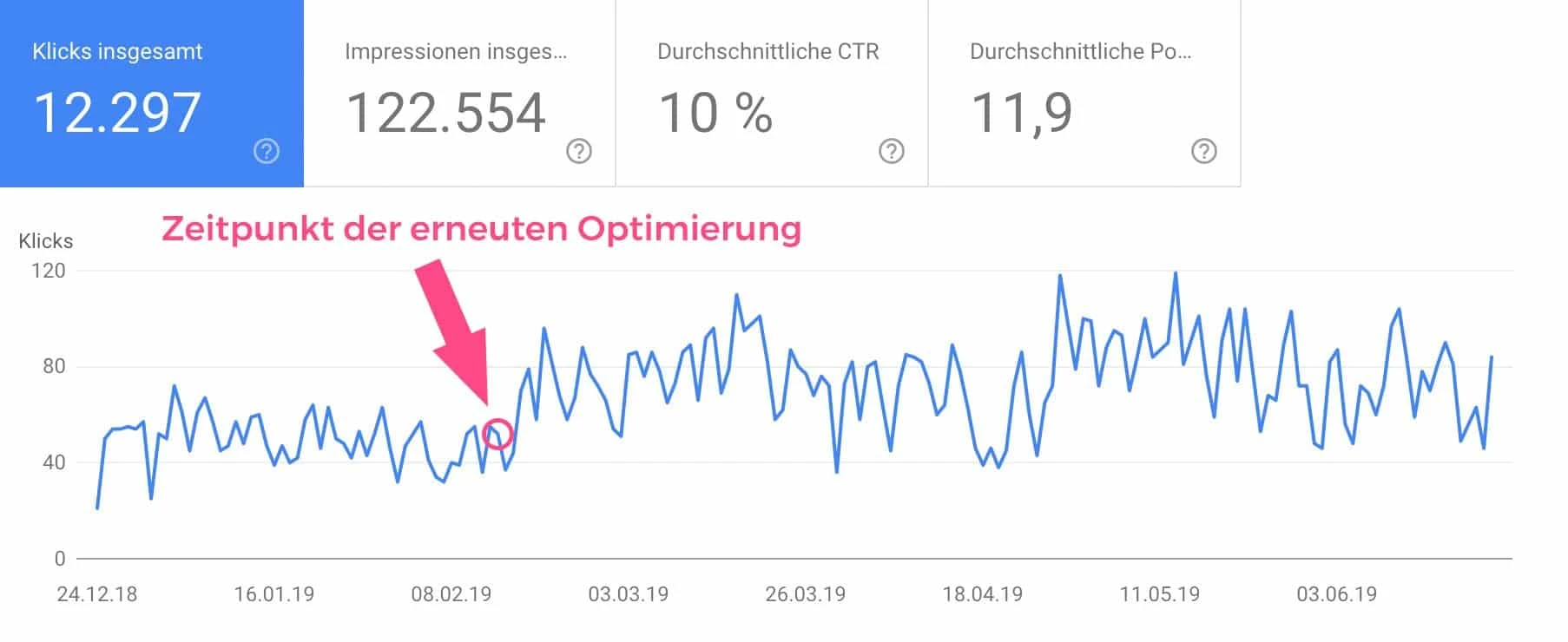
That's a traffic increase of a whopping 50%!
Since this is one of our “money articles”, the increase in visitors has resulted in about €400 in additional revenue every month ever since (from about €800 to about €1,200).
Not bad for half an hour of work, right?
3.2 Case study #2
In 2023, we more than tripled our search engine traffic at Blogmojo, from an average of about 1,400 daily clicks in fall 2022 to over 4,500.
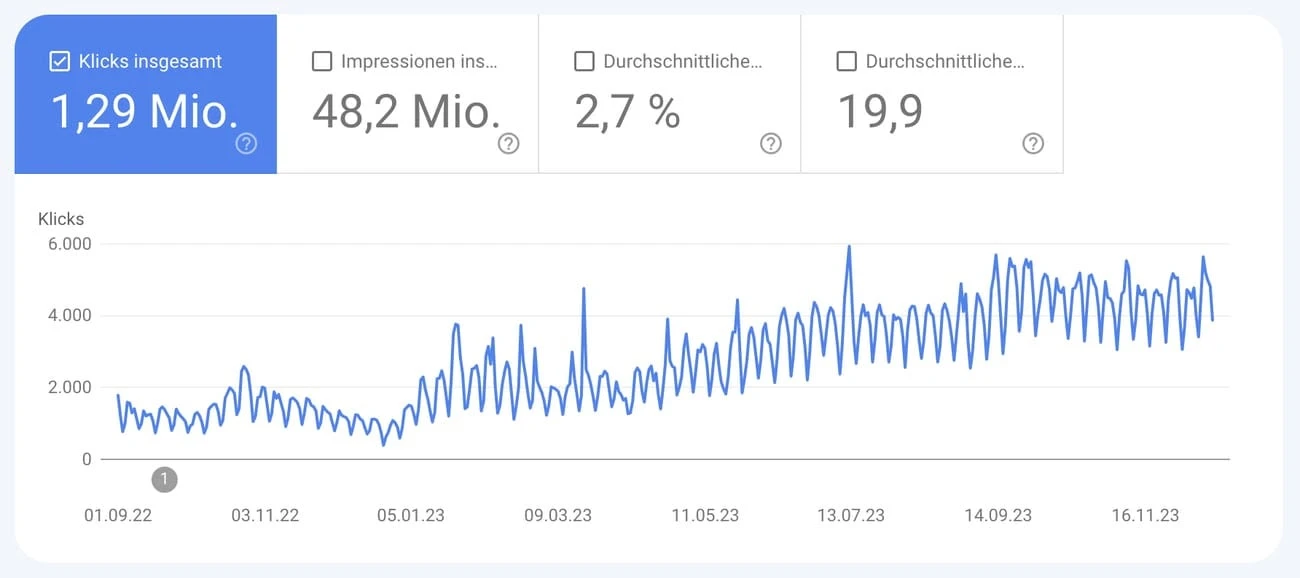
In total, we managed to get more than 1 million clicks from Google (1.23 million, to be exact. The screenshot shows the last 16 months, so you can better see the difference between last year and the year before).
No, that's not because we found a magical new SEO trick that guarantees us top rankings for every keyword. There is no such thing.
We simply managed to produce more blog articles than before and, thanks to (partly forward-looking) keyword research, to place them ideally in the Google search results.
4. Which tools should you use?
You definitely need these tools if you want to find good keywords:
- Google Search (Google itself delivers many keyword suggestions in search)
- Google Search Console (free, shows you which search queries you already get impressions and clicks for)
- One or more classic keyword tools (also to find keyword ideas, but also for keyword analysis, e.g. to find out properties like search volume, strength of the competition, and CPC)
- Suggest tools (e.g. AnswerThePublic, which only allows a few searches per day for free, to find subtopic keywords and shed light on search intent)
- An AI assistant (e.g. ChatGPT, Claude, or Gemini can help you find subtopics, who/what/why questions, and brainstorming ideas, but don't deliver reliable search volumes)
Point 5 is optional. What matters is that you always cross-check AI suggestions in a classic keyword tool. Only a tool with real search data can tell you whether a search term is really searched.
As a classic keyword tool, I've been using KWFinder (short for Keyword Finder) for quite some time:
The Basic plan of the Mangools suite, which includes KWFinder, costs €37.70 per month with annual billing (€452.40 per year) and is perfectly sufficient for beginners. Of course, you can also start with a monthly subscription for €61 and try to get as much out of it as possible.
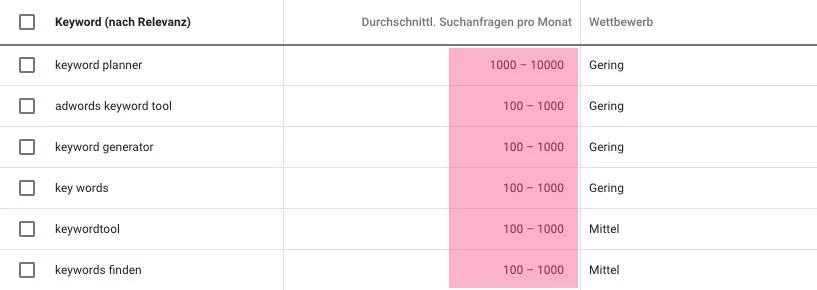
Of course, you can use the Google Ads Keyword Planner (formerly the Google AdWords Keyword Tool) to find suitable search terms.
But then you have to laboriously piece together important data, or get exact search volumes (only approximate ranges are shown) and other properties from other tools afterwards:
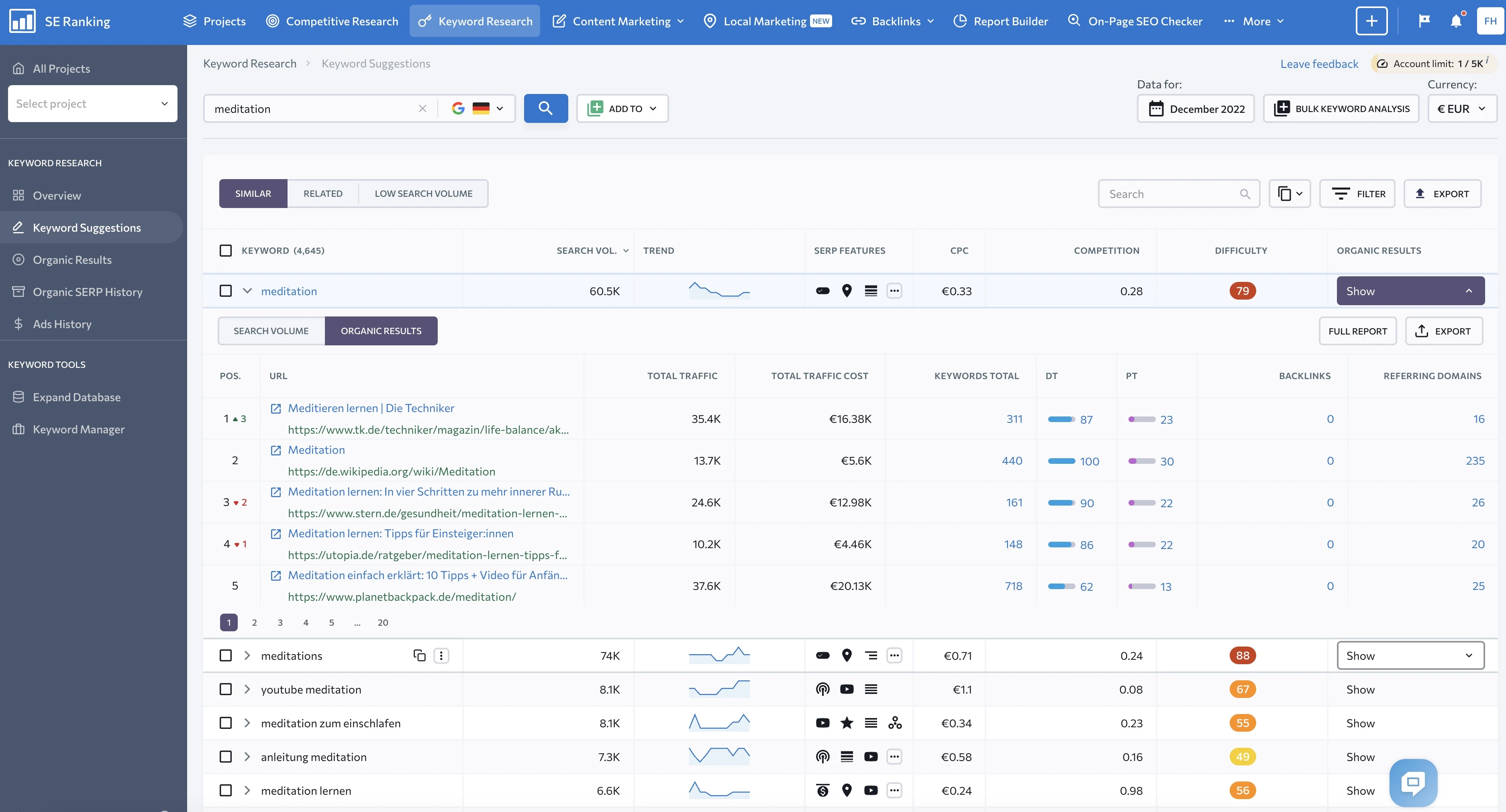
As an alternative to KWFinder, SE Ranking is worth considering. The tool is also well suited for finding new keywords and analyzing them.
Besides search volume, CPC, and the strength of the competition, you can also have the search results for a search term displayed:
I also like to use Surfer SEO a lot for keyword research.
It has the big advantage that it doesn't give you long keyword lists, but “keyword clusters”, that is, 5 to 15 keywords that are very similar in topic and that you can all cover with one article or page.
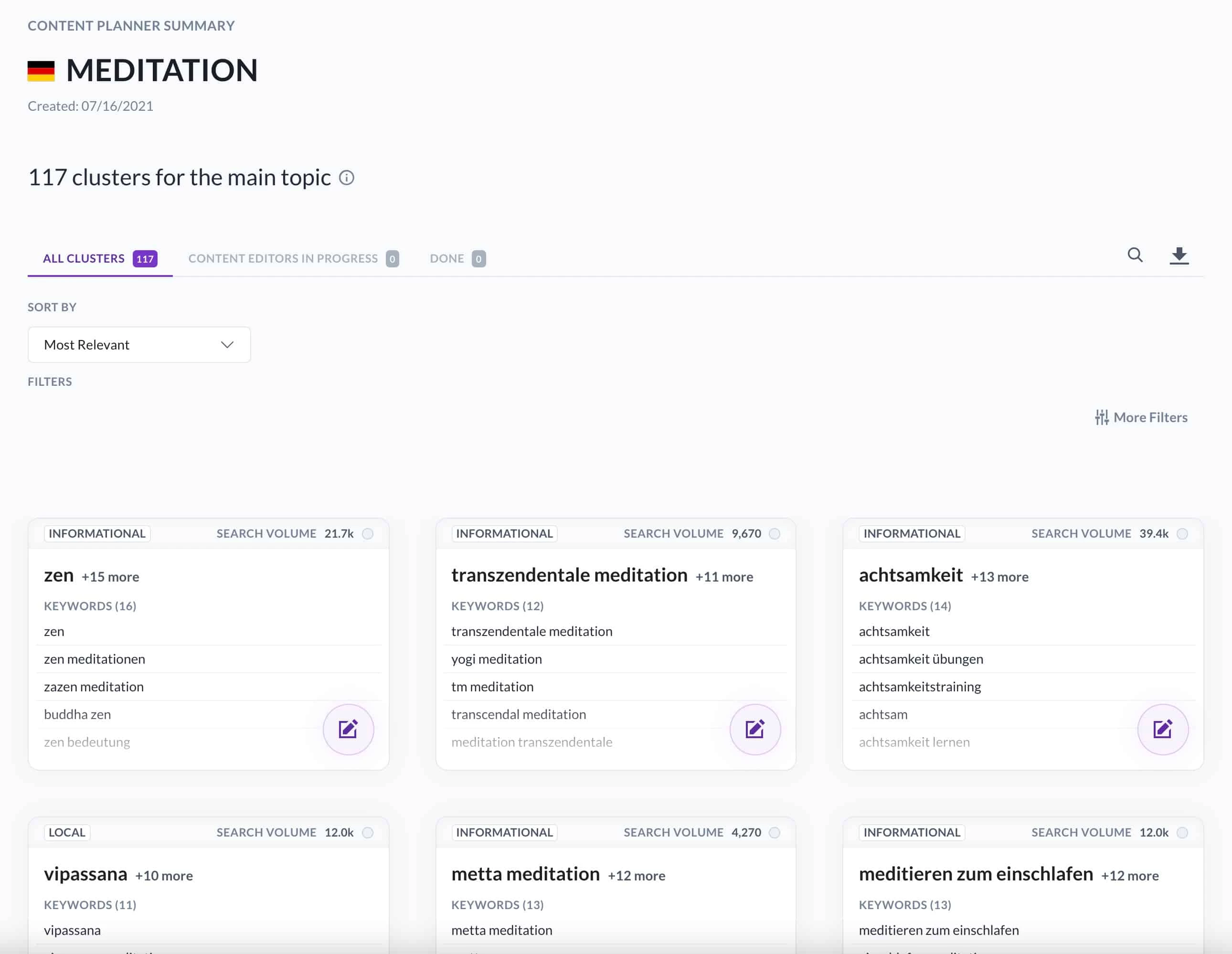
This lets you better estimate how big the visitor potential is, because you look not just at the search volume of a single keyword but at the whole topic.
You'll find a comprehensive overview of recommended keyword tools in this article: The 18 best keyword tools in 2026 (incl. 2 secret tips).
5. The most important keyword properties
A keyword is not just a keyword!
Before you wildly and aimlessly work keywords into your texts, you should take the time to analyze them thoroughly.
Otherwise, you may optimize for search terms that bring you no visitors. Or for ones that do bring you visitors, but no more customers or revenue.
Below, I explain which data and properties you should really pay attention to and what each of them means:
5.1 Word count (specificity)
How many words a search term consists of is an important factor in determining how profitable it is.
That's because the word count tells you how specific it is.
If a search term consists of just a single word, it's often a broad topic.
Such a broad topic is usually searched more often. In return, the competition is higher and the conversion rate (the percentage of visitors who become customers) is lower.
The longer and more specific a keyword is, the lower the competition. The conversion rate also rises, because searchers are clearer about what they're looking for:
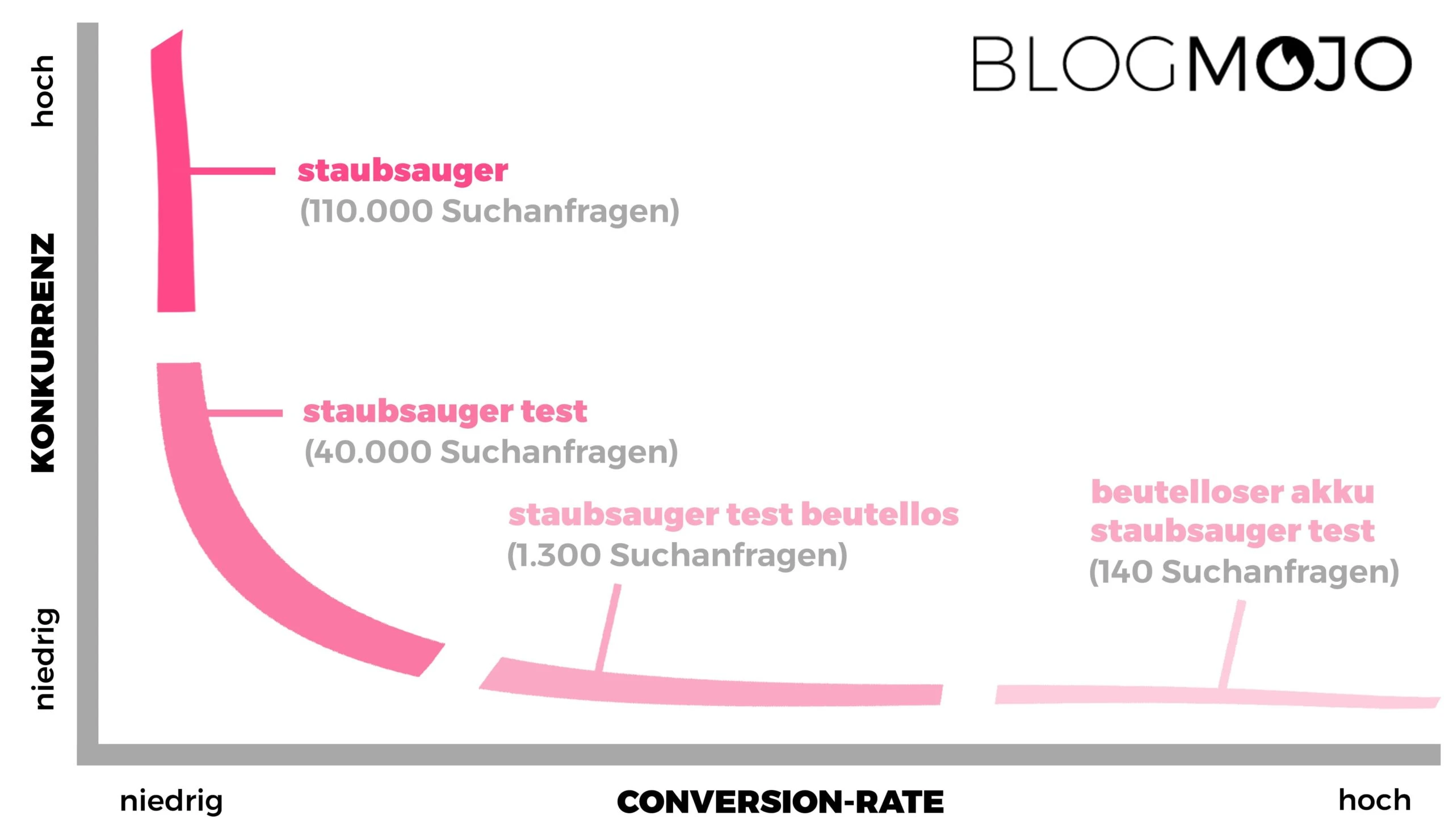
In “SEO speak”, we distinguish between short-head (also short-tail), mid-tail, and long-tail keywords:
Name | Length | Example | Competition | Conversion |
|---|---|---|---|---|
| Short-head | 1 word | staubsauger (vacuum cleaner) | high | low |
| Mid-tail | 2-3 words | staubsauger test (vacuum cleaner test) | medium | medium |
| Long-tail | ≥ 4 words | beutelloser akku staubsauger test (bagless cordless vacuum cleaner test) | low | high |
As your main keyword, you should ideally choose a mid-tail or short-head keyword, which means a fairly broad topic.
5.2 Search volume
The search volume (also abbreviated SV) is one of the main criteria when looking for a good keyword.
It states how often a search query is entered on Google (usually per month), and with it the demand:
The higher the search volume, the more visitors can land on your website with the right ranking.
For keyword analysis, it's therefore very important that you use at least one tool that shows the search volume, like KWFinder (column 3, highlighted in pink):
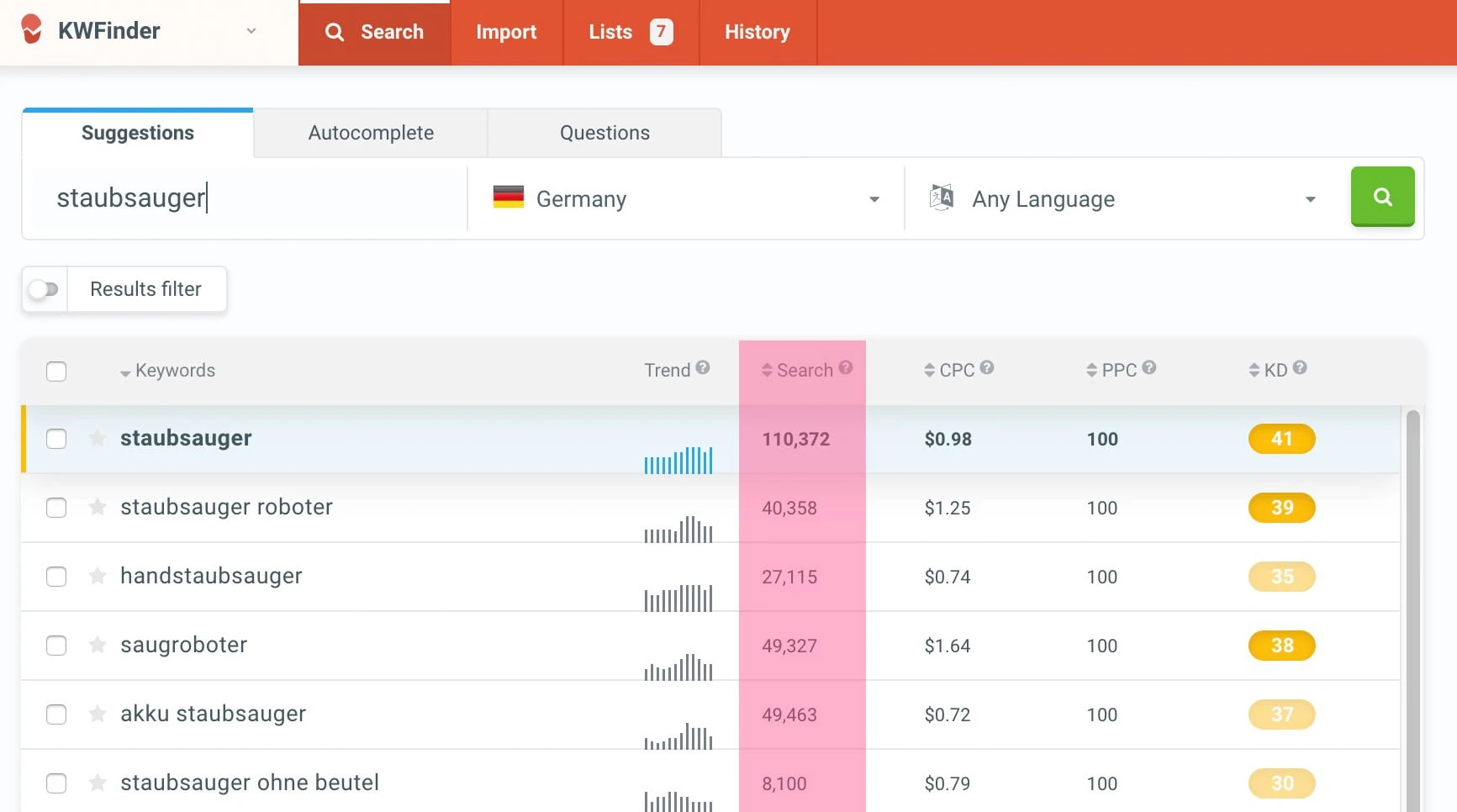
You can either sort the displayed search words and phrases by search volume in the table or filter them by search volume.
I often use a filter to exclude search terms with few searches per month (e.g. under 500):
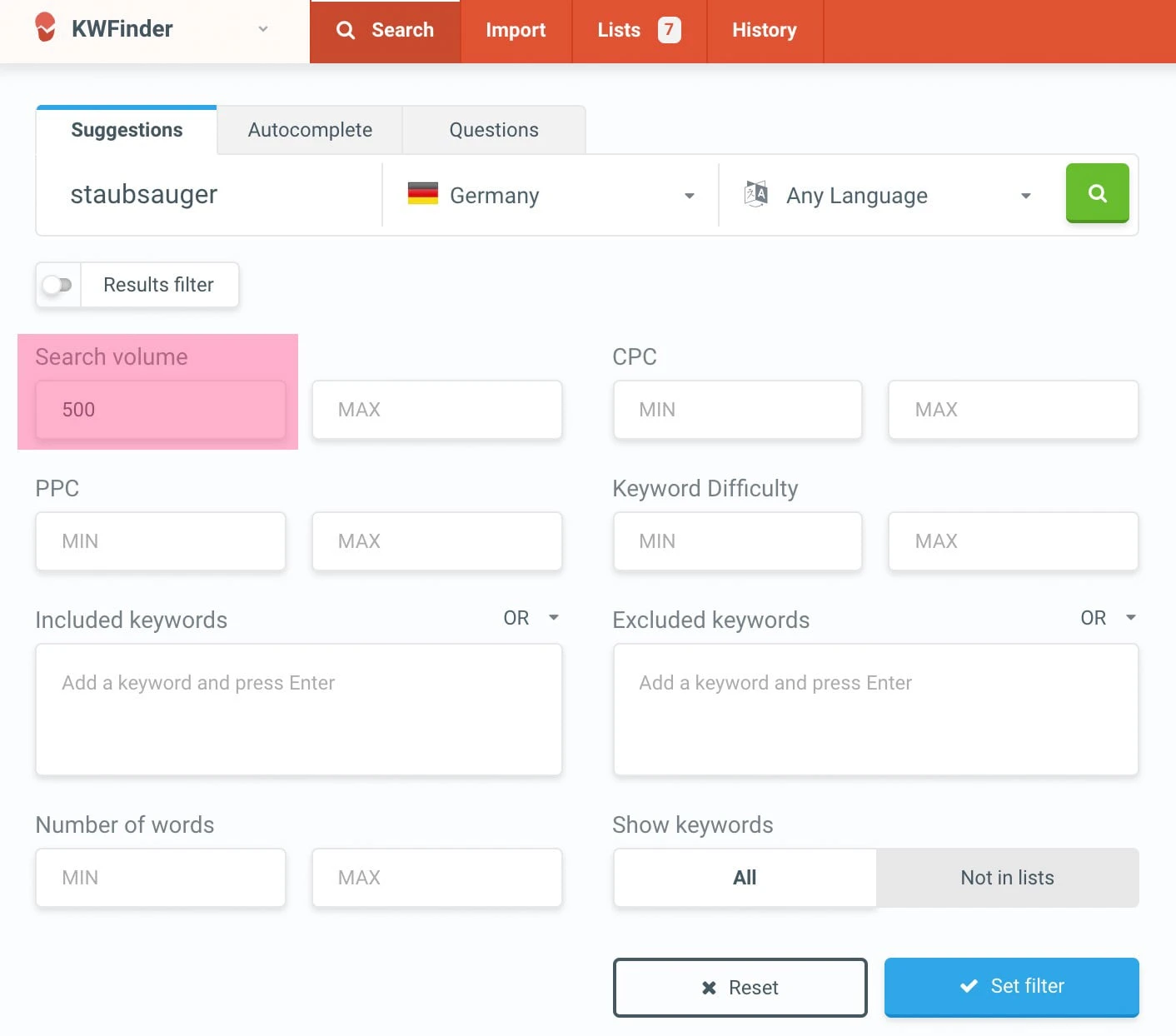
Keep in mind that this is only a rule of thumb. It can also be worth optimizing for search terms whose search volume is below 500.
First, you should never optimize your content for just a single keyword, but for a whole topic.
Second, a monthly search volume of 500 doesn't mean your search result gets clicked 500 times. That's because a large part of the clicks will also go to your competition, which is what the next section is about.
Tip: If you want to learn even more about search volume, check out our detailed article on it: What is search volume? And how do I find it?
5.3 Competition
After months of optimization work, you've finally made it to first place, angels are playing trumpets and unicorns are farting rainbows?
Think again!
Even if you land in first place for a search term, it's possible that only 15% of all visitors come to your website (in some cases even less).
Most of the traffic is spread across the first four places. At places 5 - 10, you have to expect significantly less traffic.
If you're on the second page (places 11 - 20), it's even as if you didn't show up for it at all:
Position | Click rate | Example (SV = 1,000/month) |
|---|---|---|
| 1 | 10-50% | 100-500 visitors |
| 2 | 7.5-30% | 75-300 visitors |
| 3 | 5-15% | 50-100 visitors |
| 4 | 2.5-7.5% | 25-75 visitors |
| 5-10 | 0.5-5% | 5-50 visitors |
| 11-20 | < 0.5% | < 5 visitors |
It's no coincidence that this joke is so popular in the SEO scene:
Where's the best place to hide a dead body? On the second page of Google!
That's why:
Not optimizing for the competition of a keyword is one of the biggest mistakes you can make in keyword research.
A search term with a high search volume does you no good if you languish on the second or even third page for it.
Conveniently, KWFinder offers a built-in competition analysis!
It calculates the LPS (short for Landing Page Strength) from various backlink metrics, which indicates how strong the link profile of the respective web page is:
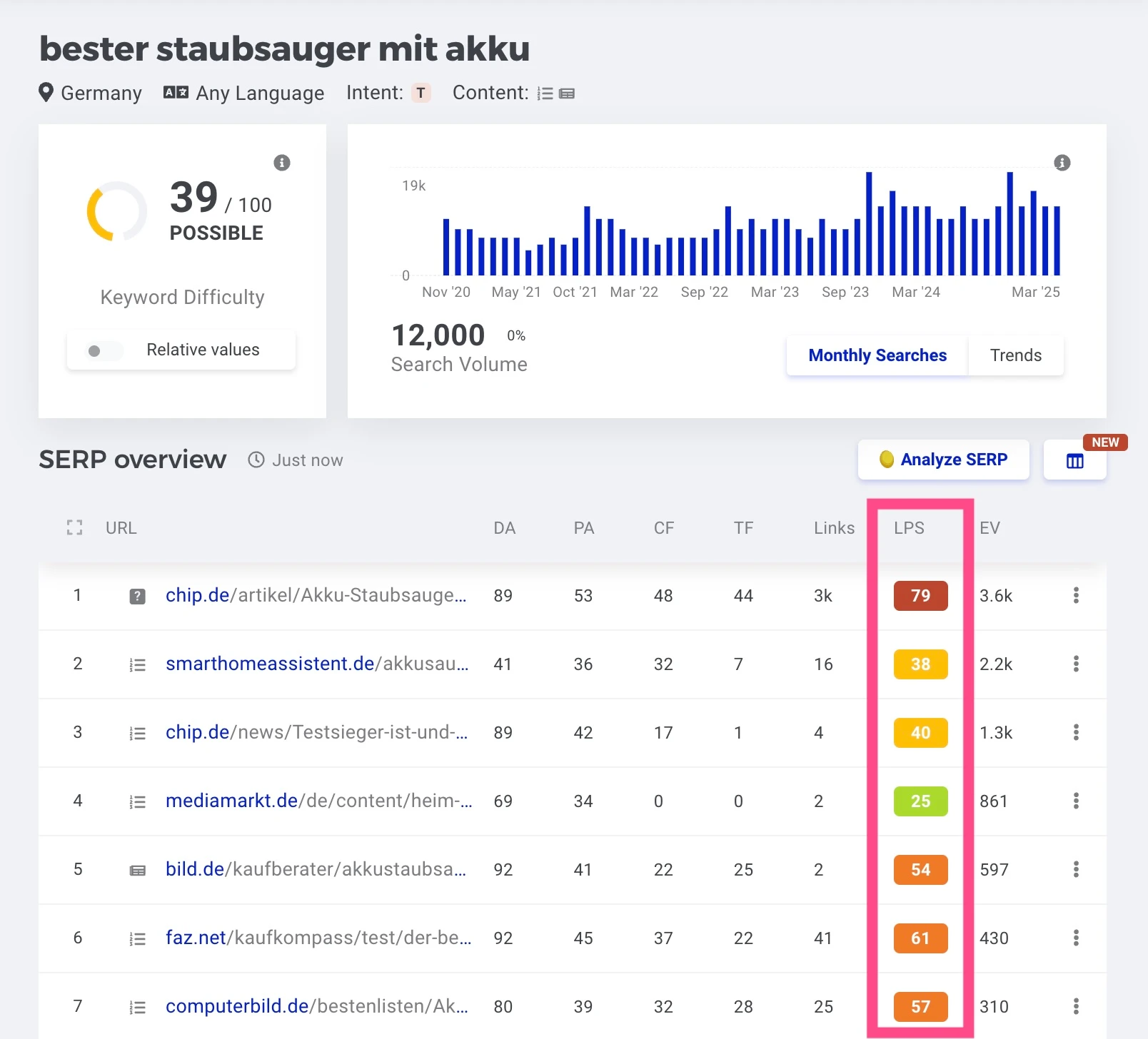
From the LPS, KWFinder in turn calculates the Keyword Difficulty (on a scale from 0 to 100), which indicates how hard it is to get to the first page for a keyword:
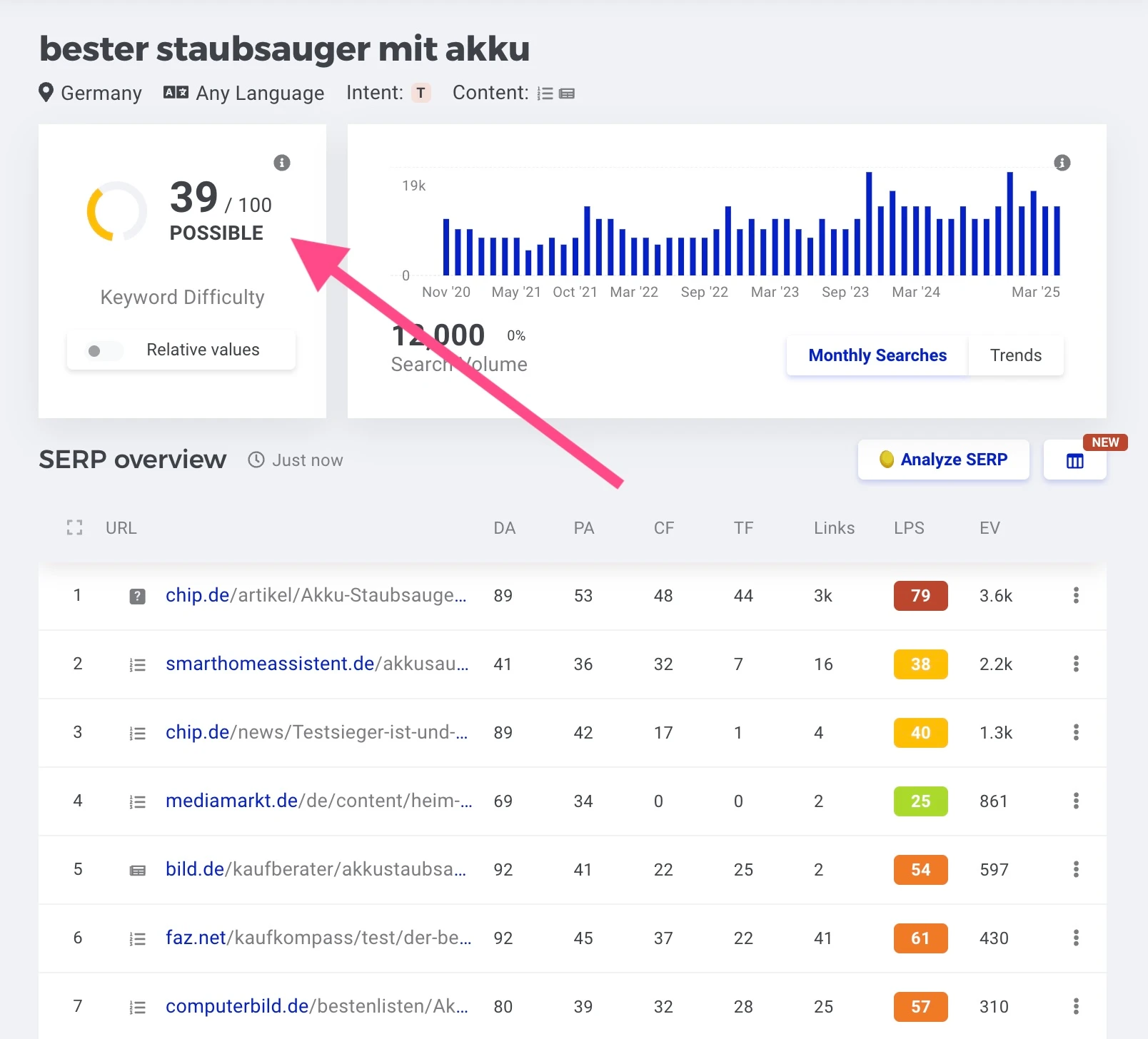
Of course, the LPS and Keyword Difficulty are not always one hundred percent accurate, just like the metrics they're made of. But they give good hints on whether you'd better stay away from a search term.
5.4 SERP features
Depending on the search term and the user, Google shows further elements above, below, or within the normal search results (also called organic search results), such as:
- AI Overviews (in Germany since March 2025) and AI Mode (since October 2025)
- Ads above or below the Google search results
- Google Maps
- Results from Google Shopping
- Google News
- Images
- YouTube videos
- Google Knowledge Graph and Knowledge Panels (show additional facts about people, places, and things in the search results)
- Featured snippets (show text excerpts from a website that directly answers a search query)
These so-called SERP features (SERP stands for search engine result page) are usually bad for you. They lower the click rate on the organic search results, so you get fewer visitors via a keyword than would be possible.
An extreme example is the keyword kokosöl (coconut oil):
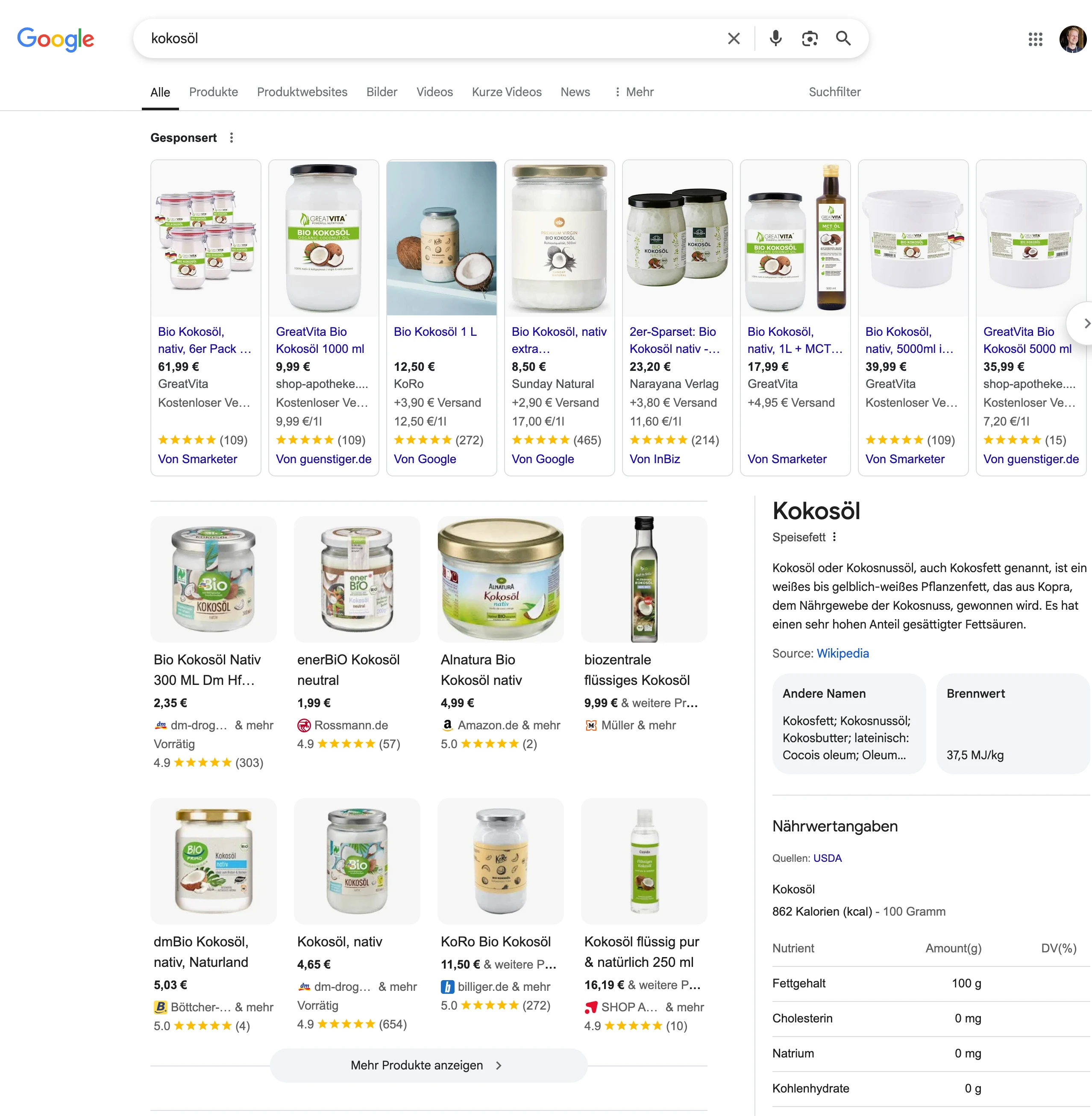
There, shopping ads are displayed right at the top, and directly below them, Google Shopping results on the left and the Google Knowledge Graph on the right. The first organic search result isn't even visible above the fold.
As a result, the click rate for first place probably drops to under 10% and that of second place to under 5%.
That's why it's often better to look for search terms where the results are as “natural” as possible.
That said:
SERP features aren't necessarily bad:
If Google ads show up in the search results, for example, that can be a sign that a keyword is profitable.
Which brings us to the next point:
5.5 CPC
CPC stands for cost per click.
It's the average price you'd pay for a click if you ran an ad on Google for a search term.
And it's interesting not only for advertisers, but also for search engine optimization:
The higher the CPC for a keyword, the more advertisers there are who run ads for this search query. And that means visitors via this search term are worth hard cash. Possibly for you, too, e.g. through selling your own services, your own products, or via affiliate marketing.
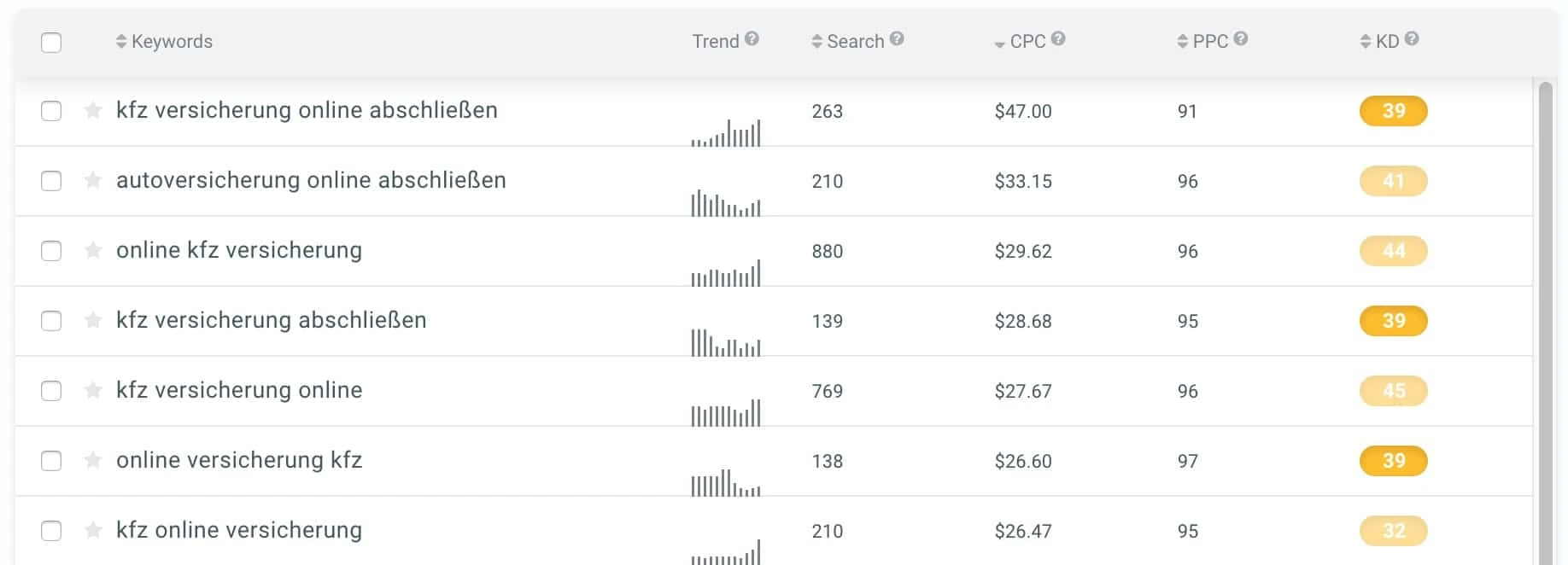
Some search queries are especially fiercely contested. For the best keywords in the car insurance space, for example, advertisers are willing to pay between €25 and €45.
And that's just for a single click!
5.6 Search intent
Search intent (also called user intent) is the goal or intention of someone who types a keyword into Google.
And analyzing it is extremely important in keyword research.
At least as important as an analysis of search volume or competition, if not more!
In detail, you should find out:
- which goals or problems searchers really have
- how they feel when searching
- what kind of search results they expect
- which aspects of a topic might interest them
Only that way can you make sure that your website also attracts the readers or customers you want.
You also need to know the search intent to tailor your content better to search engine users. Only that way can you keep your back-to-SERP rate as low as possible and thereby not only reach the top 5, but also stay there.
But which search intents are there actually? And which ones should your keywords have?
The 8 search intents
As part of the Search Quality Evaluator Guidelines, Google itself has divided keywords into these five search intents:
- Do (also called Transactional)
- Know (also called Informational)
- Know Simple
- Website (formerly Go, also called Navigational or Brand)
- Visit-in-Person (also called Local)
This division is already very good, but it doesn't go far enough for me. That's why I've extended it with the following subcategories:
- Do Commercial
- Know Commercial
- Know News
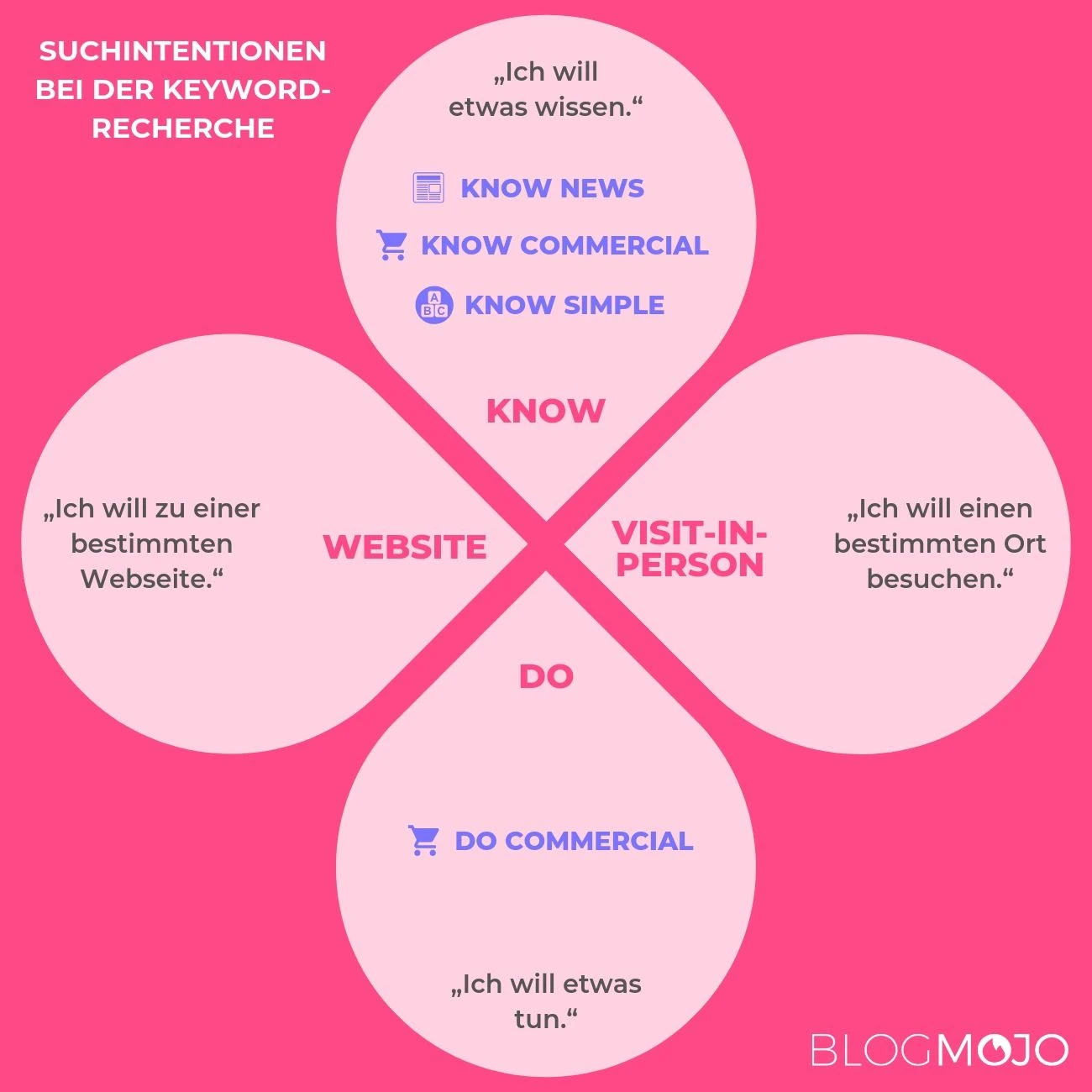
To make the model a bit easier to understand, I've created a table of all search intents for you:
Search intent | Searchers want to... | Example keywords | Matching pages |
|---|---|---|---|
| Do | do something | calculate bmi | Online tool Download page Video |
| Do Commercial | buy something | buy tv | Landing page, product, product category |
| Know | know something | cycling safety | Guide Tutorial List post |
| Know Commercial | get information before buying | phone comparison | Review Product comparison |
| Know News | know about a current event | trump elections | News article |
| Know Simple | find a single piece of information | how tall is merkel | Guide Tutorial List post |
| Visit-in-Person | visit a local place | restaurant hamburg | Home page Landing page |
| Website | go to a specific website. | twitter login | - |
5.7 Phase of the customer journey
Closely tied to search intent is the question:
Which phase of the customer journey is the searcher in?
And it's important to answer this question, because it directly affects the conversion rate (that is, how many of the Google visitors who come to your website also become customers).
According to Wikipedia, the customer journey can be divided into the following five phases:
- Awareness: Awareness of the product is raised
- Favorability: Interest in the product is strengthened
- Consideration: The customer considers buying the product
- Intent to Purchase: The intent to buy becomes concrete
- Conversion: The product is bought
An example using Netflix customers:
- video on demand, watch series online, streaming service etc.
- netflix vs maxdome, netflix reviews
- netflix prices, netflix plans
- netflix sign up, netflix free trial
- The actual ordering of the subscription
5.8 Trend
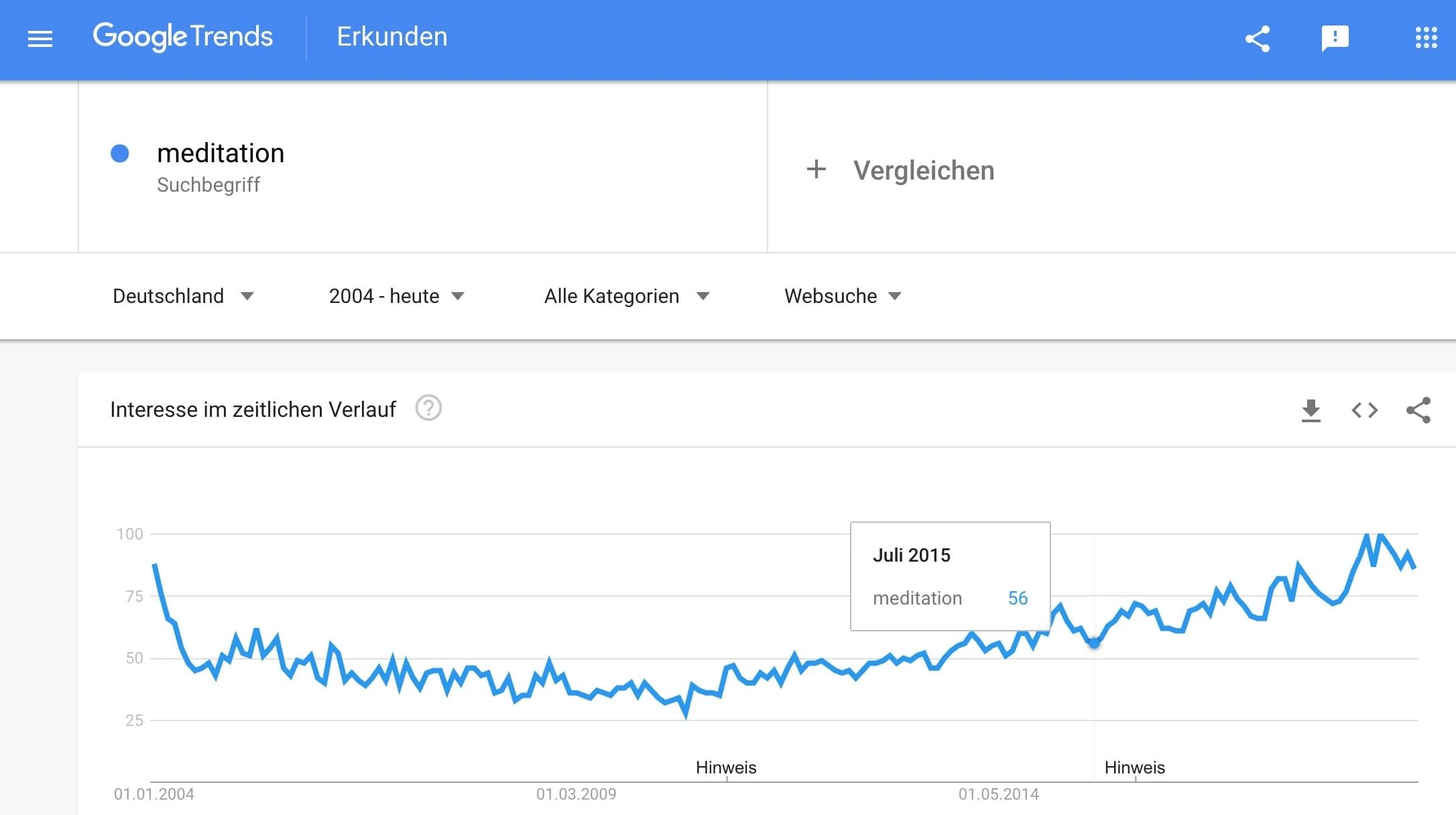
In addition to the average search volume of the main keyword (as well as that of the long-tail keywords and synonyms), it can make sense to also look at the search volume trend.
That way you can see how interest in a search term has developed over time and better estimate how high it might be in the future. You can use Google Trends, for example:
5.9 Seasonality
Recognizing whether a search term has seasonal fluctuations is important for determining when to post or update an article.
That's obvious for some search terms, like:
- Easter
- Summer
- Christmas
- April Fools' Day
But there are also some keywords whose seasonality only becomes apparent through a closer analysis of the search volume and/or a deeper dive into the topic:
Search words and phrases related to the GDPR (General Data Protection Regulation), for example, peaked in April, May, and June 2018:
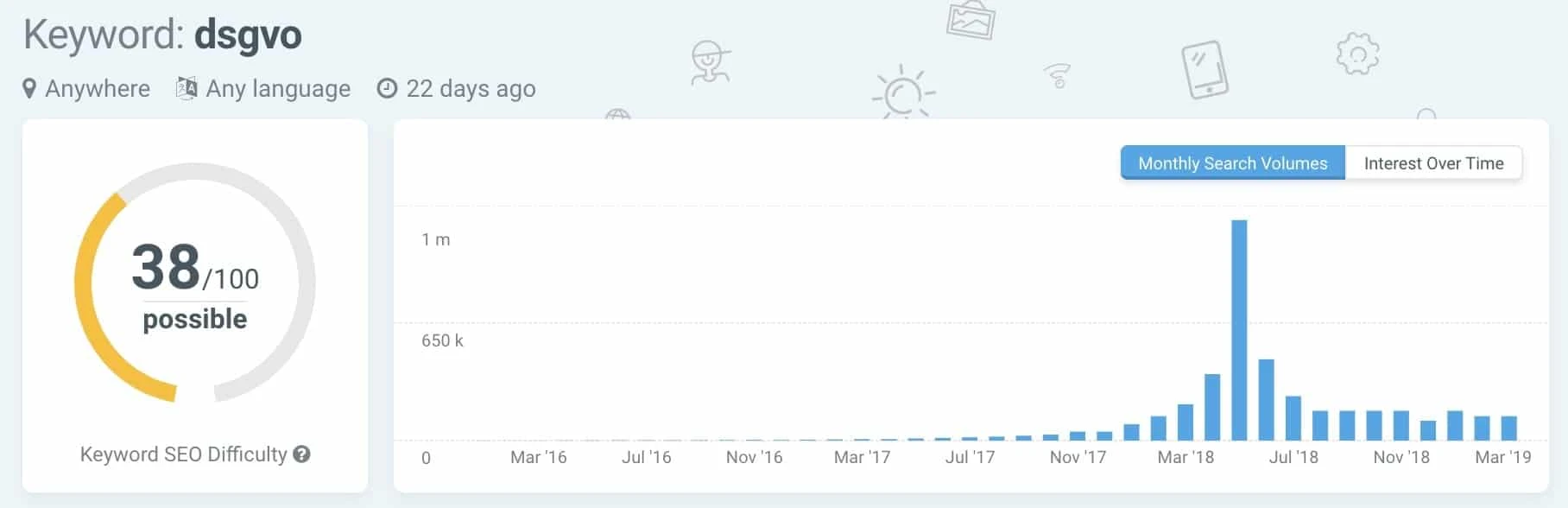
That's because May 25, 2018 was the deadline for the regulation to apply.
The most successful blog articles (also at Blogmojo) were the ones written several weeks or months before the deadline.
6. How does keyword research work?
You should always do a keyword analysis before you start writing your text.
That helps you structure your article, plan its content, and serve the keyword's search intent as well as possible.
Depending on the topic, plan about one to two hours per blog article for this. Please don't make the mistake of rushing the research, and take enough time for it!
6.1 Brainstorming
You start your research with brainstorming.
That's because keyword research isn't just about keywords, but above all about one thing:
Empathy.
That means understanding the person behind the search entry better.
Or rather:
Understanding your ideal customers better. And defining them and getting to know them as clearly as possible.
Say you're a meditation coach and want to offer your readers (and potential customers) knowledge and tips about meditation on your blog.
Then you could ask the following questions:
- What problems and goals do my ideal customers have with meditation? (Can't sit still for 15 minutes, meditation doesn't seem to do anything, can't stop the racing thoughts, etc.)
- Why do they search Google for it? What could be a trigger? (Stress at work, too much brooding, partner left me, etc.)
- What solutions might they search for? (Step-by-step guide to meditating)
- What meditation offers might they search for? (Online course, workshop, one-on-one coaching, meditation app, etc.)
- What questions do my ideal customers have about meditation? (How often should I meditate? For how long? What's the best sitting position?)
The goal is to end up with a long list of potential topics from which we can derive keyword ideas.
6.2 Finding keyword ideas
In the second step of our keyword search, we collect potential keyword ideas based on our brainstorming.
These ideas are then gradually sorted out and grouped in steps 3, 4, and 5 so we can create concrete content from them.
We can find ideas in three ways overall:
#1 Via suggest features
Suggest features serve to give us a first overview of which keywords are searched for a topic.
We can then enter the resulting suggestions into keyword tools to analyze them in more depth.
That's why this section could actually also be called “Brainstorming: Part 2”.
First, we naturally look at the search suggestions from Google itself, e.g. in the autocomplete of the search box (also called Google Suggest or Autocomplete):
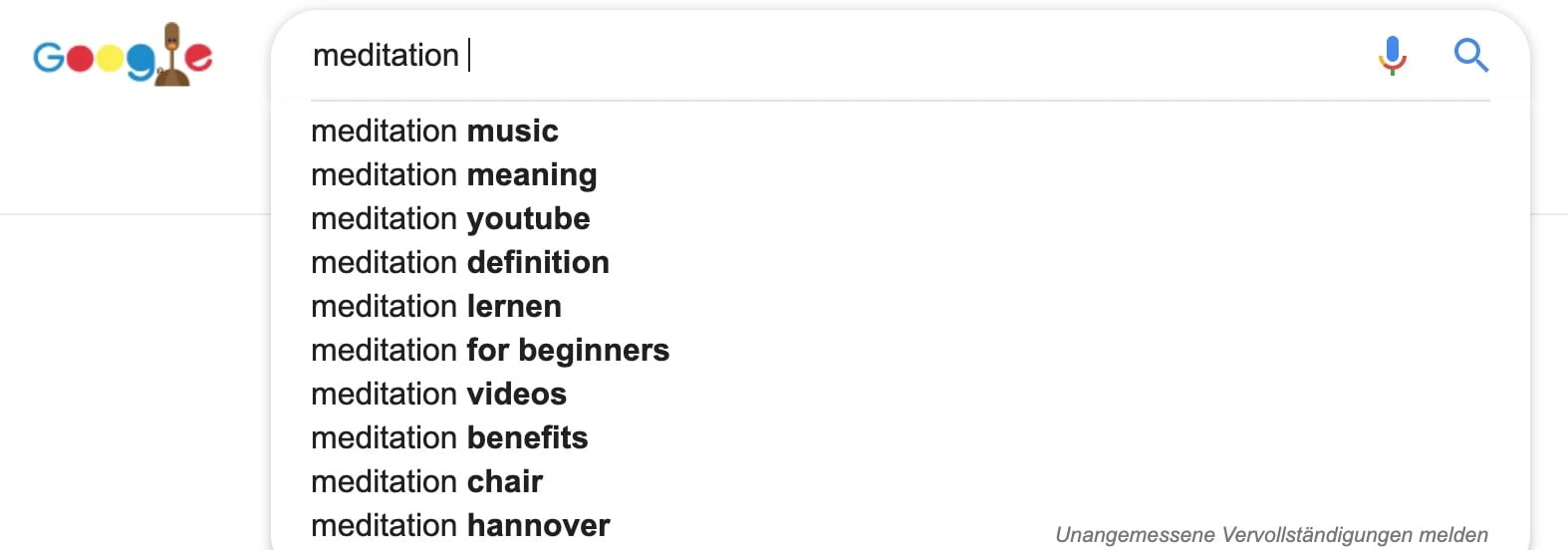
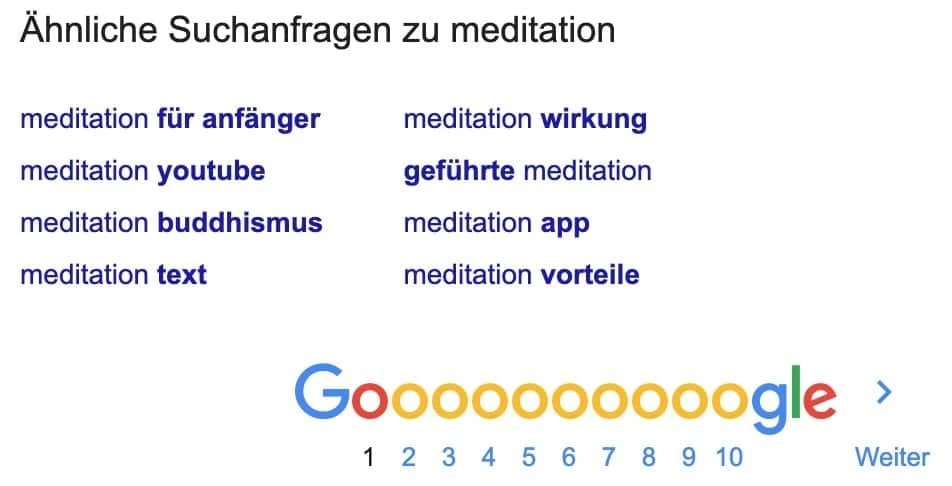
As well as the Related searches (Ähnliche Suchanfragen in the screenshot) at the bottom of every search results page:
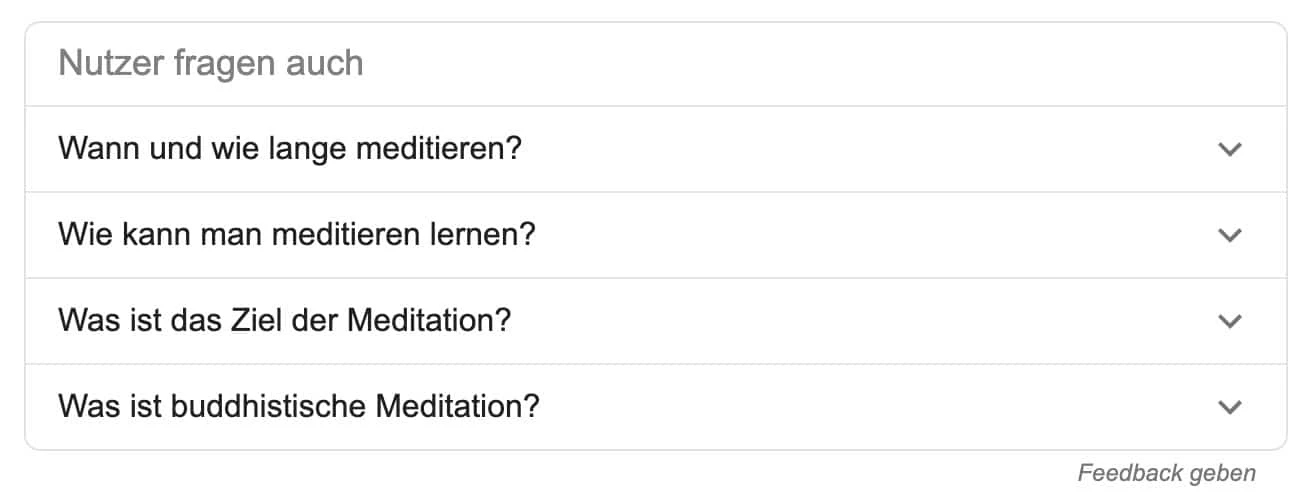
The SERP feature People also ask (Nutzer fragen auch in the screenshot) is also great for finding out which problems and questions Google users have about a topic:
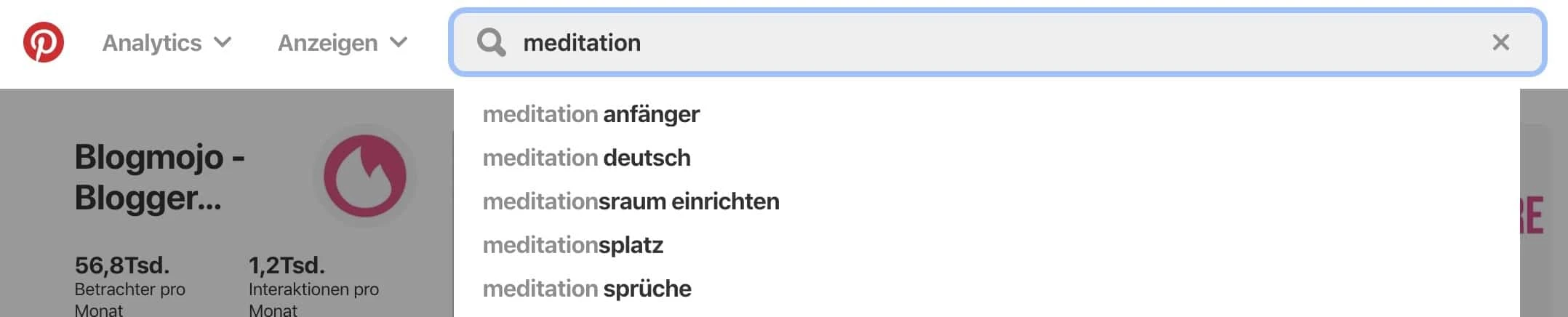
When looking for keyword ideas, you can also consult other search engines, like Pinterest:
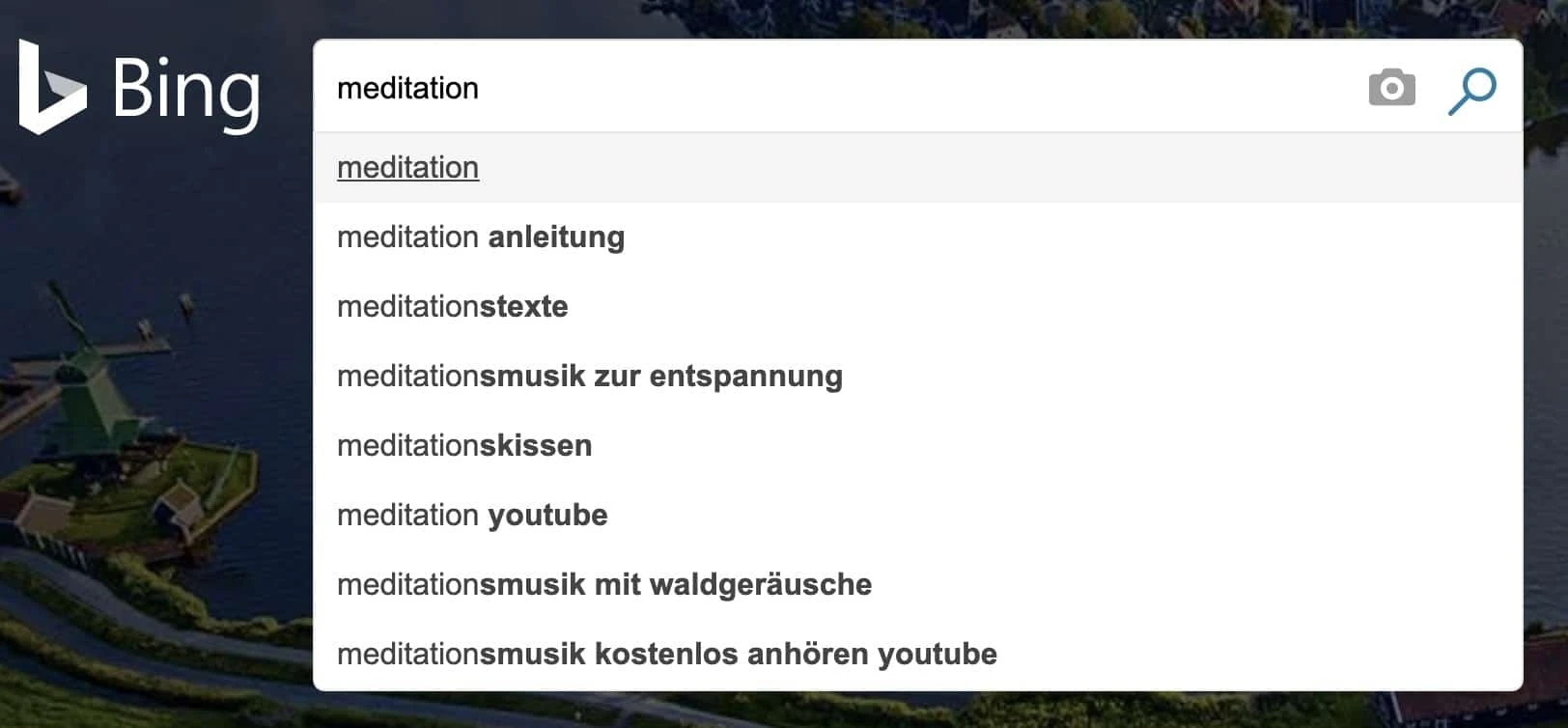
Or the search suggestions from Bing:
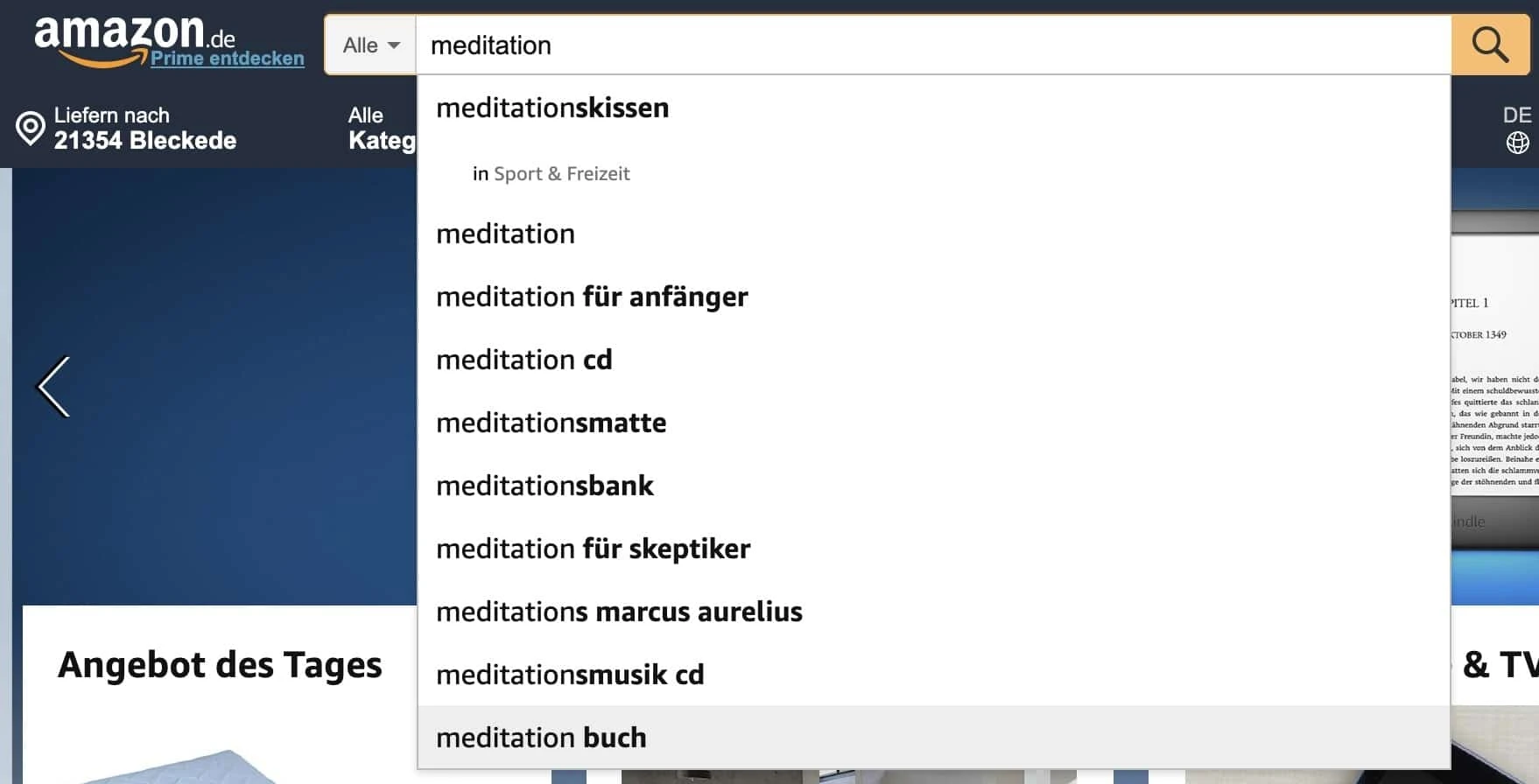
Or the ones from Amazon (especially helpful if you have an online store with physical products or do affiliate marketing):
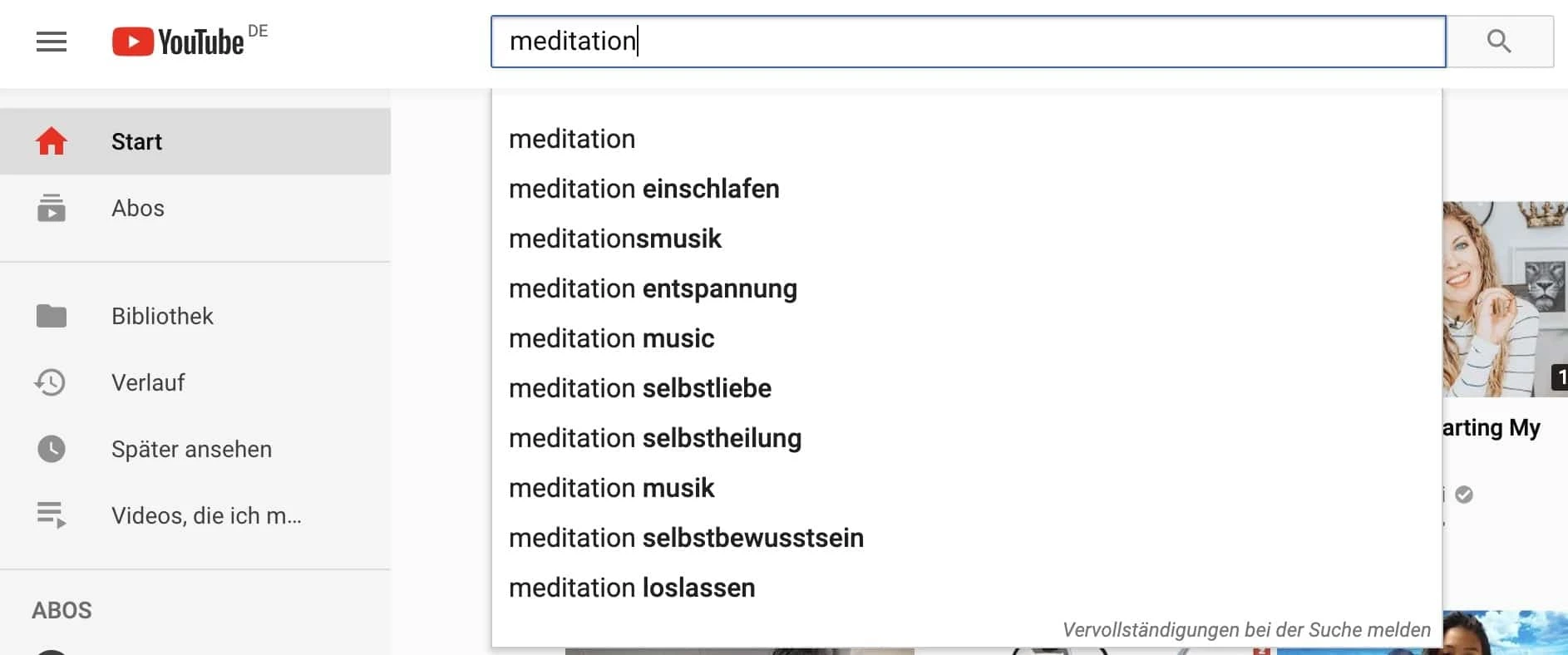
YouTube also offers autocomplete for search queries:
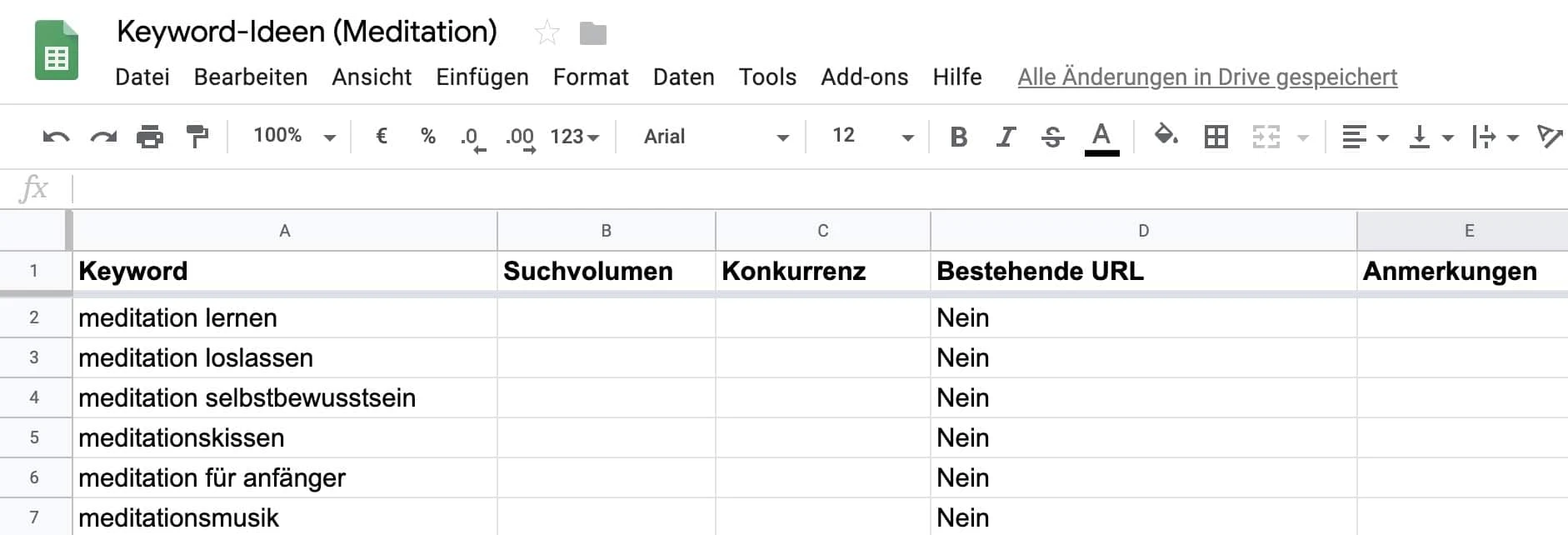
Then you collect all the keyword ideas that are interesting for you and your business in an Excel document or with Google Sheets:
#2 With keyword tools
Once you've gotten a rough overview, it's time to get down to business:
We enter our topic and, if applicable, first ideas from the search suggestions of Google, YouTube, and others into KWFinder.
The big advantage is that KWFinder immediately shows a keyword analysis of all the ideas. Including search volume, strength of the competition, CPC, and the search results themselves:
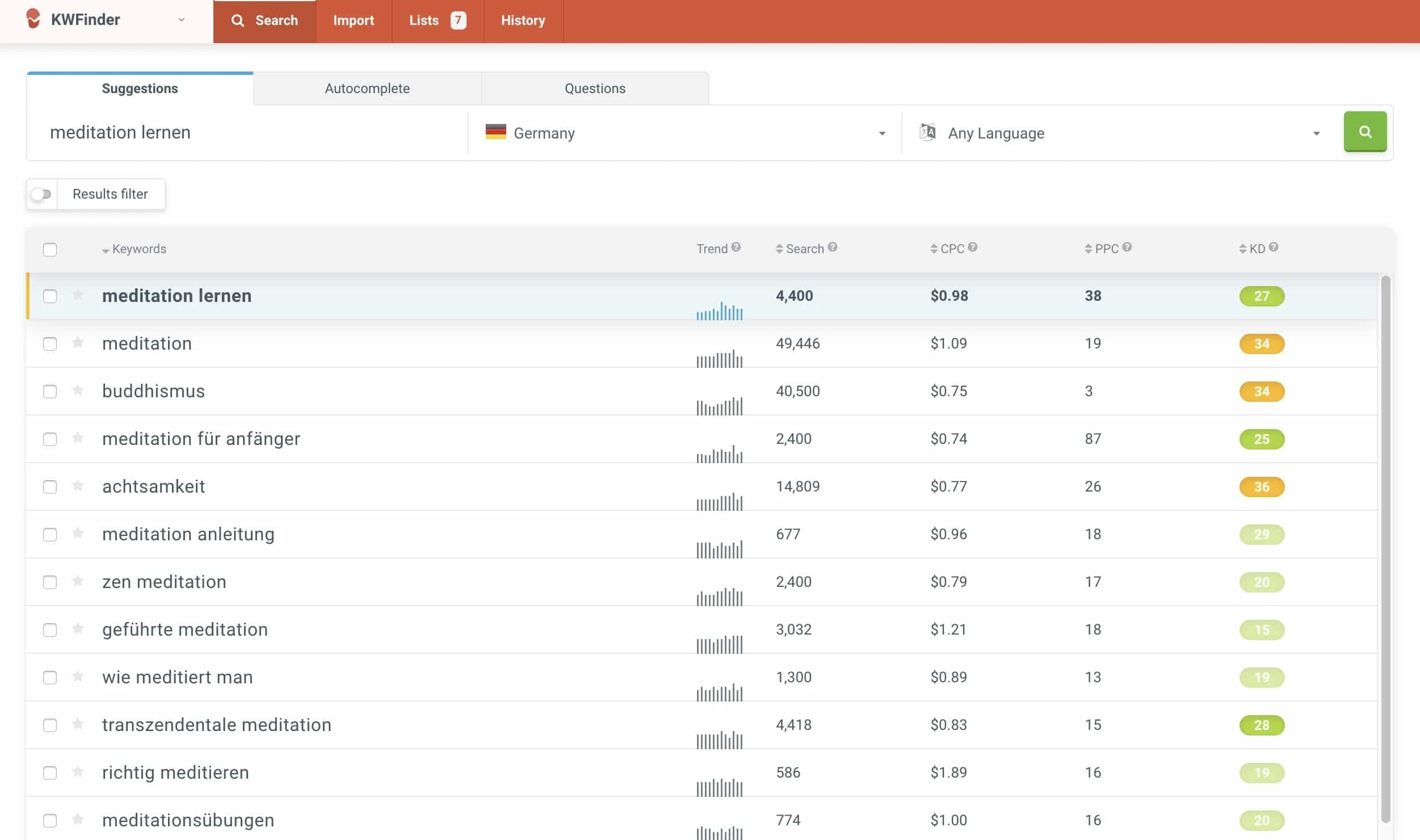
The Google Ads Keyword Planner (formerly the Google AdWords Keyword Tool) is also suitable for finding ideas for new search terms, searching them, and, if needed, downloading them:
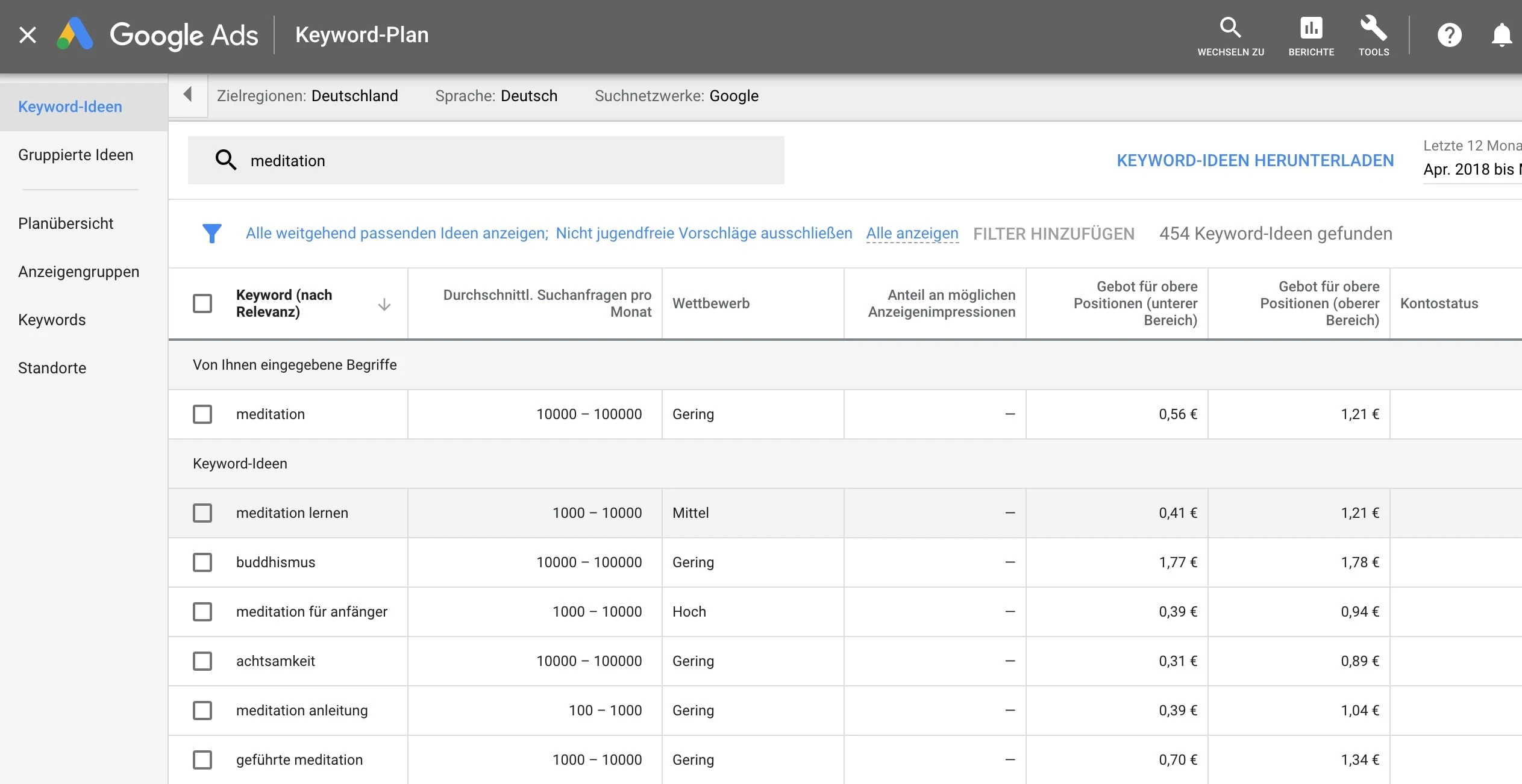
I prefer KWFinder, though, because it shows the search volume and other SEO-relevant data.
#3 Finding keywords from competitors
To get even more keyword ideas, you can also look at your competition.
You can do that with SEO tools like Semrush or ahrefs.
The tool Ubersuggest has also offered a domain-based analysis since early 2019. Unfortunately, it's no longer free by now, but at $29 a month (or a one-time $290 as a lifetime license) it's much cheaper than many pro tools.
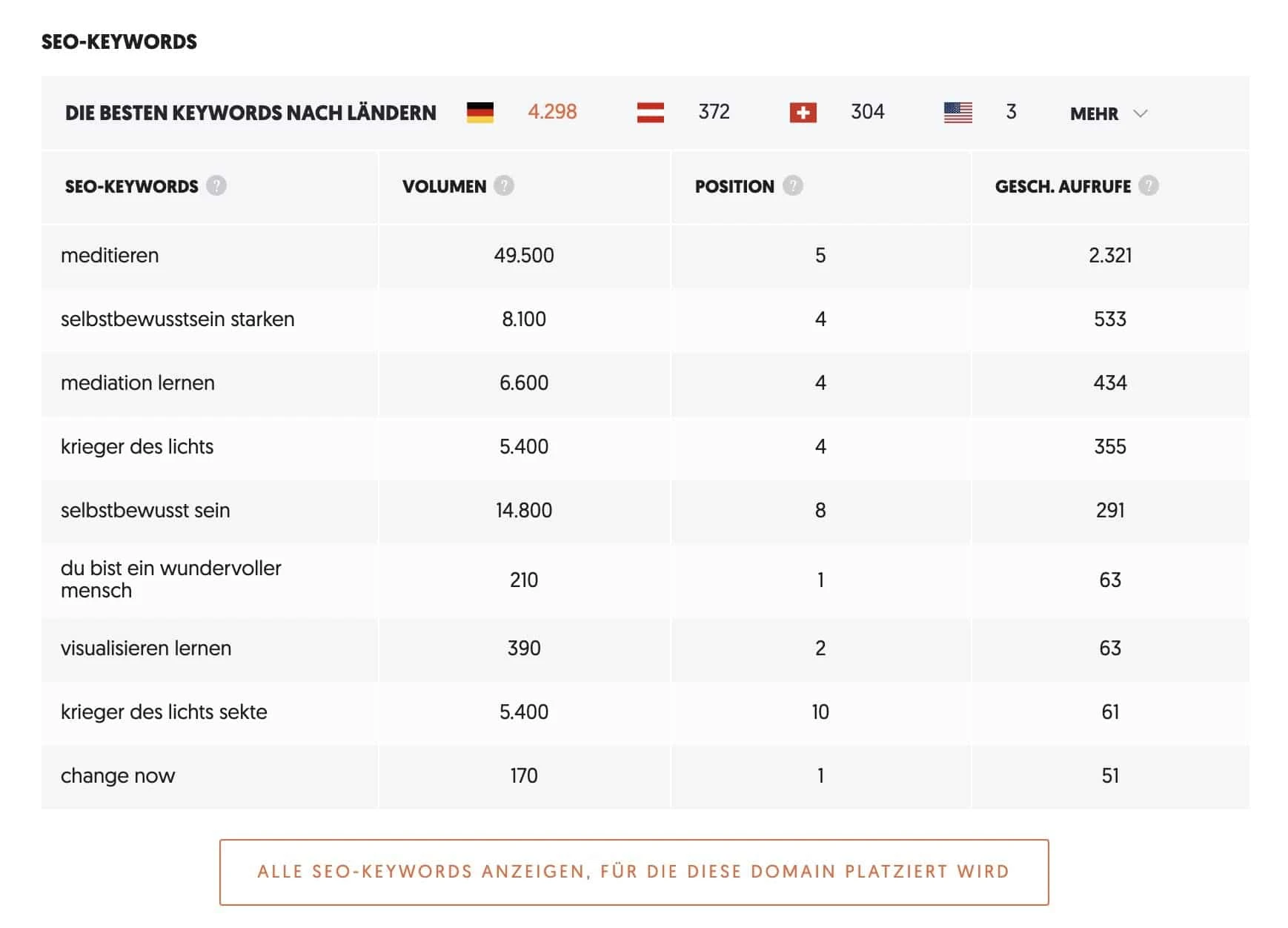
To pull in a competitor's keywords, you simply enter a domain instead of a keyword in the search box.
You'll then see an overview of the domain. If you scroll all the way to the end of the overview, you'll find a section called “SEO-Keywords”, which lists all the search terms a domain ranks for (sorted by the estimated traffic coming in via the respective search term):
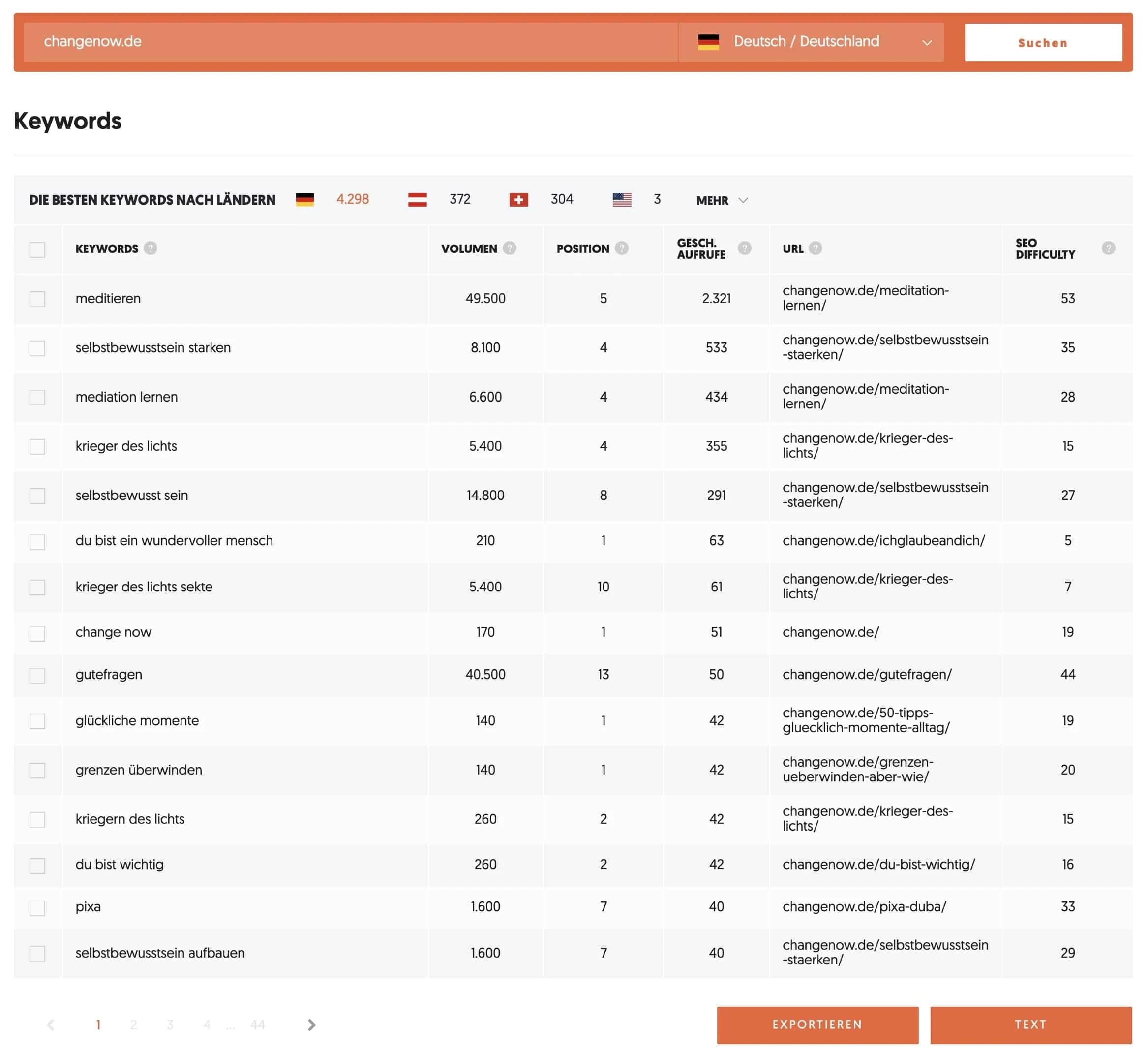
If you then click the button “Alle SEO-Keywords anzeigen, für die diese Domain platziert wird” (show all SEO keywords this domain ranks for), you'll see even more keywords:
6.3 Filtering and sorting results
By now, you should have a huge pile of keyword ideas!
Now it's time to clear out this pile (duplicates, topically irrelevant search queries, etc.) and analyze it more closely.
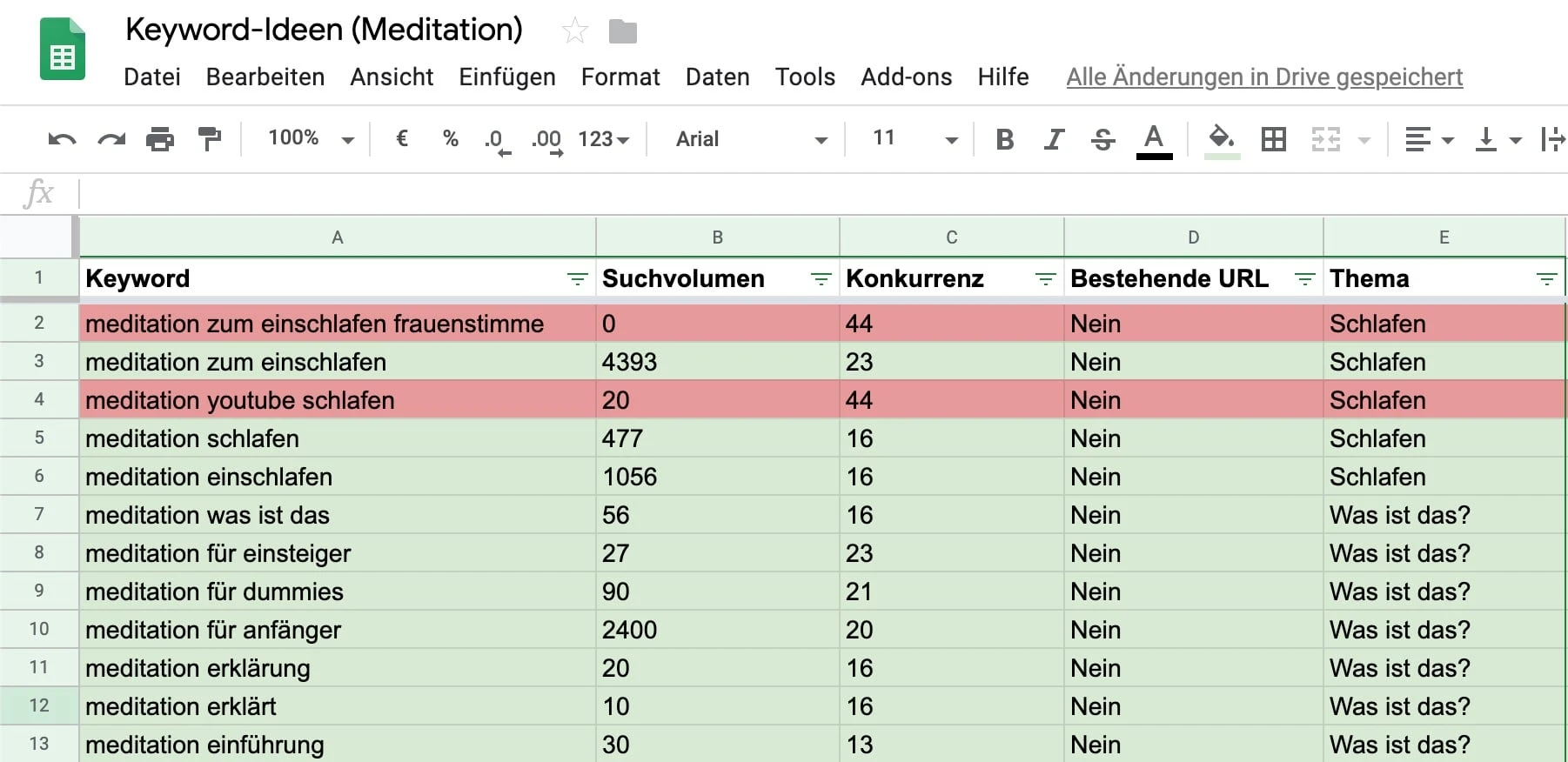
To do that, you export all the data from all the tools (many tools like KWFinder and Ubersuggest have export functions) and merge it in a spreadsheet.
Then you filter, sort, and group your spreadsheet. I often work with color markings:
6.4 Finding suitable main keywords
Once you've analyzed your keyword ideas more closely and separated the wheat from the chaff, it's time to find a suitable main keyword for each keyword group.
An example:
Since I don't have an introduction for beginners on my (fictional) meditation blog yet, I'd like to start there.
So I look at all the keywords that I've sorted into the “What is it?” topic.
There, the keyword meditation for beginners catches my eye, and thanks to its high search volume and still moderate competition, it's very well suited as a main keyword.
6.5 Building a keyword cluster
Now it's time to build a keyword cluster for the main keyword we just found.
A keyword cluster consists of secondary keywords that are closely tied in topic to your main keyword. These include, e.g., synonyms of your main keyword and subtopic keywords.
This is very important and increases the effectiveness of your keyword search by 200 quadrillion percent (at least!), because...
- You're also more likely to rank for these secondary keywords
- You also rank better for the main keyword, because you cover different language styles and search intents
- Google can classify your article better by topic
- You can swap the main keyword for another keyword every now and then, so you don't scare off your readers with “keyword stuffing”.
If you've already collected a lot of keywords, you group them by topic with our free keyword clustering tool.
You can find synonyms and subtopic keywords with KWFinder, Ubersuggest, or the free tool AnswerThePublic, for example.
For every search term, AnswerThePublic collects Google's autocomplete suggestions and presents them graphically:
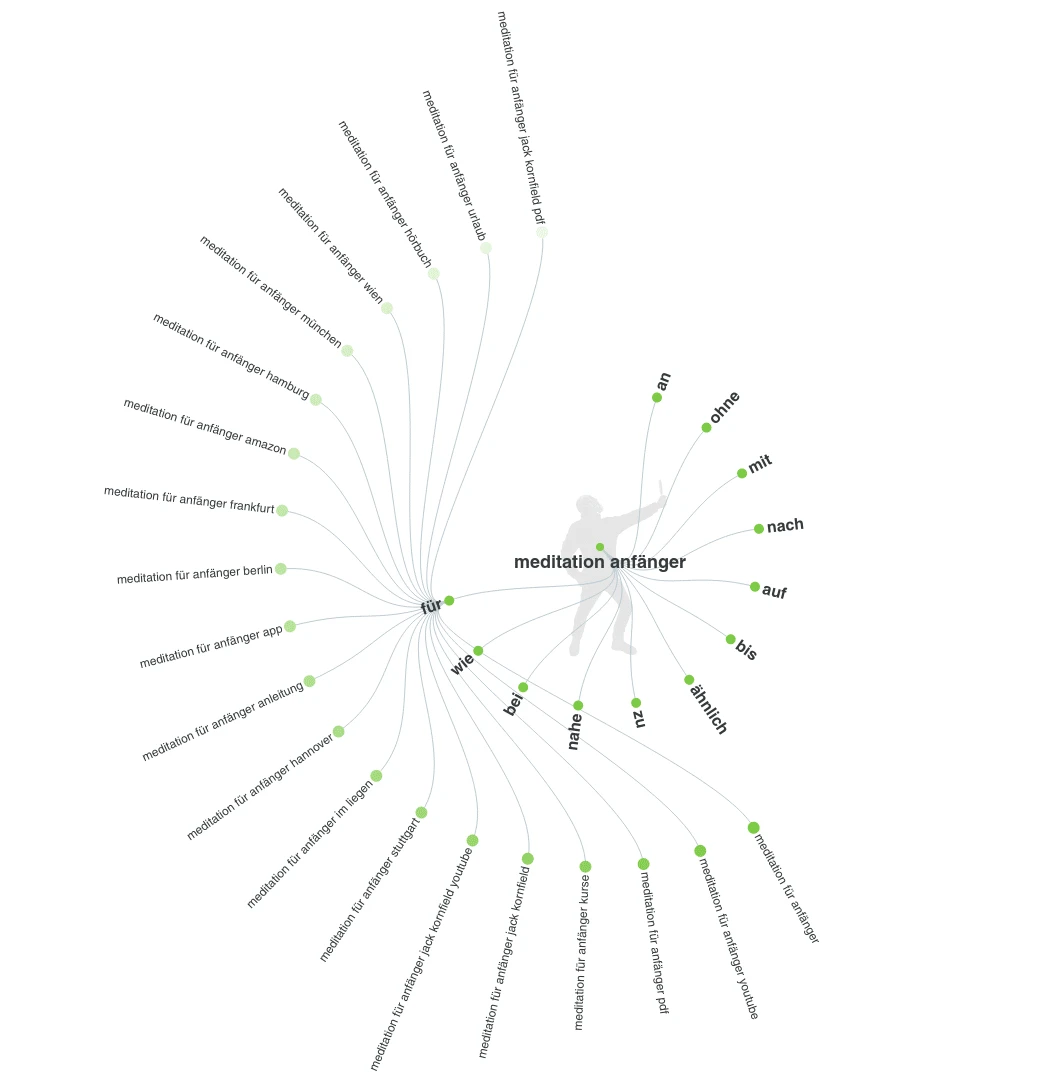
These subtopic keywords, for example, would suit our article:
- meditation for beginners lying down
- meditation for beginners courses
- meditation for beginners exercises
- meditation for beginners app
6.6 Keyword analysis after publishing
A few weeks after publishing, check which keywords your content now ranks for and adjust it accordingly.
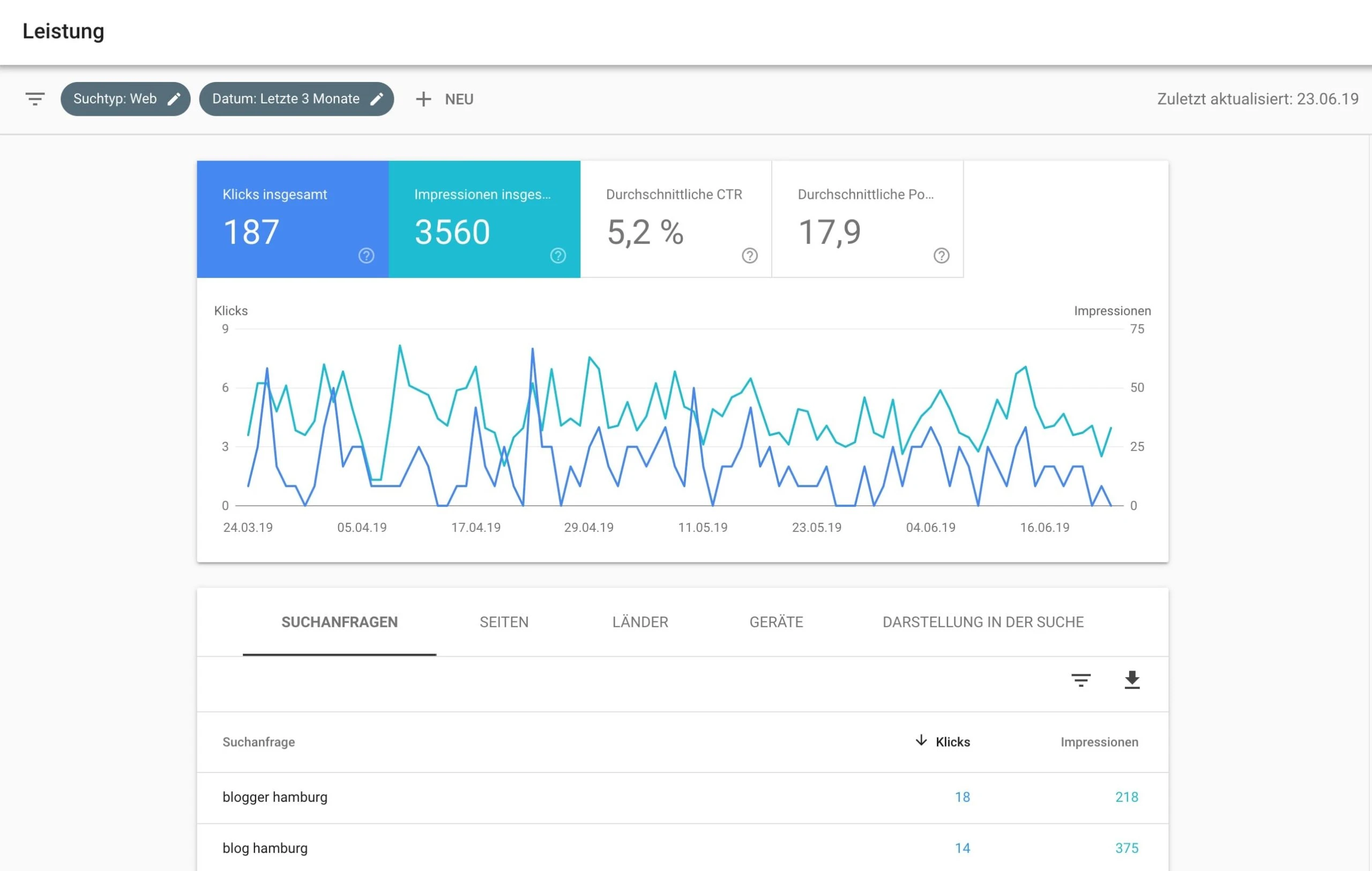
A keyword analysis for a specific page or blog article is best done with the search analytics function in Google Search Console.
There you can see exactly how many visitors come to your website via which search queries, and at which position and click rate:
6.7 Finding quick wins in Search Console
The fastest successes don't come from new keywords, but from pages that almost rank already.
Here's how it works:
- In Google Search Console, open the performance report and choose a period of at least three months.
- Sort the search queries by impressions and filter the average position to 8 to 20.
- Look for search queries with many impressions and few clicks. There, you rank visibly, but not well enough.
- For these search queries, check the search intent in the top 10, add missing subtopics, improve the title and meta description, and link to the page more strongly internally.
Especially for pages at position 11 to 20, a content update and a better title are often enough to reach the first page. That's far less effort than a new article.
By now, Search Console also shows you how your pages perform in Google's generative AI features. More on that in a moment.
7. Keyword research for AI search
More and more people ask Google (AI Overviews, AI Mode), ChatGPT, or Perplexity their questions not as a short search term, but as a whole sentence.
That doesn't mean keyword research becomes unnecessary. In its official guide to generative AI features, Google explicitly says that optimizing for AI search is still SEO. There are no special technical requirements. Anyone who does well in the normal search results has the best starting position.
Still, you can add one step to your research: prompt research.
- For your main keyword, formulate 5 to 10 questions as whole sentences, the way your target audience would ask them to an AI assistant. Good sources for this are “People also ask”, AnswerThePublic, and the questions from your customer contact.
- Ask these questions in Google (AI Mode) and in ChatGPT and see which sources are named.
- Check whether your page answers these questions clearly and with your own experience. If not, add a section.
- Keep an eye on visibility. With the AI Search Toolkit from SE Ranking, which includes 25 prompts per day across 5 AI platforms in the Core plan, you can see whether and how often your page is named.
What doesn't work: creating a separate page for every question variant. Google explicitly counts creating many pages for search query variants as a spam violation (scaled content abuse). It's better to have one strong page that covers the whole topic.
You don't need an llms.txt for Google either, because according to its own guide, Google Search doesn't use it.
8. FAQ
Here you'll find answers to common questions about searching for and finding keywords:
How much does keyword research cost?
It's possible to find keywords for free. There are good free options, such as Google Search Console, Google Trends, the Google Ads Keyword Planner, or AnswerThePublic (with a few searches per day).
The trade-off is that some things take longer with free tools. A competitor analysis with SEO tools like Semrush (from €112.52 per month with annual billing) or Ahrefs (Lite from €119 per month) is much faster. SE Ranking (from €87.20 per month with annual billing) and KWFinder (from €37.70 per month with annual billing) are cheaper.
How long does a complete keyword analysis take?
Finding keyword ideas, sorting them out, and grouping them (steps 6.1-6.3) can take a lot of time.
Mapping out all the keyword groups in a niche can take several days, depending on the size of your niche and your target audience.
For finding a suitable main keyword and building a keyword cluster, you should plan about 20 to 30 more minutes per blog article or page.
Which program is best for creating keyword lists?
I use either Microsoft Excel or Google Sheets, and the latter is my favorite.
Excel offers more features for pros, but Google Sheets is simpler and clearer, and the workflow in combination with keyword tools is better because it's browser-based as well.
Calc, the spreadsheet program from LibreOffice, is another free option.
How do I find the search volume for several keywords at once?
Bulk queries of keyword data are possible with tools like KWFinder, Semrush, or ahrefs.
As a free option, there's SearchVolume.io, which lets you query the search volume of up to 800 keywords at once.
Which keywords have the highest search volume?
Branded keywords, that is, keywords with brand or website names, traditionally have the highest search volume.
Why?
Many people prefer to type the name of a service into Google rather than the full URL into the address bar.
According to the Backlinko ranking, these are the top 10 in the US (ranking from November 2026):
# | Keyword | Search volume |
|---|---|---|
| 1 | youtube | 185,000,000 |
| 2 | amazon | 151,000,000 |
| 3 | 101,000,000 | |
| 4 | 83,100,000 | |
| 5 | gmail | 55,600,000 |
| 6 | wordle | 55,600,000 |
| 7 | chatgpt | 55,600,000 |
| 8 | walmart | 45,500,000 |
| 9 | chat gpt | 37,200,000 |
| 10 | google translate | 37,200,000 |
Do I still need keyword research when more and more people use AI assistants?
Yes. In its guide to generative AI features, Google says that optimizing for them is SEO and that there are no special requirements. AI Overviews and AI Mode build on the normal ranking and quality systems.
You should add questions in full sentences (prompts) that your target audience asks AI assistants to your classic research. More on that in section 7.
What's the best way to find out the search intent?
By analyzing the top 10 on Google and building a keyword cluster.
Is there a WordPress plugin you'd recommend for the keyword analysis of a text?
I can't recommend a specific plugin.
All plugins with a built-in keyword analysis for blog articles, such as Yoast SEO or Rank Math, put too much weight on a single keyword (the focus keyword), in my opinion.
That makes them only moderately useful for optimizing text.