
Are you looking for a keyword tool that gives you understandable data without burying you in countless reports? Then you should take a closer look at KWFinder.
I've been using the tool for many years and I'm still glad to recommend it. I especially like the combination of keyword ideas and search results. You quickly see which topics could be interesting and who already ranks for them on Google.
However, search volume and difficulty values are no guarantee of future visitors. And not every query returns a long list of good ideas. I'll show you how to use KWFinder sensibly and where its limits are.
- KWFinder combines keyword ideas, search volume, trends, and competitor analysis in a clear interface. I especially recommend it for bloggers and freelancers.
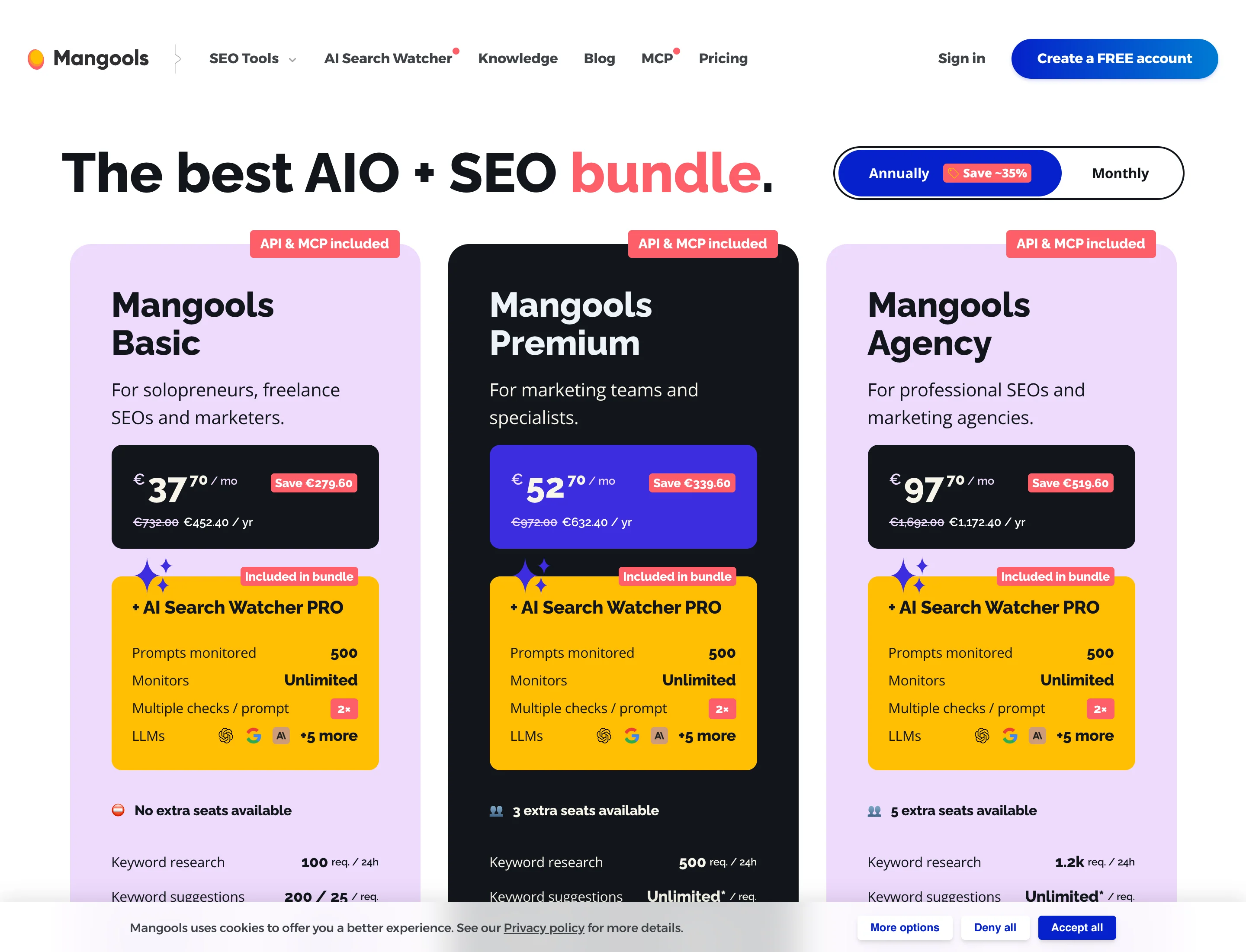
- It is part of the Mangools suite. The public SEO-plus-AI bundle starts at €37.70 per month with annual payment, so €452.40 up front.
- Import, domain search, and Keyword Gap complement the research. Watch the lookup limits and also check the search results yourself.
You can't book KWFinder on its own. You get it together with SERPChecker, SERPWatcher, LinkMiner, and SiteProfiler. The current public combo plans also include AI Search Watcher Pro. You can read about how well these tools work together in my Mangools review.
This is the public euro price list of the SEO-plus-AI package.
| Plan | Monthly payment | Annual payment | Keyword lookups per 24 hours |
|---|---|---|---|
| Basic | €61.00 | €452.40 (€37.70 per month) | 100 |
| Premium | €81.00 | €632.40 (€52.70 per month) | 500 |
| Agency | €141.00 | €1,172.40 (€97.70 per month) | 1,200 |
As of November 2026.
The annual amounts are paid in advance. I couldn't check whether taxes are added without going through checkout. Before you sign up, check the final price shown to you. Existing subscriptions and individual discounts can differ from this list.
1. Keyword research
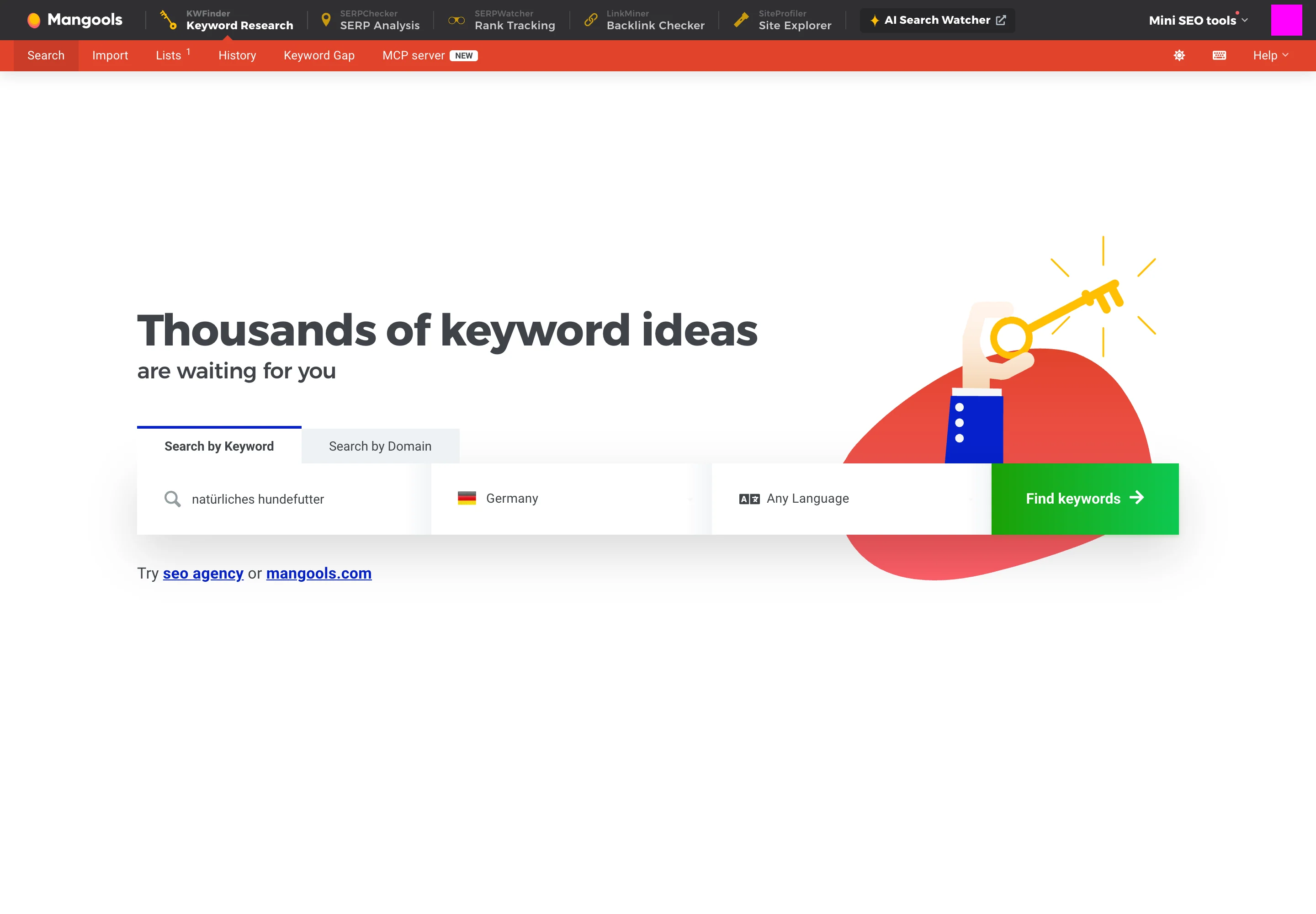
For keyword research, you open “Search by Keyword”, enter your topic, and choose the target country. For a German audience, that's “Germany”. Then you start “Find keywords”.
The language is an additional restriction. “Any Language” leaves it open; “German” narrows it to German. Which choice makes sense depends on your audience. An English search term can also be interesting for a German website.
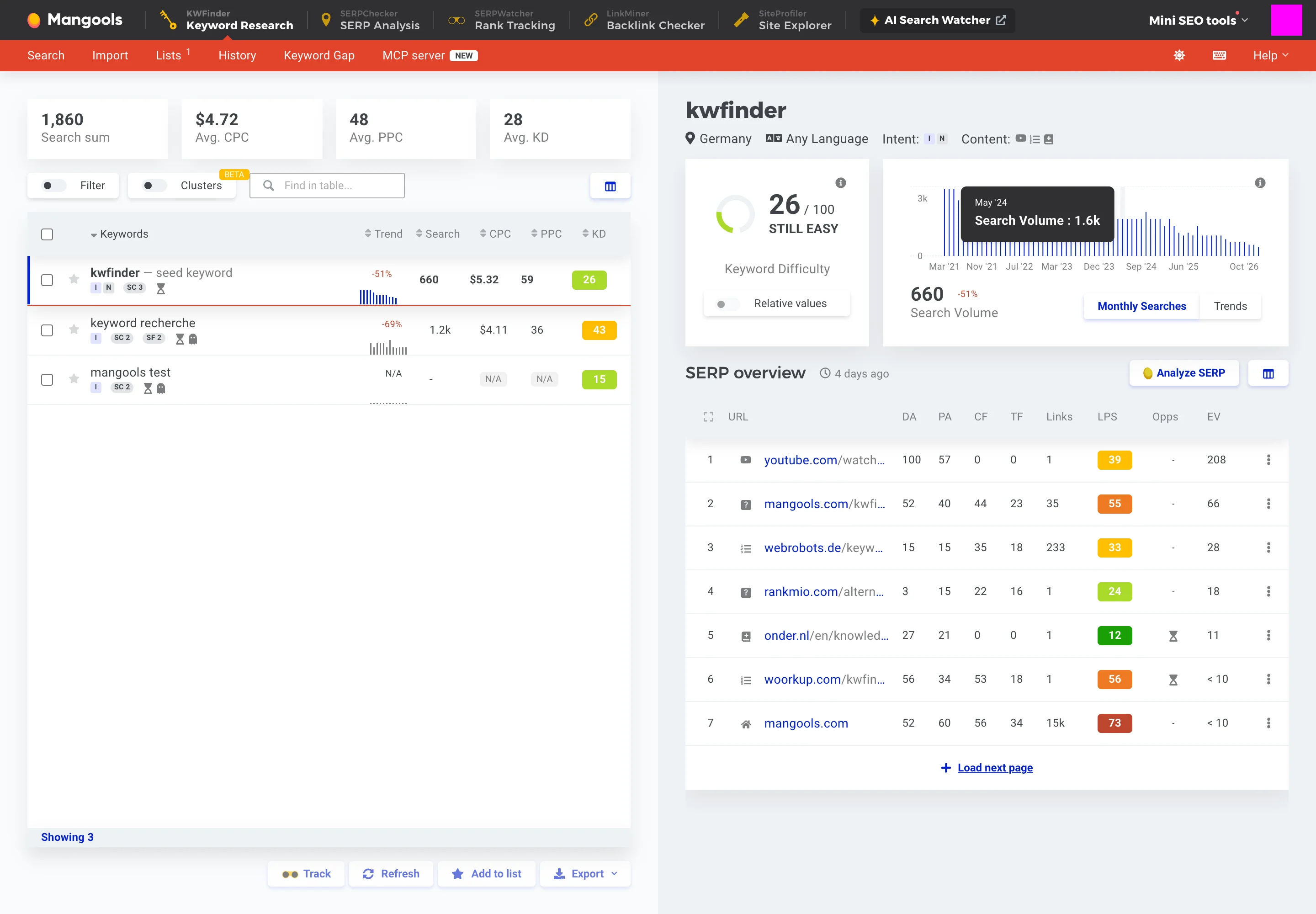
On the left you see your term and further suggestions with search volume, trend, CPC, PPC, and keyword difficulty. On the right, the tool shows the development of search volume and an overview of the search results.
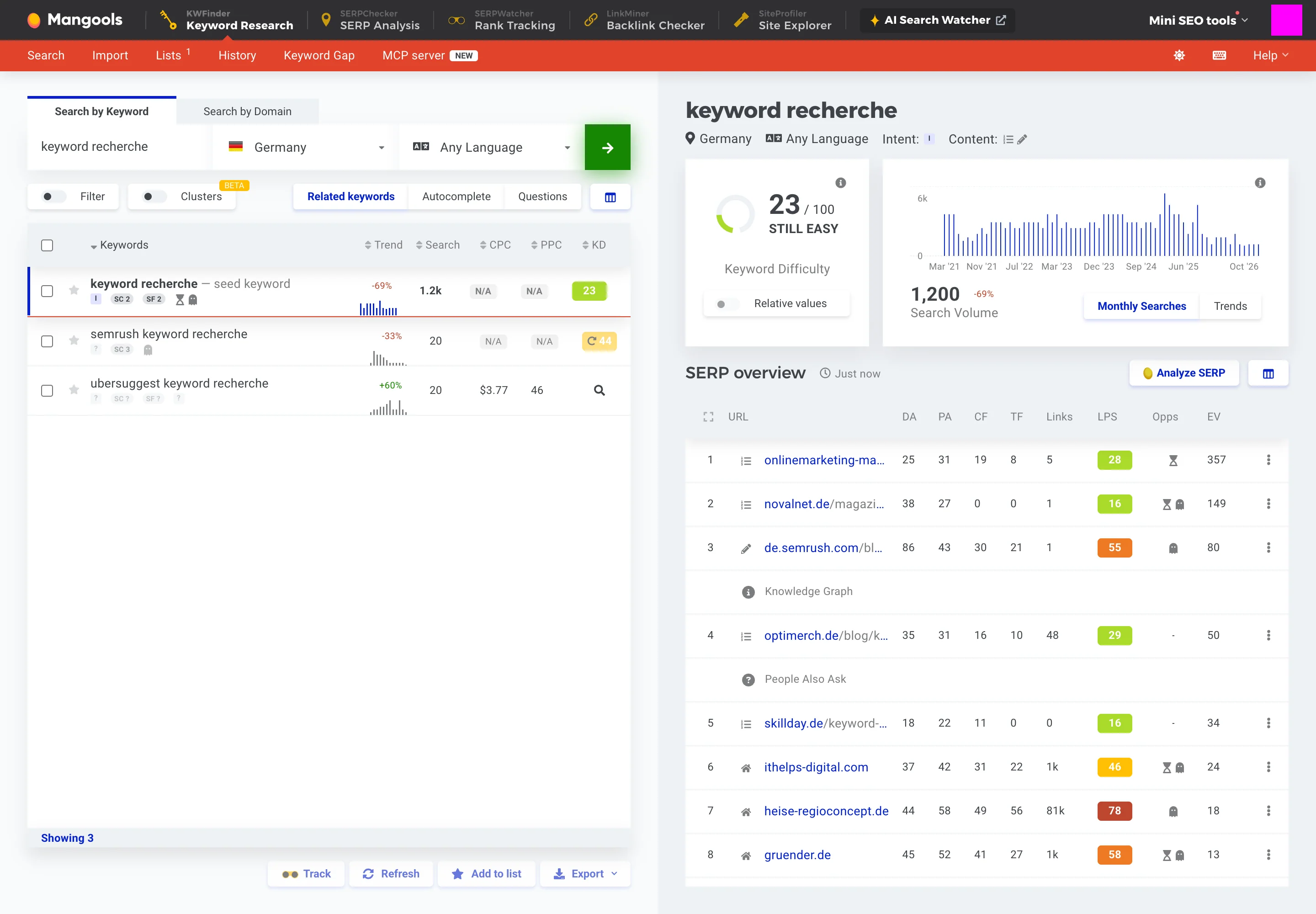
I like this layout because I can check a topic idea against the competition right away. The number of suggestions varies a lot, though. For the German keyword “natural dog food”, only one additional idea appeared next to the starting term in my test.
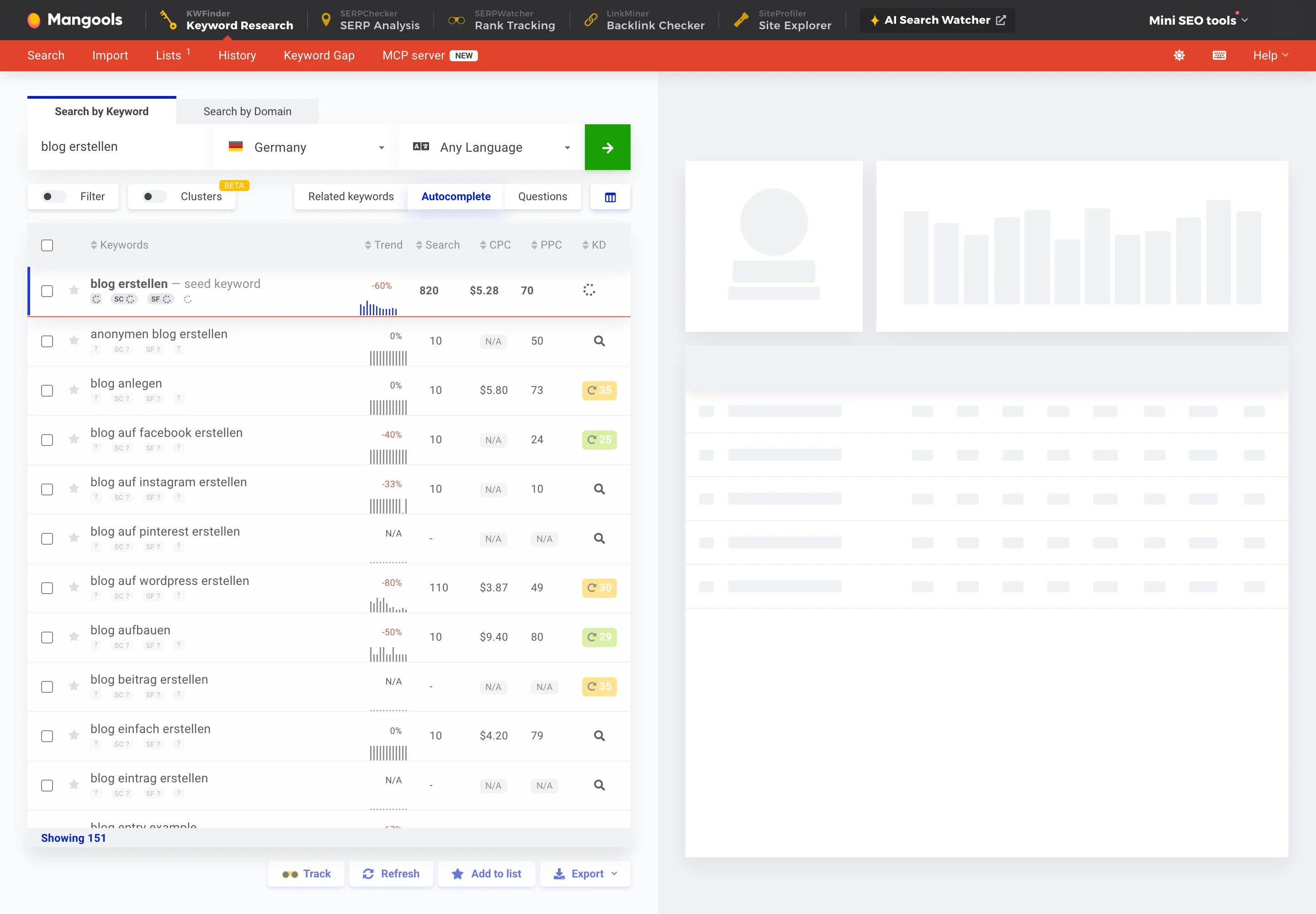
So also try other starting terms as well as the “Autocomplete” and “Questions” views. They add Google suggestions to your research. Both views use one additional keyword lookup the first time you open them for a search.
For “blog erstellen” (create a blog), the normal view showed only a short list. “Autocomplete”, by contrast, delivered 151 entries. That's a good reason not to stop after the first query.
1.1 Import and export multiple keywords
If you already have a keyword list, you don't have to research the terms one by one. Open “Import” and add them via a CSV or TXT file. Alternatively, enter each term in the input field and confirm it with Enter. Then choose the target country and click “Process keywords”.
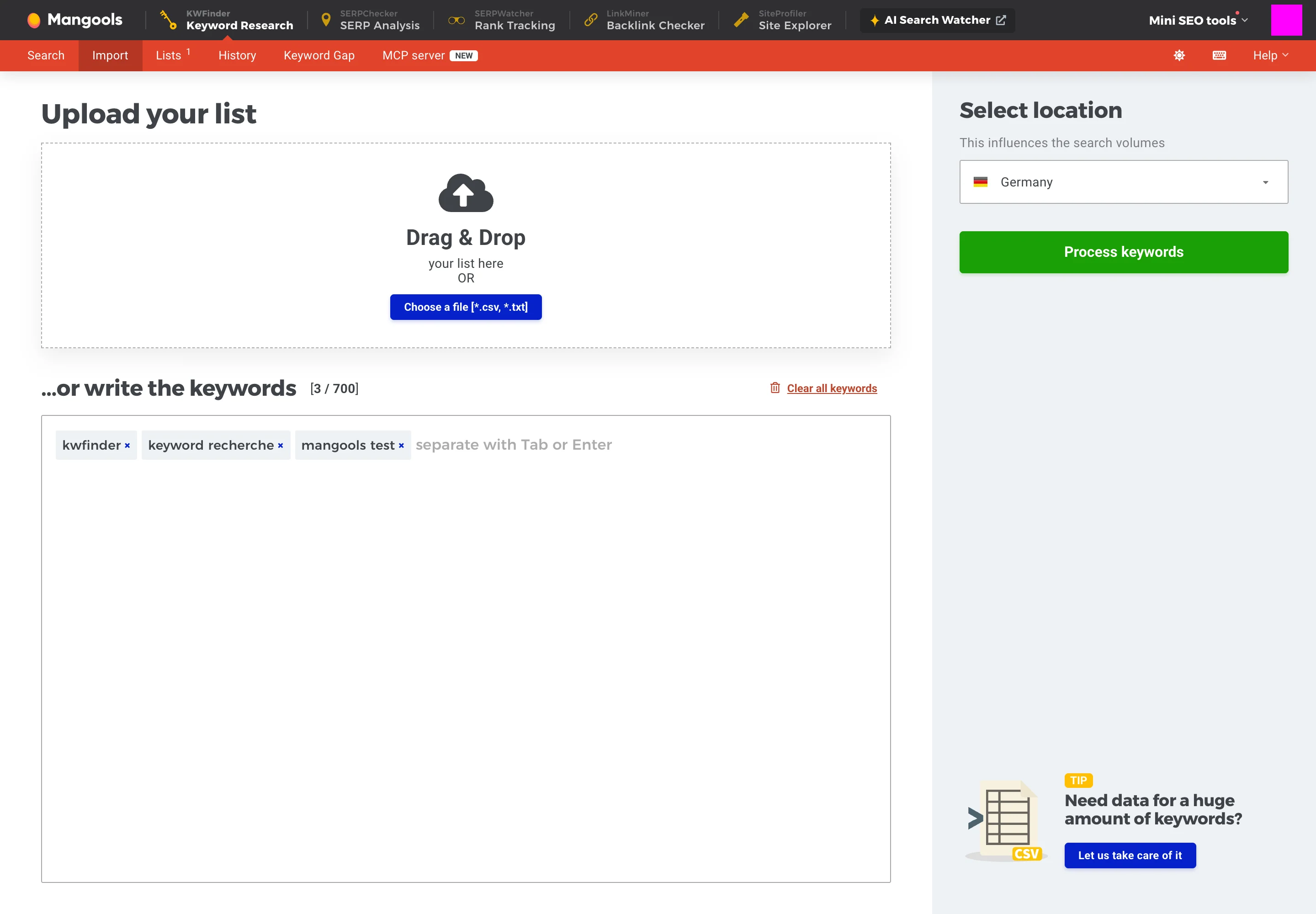
In the Premium account I tested, up to 700 keywords could be entered per import. That is the import limit of this account and no promise for every plan. You can see the actual limits in your own interface.
An import uses one keyword lookup. If you then open a term and load its SERP data, an additional SERP lookup can be used. Select the rows you want and open “Export > Export to CSV” to process the results further.
1.2 Filter keyword suggestions
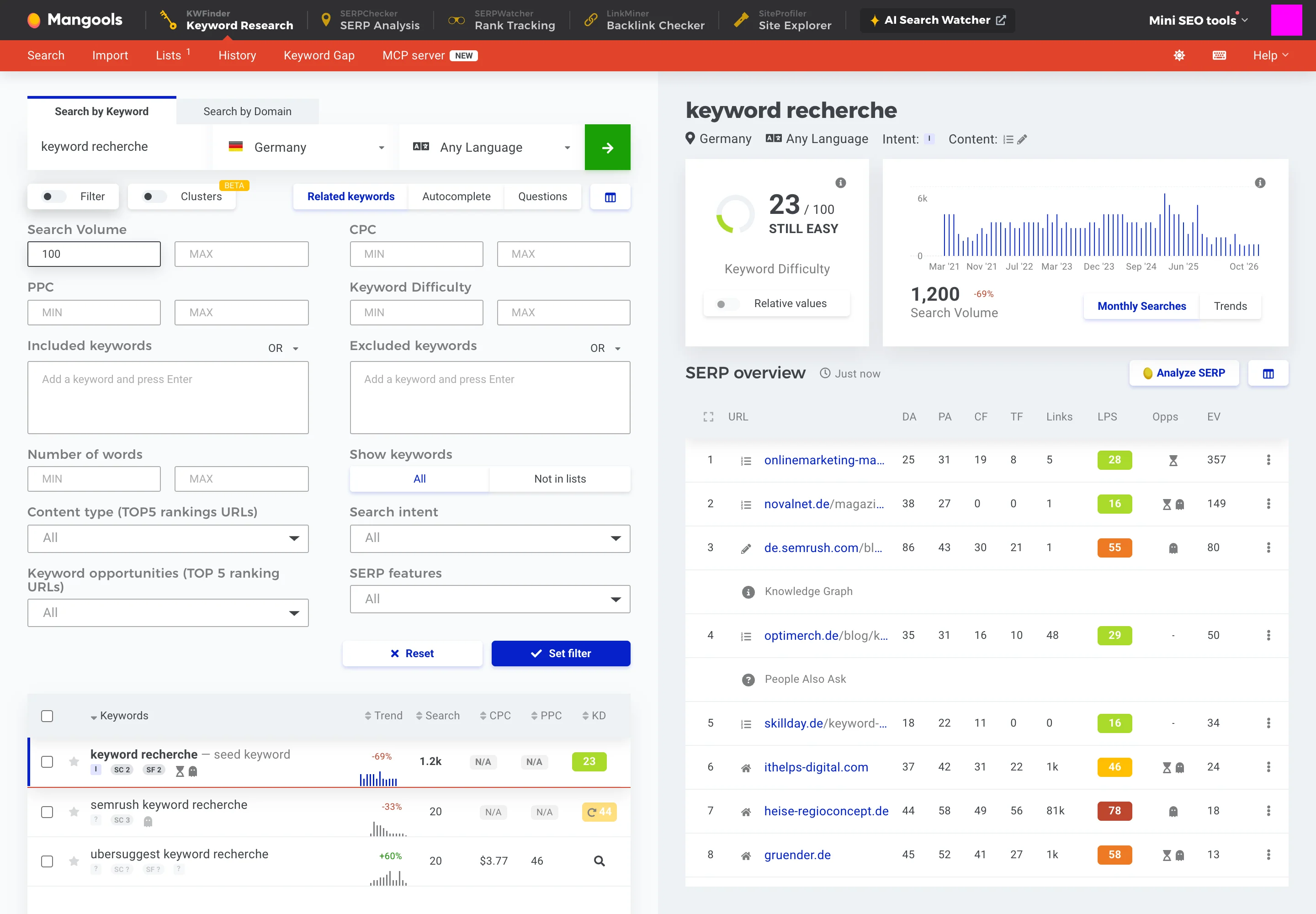
Via “Filter”, you can narrow down search volume, CPC, PPC, keyword difficulty, and the number of words, among other things. You can also include or exclude terms. With “Set filter”, you apply your selection.
In the test, a minimum search volume of 100 reduced the three terms displayed for “Keyword Recherche” (German for keyword research) to one hit. The filter doesn't generate new ideas, it narrows down the existing list.
1.3 Find your competitors' keywords
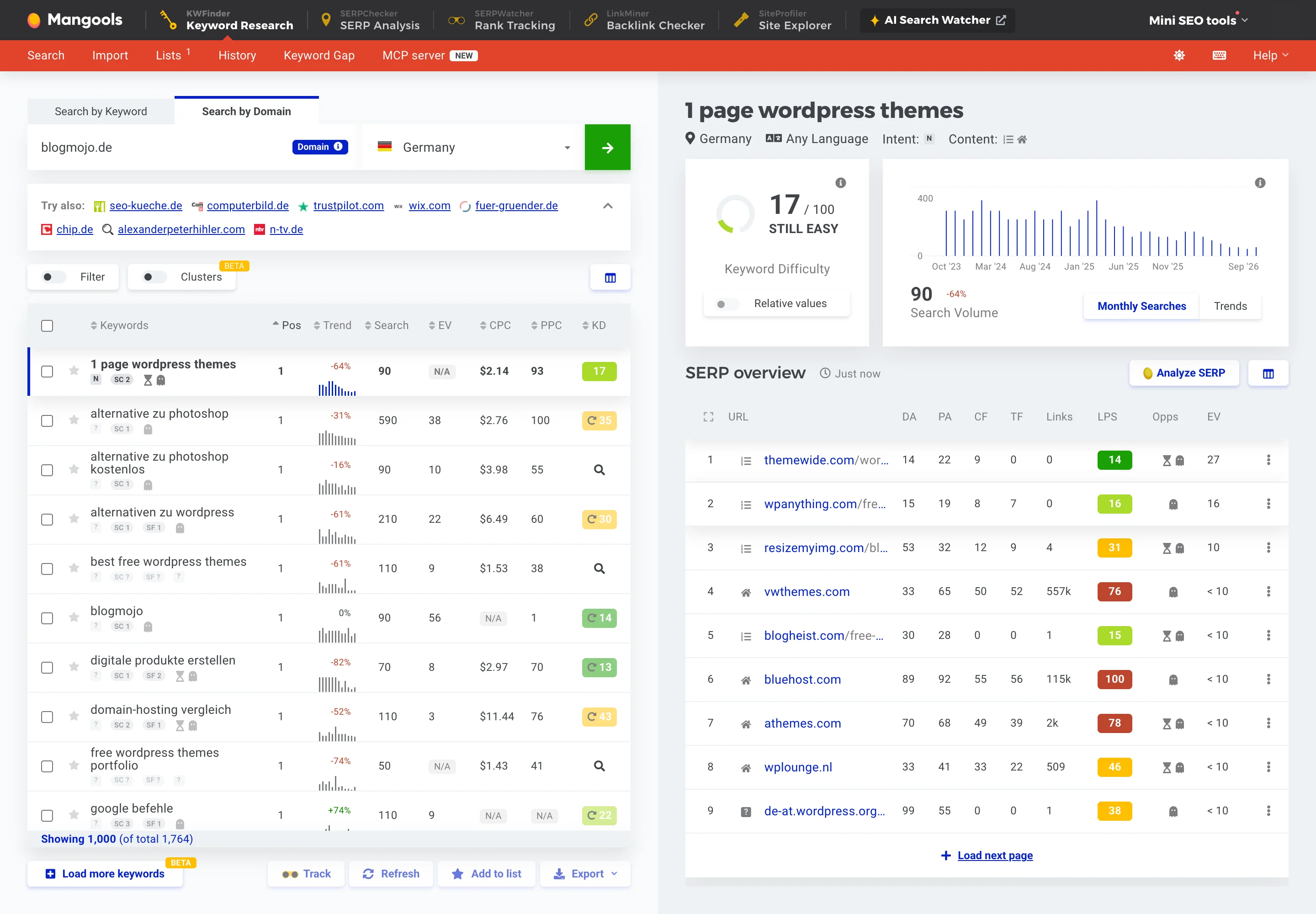
In “Search by Domain”, you enter a domain or URL and choose the target country. The results show search terms for which this website is already found. That helps you discover topics you might not have come up with through a single keyword search.
With “Keyword Gap”, you compare your domain with up to five competitors. The tool looks for terms for which the competition ranks but your website doesn't. For Blogmojo and bloggerabc.de, the test returned 114 possible gaps. Some hits were broad terms or brand searches that I wouldn't adopt as a topic of their own.
The API returned the results directly. In the web interface, an error occurred on the first call; after reloading, the list was visible. Always check such suggestions for their actual relevance to your readers.
2. Interpreting the metrics
On the left and right side of KWFinder, you find metrics (CPC, PPC, DA, PA, etc.) that help you judge what potential a keyword might have and how strong the competition for it is.
Below, I explain what these metrics mean and how you can best use them for keyword research:
Trend
The small chart shows the development of search volume over the last 12 months. You can use it to spot seasonal fluctuations. The larger chart on the right goes further back, depending on the keyword.
Search shows the average monthly search volume. The Est. visits metric estimates possible organic visits from it and from the current position. The actual click rate depends heavily on search intent, ads, and SERP features, though.
CPC (Cost-per-Click)
The CPC estimates the average cost of an ad click. The metric relates to Google Ads and not to organic competition. It can still be a sign of commercial interest. Also check the currency set in the tool before you compare prices.
PPC (Pay-per-Click)
PPC shows the competition among advertisers on a scale from 0 to 100. A high value doesn't automatically mean that organic rankings are hard to reach.
KD (Keyword Difficulty)
Indicates on a scale from 0 to 100 how strong the competition for a keyword is. KWFinder calculates it from link profile and authority data of the ranking pages. The value is a guide, but it doesn't replace a manual check of the search intent.
The calculation takes Link Profile Strength into account, meaning the link profile strength of the ranking URLs. Metrics from Moz and Majestic feed into it. You still have to judge the content, the search intent, and the prerequisites of your own website yourself.
A low value makes a keyword interesting, but not automatically easy. Open the search results and check whether your planned page can fulfill the same search intent. You should also pay attention to the age of the SERP data shown.
DA (Domain Authority)
Domain Authority is a metric from Moz. It estimates the relative ranking potential of an entire domain. A higher value doesn't guarantee that a website ranks ahead of you for your keyword. You can learn more about the metric on the Moz website.
PA (Page Authority)
Page Authority is the corresponding Moz metric for a single page. Use it to compare the ranking URLs, but also check their content and search intent. You'll find more info in Moz's explanation of Page Authority.
Links
The external links to the respective URL that the tool reports as passing authority. Don't confuse this value with the number of links to the entire domain.
CF and TF from Majestic
Citation Flow (CF) and Trust Flow (TF) come from Majestic. CF takes the volume of links into account, TF weights trustworthy link sources. Both help when comparing link profiles, but they are not quality grades assigned by Google.
LPS
The LPS (Link Profile Strength) is calculated from the link profile of a URL. For this, Mangools combines Domain Authority and Page Authority from Moz with Citation Flow and Trust Flow from Majestic, among other things. A higher value points to a stronger link profile.
That helps when comparing the competition. The LPS doesn't tell you, though, whether a piece of content fulfills the search intent well or whether you can write a better article.
Est. visits (Estimated visits)
Estimates how many organic visits a page could get through the keyword. This is not a measurement of actual visitors. The value is calculated from average CTR (click-through rate) figures, so actual visitor numbers can differ, e.g. because of search intent, ads, or SERP features.
3. My verdict on KWFinder
KWFinder is clear, easy to use, and shows not only metrics like search volume, trend, CPC, and ad competition, but also the search results. That lets you judge topics and competition side by side.
German search terms and choosing Germany as the target country worked in the test. How many usable ideas you get depends on the topic. So try several starting terms.
Something else I no longer want to do without is the import function. With it, I can check an existing list for metrics in bulk. The permitted number is shown in the import form of your account.
In short:
KWFinder is still one of the keyword tools I recommend most to bloggers and freelancers. If you want to put the additional modules in context, read my review of the whole Mangools suite.
Pros
- free start without a credit card
- user-friendly and visually appealing design
- keyword data for German search terms and locations
- easy to use
- bulk analysis of existing keyword lists
- Keyword Gap analysis
- connection to SERPWatcher and an MCP server
- additional ideas via Autocomplete and Questions
- search results and link metrics help with manual competitor analysis
- clear filters for relevant terms and metrics
Cons
- The number of relevant suggestions varies a lot depending on the starting term.
- Partly shows inaccurate search volumes (some keywords are grouped together, as in the Keyword Planner)
- Keyword and SERP lookup limits apply per 24 hours and can't be flexibly spread over a month
- The Keyword Difficulty metric and KWFinder's assessment of whether a keyword is easy or hard remain a rough guide
4. FAQ
Here I've put together the answers to the most common questions about KWFinder:
Can I book KWFinder independently of the Mangools suite?
No, unfortunately that isn't possible. KWFinder can only be booked as part of the Mangools suite, not on its own.
Can I still use KWFinder for free?
Yes. Mangools offers a free account again, without a credit card. The daily lookup and import limits are much lower than in the paid plans, though.
Is there a free alternative to KWFinder?
Yes. For first keyword ideas, you can use the Google Keyword Planner. Google Trends also helps you compare the relative interest in search terms.
If you want to stay with KWFinder, you can use the free Mangools account. It has lower lookup limits than the paid plans.
How can the LPS for position 1 be lower than that of positions 2-10?
The page with the highest LPS (Link Profile Strength) isn't necessarily the one that lands in first place.
The LPS rates the link profile, not the overall quality of a search result. So also check whether the content matches the search intent. A higher LPS doesn't guarantee a better position.
Where does KWFinder's data come from?
Mangools combines several data sources. The link and authority metrics come from Moz and Majestic, among others; search volume and other keyword data are processed separately. The values are not direct measurements from your website.