
I've been using Mangools for many years. And I still happily recommend the tools. Mostly because they show me SEO data in a way I can actually do something with.
Do you want to find topics for your blog, size up the competition, and track your rankings? For that you need an understandable interface and the right data. That's exactly where I like Mangools.
Alongside KWFinder, there are tools for backlinks, website analysis, and visibility in AI answers. You can also use the data with AI assistants through an MCP server.
In this review, I show you what of that helps in everyday work, which plan makes sense, and where you need an additional tool.
- I especially recommend Mangools for bloggers, freelancers, and small content teams. Its strength is the clear keyword and competitor analysis.
- The public SEO-plus-AI package starts at €37.70 per month with annual payment. That means €452.40 is billed at once.
- Watch the limits and the ranking interval. Basic and Premium check rankings weekly, Agency daily. A comprehensive technical website crawler is not among the modules I tested.
1. Who I recommend Mangools for
My recommendation is clear.
If you run a blog or a smaller company website and do your SEO yourself, I would put Mangools on your shortlist. You find search terms, look at the competition, and then track how your pages develop. In the suite, these tasks fit together well.
I especially like KWFinder. It puts keyword ideas, search volume, and the search results side by side. You don't have to click through a whole series of reports while researching.
For a buying decision, I would proceed like this.
- Think about whether you mainly want to improve content and rankings or need a complete technical check.
- Test your own topics and a relevant competitor domain in the free account before you pick a subscription.
- Count how many keywords you want to monitor and decide whether weekly updates are enough for you.
For content SEO, I find the package very well done. If you want to regularly crawl large websites for technical errors, I would add a specialized audit tool. None of the Mangools modules tested here covers that task comprehensively.
Create a free account with Mangools
2. How I tested Mangools
For this review, I used the web interfaces with an existing Premium account and additionally queried the official MCP server and the REST API. The examples come from Blogmojo, among other sources, and from German keyword research.
I tried keyword search, import, filters, competitor keywords, and Keyword Gap. On top of that came SERP analysis, an existing ranking project, backlinks, and SiteProfiler. For AI Search Watcher, I set up my own monitor with a German prompt.
The screenshots show the actual interfaces and results. One important detail when reading the price information is the difference between an existing account and a current offer. During the test, my existing access included only the small AI allowance. The public SEO-plus-AI plans, on the other hand, include AI Search Watcher Pro.
What this review does not deliver is a measured accuracy rate compared with Google or other SEO databases. The long-term reliability of the new AI monitor can't be derived from a single test either.
3. KWFinder: find keywords and topics
For me, KWFinder remains the heart of Mangools.
In keyword search, you enter a topic and choose location and language. On the left you see search terms with metrics, on the right the development of search volume and an overview of the Google results. This layout makes it pleasant to check an idea against its competition right away.
Here's how to start your keyword search.
- Open “Search by Keyword” and enter a term that fits your website.
- Choose “Germany” for a German audience. The language narrows the research further; “Any Language” leaves this restriction open.
- Start the search and open a suitable term. Look at search volume and keyword difficulty together with the ranking pages.
- If needed, narrow the suggestions via “Filter”, for example by search volume or included words.
This is what the interface looks like.
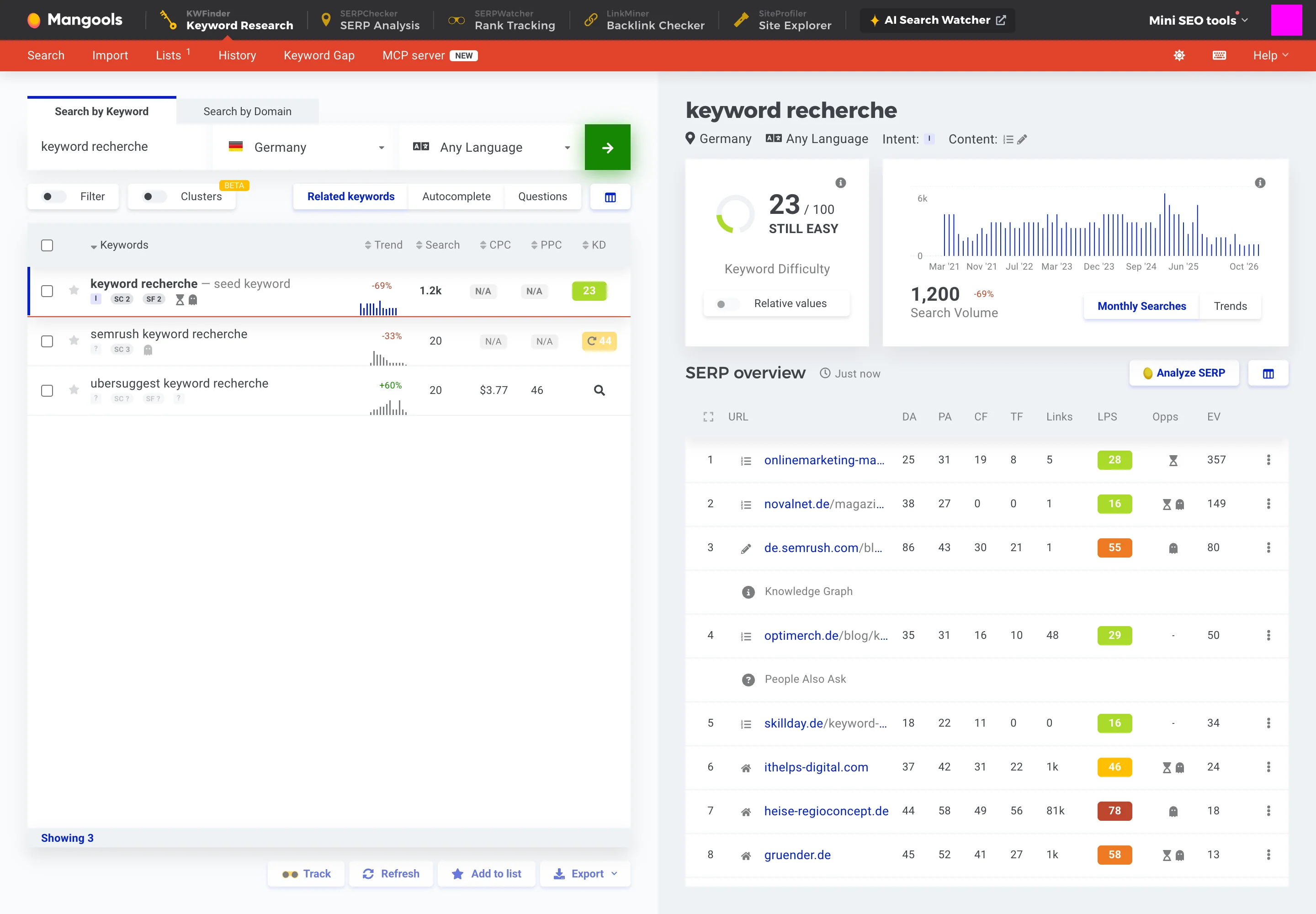
Search volume helps you weigh topics against each other. Keyword difficulty estimates how hard a keyword is based on the competition. Both values are useful starting points, but not a promise of future visitors or rankings.
The number of suggestions also depends heavily on the topic. The German keyword for “natural dog food” returned only one additional idea in my research. That's why I would always also try related starting terms as well as “Autocomplete” and “Questions”. These two views use Google suggestions. The first time you open each view per search, an additional keyword lookup is used.
With “blog erstellen” (create a blog), that made a clear difference. The normal list stayed short; “Autocomplete”, by contrast, showed 151 entries. So with a supplementary view, significantly more ideas came in.
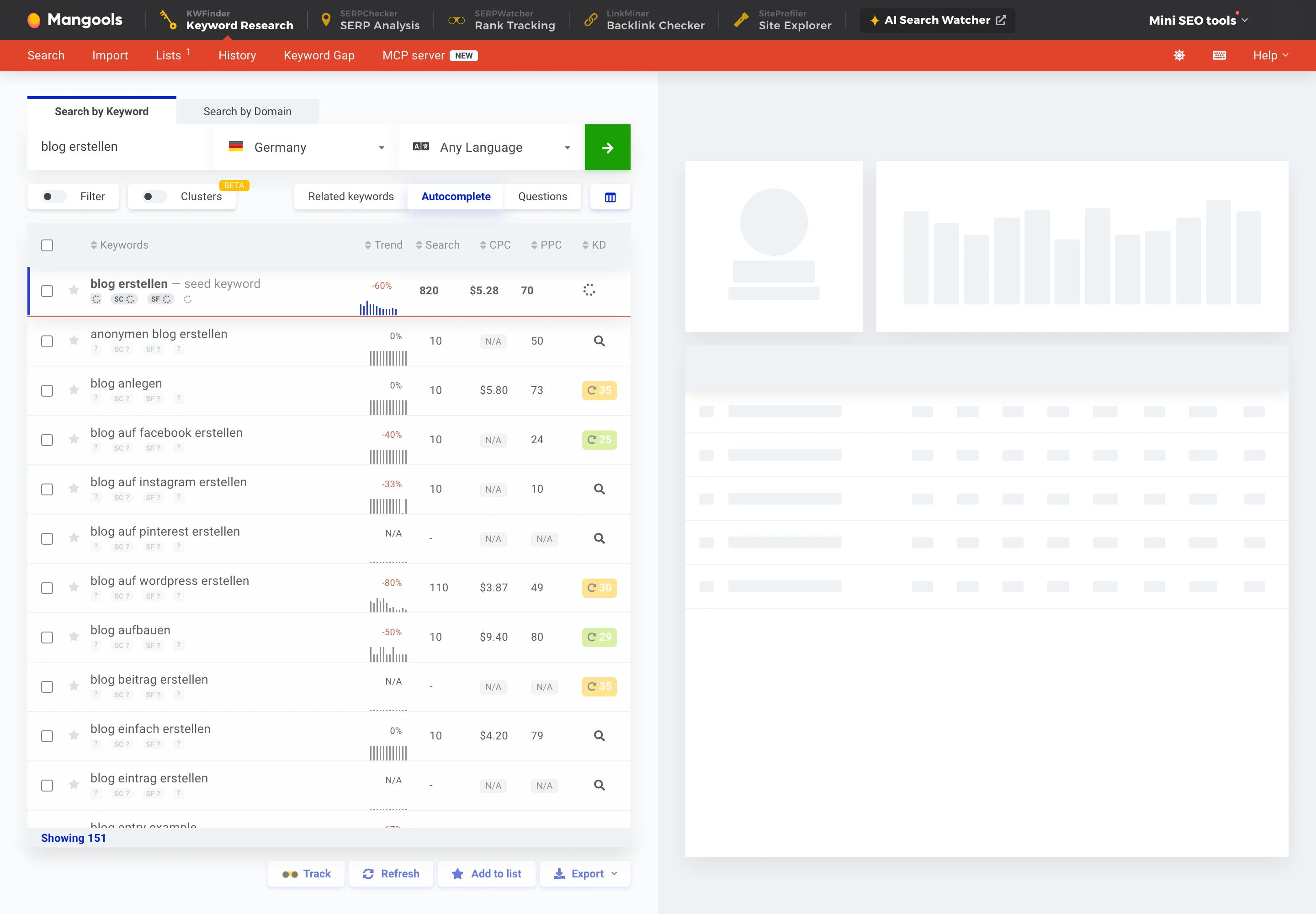
Find your competitors' keywords
Domain search helps when you don't yet know which terms might be interesting.
- Switch to “Search by Domain”.
- Enter a competitor domain or a specific URL and choose the target country.
- Start the query and check which topics fit your own website.
“Keyword Gap” works even more specifically. There you compare your domain with competitors. In the comparison of Blogmojo with bloggerabc.de, the API returned 114 terms where it had detected a gap.
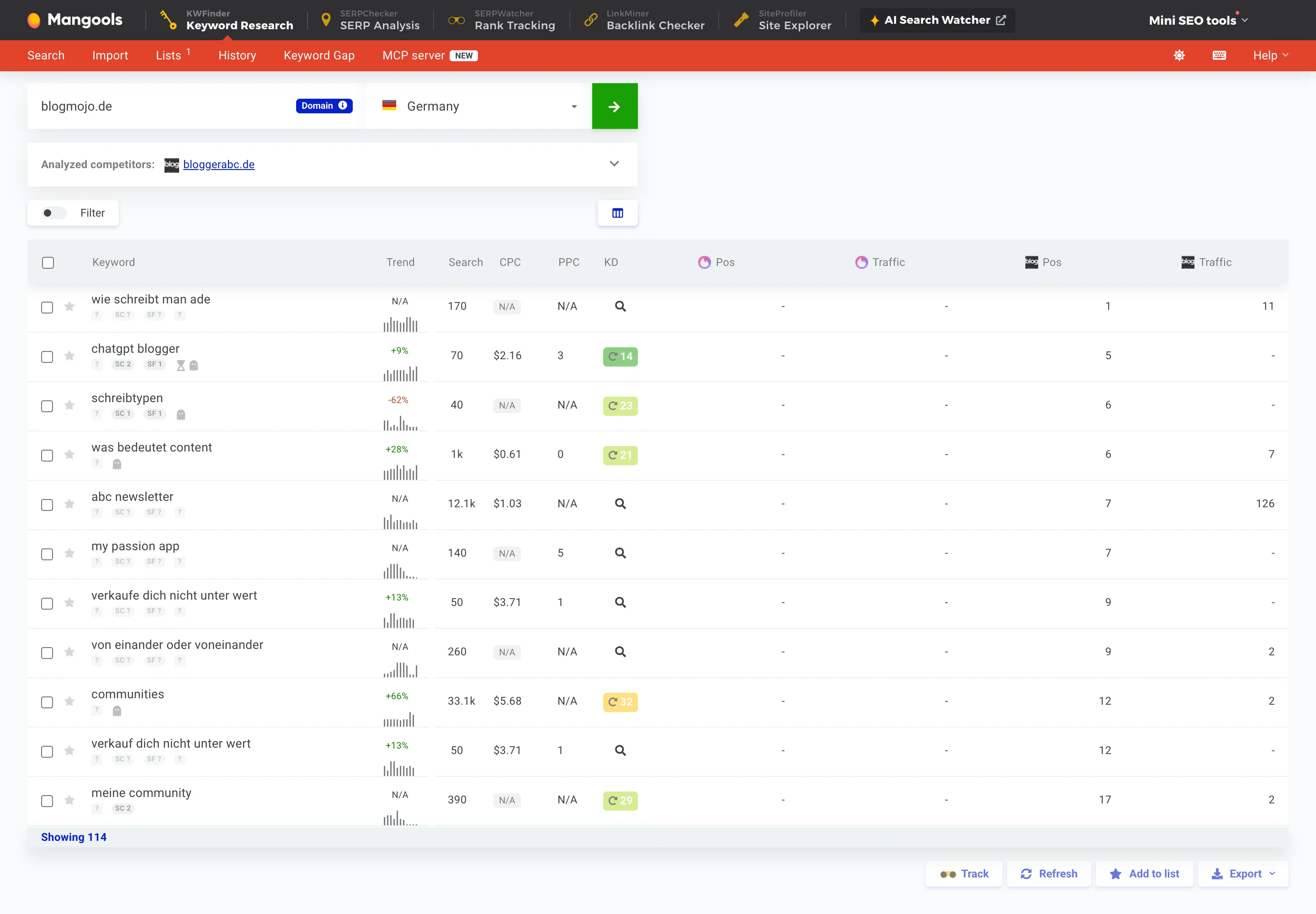
The hits are research ideas, not a finished editorial plan. Among the suggestions there were also broad terms and brand searches, which I would sort out. On the first call, the interface crashed; after reloading, the result could be displayed.
The keyword import is also practical. You can check an existing list for metrics in bulk and export selected terms as CSV. For the detailed guide with filters and metrics, you'll find my KWFinder review here.
4. SERPChecker: check the search results
A keyword can look good and still be the wrong choice.
Maybe shops dominate even though you want to write a guide. Or Google shows so many additional elements that less attention is left for regular results. That's why looking at the search results is part of research for me.
SERPChecker shows the results for a chosen location and device. On top of that come link and authority metrics as well as detected SERP features. These are additional components of the results page, such as related questions. You can check desktop and mobile separately.
Here's how to go about it.
- Enter your search term and choose the country.
- Set “Desktop” or “Mobile” and start “Analyze SERP”.
- Compare the content of the results with the page you want to create. Use the metrics as additional orientation.
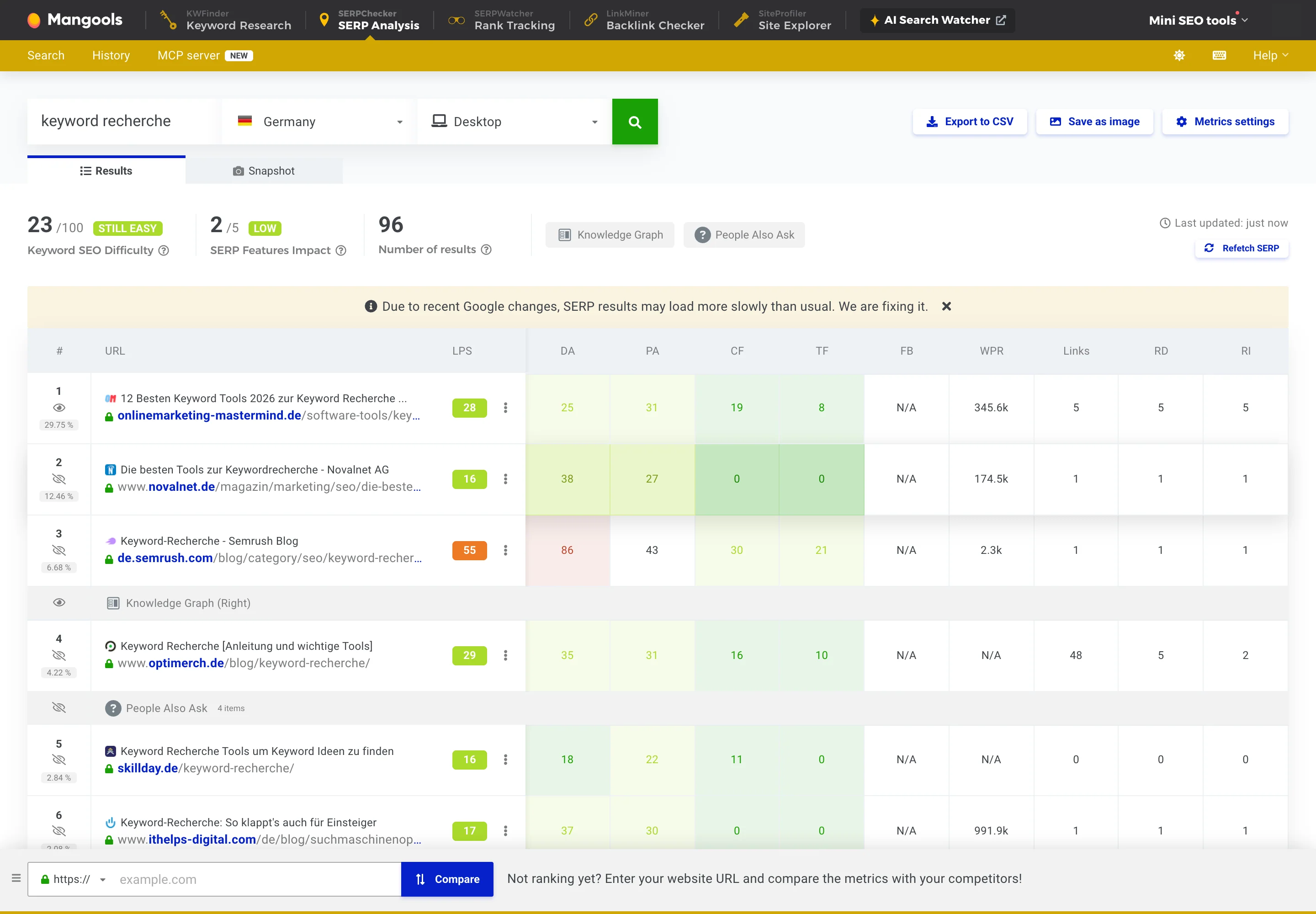
Via “Metrics settings” you can choose which metrics are shown. I like that this lets you reduce the analysis to what you need right now.
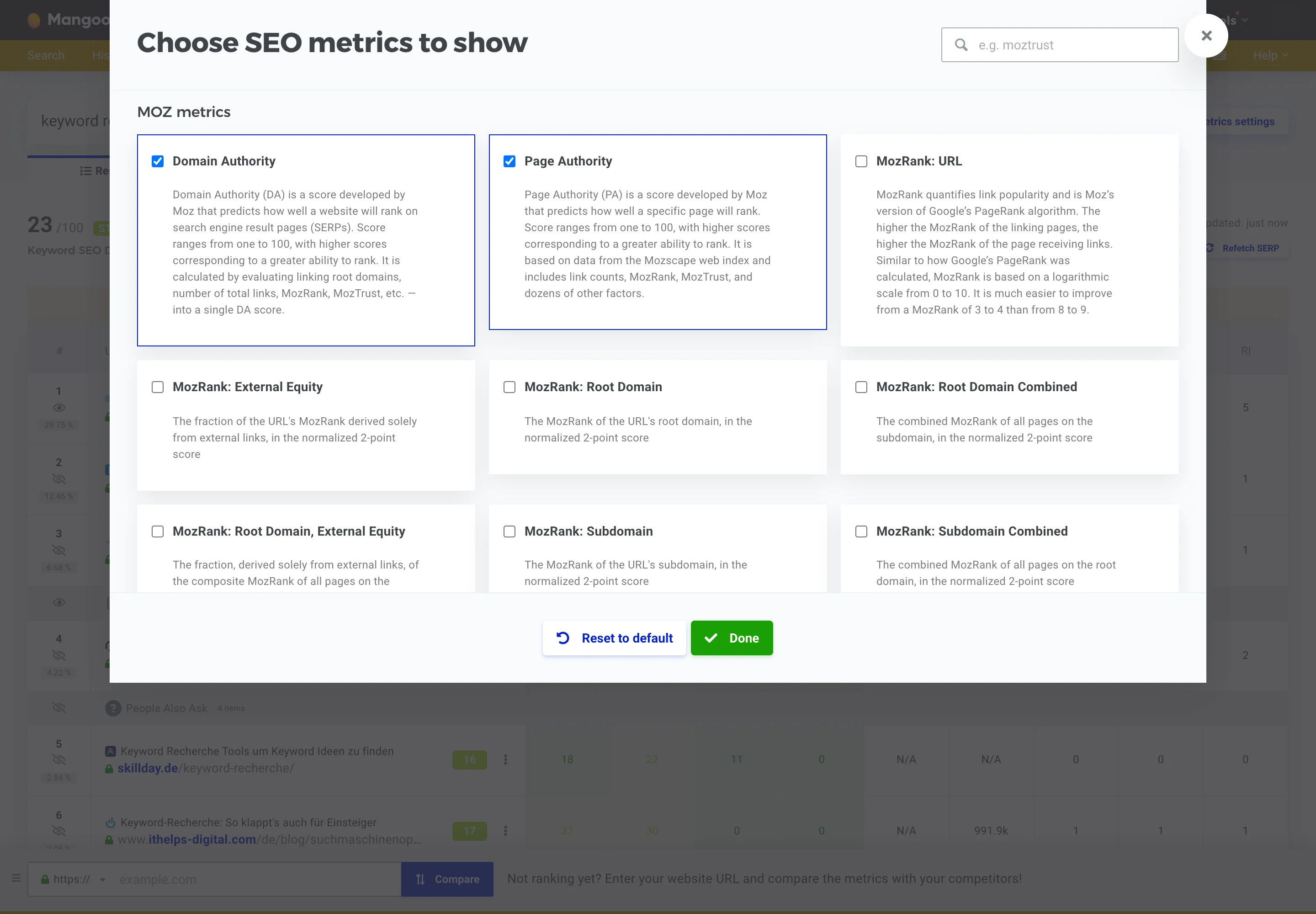
The additional “Snapshot” view shows the Google page. It needed a bit of patience in my test but became visible afterward. Mangools showed a notice about slower SERP results.
5. SERPWatcher: keep an eye on rankings
After the research, you want to know whether your work is paying off.
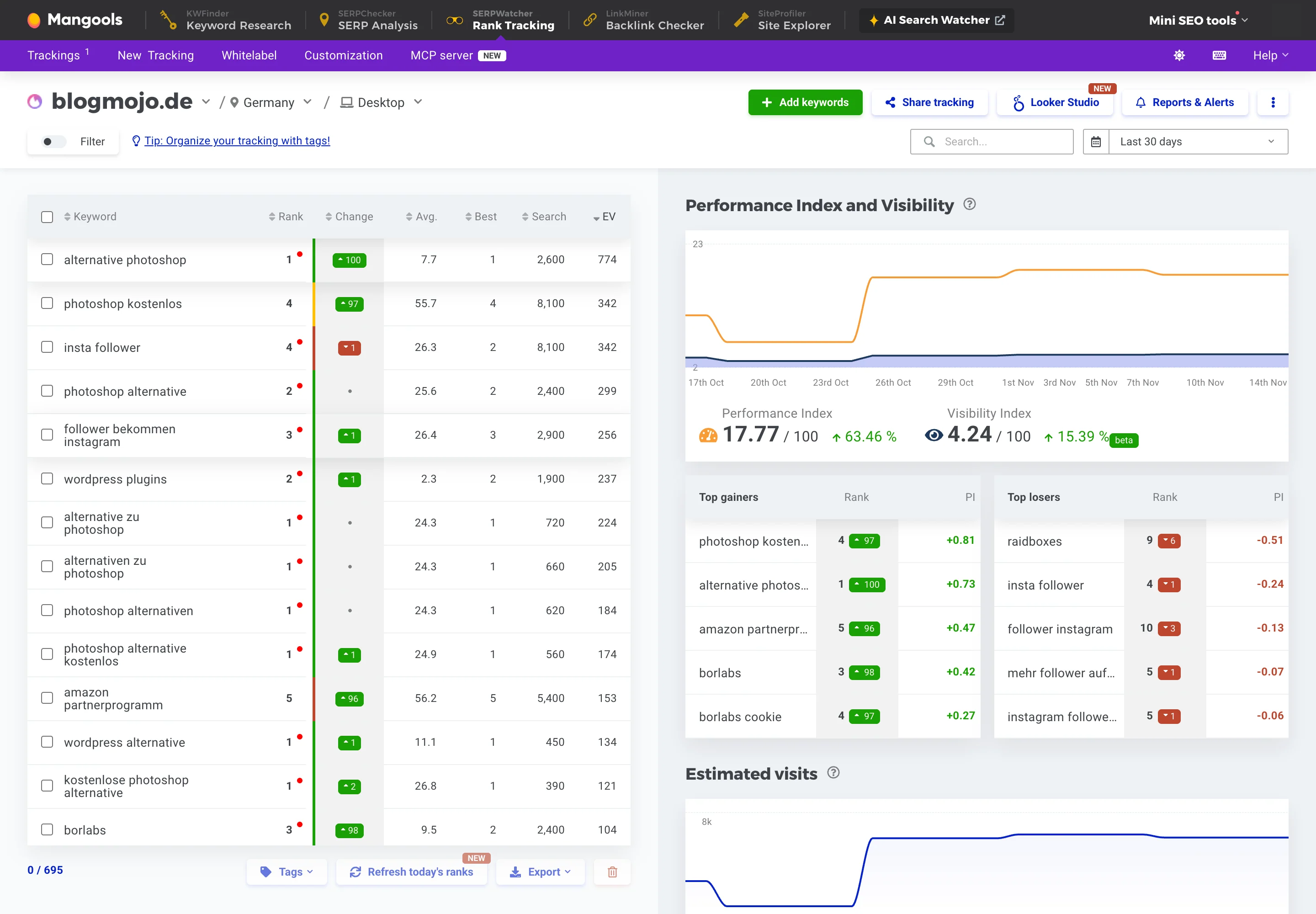
In SERPWatcher, I opened the existing Blogmojo project. Besides the individual keyword positions, it shows trends, changes, and summarized metrics. Via MCP, too, the project, the keywords, and statistics could be retrieved.
For your planning, I would recommend these steps.
- Decide which country and which device you want to monitor. These settings belong to the tracking.
- First add the keywords that stand for your important content. The booked keyword limit applies in total.
- Compare developments over a longer period and look into the individual keywords when something changes.
One point deserves special attention.
Basic and Premium update rankings weekly. Agency checks them daily. Mangools also explains this distinction in its help article on ranking intervals. If you need daily reports for clients, I would take this plan limit into account before buying.
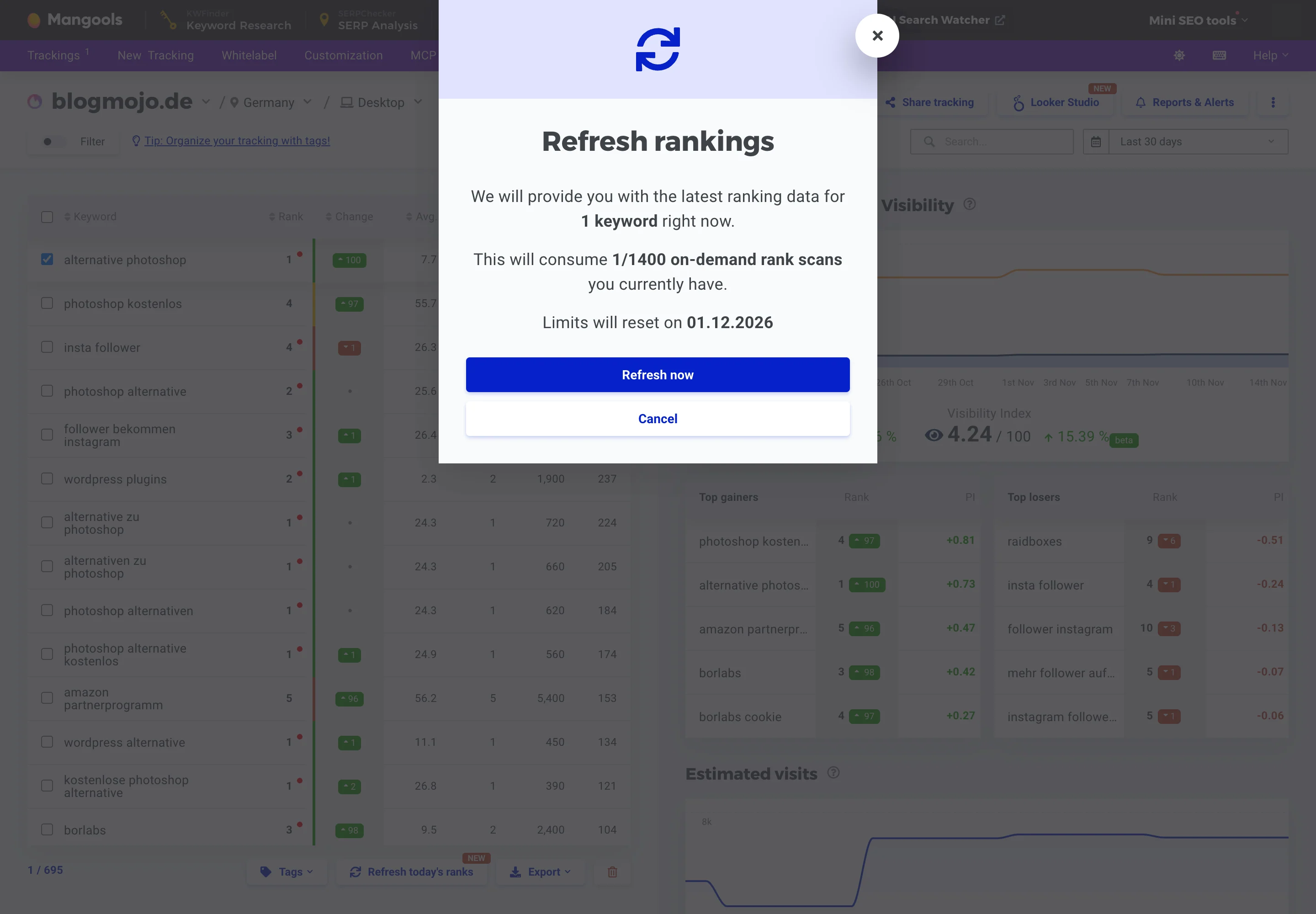
For individual keywords, there is “Refresh today’s ranks”. Such a request uses the separate allowance for manual ranking checks. My test job was accepted, but the interface announced a wait of about 180 minutes. I couldn't yet confirm the finished new rank in this test.
That doesn't diminish the usefulness of the clear trend charts for me. As an instant check, though, I wouldn't plan on this function after this experience.
6. LinkMiner and SiteProfiler: analyze links and websites
Check backlinks with LinkMiner
A backlink is a link from another website to your page. LinkMiner helps you examine such links and the pages that link to you.
- Enter a domain or URL and start “Find backlinks”.
- Check the source page, the target page, and the anchor text, meaning the visible text of the link.
- Use filters if you want to examine, for example, links with a specific anchor text. They search the backlinks already loaded.
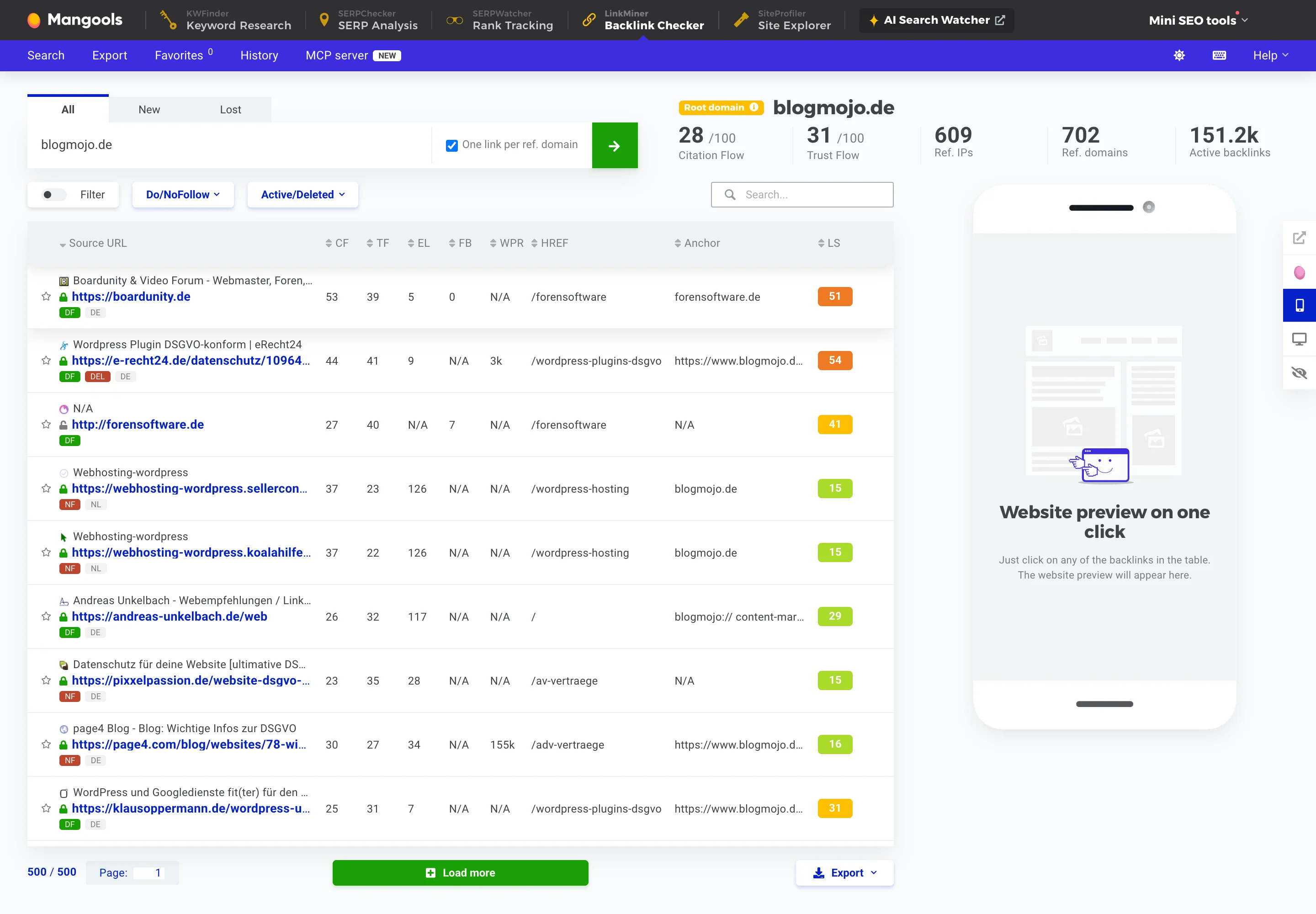
The “One link per ref. domain” function limits the display to one link per linking domain. That makes the list clearer when you want to see different link sources instead of repeated links from the same website.
An opened row shows the website preview on the right. For the target page I tested, however, it stayed in the loading state. You can also open the link to the original page directly.
LinkMiner uses data from Majestic. The metrics Trust Flow, Citation Flow, and Link Strength help with sorting. I wouldn't derive an automatic decision about a link's quality from them, though. The topic, placement, and content of the linking page are part of the assessment.
Classify websites with SiteProfiler
SiteProfiler complements this detail view with an overview. For Blogmojo, it delivered domain metrics, a backlink profile, linked content, and possible competitors.
- Open SiteProfiler and analyze the domain you want.
- Use “Overview” for a first look and “Top content” for individual pages.
- Then open an interesting piece of content or examine its links more closely.
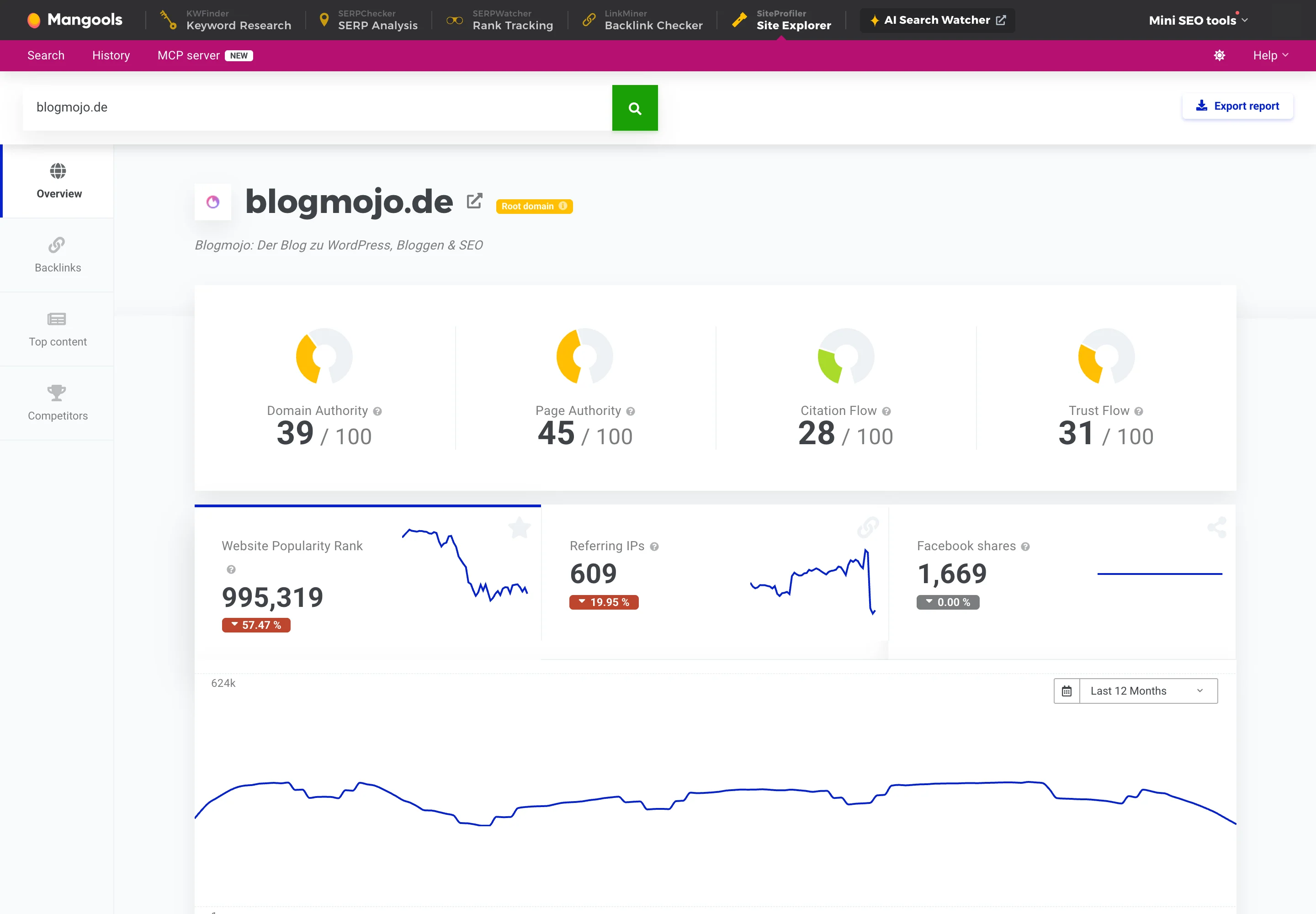
I like that for a quick first impression of a website. I would always double-check the competitor list for topical fit, though. Shared keywords don't make a large news site your most important competitor.
SiteProfiler doesn't replace a technical website crawl. For internal errors, redirects, or a systematic on-page check, I would use an additional tool.
7. AI Search Watcher: measure visibility in AI answers
I find AI Search Watcher an exciting addition to the suite. It examines whether a brand shows up in the answers of selected AI systems and distinguishes between brand mentions and cited websites.
For my function test, I entered Blogmojo as the brand and had a German prompt checked.
- Choose brand, domain, country, and the available AI systems you want.
- Add questions that potential readers or customers might actually ask.
- After the evaluation, open the brand dashboard and then the individual prompts.
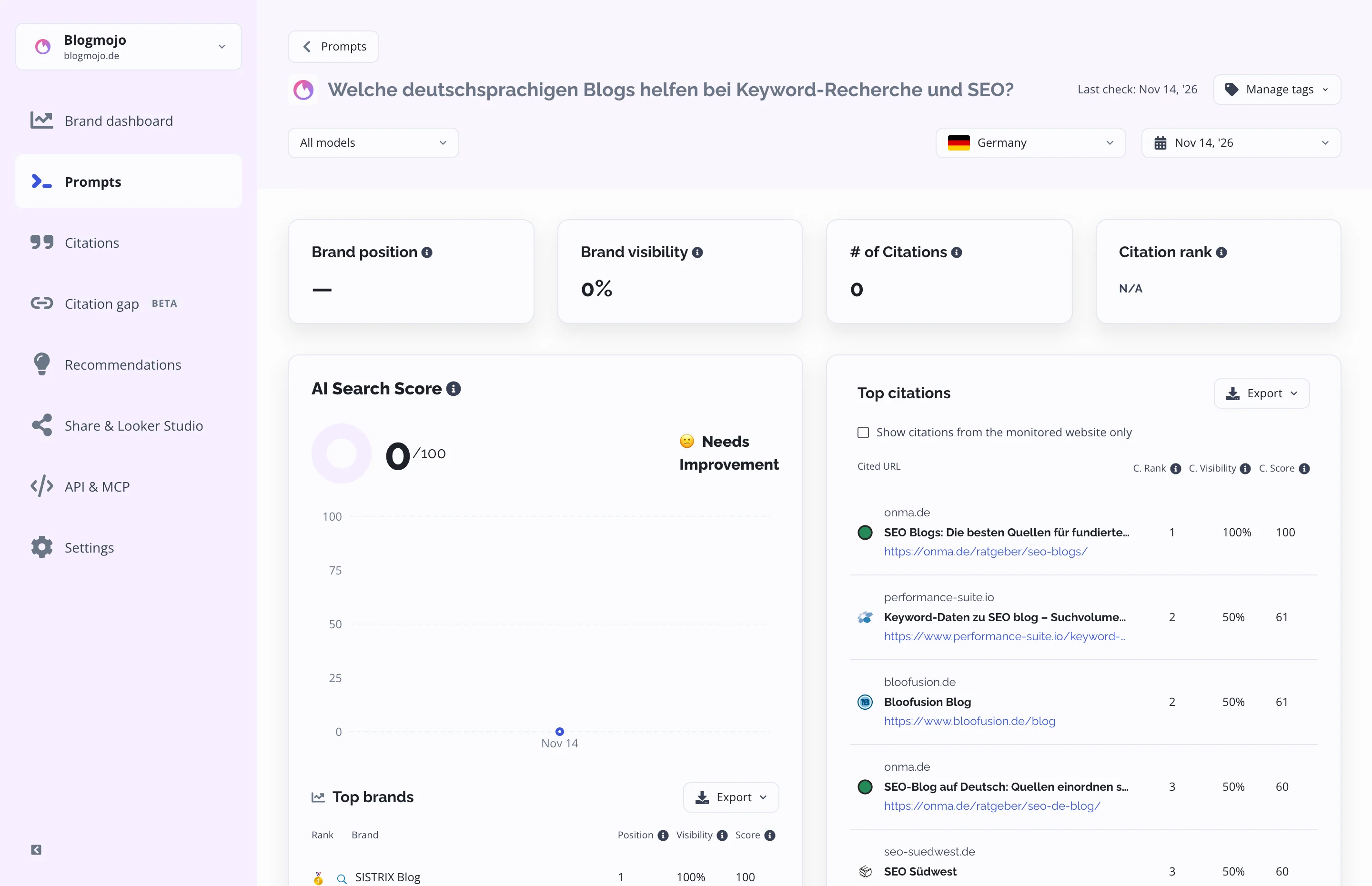
My example was “Welche deutschsprachigen Blogs helfen bei Keyword-Recherche und SEO?” (Which German-language blogs help with keyword research and SEO?). For this prompt, the tool reported no position and a visibility of 0% in the ChatGPT results.
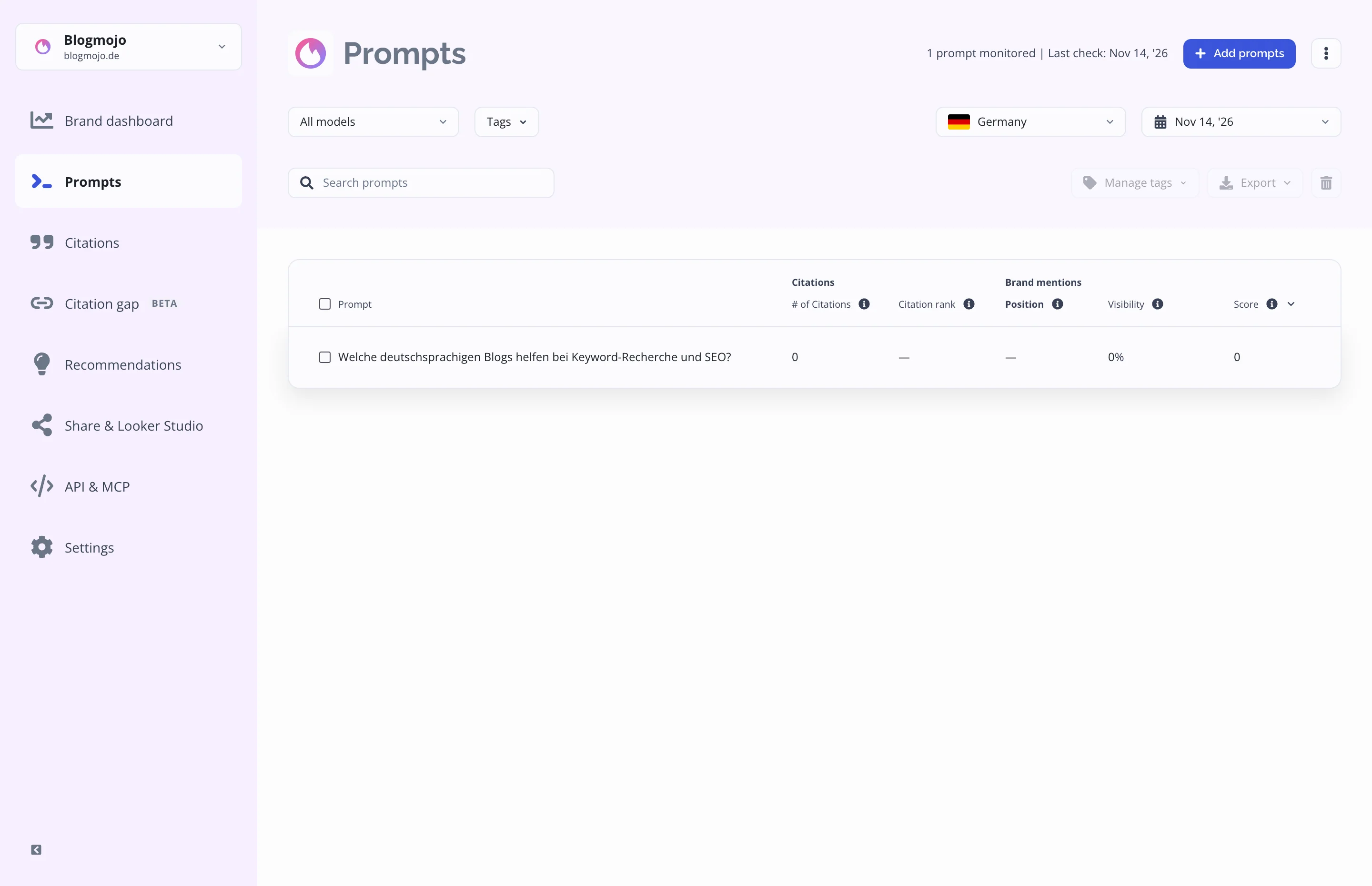
That's useful feedback on exactly this question. It doesn't follow, however, that Blogmojo is invisible to ChatGPT in general. Other prompts, points in time, and systems can produce different answers.
For me, the value lies in observing the same relevant questions repeatedly and then examining the prompt results, brand mentions, and cited websites. A single score isn't enough for that.
The public SEO-plus-AI plans each include 500 monitored prompts. The free AI access has 5 prompts in one monitor. Regular AI checks run weekly. With existing subscriptions, it's worth checking the actual access instead of assuming an automatic upgrade.
8. MCP and API: SEO data for your AI
This extension makes Mangools much more interesting for me.
MCP connects AI assistants with external tools. That way, an assistant can query real keyword or backlink data instead of inventing search volume from its language model. Mangools provides an official server for this.
Here's how to use the connection.
- Open the official Mangools MCP guide and choose your supported AI client.
- Connect it to Mangools via the sign-in path described there. The exact setup depends on the client.
- For research, also state the country, language, and the task you want. Have the queried values explained separately from the interpretation.
A sensible request would be, for example, “Research keyword ideas for my German travel blog and group matching topics.” The model can then keep working with actual tool results.
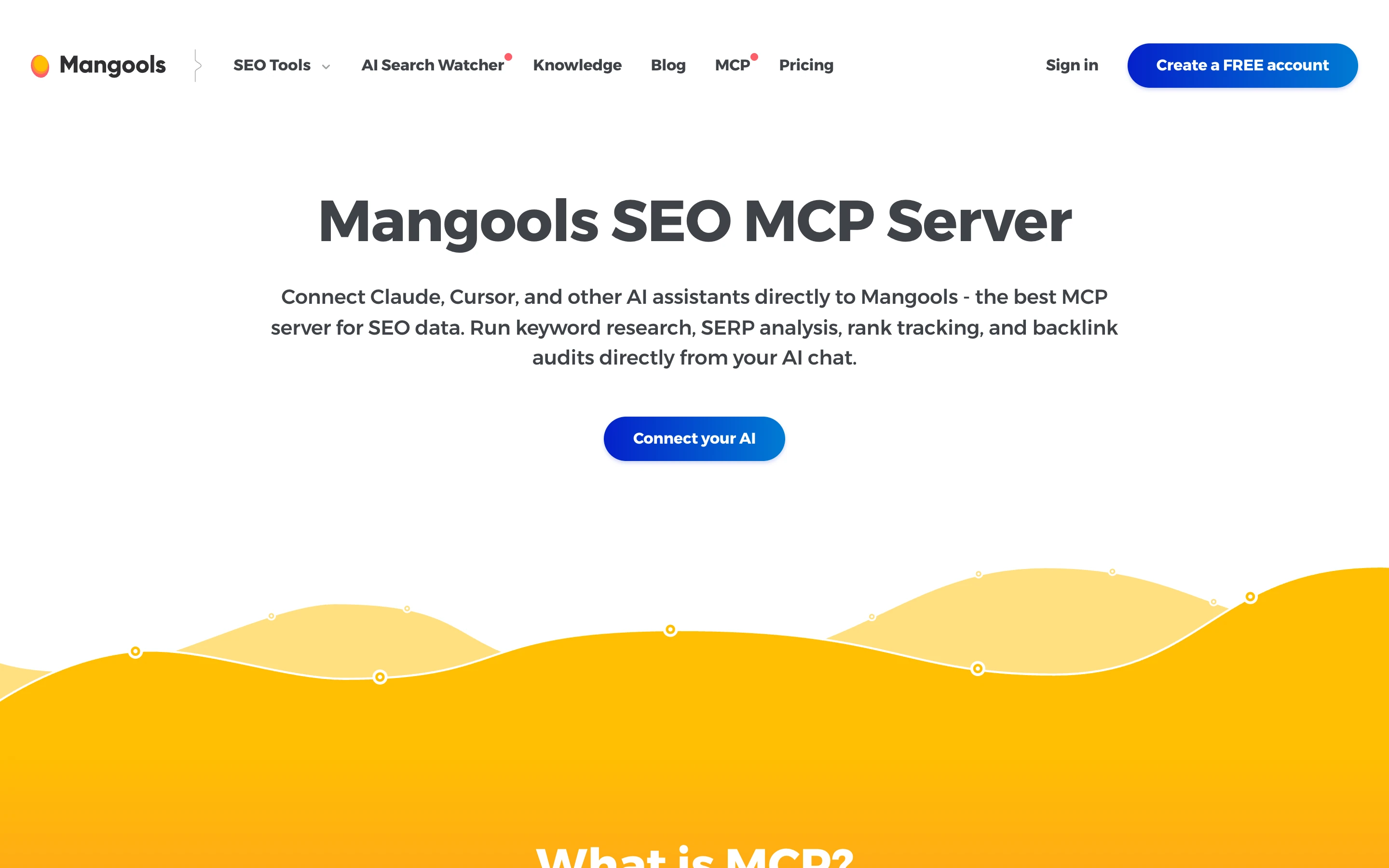
In the test, keyword research, keyword import, Keyword Gap, backlink queries, and reading ranking and AI monitor data via MCP worked, among other things. In addition, the REST API delivered location data and a SiteProfiler overview.
The REST API is aimed more at your own programs and automations. For that, you use the documented endpoints and an API key. It makes sense when you want to pull individual values into your own workflows.
Requests for new data can use up allowances. The exact way of counting depends on the account and the query; according to the provider, reading existing trackings and AI monitors doesn't use up any lookups. In addition, some MCP tools can change projects or lists. For pure analyses, I would therefore prefer read access and limit larger series of queries.
9. Pricing: Which Mangools plan do you need?
Mangools sells the plans compared here as an SEO-plus-AI bundle. So you pay for the suite and not for KWFinder alone.
The public euro price list gives the following amounts.
| Plan | Paid monthly | Effective per month with annual payment | Annual charge |
|---|---|---|---|
| Basic | €61.00 | €37.70 | €452.40 |
| Premium | €81.00 | €52.70 | €632.40 |
| Agency | €141.00 | €97.70 | €1,172.40 |
As of November 2026.
Annual payment means paying the entire annual amount in advance. The table shows the public euro price list without any individually applied discount. I couldn't check whether taxes are added without going through checkout. Before you sign up, check the final price shown to you. An existing subscription can have different terms.
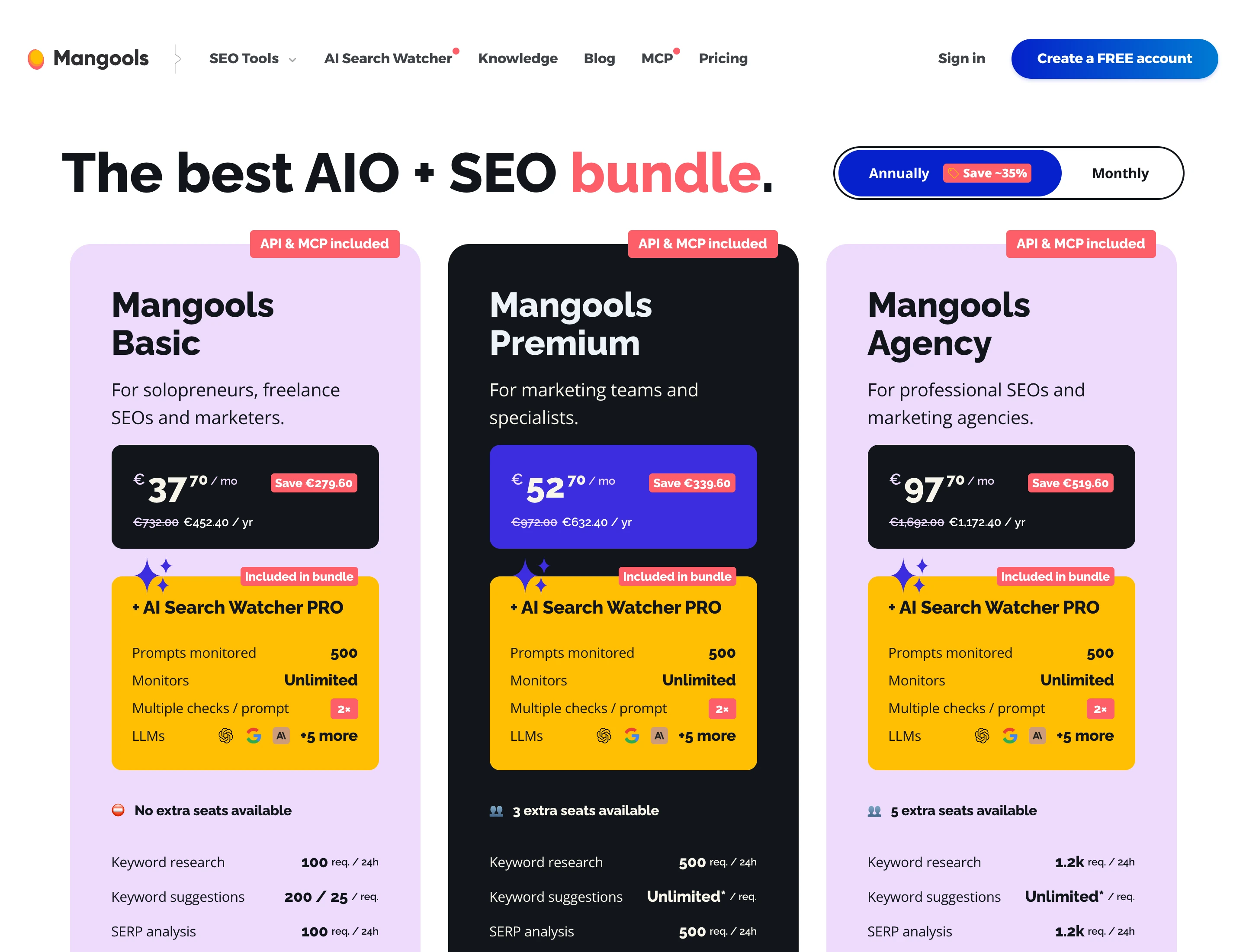
More important than the plan name, for me, are these differences.
| Limit | Basic | Premium | Agency |
|---|---|---|---|
| Keyword lookups per 24 hours | 100 | 500 | 1,200 |
| SERP lookups per 24 hours | 100 | 500 | 1,200 |
| Monitored keywords in total | 200 | 700 | 1,500 |
| Regular ranking updates | weekly | weekly | daily |
| Backlink rows per month | 100,000 | 500,000 | 1,200,000 |
| Website analyses per 24 hours | 20 | 70 | 150 |
| Monitored AI prompts | 500 | 500 | 500 |
As of November 2026.
Basic, Premium, or Agency?
For a smaller website, I would check Basic first. If you research regularly, want to see many competitor terms, or monitor more rankings, Premium is the obvious choice. I would choose Agency mainly for the daily ranking updates and the higher allowances.
Here's how you can narrow down your choice.
- Count the tracking keywords you actually need. Also factor in the locations and devices you want.
- Check against your topics whether the suggestion and competitor limits of Basic are enough for you. Basic shows a maximum of 200 related keywords and 25 competitor keywords per corresponding search.
- Only decide between monthly and annual payment once you've tried the suite with your own tasks.
An import uses one keyword lookup. If you then open individual keywords and load their search results, additional SERP lookups can be used. The allowances for keyword, SERP, and website lookups renew every 24 hours. Backlink rows, by contrast, are counted monthly.
This makes a difference especially with automated research. A high monthly need can't be worked off arbitrarily on a single day.
See the current Mangools plans
10. What I like and what Mangools could do better
What convinces me most is the clear structure and KWFinder. You quickly see which data matters for your next decision. The additional competitor analysis, the ranking monitoring, and the link tools turn the keyword tool into a useful package for ongoing work.
I like MCP, too. If you work with an AI assistant, you can give it current tool data and then check for yourself whether its conclusions hold up.
I would take these limits into account before buying.
- The number of usable keyword suggestions varies by topic. A high plan limit doesn't guarantee a long list of results.
- Search volume, keyword difficulty, and link metrics remain estimates or provider metrics. They don't replace your own assessment.
- For comprehensive technical website audits, you need an additional tool.
- Basic and Premium regularly deliver weekly rankings. My manually triggered scan wasn't finished right away.
- With Keyword Gap, I had to reload once. The SERP preview appeared with a delay, and the link preview I tested didn't finish loading.
- The interfaces I tested are in English. German search terms and a German target country could still be used.
None of these limits alone would keep me from using Mangools. But they help you pick the package that fits your tasks.
11. Which alternatives make sense?
I would base the decision on your most important tasks.
If a broader range of features matters most to you, compare Mangools with the alternatives in my SEO tools overview. To choose a ranking tool, the rank tracker comparison will help you.
If you're particularly interested in Ahrefs and other suites, you'll find a more detailed assessment in my article on Ahrefs alternatives. I did not run a new direct accuracy comparison between these providers for this Mangools review.
For the search queries of your own website, I would additionally use Google Search Console. An external competitor analysis and your actual own search data answer different questions.
12. My verdict on Mangools
I like Mangools and still happily recommend the suite.
It fits you especially well if you work on your content yourself and want to regularly research keywords, competitors, and rankings. KWFinder makes getting started pleasant, and the supplementary tools cover sensible steps around the research.
The AI connection extends this value. For me, that's a good reason to take a closer look at Mangools even if you increasingly do your SEO work with an assistant.
My recommendation stays practical.
Test your own topics and a competitor domain in the free account. If the results help you and the plan limits fit your workload, you get a very recommendable suite with Mangools.
13. Frequently asked questions about Mangools
Is Mangools the same as KWFinder?
No. KWFinder handles keyword research within the Mangools suite. On top of that come SERPChecker, SERPWatcher, LinkMiner, SiteProfiler, and, in the public combo package, AI Search Watcher.
Can I try Mangools for free?
Yes. New free accounts start with Free+ and switch to Free after 10 days. For the free SERPWatcher, ranking updates end after a total of 30 days from registration. So check your own tasks and the limits currently shown before you decide on a subscription.
Do I need another SEO tool besides Mangools?
For keyword research, competitor analysis, and simple monitoring, Mangools can be enough. For a comprehensive technical website crawl, I would use an additional audit tool.
Can I book monthly first?
Yes. The public price list includes monthly and annual plans. With annual payment, the entire annual amount is due; the monthly price shown next to it is for comparison.