The Amazon Associates program is probably the biggest and most popular affiliate program there is.
Hundreds of thousands of bloggers and website owners use it to make money online.
In my ultimate guide, I'll explain why you should use the Amazon Associates program (and when you shouldn't), how to embed affiliate links, and how to find profitable products.
I'll also show you proven strategies and tricks you can use to increase your earnings as an Amazon affiliate.
- The Amazon Associates program wins on trust, product range, and steady income, but it requires clean link integration and regular optimization.
- Use SiteStripe, specialized plugins, and clear call-to-action elements to noticeably increase your click and conversion rates.
- Follow the participation agreement strictly, analyze your statistics, and add alternative programs with better commissions where needed.
1. Why use the Amazon Associates program?
The Amazon Associates program is attractive for several reasons:
- Almost every internet user knows Amazon, and most of your readers have already ordered there.
- Amazon stands out for fast shipping and reliable customer service.
- Your readers can read extensive customer reviews.
- You'll find matching products for every blog topic, because the range is huge.
- Depending on the category, you get between 1 and 6 % in advertising fees per product sold (details in section 6.7).
- You get commission on the entire cart, not just on the linked product.
- The API lets you embed product content automatically.
- Signing up and embedding links is straightforward.
- Payments arrive reliably.
- You get access to detailed statistics.
If you go about it the right way, you can even live on the income from the Amazon Associates program alone. I've been in the program since 2011, and a large part of my monthly income still comes from Amazon commissions.
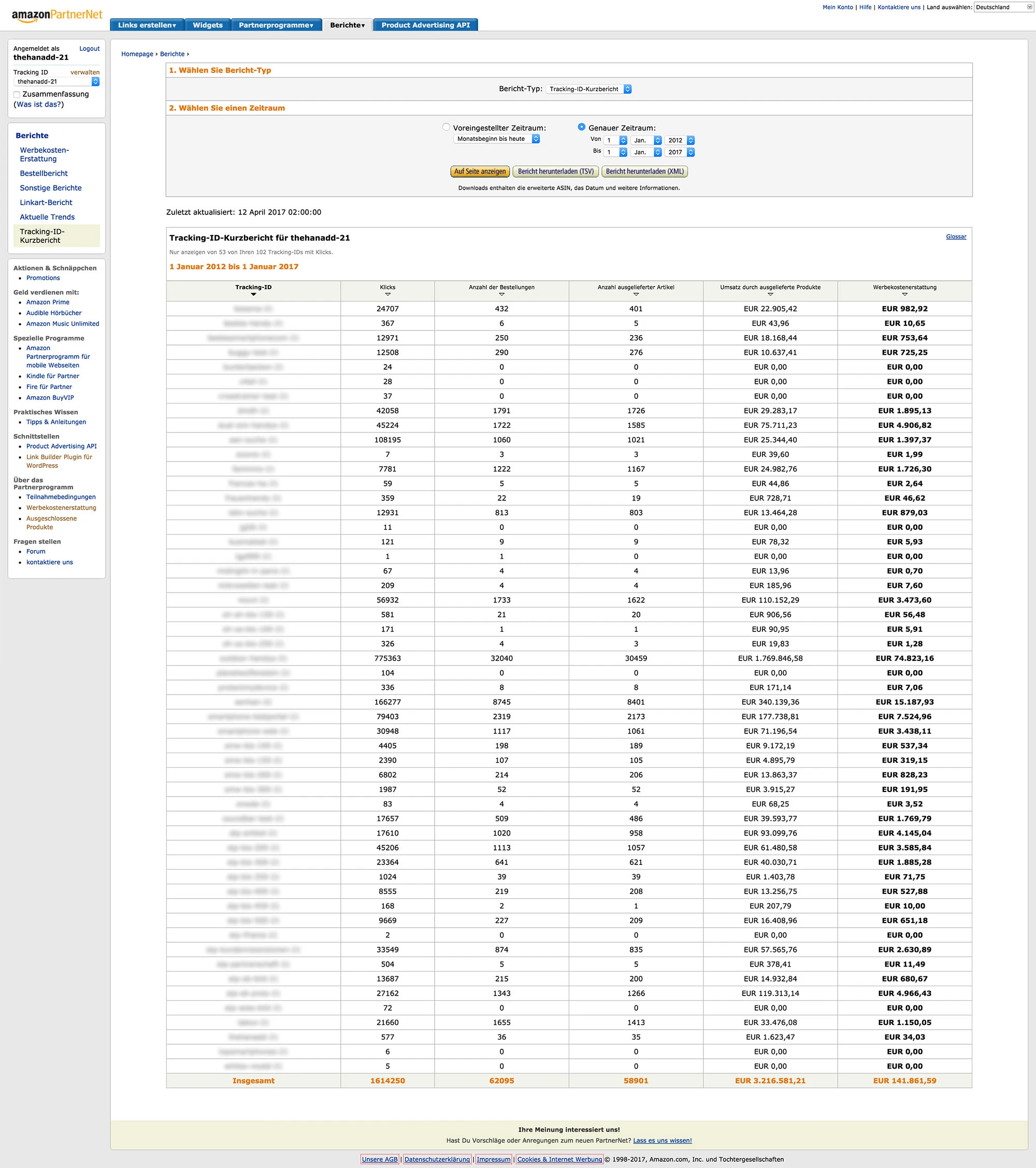
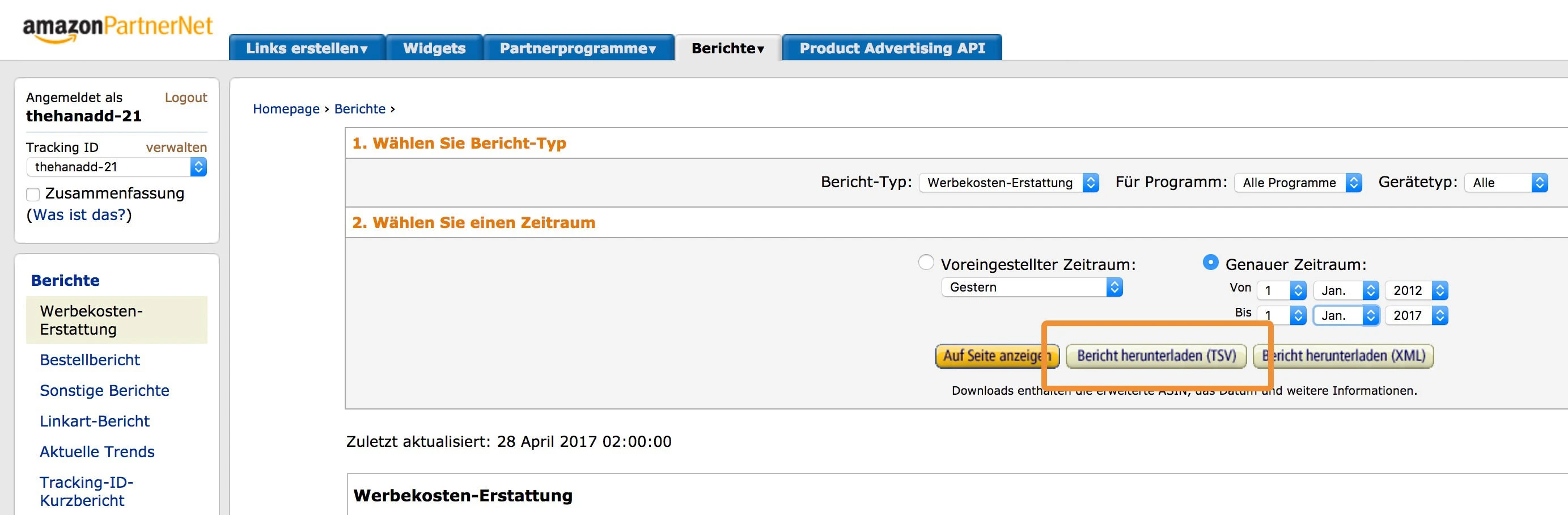
Between January 1, 2012 and January 1, 2017 alone, I generated over €3.2 million in sales for Amazon and received more than €140,000 in commissions:
2. Disadvantages of the Amazon Associates program
That said, Amazon isn't without its downsides:
- The customer has to buy within 24 hours of the click (only products in the cart remain attributable for up to 89 days). Other programs offer 30 or 90 days.
- For some product categories (e.g. smartphones or TVs), commissions are very low.
- No matter your volume, you always get the same commission rate.
- Commission rates and participation terms can change at any time, most recently on April 14, 2026 (see section 8).
- You're one of many partners of a huge corporation, so don't expect special treatment.
I experienced the fourth point painfully myself: In October 2014, Amazon changed the commission model. Previously, the commission depended on the number of sales, afterward on the product category. For my electronics blogs, that meant a drastic drop of around 50 %.
Accordingly, there were winners and losers. With my blogs that dealt exclusively with consumer electronics, cell phones, and smartphones, I was clearly among the losers. My monthly Amazon income fell by half, from about €3,500 back then to just €1,500 to €2,000, because my product categories went from 5-8% commission to only 1-3%.
My advice for a sustainable online business: Diversify your income. Don't make yourself dependent on a single source. At the end of this article, I'll give you alternatives to the Amazon Associates program.
3. How do I sign up?
Signing up is quick and straightforward:
- Visit the Amazon PartnerNet homepage and click “Jetzt kostenlos anmelden” (sign up now for free).
- Log in with your Amazon account (or create one).
- Add your personal details (if necessary).
- Fill out the website profile with the names, URLs, and content of your projects.
- Confirm the sign-up by email and set your preferred payment method (bank transfer, Amazon gift card, or check).
- Amazon reviews your details, but you still have access to PartnerNet in the meantime.
Sign-ups are only rejected in exceptional cases, for example for websites with serious quality problems or problematic content.
Side note: My partner ID thehanadd-21 comes from my first blog thehankaddiction.com, which was about the series Californication.
4. Embedding affiliate links
You have several options for embedding Amazon affiliate links:
4.1 SiteStripe
SiteStripe is the easiest way: As an affiliate, Amazon shows you a bar that lets you quickly create links to products, categories, search results, or Amazon Prime.
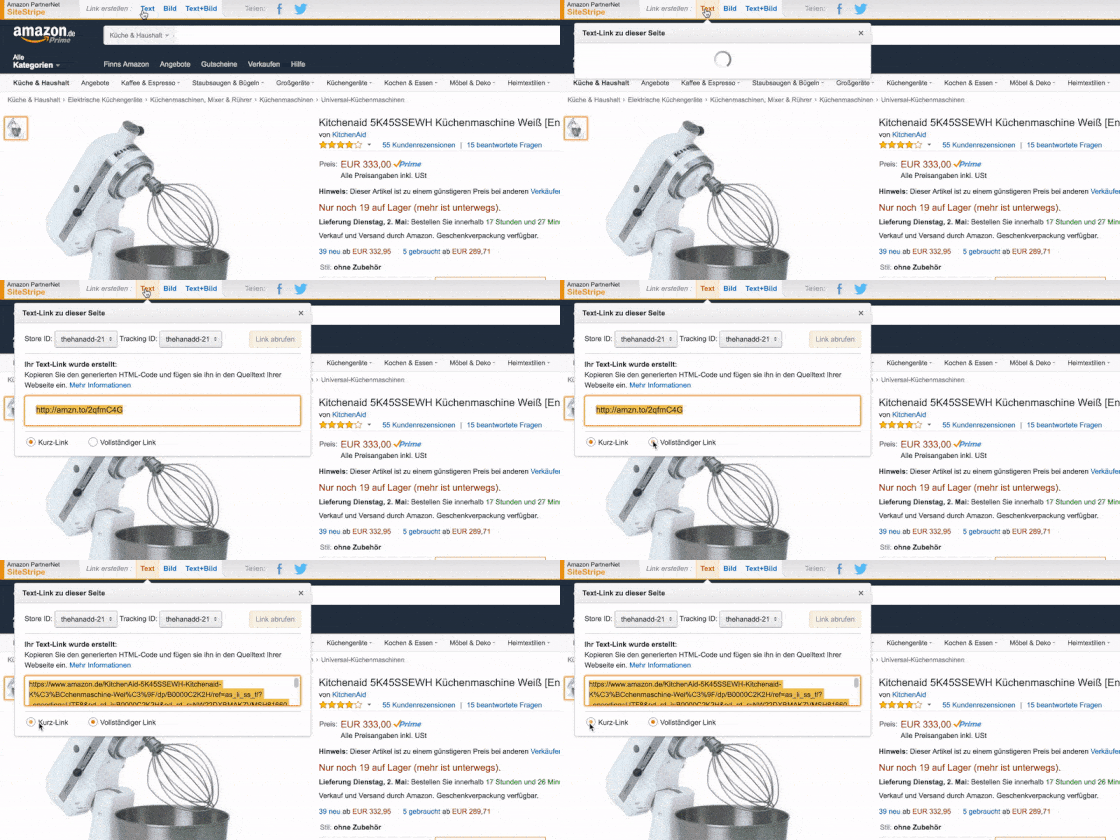
You can choose between the variants Text, Image, and Text + Image. The last one is only suitable for individual products.
https://amzn.to/...) or the short URLs I explain in section 4.3. Using external services like bit.ly or your own domains violates the participation agreement.With Text + Image, keep in mind that they're loaded via iFrame, which can increase load time.
4.2 Amazon affiliate plugins
Alternatively, you can use WordPress plugins that output product boxes. They're better for performance, because they cache data and can be adapted visually.
Besides the price, you can show more product information. Here's what a product box from the plugin AAWP looks like:
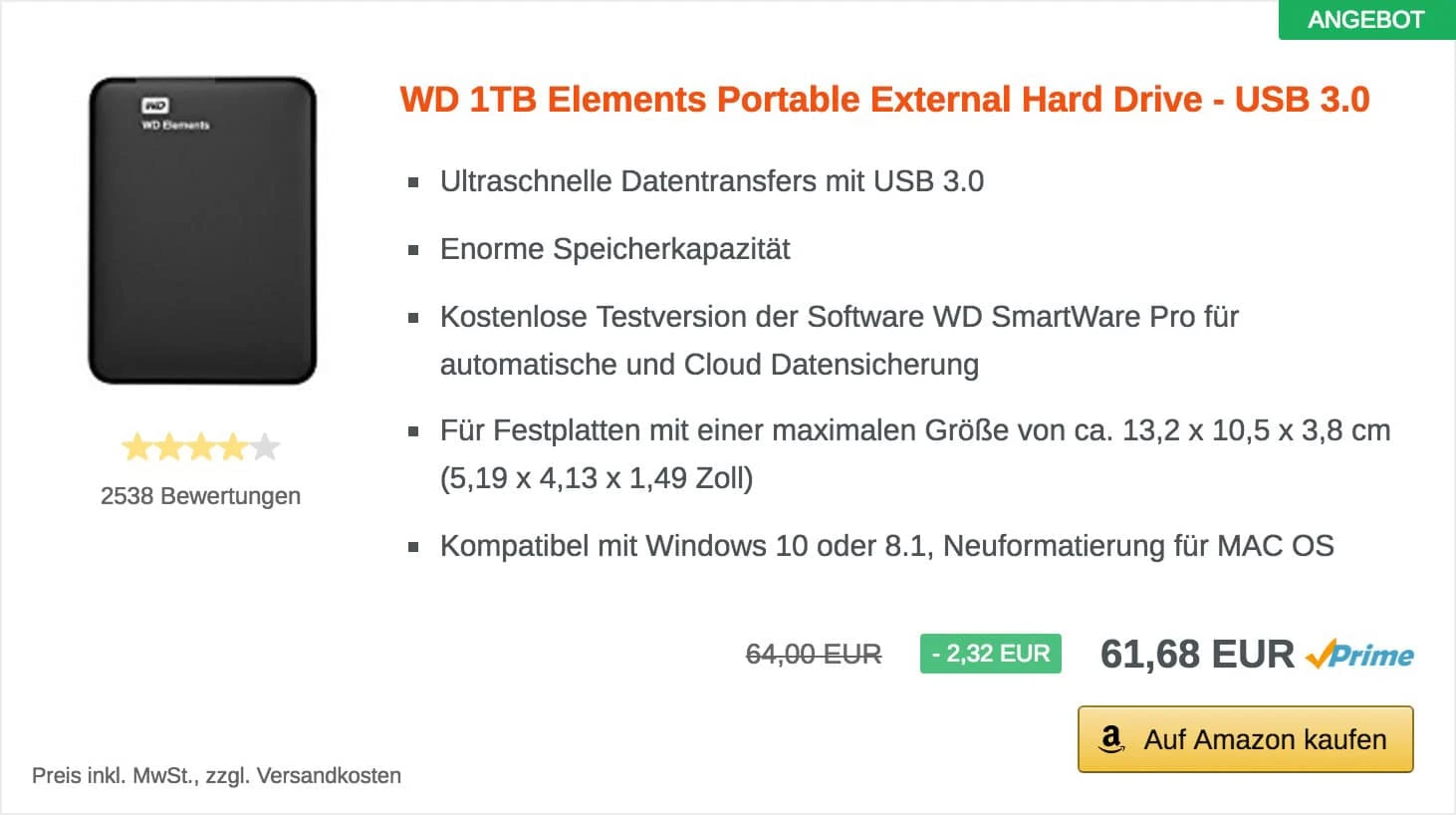
Important: You may only show prices and availability if they come via Amazon's link or the Amazon API. If you update them less often than hourly, you need a timestamp, and a price disclaimer is mandatory. Otherwise you violate the participation agreement.
Something is changing technically right now: Amazon is replacing the previous Product Advertising API (PA API) with the Creators API, and the current guidelines mention both. Check whether your plugin already supports the Creators API, otherwise the product data will stop updating.
You'll find an overview of recommended plugins in my article The best WordPress plugins for Amazon affiliates.
4.3 Short URLs
The URLs generated by SiteStripe are often very long. In tables or product lists, I like to work with the shorter variants:
A normal URL looks like this, for example:
https://www.amazon.de/s/ref=as_li_ss_tl?__mk_de_DE=%C3%85M%C3%85%C5%BD%C3%95%C3%91&url=search-alias=aps&field-keywords=Lego+Star+Wars+75003+-+A-Wing+Starfighter&linkCode=ll2&tag=your-partner-id-21&linkId=f3896c2bf611596c04a40c546eb2bc9aThe following short notations are much clearer:
https://www.amazon.com/exec/obidos/ASIN/B0094J2BZ0/your-partner-id-21
https://www.amazon.de/dp/B0094J2BZ0/?tag=your-partner-id-21
Simply replace the ASIN marked in bold with the one for your product.
4.4 Amazon search
Another option is your own search that forwards queries directly to Amazon, including your affiliate tag.
<form action="https://www.amazon.de/exec/obidos/external-search" method="get">
  <input name="tag" type="hidden" value="your-partner-id-21" />
  <input name="keyword" size="20" type="text" value="" />
  <input type="submit" value="Search" />
</form>
Replace your-partner-id-21 with your partner ID.
5. Statistics
The PartnerNet statistics don't just help with monitoring, they also help you optimize your income. You reach the reports through the tabs in the menu or the “Details anzeigen” (show details) links in the right sidebar.
The most important ones are the Tracking-ID-Kurzbericht (tracking ID summary report) and the advertising fee reimbursement report. There you can see in detail which products were bought.
If you promote subscriptions to Amazon Prime or Audible, the Sonstige Berichte (other reports) are also important for you. They're listed separately there.
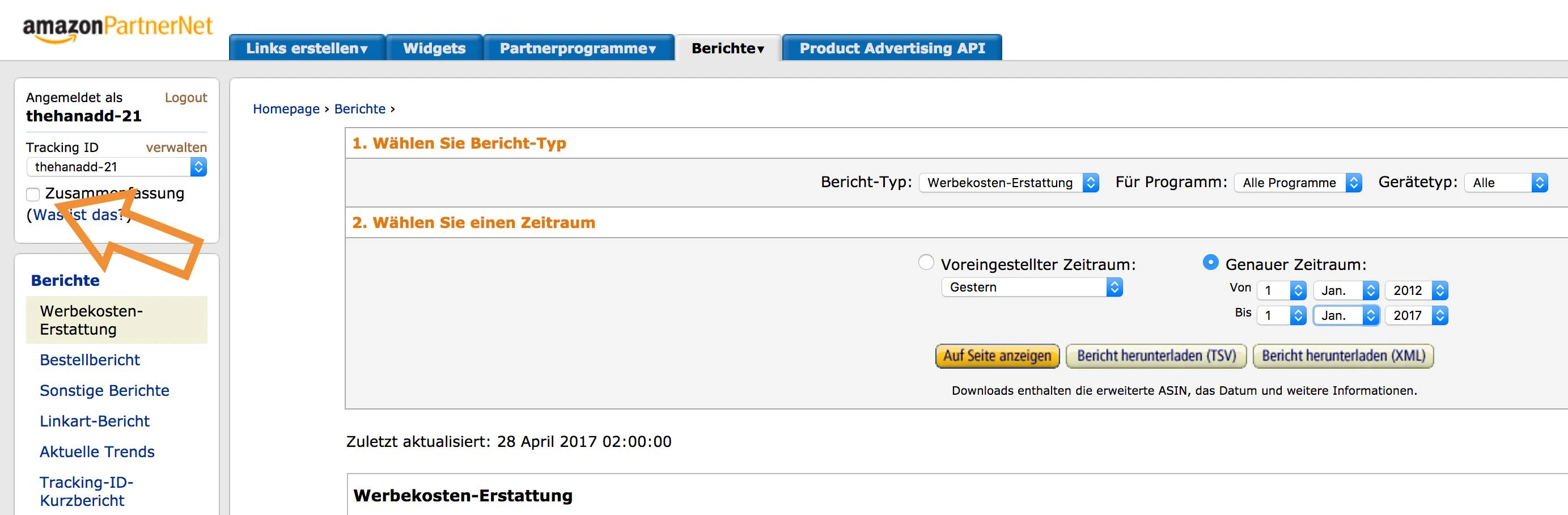
If you use several tracking IDs, pay attention to the selection field and the “Zusammenfassung” (summary) checkbox. With the box ticked, Amazon combines all IDs, without it you're looking at one specific ID:
6. My tips for more income with Amazon
There's always room for optimization. Here are seven proven tips for better results:
6.1 Find out what your readers need!
Generic banners or unsuitable products rarely lead to sales. Focus on relevant content and optimize your articles for keywords with buying intent.
The conversion rate is especially high when:
- your visitors already come with an interest in buying (e.g. through searches like “product XYZ review”).
- you recommend exactly the right product to solve a specific problem.
Only recommend products you truly stand behind, your readers notice the difference.
6.2 Don't link products that are no longer available
If you link a product that's no longer available, your conversion rate drops drastically. Thanks to the many alternatives Amazon offers on its product pages (e.g. in the sections “Welche anderen Artikel kaufen Kunden, nachdem sie diesen Artikel angesehen haben?” (what other items do customers buy after viewing this item?), “Gesponserte Produkte zu diesem Artikel” (sponsored products related to this item) or “Kunden, die diesen Artikel gekauft haben, kauften auch” (customers who bought this item also bought)), some sales still happen, but most visitors will leave anyway.
You can fix this by, first, only linking popular products that are available from many sellers, and second, checking your linked products regularly.
The plugin ASA 2 Pro helps here, as it monitors your embedded products and alerts you to availability problems.
6.3 Use eye-catching call-to-action elements
Product boxes or comparison tables with clear call-to-action buttons (“Buy now”) perform much better than simple text links. Plugins like AAWP or ASA 2 Pro make that very easy.
6.4 Skip Amazon widgets
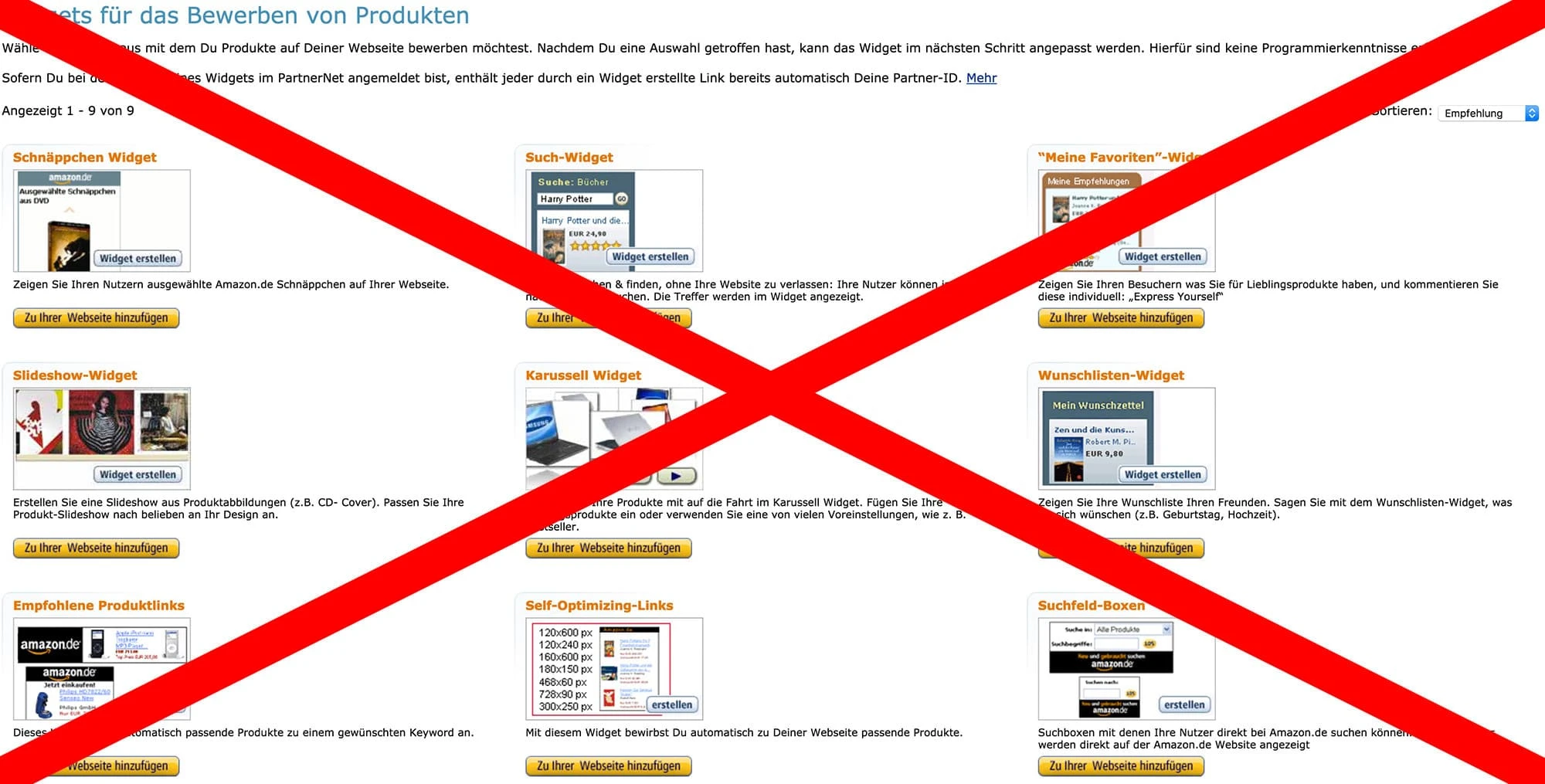
Widgets rarely look good, are technically outdated, and slow your page down. I recommend skipping them entirely.
6.5 Use your statistics
To increase your income and only recommend the products your readers actually buy, you should regularly keep an eye on your advertising fee reimbursement report.
To do that, go to Berichte > Werbekostenerstattung (reports > advertising fee reimbursement) in the top menu bar. There you pick a somewhat longer period to get the most complete picture possible of which products your visitors buy.
To sort and evaluate the products sold more easily, I prefer not to look at the report in PartnerNet, but to download it as a file (click the “Bericht herunterladen (TSV)” (download report, TSV) button) and then make it clearer in Excel with the filter function.
6.6 Work with multiple tracking IDs
With additional tracking IDs, you can test different link positions, button designs, or articles against each other. You create new IDs in PartnerNet via the “verwalten” (manage) link above the selection field.
6.7 Take commission rates into account
In some categories, the commissions are so low that linking hardly pays off. These are the standard rates for amazon.de according to the official compensation overview:
| Commission | Categories |
|---|---|
| 6 % | Clothing and accessories, shoes, handbags, watches, luxury |
| 5 % | Books, Kindle eBooks, Audible audiobooks, furniture, home, kitchen, DIY and hardware, auto and motorcycle, jewelry, power and hand tools |
| 4 % | Beauty, luggage, personal care appliances, sports and fitness |
| 3 % | All other categories |
| 2.5 % | Large household appliances, Fire TV devices, mobile electronics |
| 1 % | Groceries, game consoles, video games |
| 0 % | Gift cards, Kindle Unlimited, Android apps, wine |
You'll find the up-to-date overview in the PartnerNet compensation overview. Make sure you don't accidentally take over values from other countries. On top of that, there are time-limited special promotions whose rates can differ.
Payment is made about 60 days after the end of the month in which the commission was earned. In Germany, the minimum amount is €25 for bank transfer and Amazon gift card and €50 for check (minus a processing fee).
6.8 Optimize your advertising materials for mobile devices
A large part of the traffic comes from mobile. Make sure links, product boxes, and buttons are easy to use on smartphones and tablets.
- Make sure there's enough line spacing.
- Avoid overlapping elements.
- Make sure buttons are large enough and clearly labeled.
7. Alternatives to the Amazon Associates program
Amazon is versatile, but not always the best choice. Check whether other affiliate programs offer higher commissions or better terms.
Good starting points are networks like ADCELL or AWIN (which also includes the former affili.net). There you can filter programs by category, commission, and terms.
Large retailers like Otto, Zalando, Notebooksbilliger, Cyberport, Bonprix, Tchibo, Conrad, or Alternate often offer higher commissions, too.
Another option is the eBay Partner Network. There the commission is a category-dependent percentage of the sale value (rate card), and purchases within 24 hours of the click are counted.
8. New rules since April 14, 2026
Amazon changed the participation terms effective April 14, 2026. If you keep participating, you accept them. For most bloggers, three points are relevant:
- The product must be shipped, streamed, or downloaded and paid for within 180 days of purchase.
- Purchases by customers who arrived through paid or boosted advertising on Amazon no longer qualify for commission.
- The commission for additionally purchased products now only applies to the exact linked variant (ASIN). If the customer buys a different variant, it doesn't apply.
There's also a definition of original content for the first time. Pure redirect pages, link collections without added value, and automatically generated content without your own effort come under pressure as a result. Your own tests, comparisons, and experiences are therefore more important than ever.
9. Follow the Amazon participation agreement!
Be sure to read the agreement on participation in the Amazon Associates program and the program policies. Violations can lead to permanent exclusion.
Common mistakes that lead to exclusion:
- Masking affiliate links with external shorteners or redirecting them through intermediate pages.
- Embedding Amazon content in frames.
- Using affiliate links in printed material, e-books, or unsolicited emails.
- Leaving out the required notice: “Als Amazon-Partner verdiene ich an qualifizierten Verkäufen” (as an Amazon partner, I earn from qualifying purchases) must be clearly visible on your website.
- Using logos or trademarks without following the trademark guidelines.
- Giving false or misleading information about products or prices. Use the Amazon API for current data and add a timestamp if you update less often.
10. FAQ
Here I answer common questions about the Amazon Associates program: