You've decided to start your own blog.
But thousands of questions are buzzing around in your head:
How do I find the right topic for my own blog? What should it be called? Do I need my own domain? How do I get visitors? And how can I even make money as a blogger?
Don't worry.
Because this is the guide I wish I'd had when I wanted to start a blog myself (and had absolutely no plan).
Back then you had to fight your way through hosting, servers and installation before the first article was up.
The good news:
Today it works differently. With ChatGPT Sites, you describe what kind of blog you want, and ChatGPT builds it and, if you like, publishes it right away.
In this article, I show you step by step how to do that. From choosing a topic through name, domain, style and content to the published blog.
You can go through all 7 steps on your own, and this guide is enough for that. At the end, I introduce my skill “Blog-Starter für ChatGPT Sites” (Blog Starter for ChatGPT Sites), which guides you through the steps. It costs money, but you don't need it.
- With ChatGPT Sites, you build and publish a blog right inside ChatGPT, without hosting, installation and tech. You need a paid plan for it, and Sites is only available in the “Work” area.
- The path has 7 steps: topic, name and domain, style, content, build, publishing and your own domain. The groundwork decides whether you have to make a lot of fixes later.
- My Blog-Starter (€27 plus VAT) guides you through these steps, but it's optional. Neither it nor this article promises visitors or revenue.
What you need for a blog with ChatGPT Sites
Before you get started, here are the requirements according to OpenAI:
- A paid ChatGPT plan that includes Sites, for example Plus. Sites isn't available on the free plan.
- ChatGPT on the web or as a desktop app.
- The “Work” area. That's where you find the “Sites” plugin.
At the top of ChatGPT, you can switch between “Chat” and “Work”. Sites and Skills only show up in the “Work” area. You'll look for them in vain in the regular chat.
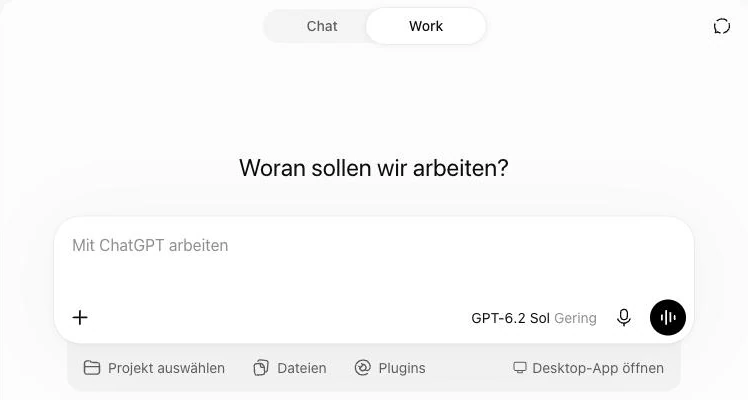
You'll find more about the costs further down in a section of their own. For now, just this much. Building a small blog took about 4 minutes in my test. Most of the time goes into the decisions before that.
Let's get started.
1. Find a topic that will carry you for a long time
The topic is the most important decision. Not because it has to be perfect, but because you'll be working on it for months.
I know what I'm talking about. My first blog was about the US TV series “Californication” and was a complete failure. After that, I built a few more niche sites that didn't amount to anything either. It only worked with a different topic.
Don't make the same mistake and check your topic (more on that in the article Find a blog topic) before you put time into the technology. The question of what you should blog about is easy to answer:
Something you feel passionate about. Something you're truly and genuinely interested in. Something you burn for.
Take a moment to answer the following questions:
- Can you imagine working on the topic every day?
- Can you imagine making videos about the topic or writing a book about it?
- Or giving talks about it?
- If you sit down with pen and paper for half an hour, do you come up with 20 ideas for potential articles?
- Do you often talk to your friends about this topic at length?
If you can answer all or most of the questions with yes, the topic is the right one.
Being able to make money with a topic is also an important factor. Especially if you want to become a full-time blogger.
However, this should always come second. Because you can make money in many fields. All the more so if you're an expert in your topic and can deliver brilliant content to your readers.
1.1 Stand out with a niche
It helps to find a niche within your topic. You can then use it as a unique selling point for your blog. My niche and my hobbyhorse are, for example, search engine optimization (SEO), especially keyword research.
A broad topic like “hiking” exists a thousand times over. A niche combines the topic with a target group, a situation, a perspective or a place:
- Target group: “hiking” becomes “hiking with a dog”.
- Situation: “cooking” becomes “cooking after work in 20 minutes”.
- Perspective: “garden” becomes “balcony gardening in a rental”.
- Place: “day trips” becomes “day trips around Leipzig”.
The counter-check is simple. Write down ten concrete article titles for your niche. Ideally questions real people would ask, such as “Which balcony plants can handle full sun?”. Would you like to write at least five of them? Then the niche fits. If not, sharpen it or widen it.
You can ask ChatGPT to suggest three ways to narrow it down and the ten article ideas. But you make the choice, because you'll have to write about it later.
Website basics: the most important terms
| Term | Meaning |
|---|---|
| Website | All the content on a domain |
| Web page | A subpage of a website |
| Homepage | The start page of a website |
| Blog | A website that shows posts (usually) in chronological order, often also part of a website |
| URL | The complete internet address that appears in the browser, e.g., https://www.blogmojo.de/blog-erstellen/ |
| Domain | The name of your website in the URL, in the example blogmojo.de |
| Subdomain | An address subordinate to the domain, e.g., lernen.blogmojo.de |
| Permalink | The part of the URL after the domain, e.g., /blog-erstellen/ |
| Host | The service provider that supplies the server your website sits on. With ChatGPT Sites, OpenAI does that. |
2. Find a blog name and a matching domain
If you want to start your own blog, it needs a name (e.g., Blogmojo) and, ideally, a domain with the same name, like blogmojo.de.
Your domain is the address under which your blog can later be reached in the browser. This is how a URL is put together:
You don't know yet what your blog or your domain should be called?
No problem.
In the following two sections, you'll find help with choosing.
2.1 What to consider when choosing
When choosing your blog name and your domain, you should pay attention to the following:
- The shorter the name, the better (ideally under 16 characters)
- Ideally avoid umlauts (ä, ü, ö) or the Eszett (ß) in the domain, because how they come out in a domain name is ugly (e.g., unschoen.de or heiss.de). The blog name itself may contain them.
- The spelling of the name should be clear to most people when they hear it
- The blog name should make it recognizable what your blog is about
- For a German blog, a .de domain works best (.com and .net are also acceptable)
- No brand or company names of others
One more word of warning before you get started:
Please don't make the mistake of spending too much time on choosing a name. Your blog name doesn't have to be super creative and clever.
Remember:
A clear and easy-to-remember blog name is better than a clever one in 99% of cases.
And if you find after a few weeks that you no longer like the name, you can still switch to a different domain. It takes some work, but it's not the end of the world.
2.2 Formulas for blog and domain names
Three simple formulas that I followed for many of my blogs are:
Formula 1: Blog topic + unique selling point
So for example:
- Blog + Mojo = blogmojo.de
- Karriere + Bibel = karrierebibel.de
- Liefer + Held = lieferheld.de
Formula 2: Playing with letters & syllables
This is a formula that's especially popular with startups:
- Fiver + r = fiverr.com
- Liefern + ando = lieferando.de
- Check + r = checkr.com
Formula 3: Your own name
In some cases, it can make sense to choose your own name as the domain for your blog or website.
Especially if you yourself are in the foreground of your blog as an expert or a person, e.g., as a coach, consultant, freelancer, artist, model or author.
You can use just your first name or your first and last name:
- maxitheomustermann.de or better: maxi-theo-mustermann.de
- maximustermann.de or better: maxi-mustermann.de
- maxitheo.de
- maxi.de (domains of well-known first names are already taken in 99% of cases)
Choosing your name as a domain helps you build a personal brand and also has the advantage that you don't limit yourself in terms of topic.
However, you should rather choose a made-up name if you run your blog:
- as a team (and you might want to withdraw completely from day-to-day business at some point)
- and want to sell it later (or at least want to keep that option open)
2.3 Check availability and trademarks
Whether a domain is available is only shown reliably by the domain provider. ChatGPT can do a rough preliminary check for you, but “not found” only means “probably available”.
Also search for the name once in a search engine and in the trademark register of the German Patent and Trademark Office (DPMAregister), so it doesn't collide with an existing trademark. That doesn't establish legal clearance.
2.4 Do you need your own domain right now?
No. For the start, the free address that ChatGPT Sites gives you is enough. It ends in “chatgpt.site”. Your own domain looks more professional and belongs to you, even if you move later.
If you want to buy one right away, I recommend do.de (a German domain provider; affiliate link, if you buy through it I receive a small commission, the price doesn't change for you). You can see the current price there directly.
There are three things to keep in mind when ordering:
- Order only the domain. For ChatGPT Sites you don't need web hosting or an email package.
- Make sure you can edit the domain's DNS records yourself. You'll need that in step 7.
- Write down the login details for your customer account and never enter them into a chat.
3. Choose a style that looks like your topic
A style defines fonts, colors, layout and image technique. It's a starting point, not a finished design.
The biggest risk here is the uniform look. If you just let an AI do its thing, you often get the same template as everyone else. You should recognize and avoid these patterns:
- A blue button on a white background with no connection to your topic.
- Three or six equally sized cards with icons in squares.
- A bar of key figures like “500+ readers” even though your blog is new.
- Clichés like “Welcome to my blog” instead of a concrete sentence about who writes about what here.
A topic object is better. That's a typical, recognizable object of your topic, such as a preserving jar, a balcony planter or a well-worn hiking guide. From it, you derive colors and a recurring detail.
Here's what the difference looks like with an invented preserving blog:
Choose two styles that differ clearly and compare them. Have ChatGPT generate a style sample as an image for each, if image generation is available. These are only mood pictures, the real page looks similar, but not pixel-identical.
Three things should be right with every style:
- The first screen shows the blog name, one sentence about the topic and a clear next action without scrolling.
- Body text is at least 18 px, and the contrast between text and background is at least 4.5:1.
- Fonts are hosted yourself and not loaded from Google servers. That avoids unnecessary data transfers to third parties.
4. Prepare the content before ChatGPT builds
This is the step most people skip. Yet it saves you money and nerves. Every change in Sites uses up credit, and a blog with finished texts needs fewer rounds of corrections later.
4.1 About me text
Write it from your own details. Why do you write about this topic? What have you tried, experienced or learned yourself? 100 to 150 words in the first person are enough.
Don't let ChatGPT make anything up. An About me text with invented details is worse than a short, truthful one.
4.2 Categories and first articles
First settle on three to five categories. A new blog doesn't need more.
From your ten article ideas, pick the three you'd most like to write. You can have ChatGPT write drafts for you, but you should leave placeholders everywhere your own experience belongs, for example [Your own experience goes here: ...].
Because an article without your own experience is interchangeable, and readers and search engines notice that. Every article gets a title under 60 characters, a description under 155 characters, a category, a date and an alt text for the featured image.
4.3 Impressum and privacy policy
In Germany, most publicly accessible blogs need an Impressum (the legal notice German websites must carry), unless they are purely private, for family and friends. If you're unsure, create one. Virtually every website needs a privacy policy, because technical data such as IP addresses is generated as soon as the site is opened.
I'm not a lawyer, and neither this article nor ChatGPT replaces legal advice. Have both pages created with a reputable Impressum and privacy policy generator or checked by a professional.
For the build, you first create both pages with visible placeholders, for example [First and last name] and [Email address]. Made-up details have no place there.
If you don't want to show your private address, there are providers of addresses that can be used for service of legal documents (ladungsfähige Anschrift). You have to sort that out yourself.
If you plan affiliate links or partnerships, you mark them on the blog, for example with an asterisk and a note at the end of the article. Paid partnerships you mark as “advertising” (“Werbung”).
5. Build the blog with ChatGPT Sites
Now it's time to build. You have everything Sites needs: name, topic, style, categories and your texts.
Send Sites one single, complete build request. Several small messages cost more credit and lead to more corrections. My template looks like this:
@Sites Please build me a website: a German-language blog.

Blog name: [blog name]
Topic and niche: [niche]
For whom: [target group]
One sentence for the home page: [short version]
Type of blog: [e.g., food blog or travel blog]. Visible on the home page and in every article: [typical element, e.g., recipe card]

Pages: home page, article overview, one page per category, one page per article,
About me, Impressum, privacy policy and a friendly 404 page.
Categories: [three to five categories]

Every article is its own Markdown file in the folder articles/.
Style: [style]. Please host fonts yourself, don't load them from Google.
No cookies, no tracking scripts, no made-up numbers, reader testimonials or logos.
Placeholders in square brackets stay visible.

First save only one version and don't publish yet.
In a new chat in the “Work” area, type @Sites. ChatGPT then suggests the “Sites” plugin:
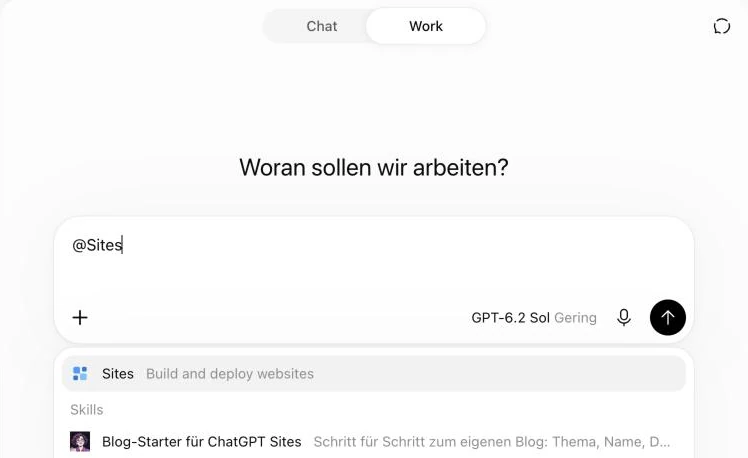
Select it, paste in the filled-out request and send it. As in my test, building a small blog then takes a few minutes. Enough time to grab a coffee (or tea).
The last sentence in the request is important. According to OpenAI, every published address is live immediately. Sites can first save just one version, which you look at in peace.
5.1 Check the preview
Open the preview on your phone and on your computer and go through these points:
- Without scrolling, do you see the blog name, one sentence about the topic and a clear action?
- Can an article be opened and read comfortably, and does the menu work on your phone?
- Are the Impressum and the privacy policy in the footer, and can they be opened?
- Do you see made-up details anywhere, such as reader testimonials, numbers or logos? Then get rid of them.
- Are all placeholders in square brackets visible, and are they there on purpose?
- Does the page look like your topic or like a standard template?
- Do images have alt texts, and is text on colored areas easy to read?
On the technical side, you can ask Sites to check these points and show you the result:
- The files sitemap.xml, robots.txt and feed.xml are reachable.
- Every page has its own title and description.
- No fonts, scripts or images are loaded from third-party servers.
- No cookies are set.
Collect all defects and send them in one single, numbered change message, with the exact spot and the desired result. Add that everything else stays unchanged and that Sites should again save only one version. After two rounds of changes at most, that's it. Small things like spacing or individual colors you can also fix later, once the blog is already running.
If the build aborts, shorten the same request. Build the blog first without the starter articles and add the articles afterward, one by one.
6. Publish your blog
If the preview fits, you ask Sites to publish the saved version. In the sharing settings, you set who may see the site. For a blog, you choose “public”, meaning everyone with the link.
Then open the finished address in a private browser window and test it like a visitor, that is, without being logged in.
One more detail about the address. According to OpenAI, the name of the free “chatgpt.site” address can be changed in the site's settings. Better do that before sharing it than after.
Done. Your blog is online.
7. Connect your own domain
This step is optional. For it, you need a domain that you bought in step 2 or already own.
Consider the costs beforehand. Your own domain costs 25 credits per month in Sites, taken from your plan's credit. Plus includes 125 credits per month. You decide whether your own name is worth that to you.
Here's how to go about it:
- In ChatGPT, open your site and, there, the site's settings. That's where you find the function to add a domain (“Add domain” at OpenAI).
- Enter your domain with www, for example
www.yourname.de, so it serves as the main address. - Sites shows you DNS records. Copy exactly these values.
- Log in to your domain provider, open the domain's DNS settings and create the records with type, name and value exactly like that. Beforehand, remove old records with the same name, such as a parking page from the provider.
- Wait a few minutes and then refresh the domain status in Sites. Sometimes it takes longer.
It can take up to a day until the DNS settings of your domain (they tell a browser where to find the content of a domain) are applied worldwide. That means that right after the change, your domain often can't be reached through the browser yet and shows the error “Website not reachable”.
That's completely normal and no reason to panic. Just wait a little and try again in a few hours.
Use only the values that Sites shows you. Never take records from an article or from an AI's memory. Not even from this article.
With a real domain that I tested, it worked like this in practice:
The address with www pointed to Sites through a DNS record (a CNAME to the host that Sites showed) and was served by Sites. The domain without www I forwarded to the www address at the domain provider.
If the status gets stuck, compare your records with the current details in Sites, including the TXT record for verification. If they are correct and in effect, remove the domain in Sites and add exactly the same name again.
If you can't find the DNS settings at your provider, don't guess menu paths, look at the provider's help. And never enter passwords into a chat.
How to add new articles afterward
Because every article in the build request is its own file in the folder articles/, a new article later is just a new file. For that, save this template:
@Sites Please add a new article to my blog [blog name] ([address]).
Create only one new file in the folder articles/ for it and change nothing else.

Title (under 60 characters): ...
Description for search engines (under 155 characters): ...
Category: ...
Date: ...
Featured image: [attached] Alt text: ...

Text:
...

First save only one version and show me the preview of the article.
Check whether it appears in the article overview, in its category, in the sitemap and
in the feed. I'll publish after that.
A rhythm of one article every one to two weeks is realistic for the start. Collect ideas from questions that readers or friends ask you, and update old articles with a date when something changes.
Good articles usually take months until search engines find them.
What's even more important:
You should learn SEO. SEO is the key to steady blog visitors and revenue (and very likely also the reason you found this article).
Your starting point for learning SEO should be keyword research. Researching what people search for on Google around your topic also helps you enormously in understanding your readers and having a packed editorial calendar.
The article What is SEO? also offers a good introduction.
Avoid typical beginner mistakes
Here I've put together five typical beginner mistakes that you should avoid when setting up your new blog.
I've made every single one of them myself:
Mistake #1: Relying on only one source of income or visitors
The internet moves fast. If you want to be successful as a blogger in the long run, you have to diversify, first, and go with the flow, second.
A channel that brought plenty of visitors to your website today can be unprofitable again tomorrow. Google, Facebook, YouTube, TikTok or Instagram like to change their algorithms.
The same applies to sources of income. Google AdSense, for example, doesn't bring in the same revenue today as it did 5 years ago, because many more users have installed ad blockers and don't click on banner ads as often anymore.
Native advertising, e.g., sponsored posts, is still popular with companies, but prices are dropping there too (especially for blog posts, not so much on Instagram, YouTube or TikTok).
Mistake #2: Not creating an editorial calendar
It saves you a lot of work to create an editorial calendar in which you note ideas in advance and plan your posts.
That way, you can make sure you publish new blog articles regularly, avoid long blog breaks and always know what you can write about (and you don't have to brainstorm anew every time you want to write a blog article).
Mistake #3: Not doing keyword research
Keyword research is essential for every successful blog, so don't wait until after 40 blog articles to start!
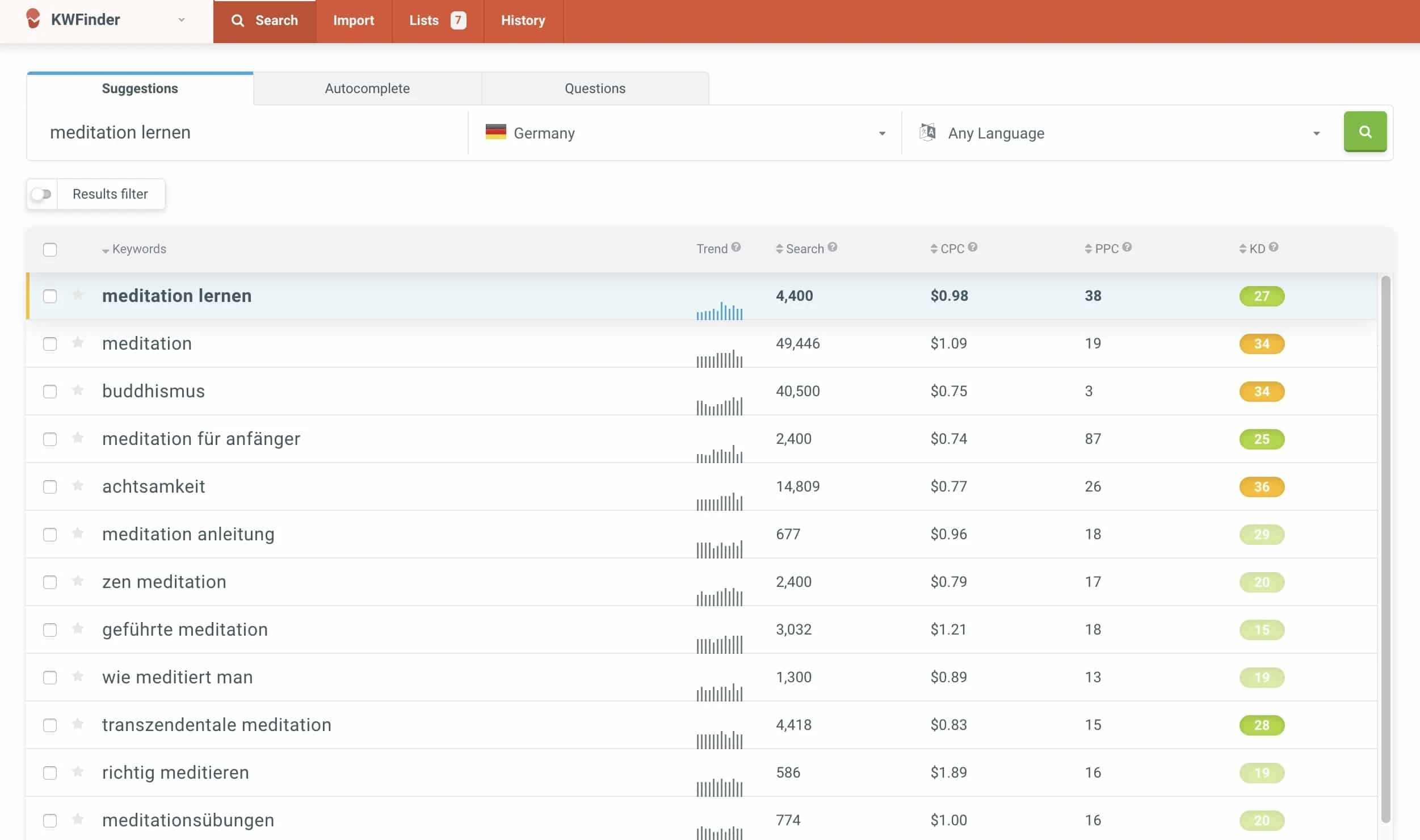
That way, you make sure you get more visitors through Google and don't write articles nobody is interested in, but ones that are still read regularly months after publication.
A good starting point for that is my ultimate guide to keyword research.
Mistake #4: Not valuing your own time
When you're just starting out, you're happy about every small partnership request and willing to write about anything, even if all you get for it is a free product.
Over time, though, you'll find that this is no longer enough and your time is worth more than a free product sample.
Don't sell yourself short and don't let companies take advantage of you!
Mistake #5: Not offering a newsletter
Start early with setting up a newsletter and building an email list. By the way, you can also do that for free.
Think about what you can offer your visitors as a lead magnet for signing up to your newsletter (it also helps if you position yourself and don't write about many different topics).
With an email list, your readers are more strongly tied to your blog than if they are fans or followers of your social media channels.
You'll find an overview of the best newsletter providers in this article: Newsletter tools
What does a blog with ChatGPT Sites cost?
Here are the items at a glance. The details come from OpenAI, and prices and terms change quickly:
- A paid ChatGPT plan with Sites, for example Plus. You can see the current price at OpenAI.
- Building and changing uses up credits from your plan.
- According to OpenAI, hosting is free until December 31, 2026. After that, usage is charged against your plan's allowance.
- Your own domain costs 25 credits per month in Sites. Plus includes 125 credits per month.
- You buy the domain itself from a domain provider, for example at do.de.
Before you start, check in your ChatGPT settings whether you see Sites and what your plan includes. It's still an inexpensive blog. But it's not free, and you should know that beforehand.
The guided path: Blog-Starter for ChatGPT Sites
You can do everything so far on your own. If you'd rather be taken by the hand, there's my skill “Blog-Starter für ChatGPT Sites” (Blog Starter for ChatGPT Sites).
A skill is a set of instructions that ChatGPT loads and then follows. Mine guides you through this path as a conversation and additionally helps you choose the type of blog:
- It asks one question per message, makes suggestions and always shows you which step you're on.
- It knows 19 types of blogs and 15 styles and suggests suitable ones.
- It keeps a blog profile that you can paste into a new chat to pick up exactly where you left off later.
- It fills in the build request for you and accompanies you through the check, the publishing and the domain.
And what it doesn't do:
It doesn't buy anything for you, it doesn't give legal advice, and it doesn't promise you visitors or revenue. It also doesn't invent reader testimonials, numbers or facts about you.
The Blog-Starter costs €27 plus VAT, one-time. You get it as a ZIP download through Polar, updates are included, and the license is personal. On top of that come the costs for ChatGPT and your domain, as described above.
You upload the ZIP file in ChatGPT under “Skills” via “Hinzufügen > Von deinem Computer hochladen” (Add > Upload from your computer). After that, the skill is available in the “Work” area:
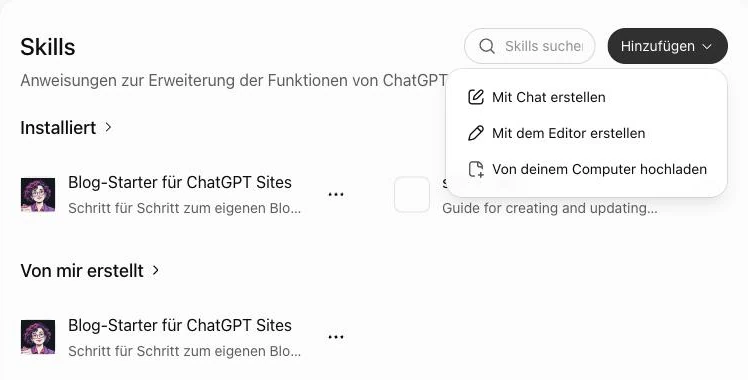
Do you need it? If you'd rather go through the steps yourself, no. If you want decisions taken off your plate and don't feel like thinking of everything yourself, it saves you time and a few rounds of corrections.
To the Blog-Starter with all details, examples and FAQ
Frequently asked questions
Can I create a blog with ChatGPT Sites for free?
Where do I find ChatGPT Sites and Skills?
Do I need programming skills?
Do I need my own domain?
How long does it take until the blog is up?
Do I need an Impressum and a privacy policy?
Which content does ChatGPT Sites not allow?
Why start a blog?
There are a million good reasons to start a blog. These five are probably the most popular:
- Earn money from home: As a blogger, you can earn money from home (or from anywhere in the world). I've been in blogging and online business since 2011 and now have months in which I make five-figure revenue. Blogging is time-consuming and can be hard work, but it comes with little risk and low upfront costs.
- Become an author: A blog is a good starting point if you want to become an author. A novel or nonfiction book sells much better if you already have an audience.
- Win customers for your business: A blog is a great way to win customers for your business (e.g., if you're a coach, consultant or freelancer). Or to increase the (brand) awareness of your business.
- Sell online courses: A blog is ideal for establishing yourself as an expert in a niche and selling online courses to your readers.
- Simply write: Even if you just want to write, share your life with others, inspire people or build a community, a blog is the ideal tool.
What should I write about?
The success of your blog always depends on your readers:
The better you understand your readers, the more you can offer them. And the more likely they are to share your blog articles, subscribe to your newsletter or become customers.
So get to know your readers better.
Find out what problems, fears, worries and goals they have. Find out what their most burning questions are. Find out what keeps them awake at 2 a.m.
To do that, you can, for example:
How do I get visitors?
There are many visitor sources for your blog, e.g.:
- Google (and other search engines)
- Facebook, Pinterest and other social networks
- Other bloggers and influencers
- Newsletter marketing
- Paid advertising
In my view, the best visitor source is and remains Google. It brings you visitors in the long run and in a plannable way, without you having to constantly work on it.
Is it possible to create a private blog?
Yes. That makes sense, for example, for a blog about a year abroad, a private travel blog or an online diary that only family or friends should read.
In ChatGPT Sites, you set who may see the site in the sharing settings. What options your plan offers there, you can see directly in the site's settings.
How long does it take until a blog is successful?
There's no general answer. In most cases, though, you should think in years rather than weeks.
If you work on your blog consistently, a lot can already happen after 6 to 12 months. But the real lever often comes later.
Should I build a newsletter right away?
Yes. If I were starting from scratch today, I would build an email list much earlier.
Google traffic is great. But a newsletter gives you direct access to your readers, independent of platforms and algorithms.
How important is SEO at the beginning?
Very important. Especially if you want to win visitors from Google in a plannable way.
You don't have to be an SEO pro at the beginning. But you should understand what your target group searches for and how to structure content for it in a sensible way.
How often should I blog?
Consistency matters more than frequency. Better one good article every week than ten mediocre ones in a month followed by radio silence.
What is the biggest beginner mistake in blogging?
Many beginners write past their target group, underestimate SEO or give up too early.
A blog is not a sprint. You need stamina, a clear focus and the willingness to keep learning.
Can I build a blog on the side?
Yes, absolutely. That's how most people start. A blog is very easy to build on the side, as long as you have realistic expectations and stick with it consistently.