My old WPspace review was outdated in several places.
LITEspace no longer costs a flat €15 net. The permanently free hosting plan doesn't exist anymore either. And the plan structure has changed fundamentally.
That's why I tested LITEspace again from scratch in July 2026. I installed WordPress, clicked through the customer center and Plesk, created a backup, set up a staging copy, and measured the test site with Google PageSpeed Insights.
The result:
WPspace is still an interesting managed WordPress hosting provider. But the best price now requires a very long prepayment.
- In the current hands-on test, I installed WordPress 7.0.1, opened it via SSO, created a 30 MB backup, and set up a real staging copy.
- The empty WordPress test site scored 100 points on PageSpeed, on mobile and on desktop. The WordPress Site Health check did report a disabled opcode cache, though.
- LITEspace costs €24 net per month, or €10 with three years paid in advance.
My test basis
I don't know WPspace only from a price table. For the original test, a WordPress test site ran at the provider for several months. I also had the WPspace team optimize two websites.
In January 2026, I also ordered a LITEspace plan again. For this update, I logged into the test access on July 15, 2026, and set up a completely new WordPress website. The screenshots and PageSpeed values in the next sections come from this test.
Plans and prices 2026
WPspace offers three managed WordPress plans:
- LITEspace for one WordPress website plus staging
- PROspace for up to three WordPress websites
- MAXspace for up to ten WordPress websites

The prices depend heavily on the prepayment period:
| Plan | Monthly | 3 years |
|---|---|---|
| LITEspace | €24 | €10 |
| PROspace | €48 | €20 |
| MAXspace | €96 | €40 |
All prices are per month and plus 19% German VAT.
The plan cards call the three-year discount a “lifetime discount”. At the same time, WPspace labels the offers as limited in time and adds further restrictions in the footnotes. So check the total amount and the renewal price in the shopping cart before you order.
What's included in LITEspace?
The smallest plan currently includes:
- one WordPress installation plus staging
- 2 vCPUs and 2 GB RAM
- 5 GB SSD storage
- unlimited traffic
- 1 GB PHP memory
- a premium cache plugin
- daily backups with 14 days of retention
- free SSL certificate
- free WordPress migration service
According to WPspace, traffic and visitors aren't limited. Storage and resources can be expanded.
One important difference from my old review concerns email. With LITEspace, mailboxes are no longer included but can be added as an option. PROspace includes 15 mailboxes, MAXspace 50.
Management and developer tools
I could see these features myself in the LITEspace control panel:
- WordPress admin SSO and one-click installation
- SSH, WP-CLI, and Git
- server and WordPress logs
- maintenance mode and search engine indexing at the click of a button
- automatic WordPress and plugin updates
- backups, website copies, and WordPress import
- Imunify, web application firewall, and SSL management
My LITEspace hands-on test 2026
After logging in, I first landed in the WPspace customer center. From there, I opened the actual hosting control panel without a second login. Technically, WPspace uses Plesk for this.
The interface is extensive. Files, databases, FTP, backups, PHP, logs, SSH, cron jobs, Git, website import, SSL, Imunify, and the web application firewall are directly accessible.
That's good for experienced WordPress users. Absolute beginners may feel overwhelmed by the many menu items at first, though.
Installing WordPress and opening it via SSO
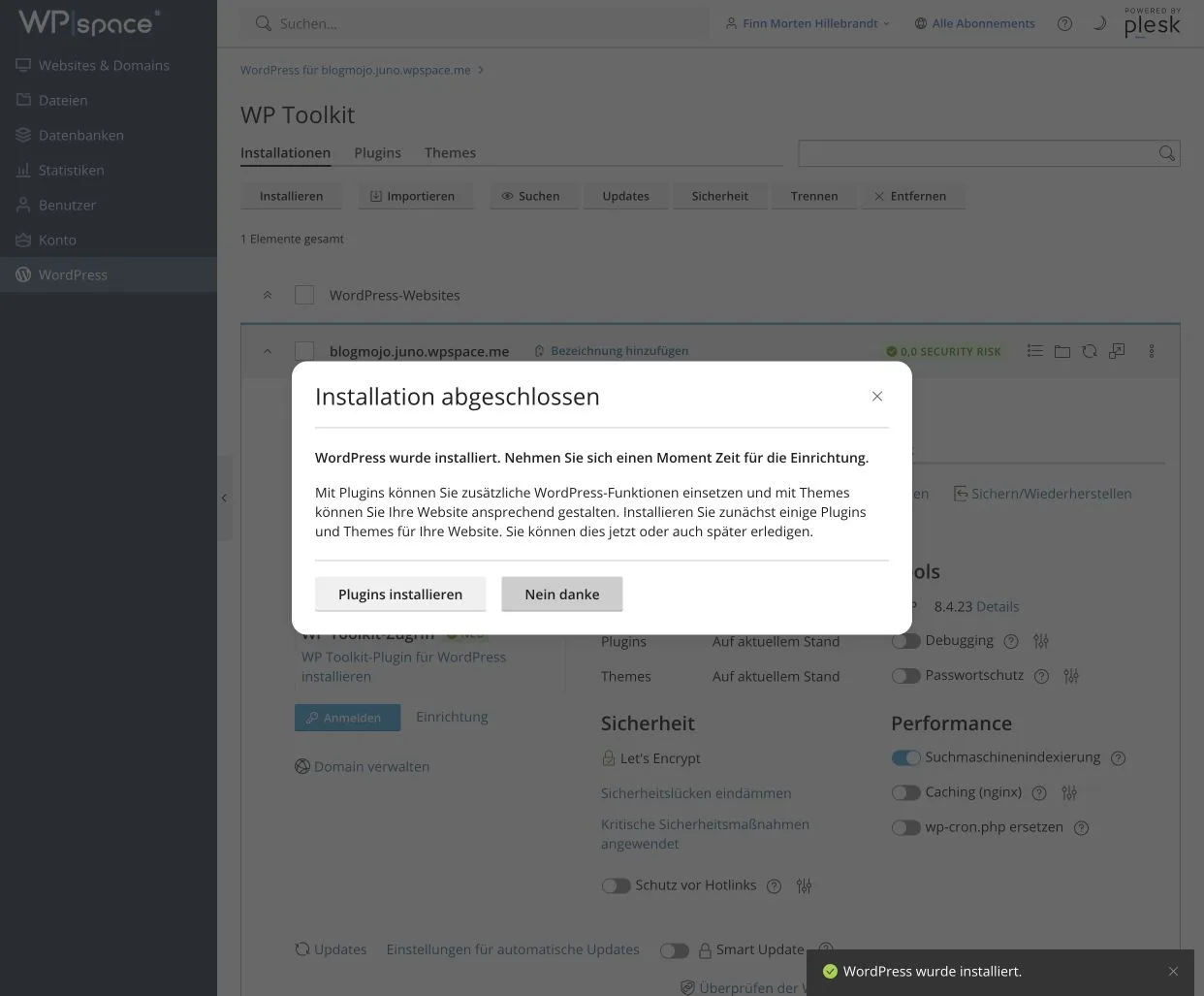
Using the WP Toolkit, I installed WordPress 7.0.1 directly on the provided test domain. The toolkit created the database and credentials automatically and reported a security risk of 0.0 after the installation.
The log-in button next to each site was especially handy. One click opened the WordPress dashboard as administrator. I didn't have to enter a username or password again.
Backup and staging in a real test
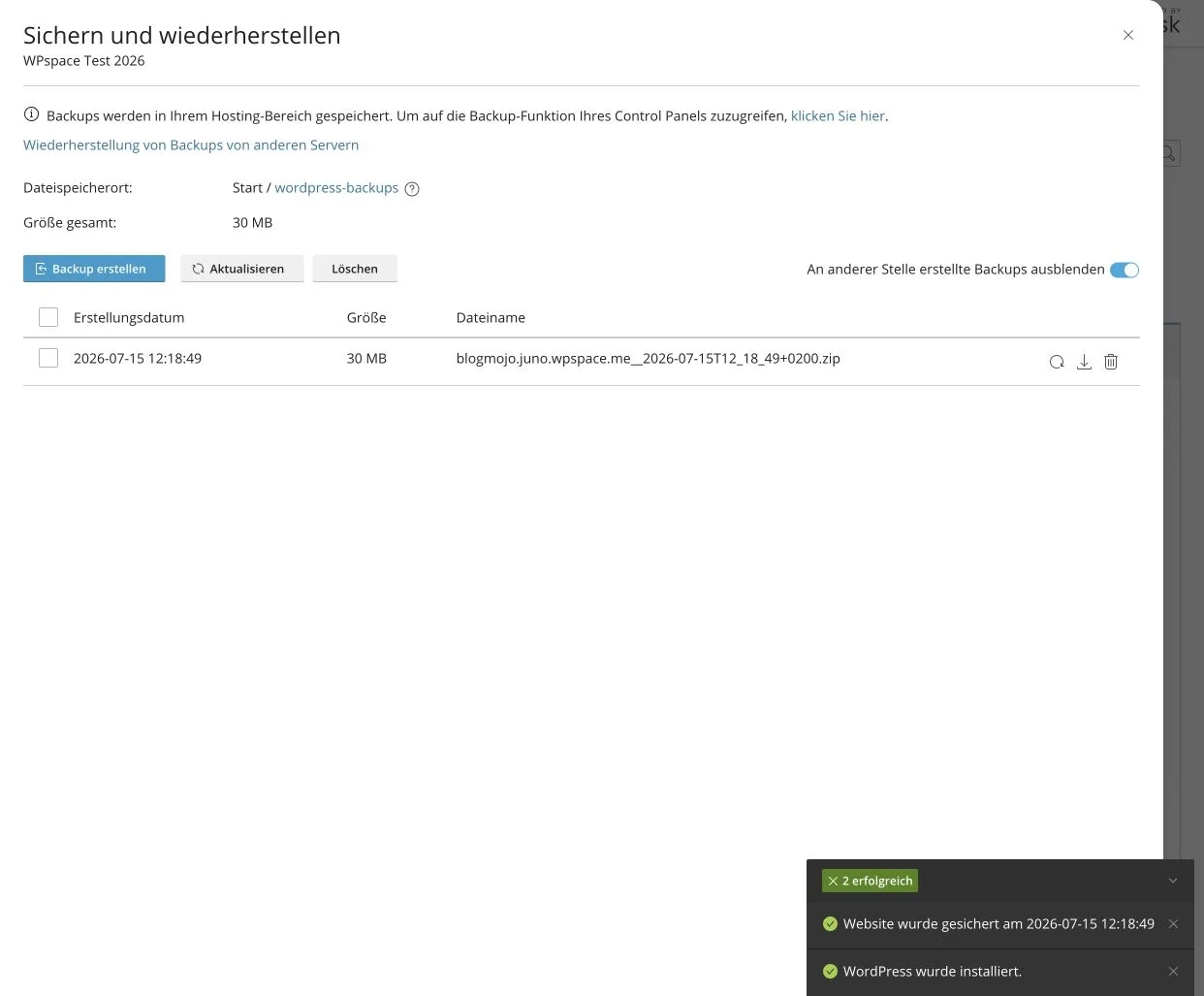
Next, I created a manual backup through the WP Toolkit. The ZIP file was 30 MB. Afterward, the toolkit offered its own actions to restore, download, and delete it.
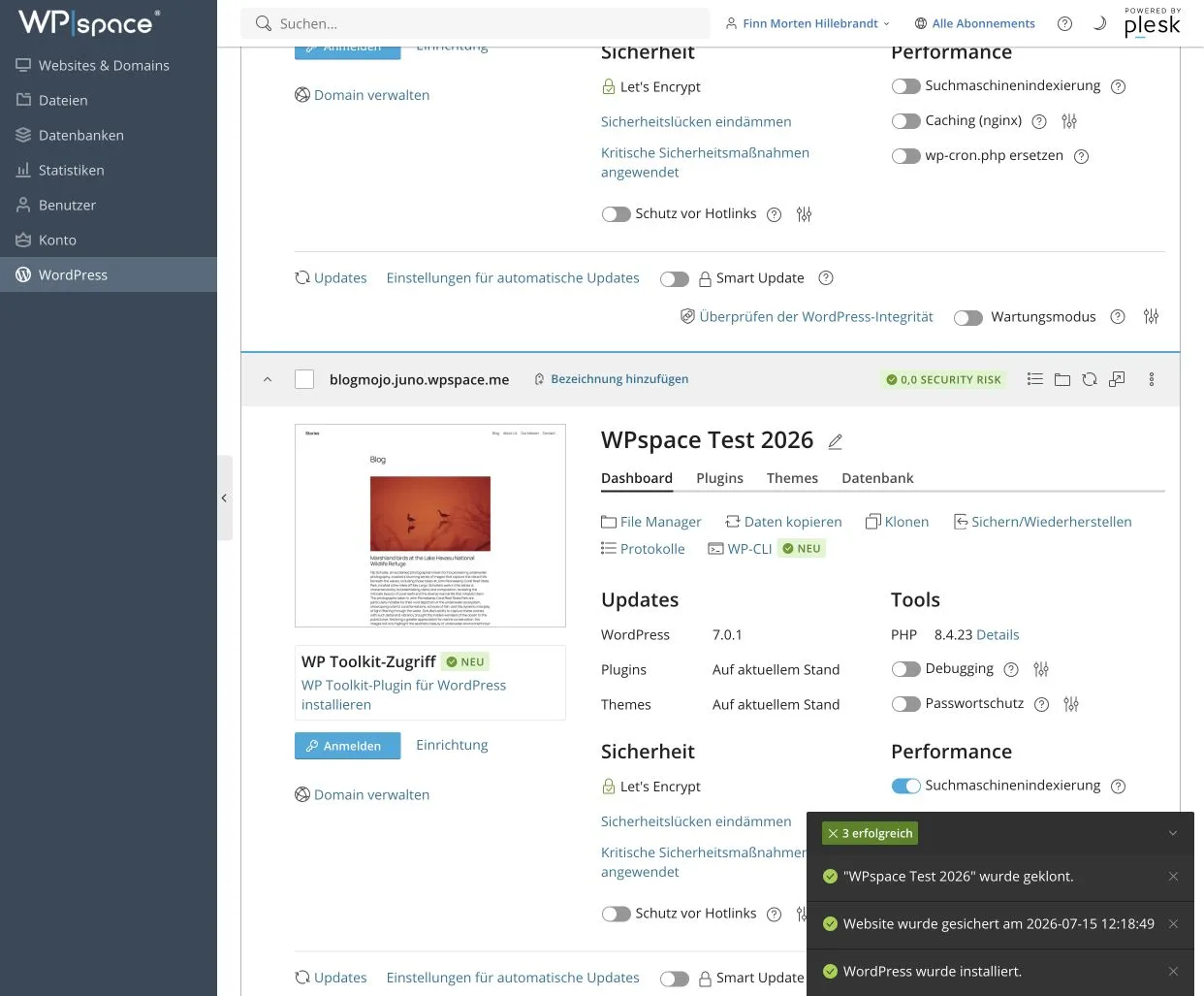
The promised staging isn't just a marketing checkmark either. I cloned the complete installation to a new staging subdomain. Files, database, and configuration were copied automatically. After about a minute, the second WordPress installation appeared in the toolkit.
It was also a plus that search engine indexing was disabled on the staging copy. That way, the test version doesn't end up on Google by accident.
Current PageSpeed test
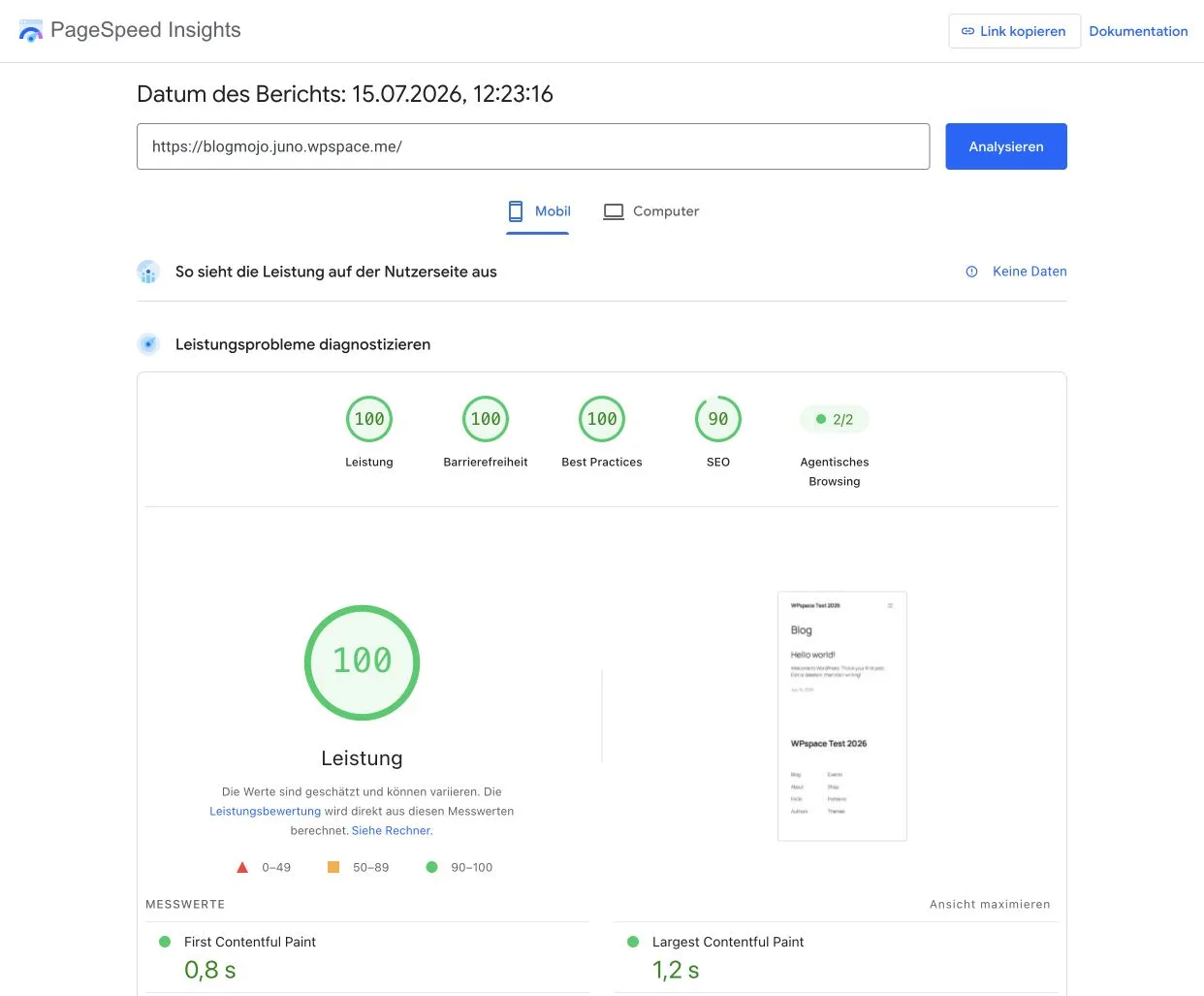
On July 15, 2026, the freshly installed WordPress website scored 100 performance points on Google PageSpeed Insights, on mobile and on desktop.
The mobile measurements:
- First Contentful Paint of 0.8 seconds
- Largest Contentful Paint of 1.2 seconds
- Total Blocking Time of 0 milliseconds
- Cumulative Layout Shift of 0
- Speed Index of 1.1 seconds
On desktop, FCP was 0.2 seconds, LCP was 0.3 seconds, and the Speed Index was 0.4 seconds. That's very fast.
One downside showed up in the WordPress Site Health check. The opcode cache was disabled on the fresh installation. That's not the same as Redis or the optionally activatable nginx cache. Still, from a managed WordPress host, I would expect PHP OPcache to be active by default.
The other server values were decent. WordPress ran on PHP 8.4.23 via FPM/FastCGI, with a PHP memory limit of 1,024 MB, an upload limit of 2 GB, and MariaDB 11.4.12.
My historical performance measurements
From July 2022 to January 2023, the average response time of my test site was 469 ms. It was measured without a caching plugin, individual performance optimization, or additional server-side caching.
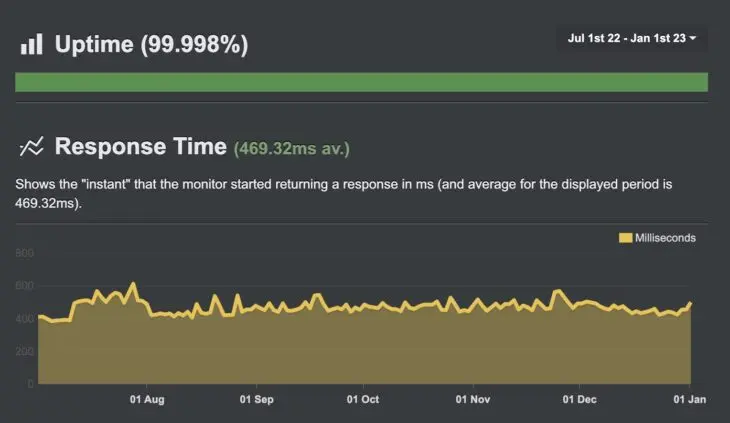
Back then, that put WPspace among the fastest hosts in my comparison. But in 2026, this number is no longer valid as proof of current speed. Hardware, software, and plans have changed since then.
PageSpeed optimization by the WPspace team
My most interesting practical experience with WPspace was the free PageSpeed optimization. I had it done for two websites.
For my test site, the measured load time dropped from 814 ms to 279 ms back then. Largest Contentful Paint and Time to Interactive were also more than halved.
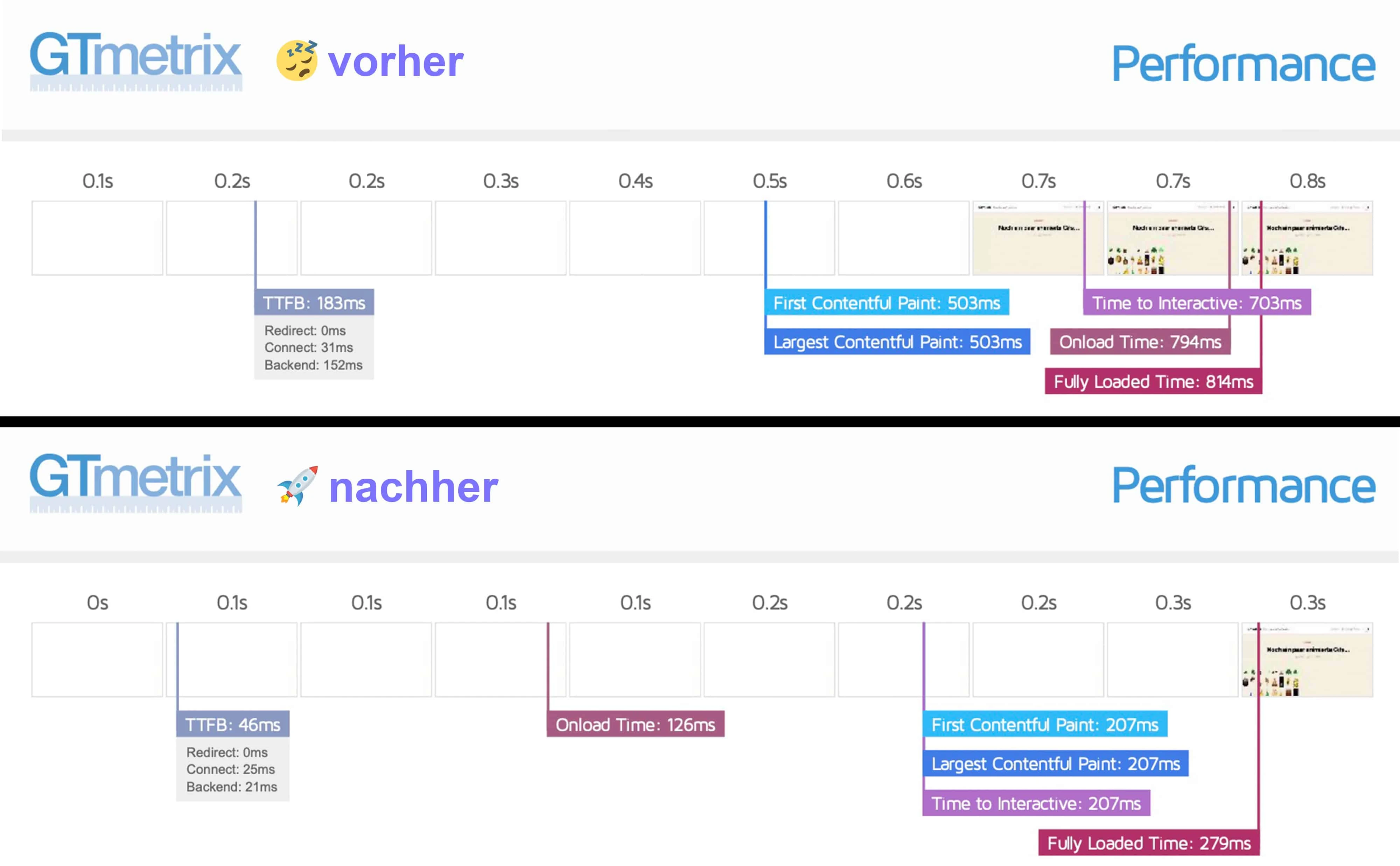
Then I gave the team a harder task and had them check Blogmojo itself. The website was already heavily optimized. Even so, LCP and FCP improved by about another 30 ms.
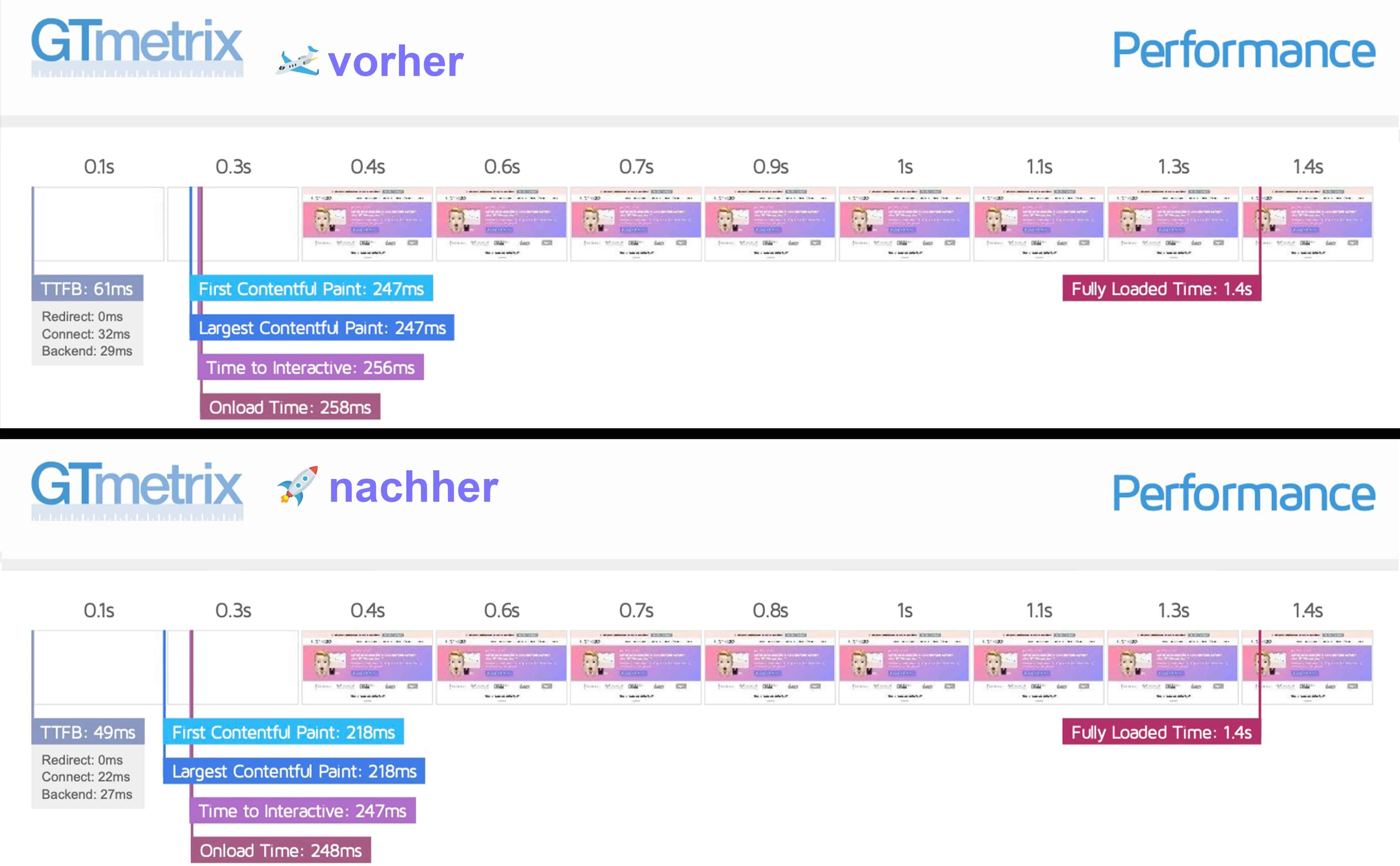
After the optimization, I also received individual recommendations on plugins and setup. That was more concrete and more helpful than an automatic report with generic tips.
Try it free for 14 days
The former permanently free plan was discontinued. Today, WPspace offers a free 14-day trial with full access instead.
The process according to the provider:
- You get immediate access to the test hosting.
- If you want, the team copies your website within one business day.
- You can test the hosting and the optimized copy for 14 days.
- If you don't order, the trial ends automatically.
For a realistic hosting test, that makes more sense than a permanently free but heavily restricted mini installation.
Security and support
According to the current product page, the security features include:
- daily security and malware scans
- web application firewall and Fail2Ban
- DDoS protection and bot protection
- free malware cleanup
- one-click hardening for WordPress
- isolated resources per hosting package
- server location in Germany
Support is available in German by email, live chat, and phone. Chat and phone can be reached Monday to Friday from 9 a.m. to 5 p.m.
My contacts with the team so far have been fast, friendly, and technically sound. It was especially positive that the PageSpeed optimization didn't end with a standard report but included specific follow-up questions and recommendations.
The current customer center also had an Intercom live chat built in. I didn't send a new support request during this test and therefore didn't measure a current response time.
Who is WPspace for?
WPspace is a good fit if you:
- run a business WordPress website
- want dedicated resources instead of classic shared hosting
- actually use staging, Redis, SSH, and WP-CLI
- value German-language WordPress support
- want the provider to migrate and optimize your website
It's a worse fit if you:
- want to host privately
- are only looking for the cheapest possible starter hosting
- don't want to pay three years in advance for the best price
- need a lot of storage or included email mailboxes with LITEspace
Pros and cons
- Dedicated resources for every hosting plan
- Premium cache plugin included
- Staging clone created successfully in the hands-on test
- Manual 30 MB backup created successfully in the hands-on test
- WordPress installation and admin SSO worked without problems
- 100 PageSpeed performance points on the empty test site
- Free WordPress migration service
- Free PageSpeed optimization by WordPress experts
- SSH, WP-CLI, and Git support
- Daily security scans and malware cleanup
- Server location in Germany
- German-language support by email, chat, and phone
- 14-day trial with no obligation afterward
- Offer for business customers only
- All prices are shown net
- The cheapest advertised monthly price requires three years paid in advance
- LITEspace includes only 5 GB of storage
- Email mailboxes have to be added separately with LITEspace
- PHP OPcache was disabled on the fresh test installation
- The extensive Plesk control panel can overwhelm beginners
- Historical performance measurements can't be equated with today's platform
My WPspace conclusion
The core WPspace features I tested worked in the current test. Installation and SSO ran smoothly, the manual backup was created quickly, and the staging copy was ready after about a minute. The PageSpeed values of the empty test site were strong too.
The flip side is the pricing model. The eye-catching price of €10 net only applies with three years paid in advance. Paid flexibly by the month, LITEspace costs €24 net. On top of that come email mailboxes and additional storage if you need them.
LITEspace still isn't perfect. 5 GB of storage is tight, the control panel is pretty crowded for beginners, and PHP OPcache was disabled in my test. I also wouldn't use my historical 469 ms as a selling point anymore.
All in all, WPspace is a good choice for business WordPress users who really need staging, backups, SSH, and personal support. But use the 14-day trial first and measure your own website.
You can find more providers in my WordPress hosting comparison.





