
You've had enough.
You've been working on SEO for weeks or even months.
Maybe you've already tried to find keywords on your own. To optimize page titles and meta descriptions. Or to improve your PageSpeed score.
But your Google rankings just won't rise.
Or you're a complete beginner and so overwhelmed by all the information out there that you don't know where to start.
The good news:
I'll take you by the hand and show you what really matters in SEO.
In this article, I'll show you 8½ easy beginner tips to improve your website's Google rankings (most of them are free).
- With targeted keyword research, you find keywords you can realistically rank for and that bring visitors who turn into customers.
- Write the best content on a topic and fulfill the search intent better than your competition.
- Optimize the user experience: fast loading times, mobile optimization, and well-structured, readable texts.
1. Do keyword research
Keyword research is the most important and first measure for improving your Google rankings.
It lets you make sure that you optimize your pages or articles for keywords that ...
- don't have too much competition (so you can actually get onto page 1 instead of languishing on page 2 or 3)
- have only a low search volume (so they're searched for on Google little or not at all)
- bring you visitors who really become customers (and don't just read your content and then leave again)
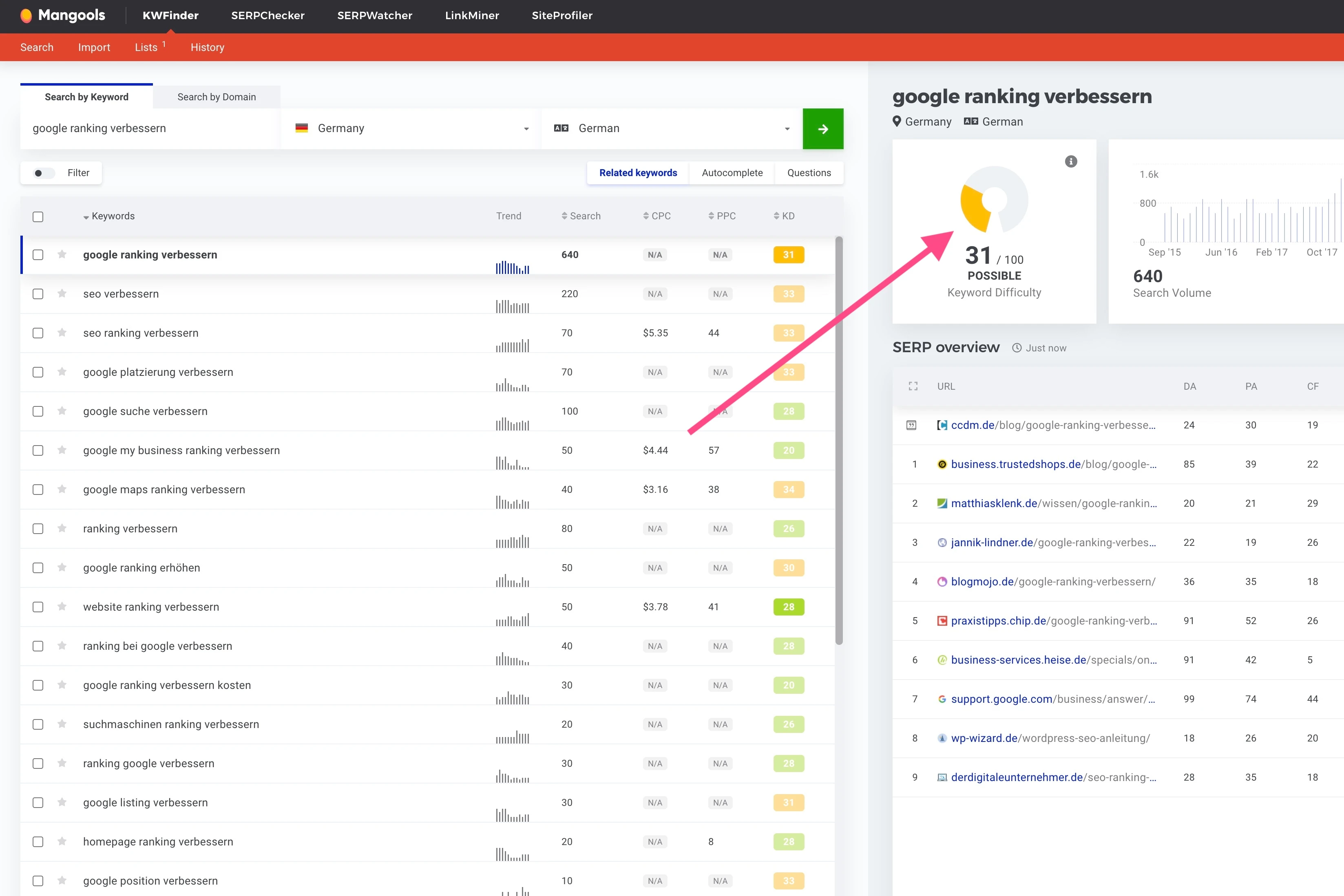
For this, it's important to use a good keyword tool. For beginners, I recommend KWFinder.
Unlike many other tools, it doesn't just show the exact search volume. It also analyzes the competition and gives you an assessment of how easy or hard it will be to reach page 1 or position 1:
But of course, keyword research involves more than that:
I explain in detail how you can find good keywords and what to watch out for in keyword research in this guide: Keyword research.
You'll find more recommended keyword tools in this overview: The best keyword tools.
2. Help Google understand your content
Google isn't a human but a machine, and it understands and evaluates texts differently than we do.
If you want to raise your Google rankings, you should adapt your pages and articles so that their content is understood not only by people but also by Google and other search engines.
Four things are important for this:
2.1 Using keywords
Google and other search engines determine how relevant a page or article is to a keyword, among other things, by how often and where it's placed there.
For example, it's important to mention your main keyword and relevant secondary keywords (synonyms or long-tail keywords) in the page title, the main heading, and a few times in the body text.
2.2 Structure
The structure of your pages and blog articles is important for Google to understand their content.
If a sentence or a section is formatted as a heading (<h1>, <h2>, <h3>, etc.) or stands out from the rest of the text through its color, font size, or font weight, it carries more weight than normal body text.
2.3 Describing all non-text elements
Google is a text-based search engine. That means Google doesn't understand what your embedded images, videos, podcasts, or other non-text elements are about.
For images, it's therefore important to set an alt text and choose a descriptive file name.
2.4 Optimizing with Surfer SEO (optional)
The Google algorithm is now much smarter than it was 10 to 15 years ago and uses different and more complex ranking factors.
Including keywords in texts still leads to much better Google rankings. But thanks to AI technologies such as neural matching, which can determine the “semantic proximity” of words, phrases, sentences, or paragraphs to one another, Google is getting better and better at understanding texts even without keywords.
A tool that takes this technological progress into account for keyword optimization is Surfer SEO.
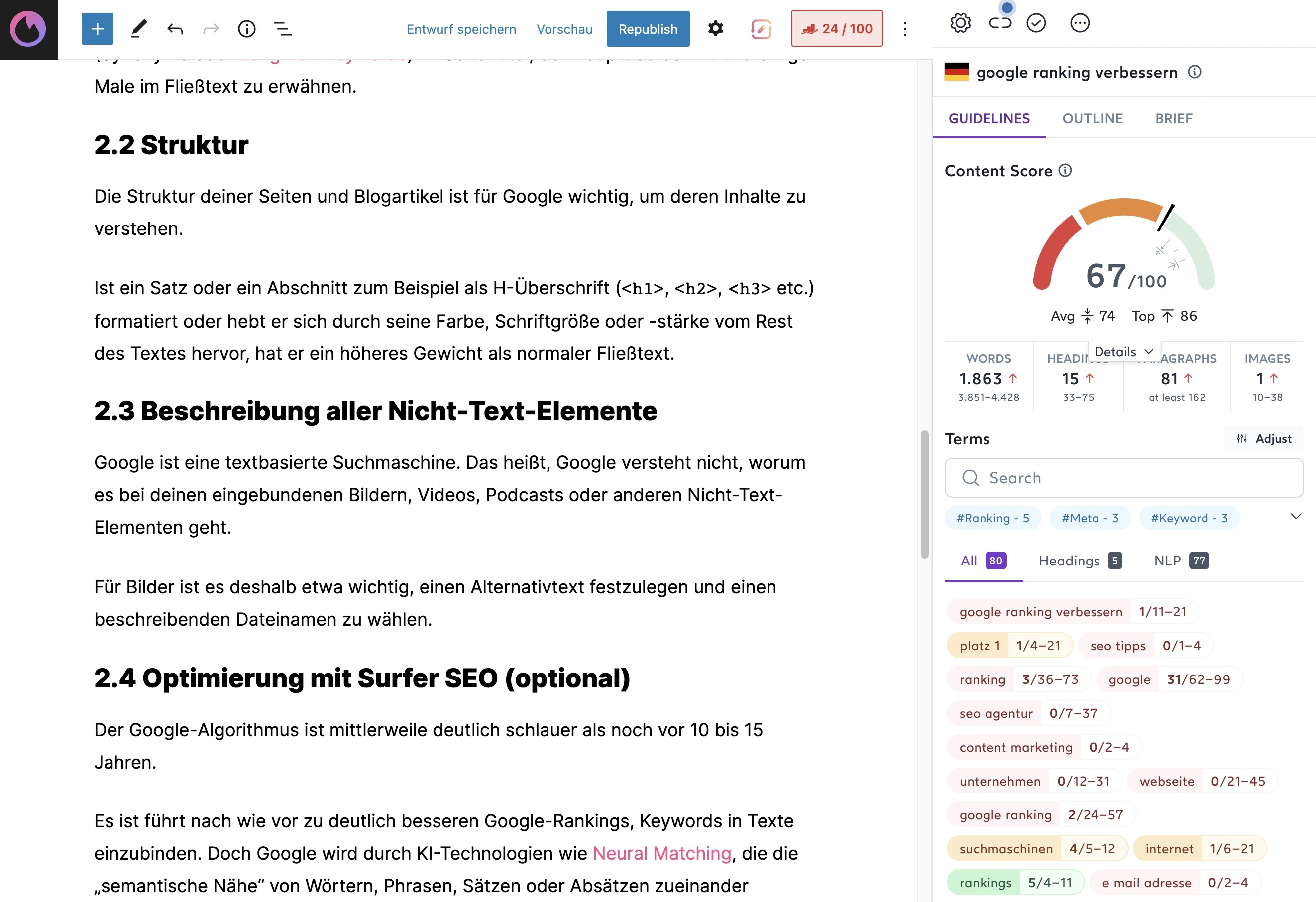
The tool's Content Editor shows you which phrases and words could be important for a better ranking and how many words, headings, paragraphs, and images an article should ideally contain.
For my blog articles, I try to reach a score of 80 to 90 (scores above 90 often make for worse readability):
You'll find more information on generating text with artificial intelligence in this comparison: The best AI text generators.
3. Write the best content on a topic
Have you ever wondered why some articles or pages are in position 1 and others aren't?
The reason is often simpler than you think:
Because they deserve it and they're really good.
Of course, that isn't always true, but it is often enough. Good articles get shared more often, get linked more often, have a longer dwell time, and fewer visitors jump back to the search results because their goals and problems weren't solved.
So here's a simple SEO tip for improving your Google rankings:
Look at the pages or articles in positions 1 to 5. And write content that's even better. Content that, for example, goes into even more detail, solves problems faster and in fewer steps, or is more entertaining, more moving, or more exciting.
Which brings us to the next topic:
4. Fulfill the search intent better
Have you ever been on the first page of Google or even in position 1? And then dropped back to page 2 or 3 after a few days or weeks?
Then you most likely didn't give search engine users what they were looking for.
You didn't fulfill their search intent.
To measure how well a page fulfills the search intent, Google probably uses at least one of the following two metrics:
- Back-to-SERP rate, meaning the share of users who click on a page and then return to the search results.
- Dwell time, meaning how long users stay on a page.
So for every page or blog article, ask yourself:
- What are the most pressing questions of users who type a particular keyword into Google?
- What goals and wishes do they have?
- What problems or worries are they looking for a solution to?
- Which aspects of the problem or topic interest them most?
Also look at which pages are on the first page of Google for a keyword and let them inspire you. Because these are the pages that, in Google's eyes, fulfill the search intent best!
The first 10 search results don't just help you answer the 4 questions above. They also contain a lot of other useful information, such as:
- What kind of page do users expect (e.g., a detailed blog article, an online shop, a price comparison)?
- How long does the content need to be?
- How does the content need to be structured?
- What do users want to see first?
- How do users want to be addressed?
- Who is your target audience?
5. Update your pages regularly
The internet moves fast. And that's reflected in the search results on Google, too:
For many search queries, freshness is an important ranking factor.
What I keep noticing:
Pages or blog articles that haven't been updated for a while eventually slip a few positions. Even if they've been in the top spots for months or years.
Pages for highly competitive keywords or dynamic topics (e.g., product comparisons, current world events, or trending topics) in particular benefit from regular updates.
My tips for this:
- Update your most important pages or blog articles at least every 3-6 months.
- The best way to find out how often they should be updated is to experiment (freshness isn't important for all keywords).
- If you have a WordPress website, remove the date from your permalinks, otherwise the URL changes every time you update an article or a page!
- Make your blog articles or pages a little bit better with every update!
- Sometimes also change the publication date in WordPress (in most cases, though, a mere update is enough for Google to adjust the date in the snippet).
6. Improve the readability of your texts
Be honest. How many (blog) articles do you read all the way to the end?
Probably very few.
The most important reason for that (as you can probably guess) is a boring writing style. The second most important is poor formatting and structure of your blog articles.
Endlessly long, nested sentences take the joy out of reading. Enormously so.
So do paragraphs that just won't end (and could have come from a school essay or a doctoral thesis).
You should pay attention to these 10 points in your articles:
- Give your blog articles subheadings (
<h2>,<h3>, etc.). - Use numbered lists, bullet lists, and tables.
- Write shorter paragraphs and shorter sentences.
- Supplement your articles with images, videos, audio files, or other media.
- Add a table of contents.
- Use italics and bold sparingly (use paragraph breaks instead to emphasize certain points).
- Give your readers the structure you promise in the headline (if you promise a guide with “7 steps”, it should also have 7 numbered steps).
- Not too small and not too large a font.
- The font stands out well from the background.
- Sufficiently large line spacing.
The great thing about it:
This doesn't just make your readers happy, but Google too.
If you write well-structured and readable articles, you're already ahead of 80% of your search engine competition.
7. Selling vs. informing
Important to understand when you do SEO:
Very few of the people who come in through Google want to buy something right away.
Someone who types a search term into Google wants, in most cases, to know something, find something out, learn something, do something, or has a problem they're looking for a solution to.
So solve their problems and help them reach their goals!
And write the 6 types of articles that do exactly that, such as:
- Advice articles and guides (the ultimate guide to a low-fat diet, the 10 best tips for Berlin, 11 tricks to make food last longer, etc.)
- Tutorials and how-tos (how to make your own play dough, how to install WordPress in 5 minutes, etc.)
- Reviews and experience reports
- Product comparisons (iPhone 14 Pro vs. Samsung Galaxy S22 Ultra, the 3 best kids' backpacks, etc.)
- Recipes
- Knowledge and encyclopedia articles
Just by writing more of the article types listed, you'll get more visitors from Google.
Even if you don't go to the trouble of picking out keywords for them.
8. Offer a good user experience
Google's goal is to fulfill users' search intent not only as well as possible but also as quickly as possible.
That includes not sending search engine users to websites that are insecure, load slowly, or aren't displayed correctly on the device the user is using.
You should implement the following points for this:
- Optimize your website for different devices, resolutions, and browsers (think responsive design!).
- Improve your absolute loading time (ideally under 2 seconds).
- Improve your Core Web Vitals.
- Switch your website to HTTPS (without mixed content, domain-validated is enough).
- Avoid disruptive or aggressive advertising (e.g., pop-ups that can't be closed or ads that cover the whole screen).
- Protect your website from hackers (keep WordPress plugins, themes, and WordPress itself up to date, use secure passwords, etc.).
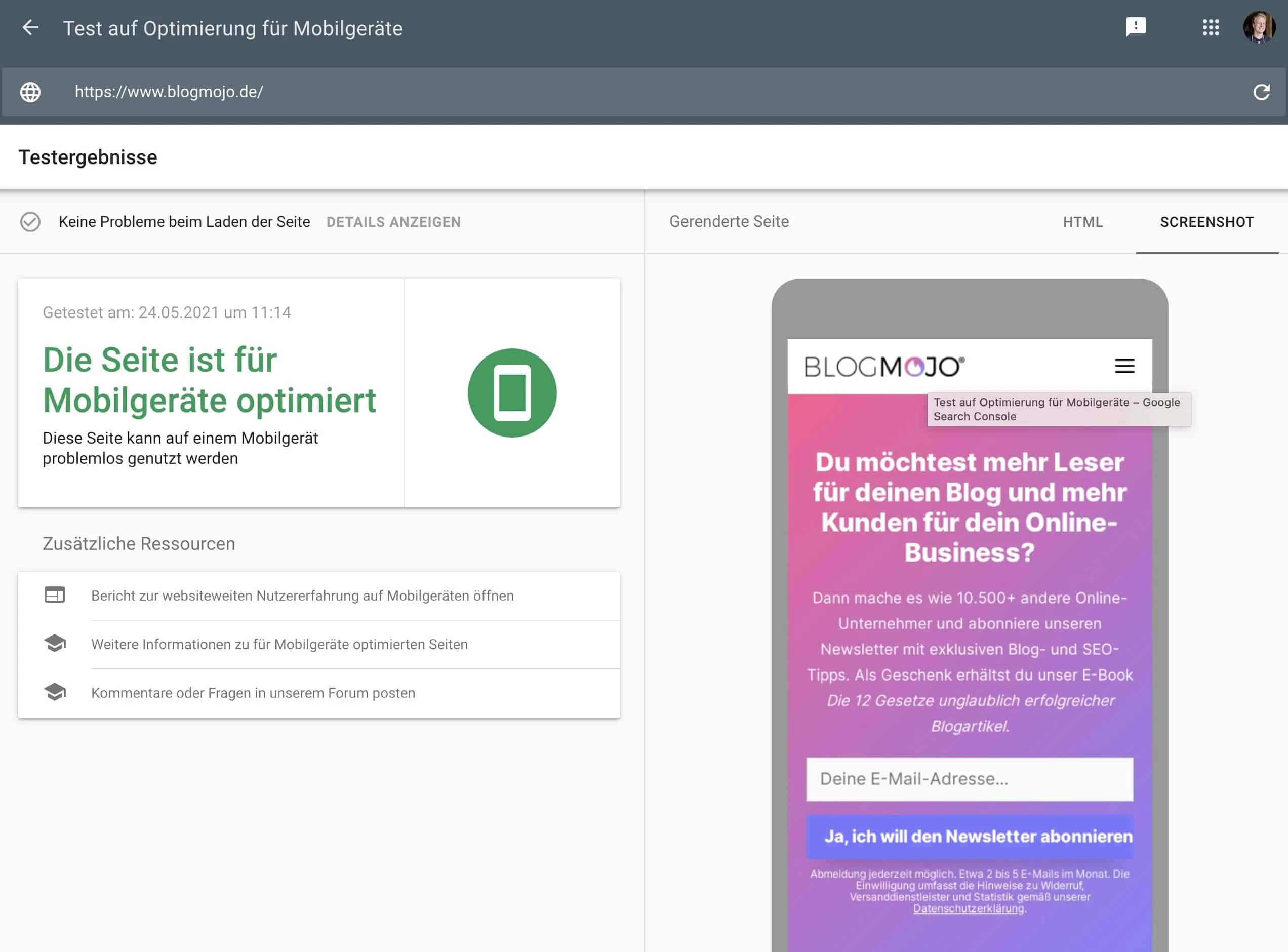
Google itself provides many tools for testing your website's usability, such as Google Search Console, PageSpeed Insights or the mobile-friendly test:
The half tip: Optimize your click-through rate
You may have wondered:
Why isn't this point 9?
That's because the last tip isn't about improving your Google ranking, but about getting more out of your existing ranking. That means getting more people to click on your search result.
Part of that is writing meta descriptions and page titles that get clicks (where power words, for example, can help).
Using structured data could also improve your click-through rates in the search results enormously in the past.
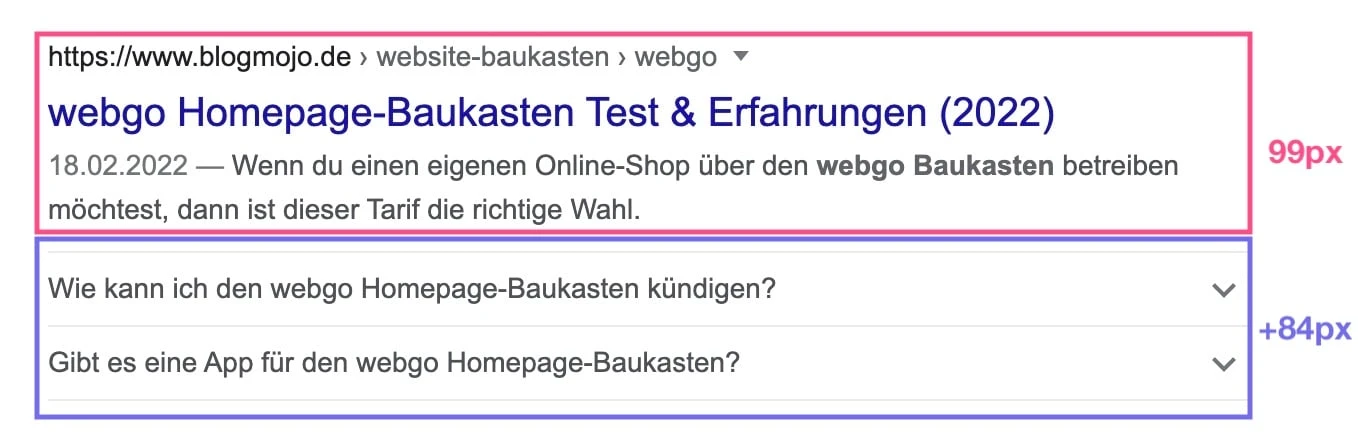
One example of this was, for a long time, the FAQPage schema, which made expandable question-and-answer buttons (also called “toggles”) appear below your search result, making it look bigger and more eye-catching.
Since August 2023, however, Google has severely restricted these FAQ rich results. According to Google's own documentation, they are now only shown for well-known, authoritative websites in the government and health sectors.
So for most other websites, including your blog, the FAQPage schema no longer brings bigger search results. It still doesn't hurt to include it, for example in case Google changes its criteria again at some point.
This is what FAQ toggles looked like when they were still available for all websites:
FAQ
Here I've put together answers to frequently asked questions about Google rankings:
How long does it take for my Google rankings to improve?
That depends on many different factors, for example the current state of your website, which SEO measures you implement, and which keywords you want to improve your rankings for.
You'll find an overview of how long it can take for individual SEO measures to take effect in this article: How long does SEO really take (incl. 6 examples)?
What does a top ranking on Google cost?
Where can I check which Google rankings I currently have?
The easiest way is the Performance report in Google Search Console. There you can see exactly which keywords bring visitors to your website and which of your pages rank for exactly those keywords.