
My old review of Real Cookie Banner was no longer up to date. Prices, system requirements, and even the details on the free version had changed.
So I tested the plugin again from scratch.
For that, I installed Real Cookie Banner 5.2.28 on a real WordPress test site. I went through the setup wizard, scanned the website, created a service, built a content blocker, and checked the behavior on the frontend.
The test was far more revealing than a tour through the settings.
- The guided wizard makes the extensive setup manageable even for beginners.
- On my fresh test site, the service scanner found three concrete services, but it is explicitly not a complete cookie scanner.
- The Gravatar content blocker worked correctly in the practical test and only loaded the content after targeted consent.
What is Real Cookie Banner?
Real Cookie Banner is a consent management plugin for WordPress. It shows a consent dialog and can block scripts, external content, and other services that require consent until the visitor makes a choice.
The plugin brings several tools together for this:
- setup wizard with twelve tasks
- service scanner with concrete recommendations
- more than 160 service templates
- more than 130 content blocker templates
- content blocker with visual preview
- more than 20 design templates and over 200 settings
- consent history and Pro statistics
- support for 19 languages
The provider devowl.io is based in Germany. According to the provider, consents are stored locally in WordPress and not outsourced to an external consent service.
How I tested Real Cookie Banner 5.2
My test environment consisted of:
- a real, publicly accessible WordPress test site
- WordPress 7.0.1
- Real Cookie Banner Free 5.2.28
- the block theme Twenty Twenty-Five
- a fresh installation without prepared services
I deliberately didn't just collect screenshots from the backend. After setup, I rejected the banner on the frontend and then released the Gravatar blocker separately.
Setup with twelve tasks
After activation, Real Cookie Banner doesn't open a rigid configuration page but a checklist. It leads you from the license and the operator details to the finished banner.
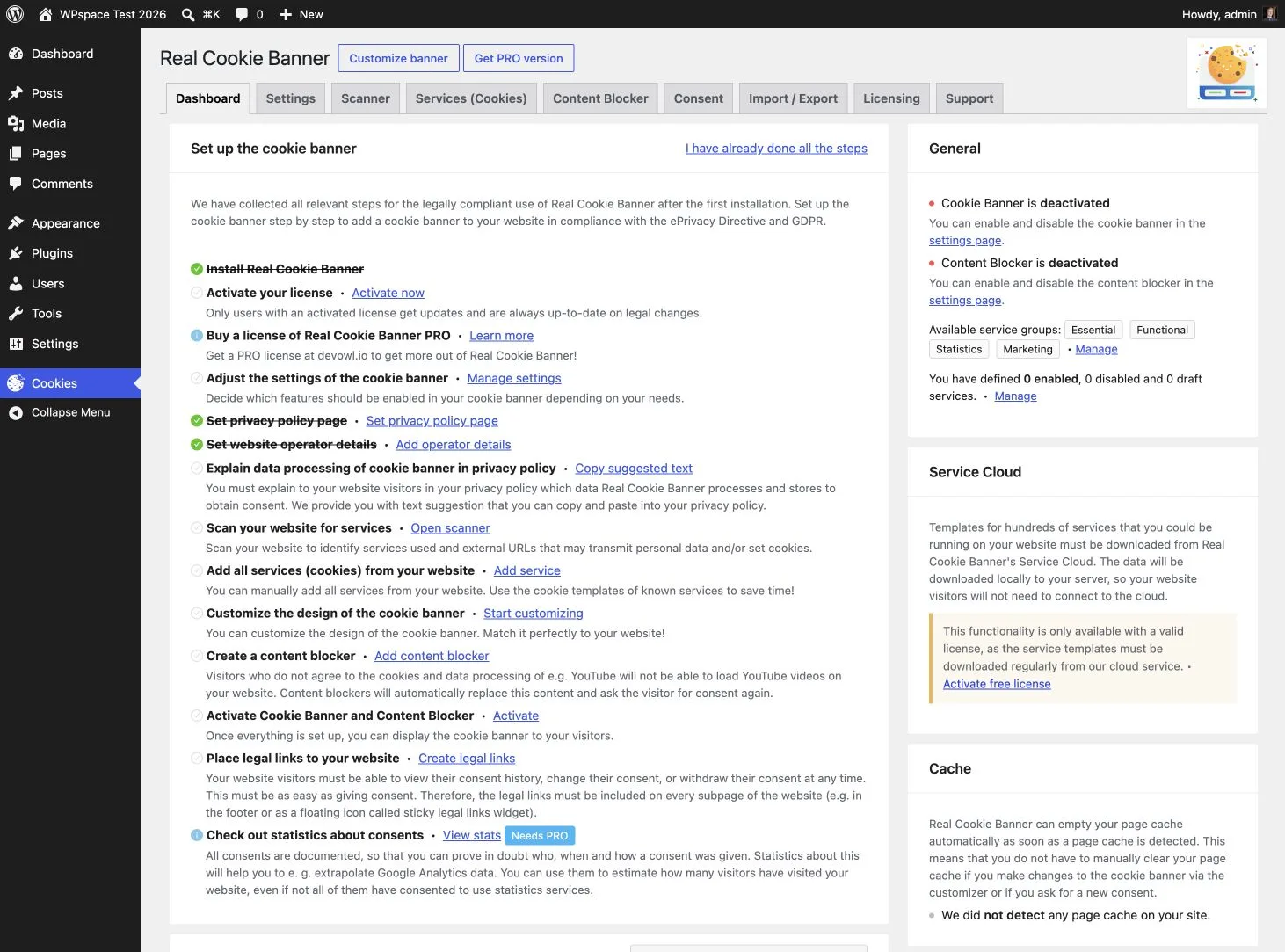
The twelve steps cover these points, among others:
- license and basic settings
- privacy policy and operator details
- service scanner and services
- design and mobile display
- content blocker
- activation and legal links
- statistics in the Pro version
This is one of the plugin's big strengths. Despite the considerable range of features, I knew at every point what to do next.
My test installation ran in English because the WordPress backend language was set to English. That is not a limitation of the plugin. Real Cookie Banner itself is also available in German.
A small catch with the free version
The free version can initially be started without a license. For the service scanner, the template data from the Service Cloud, and automatic updates, however, the plugin requires a free license activation.
For that, I had to agree to the transfer of technical installation data to devowl.io. Telemetry, newsletter, and a visible reference to Real Cookie Banner stayed optional and could be deselected.
That is explained clearly. Still, you can't use the full convenience of the free version without any external communication.
The service scanner in a real test
The scanner examined the pages from the sitemap, installed plugins, external resources in the HTML, and special WordPress systems. On my fresh test site, it found three concrete recommendations:
- Gravatar
- WordPress Comments
- WordPress Emojis
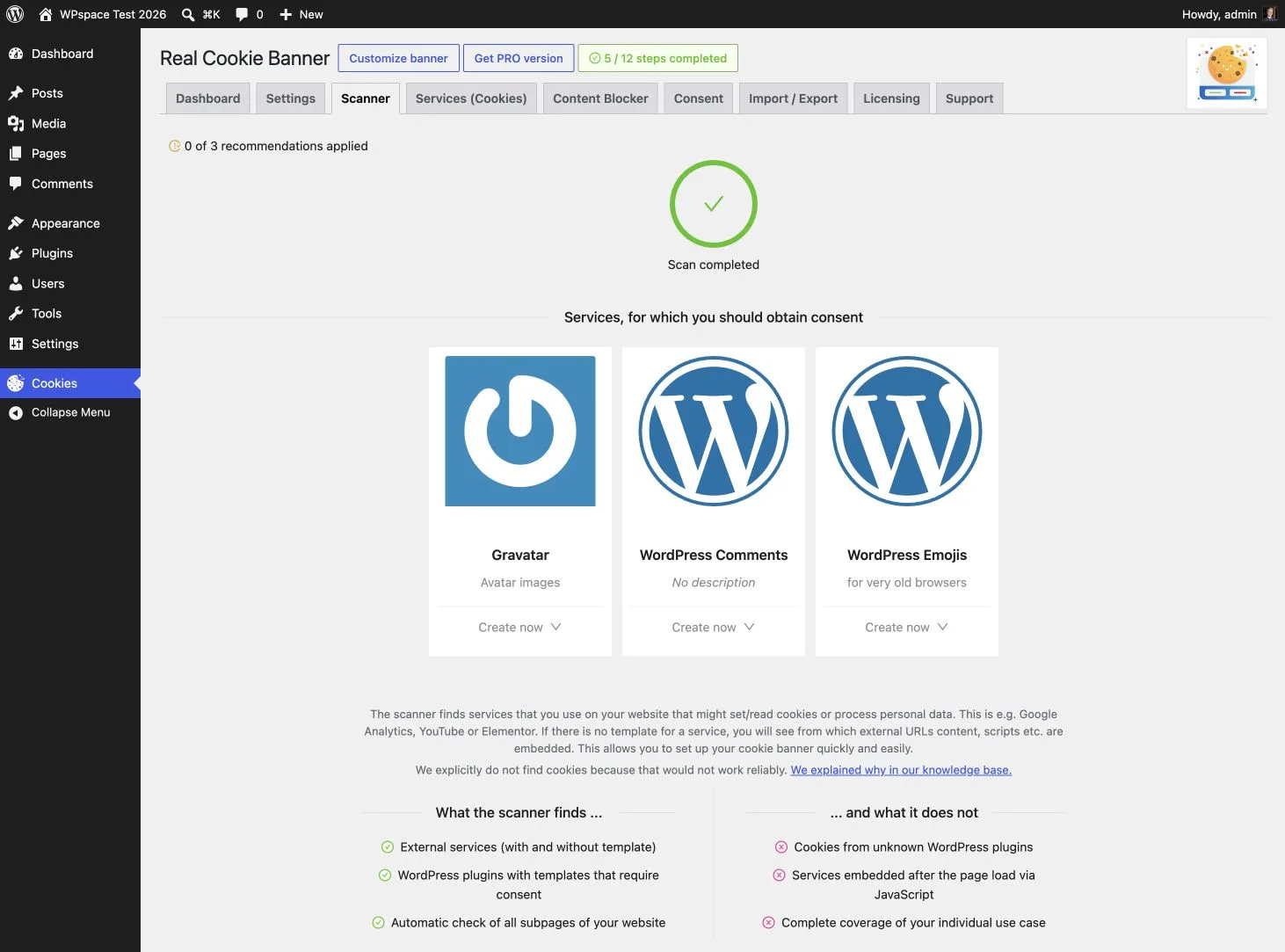
The results were plausible. Above all, I liked that the plugin doesn't promise false completeness.
The scanner itself points out that it is not a cookie scanner. Unknown plugins, services that are only loaded later via JavaScript, or special cases can go undetected.
How good are the service templates?
I accepted the Gravatar recommendation. The template already contained the provider, purpose, privacy policy, legal basis, affected countries, and details on the EU-US Data Privacy Framework.
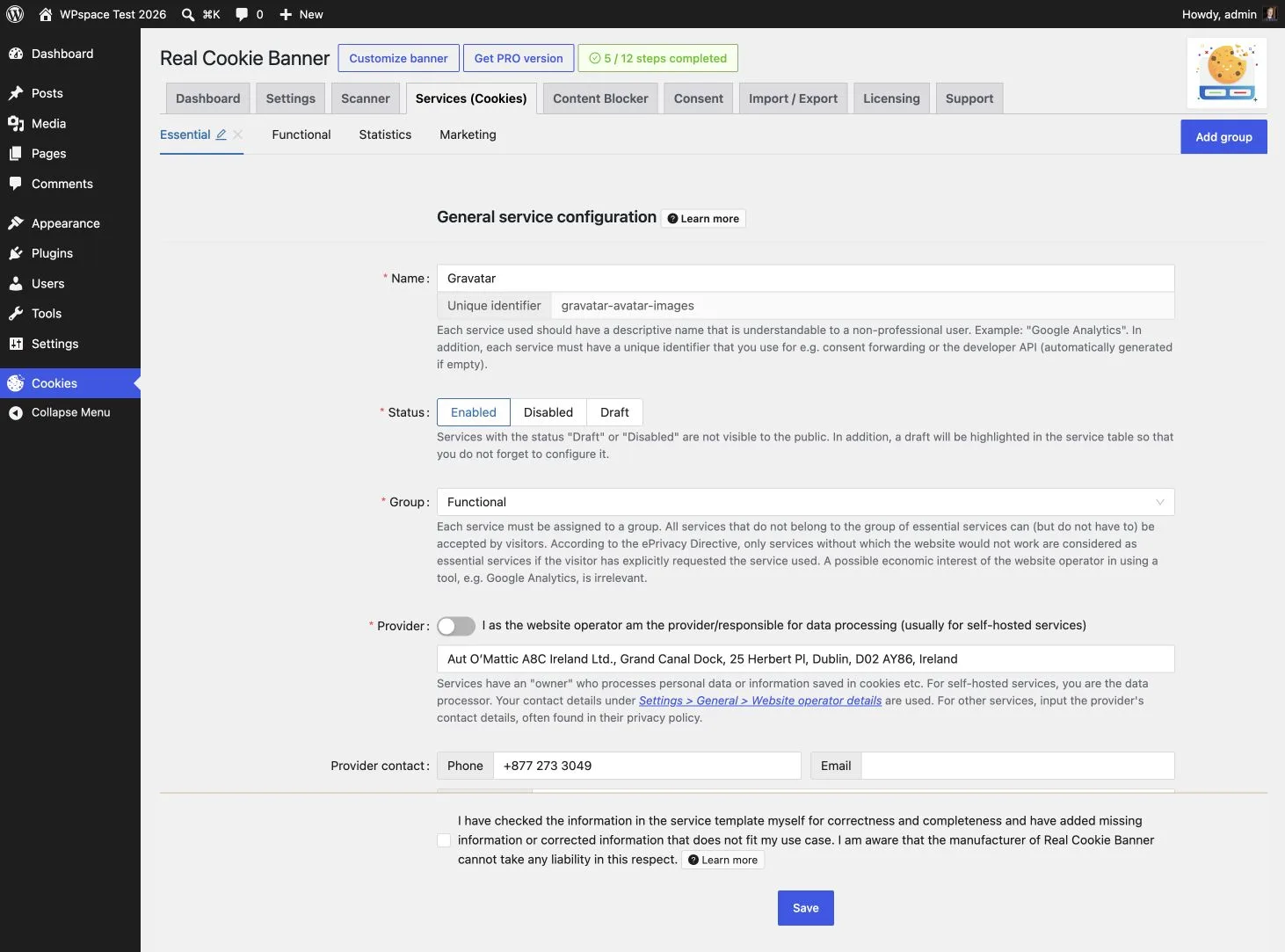
That saves a lot of research. You still shouldn't adopt the details blindly. That's why Real Cookie Banner requires an explicit confirmation before saving that the template fits your own website.
That's exactly how it should be. A template is a starting point, not an individual legal review.
The content blocker in practice
I was able to create a matching content blocker directly from the Gravatar template. The visual preview was enabled by default.
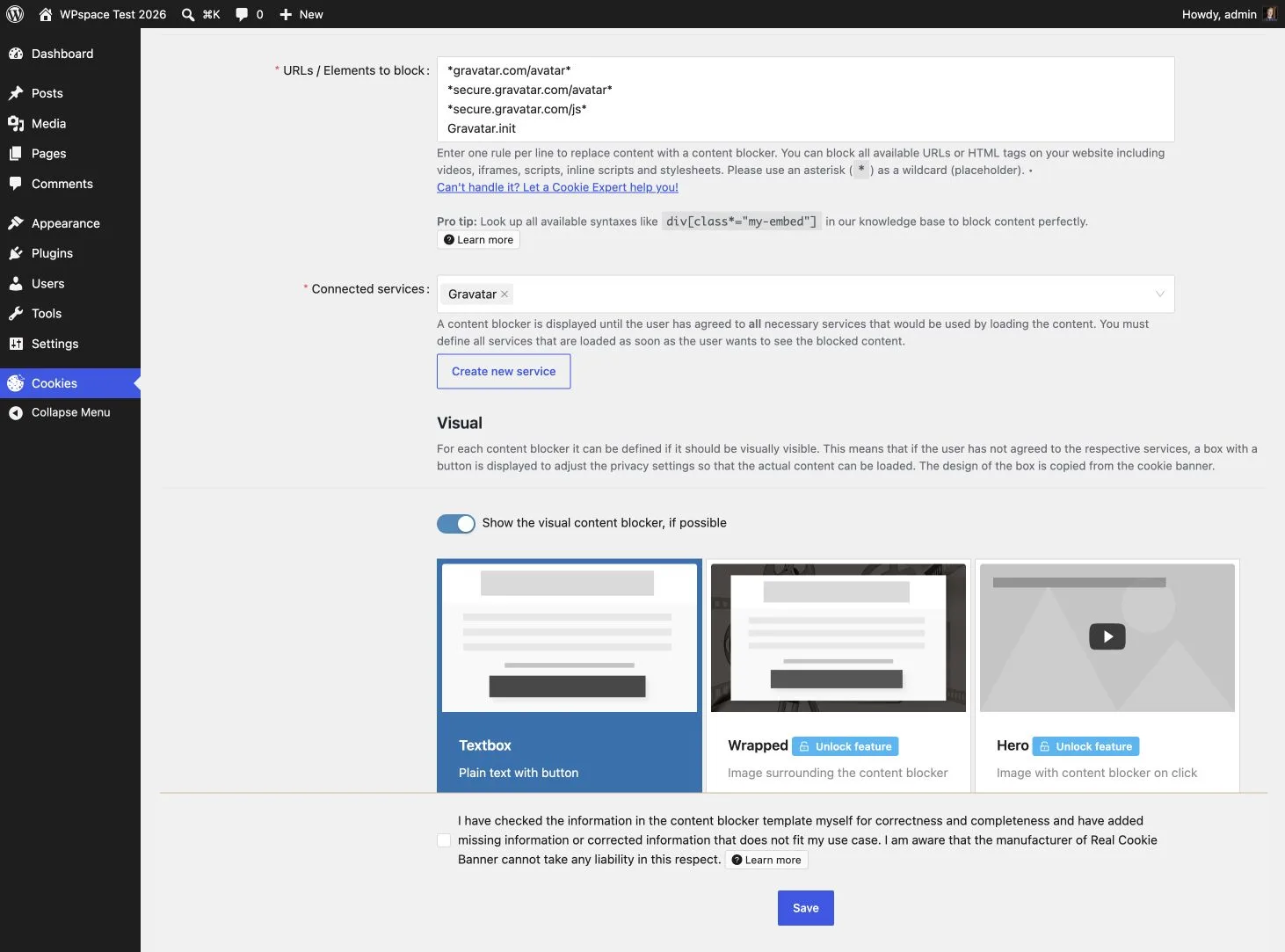
On the frontend, I then tested two cases:
- In the consent dialog, I chose “Continue without consent”. The banner disappeared, and Gravatar stayed blocked.
- Then I released Gravatar directly in the placeholder. The blocker disappeared and the content was loaded.
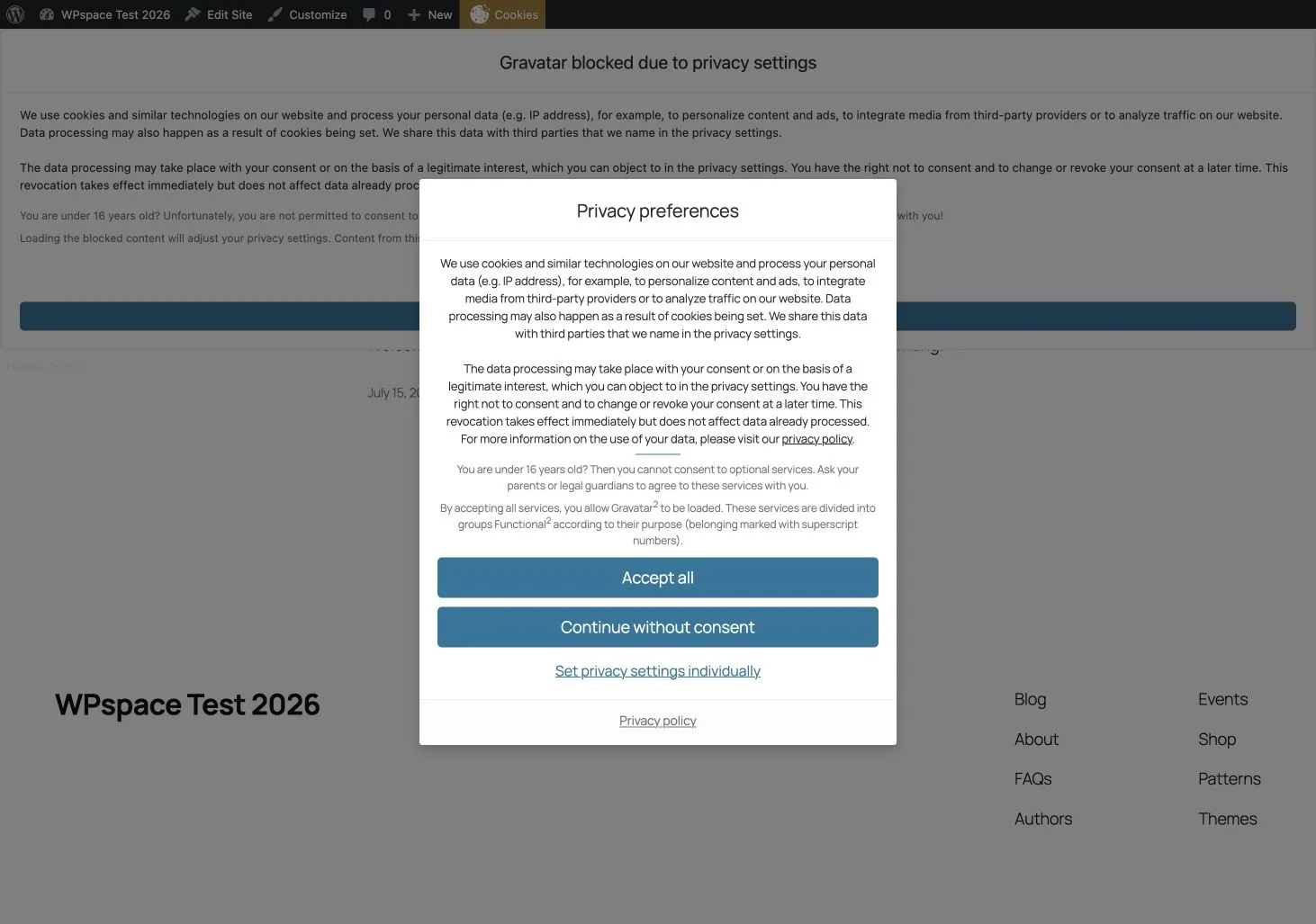
With that, the plugin passed the most important part of my practical test. The rejection was respected, and the targeted release worked without reopening the whole dialog.
Design editor with a real live preview
The banner is designed in the WordPress Customizer. The settings are on the left, and on the right I see the effects directly on the website.
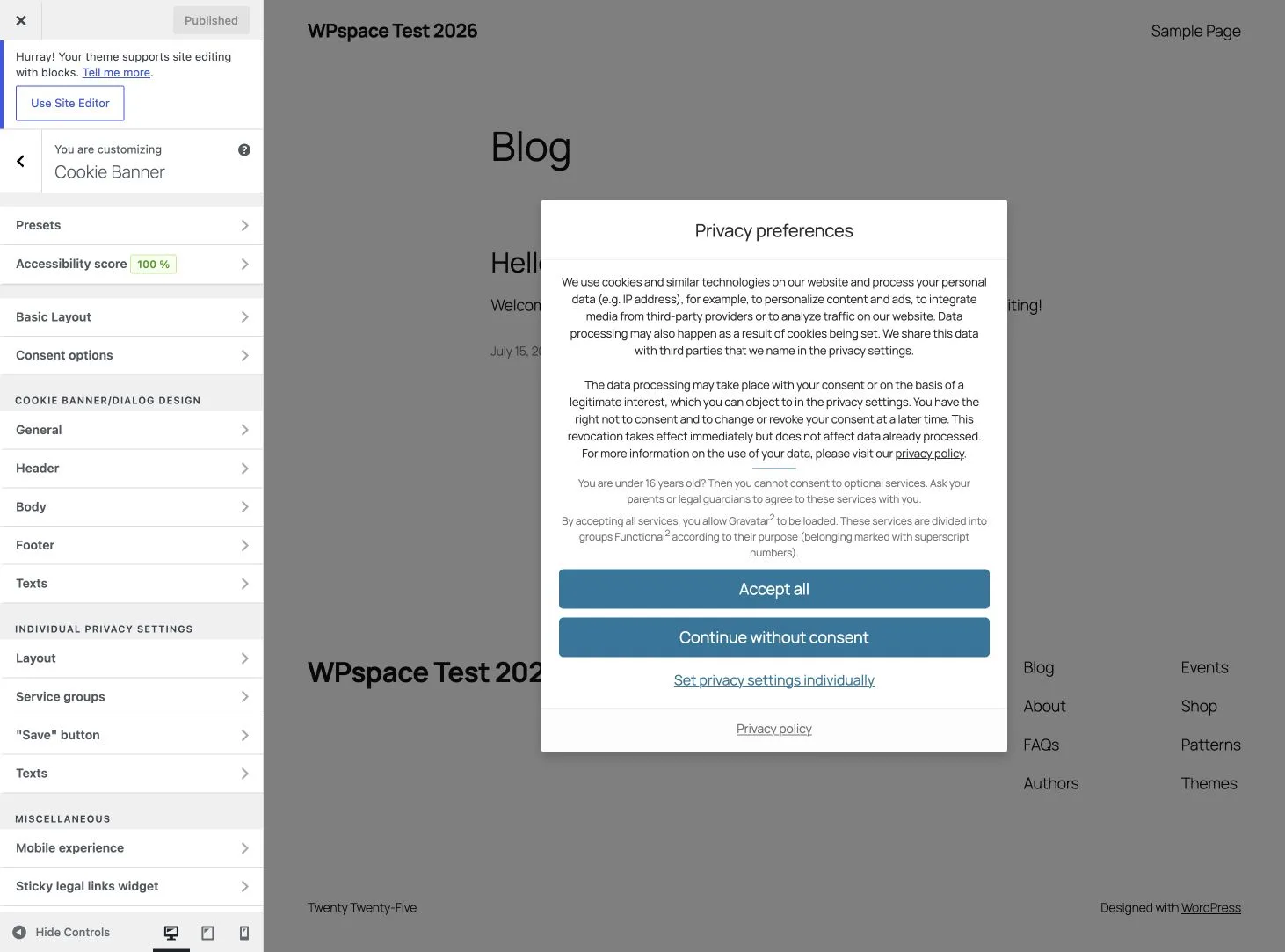
In the editor, you can customize these areas, among others:
- templates and basic layout
- buttons and consent options
- header, text, service groups, and footer
- mobile display
- permanently visible legal links
On my test site, the built-in accessibility check showed 100%. That is not a complete accessibility audit, but it is a helpful check for contrasts and the chosen design.
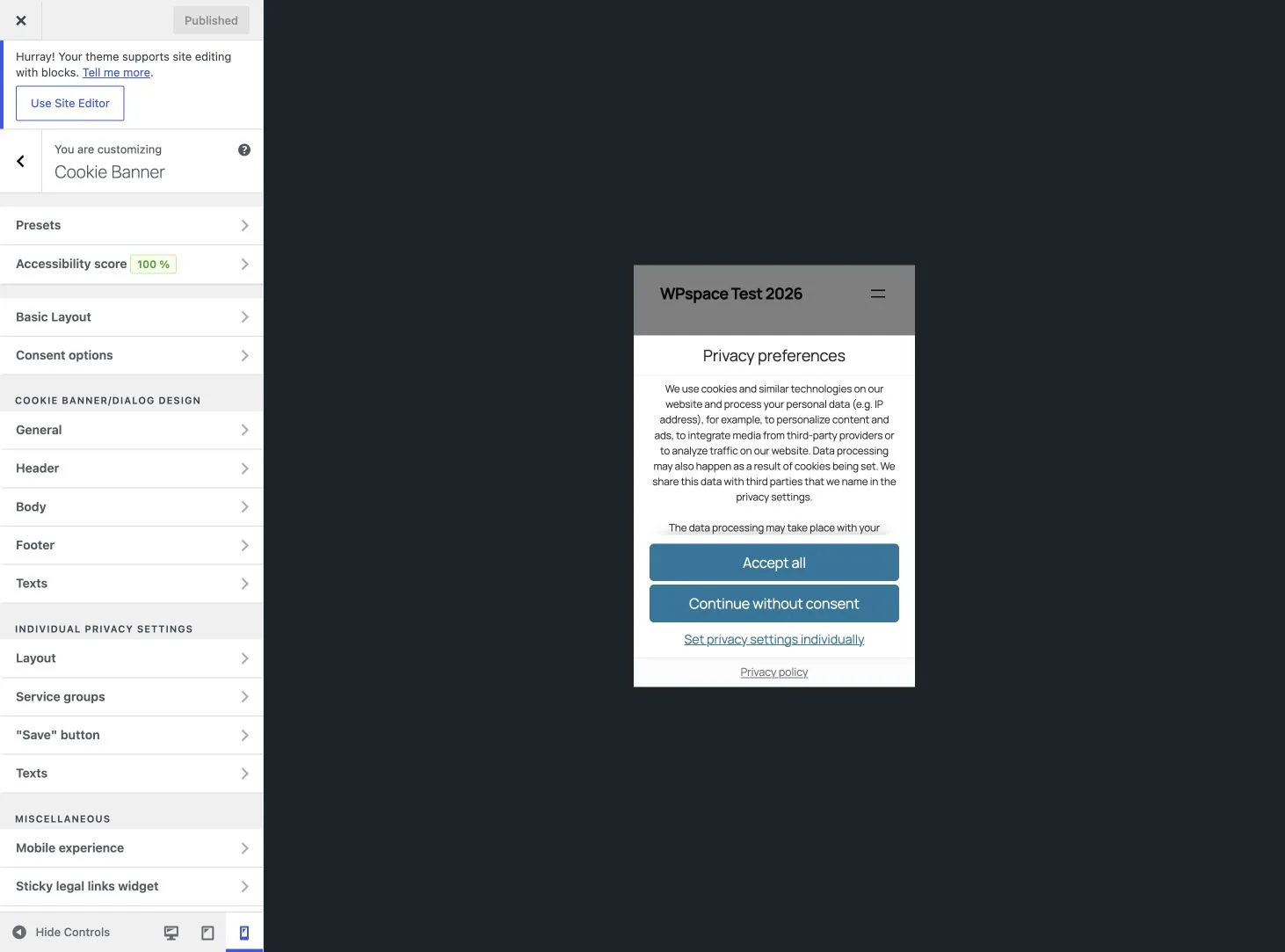
The mobile preview worked in the test as well. That matters because a banner that looks unobtrusive on the desktop can quickly cover the entire visible area on small displays.
Free or Pro?
An old version of this article claimed that the free version is limited to 50 consents per month. That is wrong.
In Real Cookie Banner Free, you can create an unlimited number of your own services and content blockers. However, you have to research and enter significantly more details yourself.
The Pro version mainly adds convenience and special features:
- most of the service and content blocker templates
- consent for unsafe third countries
- statistics
- advanced visual content blockers
- design templates
- IAB Transparency and Consent Framework
- Google Consent Mode v2
- geo-restrictions
- support for tag managers
- forwarding consents between websites
For a small website with few services, the free version can be enough. As soon as many external services, several websites, or special consent scenarios come into play, Pro saves considerable time.
Real Cookie Banner Pro pricing
Pro licenses are billed annually. All packages include the Pro features, updates, and premium support.
- Single: €59 gross per year for one website
- Starter: €89 gross per year for three websites
- Professional: €129 gross per year for five websites
- Business: €229 gross per year for ten websites
- Agency: €299 gross per year for 25 websites
According to the provider, each production website comes with an additional development or staging environment. The Single license therefore covers, for example, one live website and one test environment.
If you switch from a comparable solution, you can get the first year for €1 under the provider's current offer. You should check the conditions and duration of the promotion directly with the provider before buying.
Pros and cons
Pros
- very good guided setup process
- plausible scanner recommendations in the practical test
- more than 160 service templates
- more than 130 content blocker templates
- reliable blocking and targeted release on the frontend
- extensive design editor with live preview
- local storage of consents
- free version with no limit on consents
- German provider and German-language support
Cons
- many particularly useful templates are reserved for Pro
- scanner offers no guarantee of complete detection
- Service Cloud and updates require a license activation
- technical installation data is transferred to devowl.io for this
- Pro license runs as an annual subscription
My verdict after the practical test
Real Cookie Banner 5.2 made a very good impression in my test. Above all, the clear checklist, the detailed templates, and the content blocker that actually works set the plugin apart from simple banner solutions.
My most important criticism doesn't concern the blocking but the expectation placed on the scanner. It finds a lot, but not necessarily everything. If you install the plugin and never check anything again, you rely on a certainty that the vendor itself doesn't promise.
My recommendation is therefore a nuanced one:
- For small WordPress sites with few services, the free version is worth a serious test.
- For business websites with several integrations, Pro is usually the more sensible choice because of the templates and extra features.
- If you don't use WordPress, you need a platform-independent consent solution.
Among the pure WordPress solutions, Real Cookie Banner therefore remains one of the strongest options for me. Not because it takes every check off your hands, but because it explains the remaining work well and supports it cleanly on the technical side.
What alternatives are there?
The best-known direct WordPress alternative is Borlabs Cookie. Version 3 also offers a scanner, a package library, and powerful content blockers.
You'll find more WordPress solutions in my comparison of the best cookie plugins for WordPress. I compare platform-independent offers in the article on cookie consent tools.
Frequently asked questions
What can the free version of Real Cookie Banner do?
The free version supports an unlimited number of manually created services and content blockers. It isn't limited to a certain number of consents per month.
Many templates, statistics, geo-restrictions, and other convenience features do belong to the Pro version, though.
Does the service scanner find all cookies?
No. The service scanner is explicitly not a cookie scanner.
Among other things, it examines installed plugins, pages from the sitemap, and external resources in the HTML. It can miss unknown plugins or services that are only loaded later via JavaScript.
What are the system requirements for Real Cookie Banner?
Version 5.2.28 requires at least WordPress 5.9 and PHP 7.4. According to WordPress.org, it is tested up to WordPress 7.0.1.
Do the consents stay on my own server?
Yes. According to the provider, website visitors' consents are stored locally in your own WordPress installation.
For updates and the Service Cloud, however, the free version requires a license activation. This transfers technical installation data to devowl.io.
Does Real Cookie Banner work with WordPress Multisite?
Yes. The plugin supports WordPress Multisite. Forwarding consents between several websites is a Pro feature.
Does Real Cookie Banner make a website legally compliant automatically?
No.
The plugin provides tools for consents and the technical blocking of services. The right configuration and the legal assessment remain the responsibility of the website operator.





