You feel safe.
You're writing a new blog post. The birds are chirping and the sun is shining outside. Your espresso machine hums in the background.
What you don't notice:
Somewhere in the background, someone is trying to read one of your blog posts and only gets an error message. Or they leave your website in frustration because your load time is terrible.
And that doesn't happen just once, but a hundred or even a thousand times (if you get a lot of traffic).
Every single day.
In this article, I'll show you 12 deadly sins of WordPress SEO that you should avoid at all costs.
1. No redirect from www to non-www (or vice versa)
Take a look at these two URLs.
https://www.gradually.ai
https://www.gradually.ai
What you may not know:
Technically, these are two different domains (the part of the URL that is marked in bold), and in principle you could show different websites on each of them.
Since that is neither desirable nor sensible in 99.999% of cases, you should redirect the domain you don't use to the other one.
An example of why this matters:
My blog runs under the domain www.gradually.ai.
Now someone types www.gradually.ai without the www into the browser's address bar. If the two domains don't point to the same server or the same server directory, that person sees either an error page or a dummy page saying “A new web presence is being created here.”
Frustrated, they leave the site again, and you've lost a reader.
The error can have two different causes.
- The A records in the DNS entries for your root domain (
.www.gradually.ai) and the www subdomain (www.gradually.ai) point to two different IP addresses. - The root domain and the www subdomain point to two different server directories.
You can set this in the admin area of your host (or of your separate domain provider). If you can't find the relevant options, just ask your host whether they'll set it up for you.
2. No redirect for old permalinks
Many blogs are linked to by many big online magazines and other bloggers, but at some point changed their permalink structure and didn't set up redirects.
First, that means every visitor who arrives through the old links lands on a 404 page. Second, the link power gets lost, and your Google visibility suffers massively as a result.
So when you change your permalink structure (for example from /2017/10/02/post-xyz/ to /post-xyz/), make sure you add the matching redirects to the .htaccess file. This handy little tool from Yoast can help with that.
3. No redirect to the new domain
The last and worst redirect mistake is a missing redirect when you change domains (often along with a change of blog or company name).
Sadly, this one happens just as often as redirect mistakes 1 and 2, or maybe even more often (after all, you rarely change your permalink structure, and most hosts already take care of the redirect from www to non-www or vice versa).
It's bad for three reasons:
- No visitors arrive through direct input in the browser anymore
- No visitors arrive through links anymore
- All your Google rankings go down the drain
In some cases, the new blog can only be found through an elaborate Google search, which is a slap in the face for the blog's readers.
If you have your own domain, you can fix the error by adding one line to the .htaccess file in the root directory of your domain (please replace the URL in the example with your own!):
redirect 301 / https://www.deineneuedomain.deTo redirect a Blogspot blog to a WordPress blog, I recommend the plugin Blogger 301 Redirect (which doesn't create real 301 redirects, but still works well).
To redirect a WordPress.com blog, you have to buy the paid add-on Site Redirect for 13 USD a year. #bettertohostyourself
4. Search engine access blocked
When people install WordPress fresh or set up their blog from scratch and create a test installation under a different blog URL for it, they often tick the box “Suchmaschinen davon abhalten, diese Website zu akzeptieren.” (“Discourage search engines from indexing this site”, found in the WordPress admin area under Einstellungen > Lesen > Sichtbarkeit für Suchmaschinen, i.e. Settings > Reading > Search engine visibility).
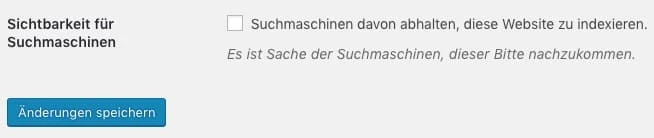
That's all well and good. The problem is when you forget to untick the box again and your website doesn't show up in Google search results for days or weeks.
That has happened to me once, too, and it cost me around 3,000 visitors, because my blog wasn't listed on Google for a week.
5. Broken design (e.g. caused by minify or caching plugins)
What I also see quite often are blogs whose design is broken by minify or caching plugins. It has happened to me quite a few times, too.
The damage ranges from sidebars that appear below the article instead of next to it, through broken menus, to blogs that show no content at all, just a white page. I probably don't need to explain to anyone why that isn't great.
A broken design often goes unnoticed for days, because with many caching or minify plugins the changes aren't shown when you're logged in to WordPress.
You can fix the resulting problems by adjusting the plugin settings, e.g. by excluding certain JavaScript or CSS files from caching or minifying, or by deactivating incompatible plugins.
6. Poor Core Web Vitals
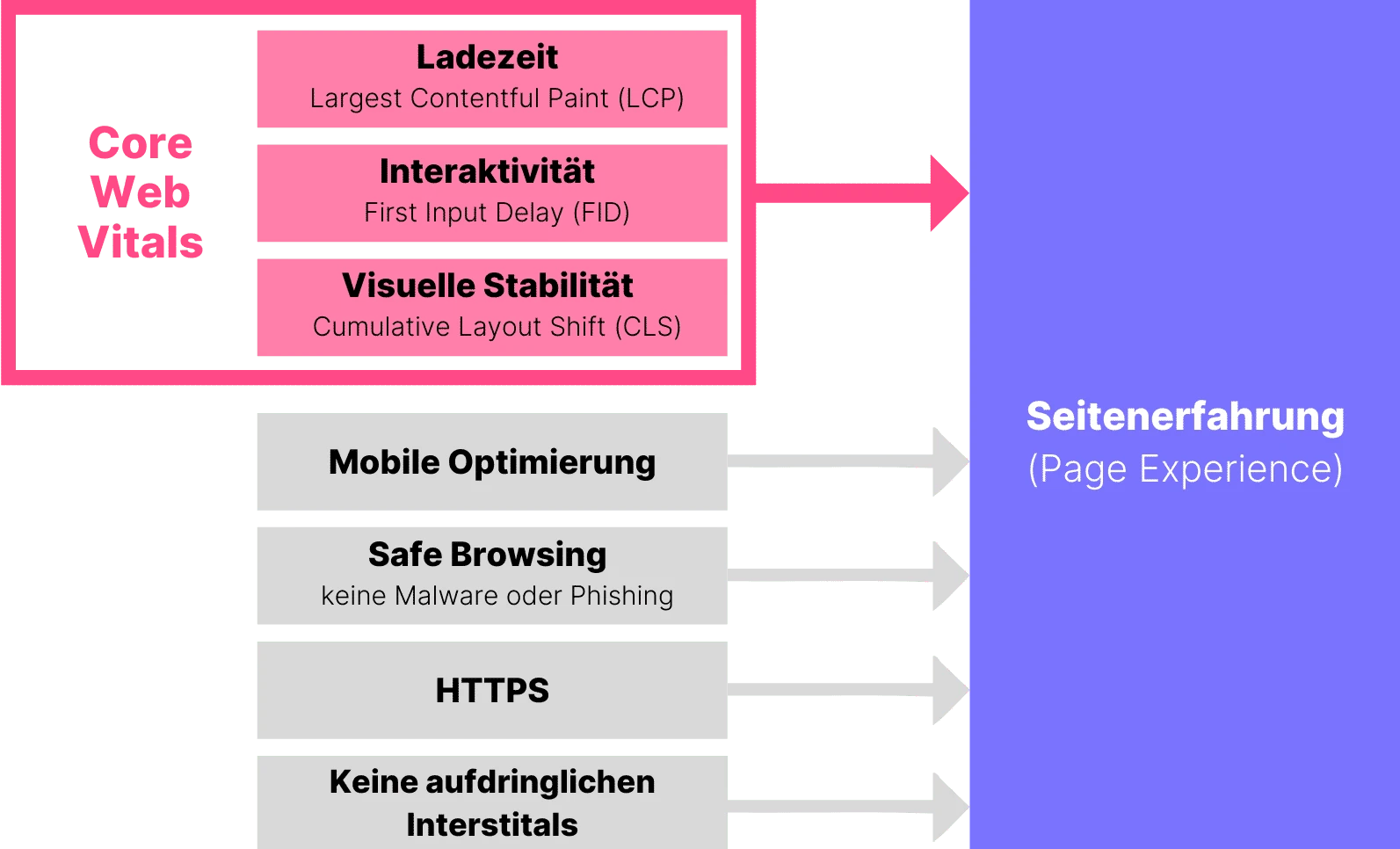
The Core Web Vitals are meant to help rate the user experience of a web page better.
They are expected to be integrated into the Google algorithm from mid-June 2021 and consist of the following three components:
- Largest Contentful Paint (LCP): Measures the “perceived” load time of a web page
- First Input Delay (FID): Measures the interactivity of a web page
- Cumulative Layout Shift (CLS): Indicates how much the page layout shifts while loading.
As a ranking factor, they join various existing factors for evaluating the page experience, such as mobile usability or HTTPS:
Everything you need to know about the Core Web Vitals, e.g. how to measure them properly and how to optimize your WordPress website for them step by step, I've put together in my ultimate guide to the Core Web Vitals.
The most important measures include, for example, installing a caching plugin, enabling gzip compression, compressing images (e.g. with ImageOptim or the EWWW Image Optimizer), and deactivating unnecessary plugins.
7. No HTTPS
HTTPS has been a ranking factor since August 2014. It's one of the few that Google communicates so openly.
Even today, HTTPS is still a ranking factor for Google, if only a light signal, as the announcement about the Core Web Vitals showed.
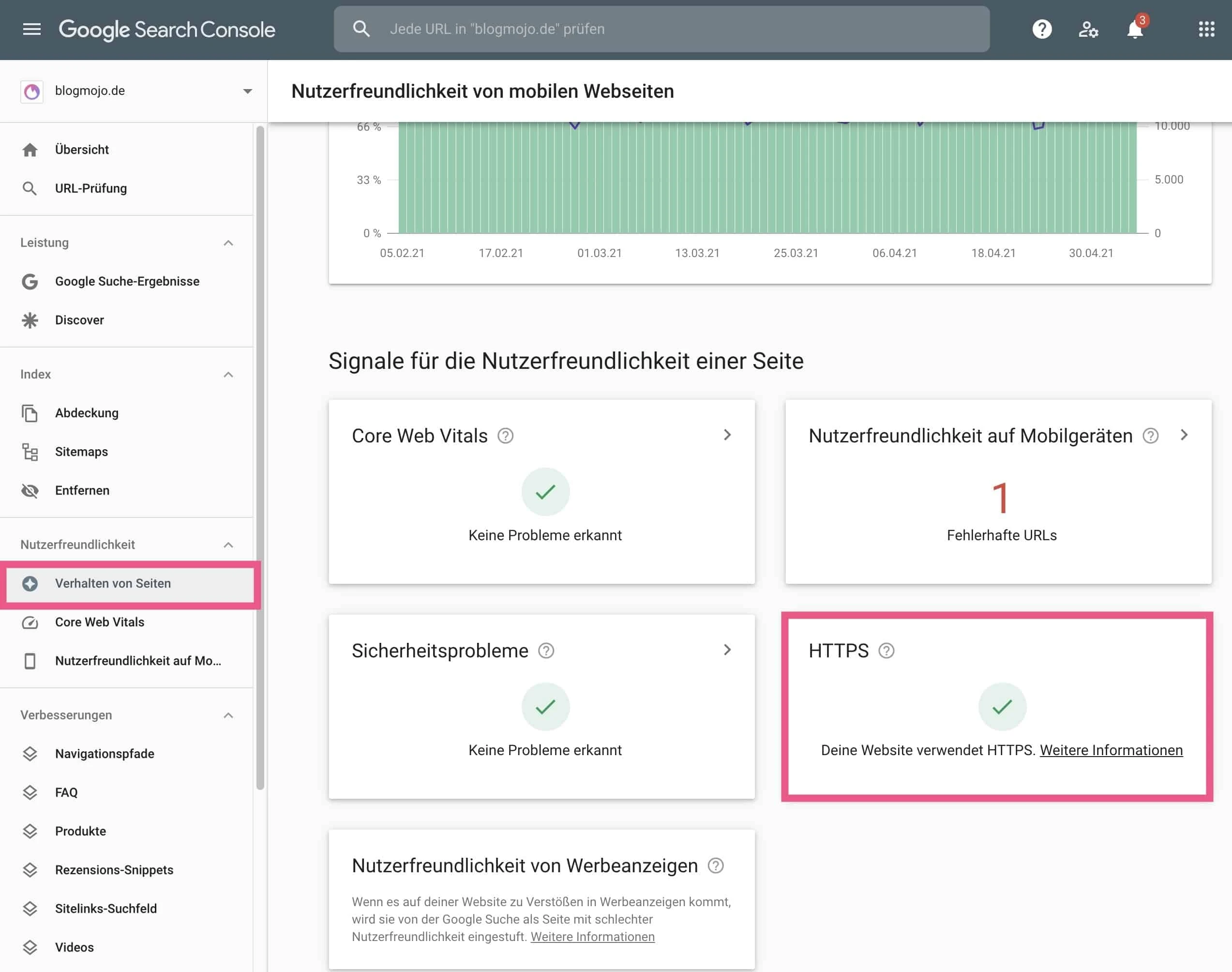
Since April 2021, you can also check whether there are problems with HTTPS on your website using the new Page Experience report in Google Search Console (in the sidebar under Verhalten von Seiten, i.e. page behavior):
There's another compelling reason to use an SSL certificate:
The most widely used (desktop) browsers brand unencrypted websites:
In Firefox, for example, forms or login pages without HTTPS are shown as not secure:

For Chrome, HTTPS is the new standard. All websites without HTTPS are shown as not secure:

If you haven't switched to HTTPS yet, take a look at my comprehensive guide on it: How to switch WordPress to HTTPS in a few simple steps
8. Your website is not self-hosted
Of course, it's much easier to create your blog or website on WordPress.com or Blogger.
You can start writing right away and don't have to learn about hosting, WordPress, FTP servers, etc. beforehand.
The price is a rude awakening later, when you want to do a bit more with your blog than just publish blog posts:
- You can't customize your design the way you'd like
- You can't use your own themes
- You can't install plugins and can only extend your blog with new features to a limited degree
- You can't change anything in the server settings
- You can't access your files via FTP
- You're tied to one platform and can't switch hosts without a lot of effort
On top of the technical limitations, some blog services such as WordPress.com are free in the basic version, but if you want your own domain, extra features, or more storage, you pay a good deal more.
Advanced SEO features and removing the WordPress.com branding, for example, require the Business plan, which costs a whopping €25 per month.
Good hosting incl. a domain, without branding and with SEO features, starts at €5 per month. You'll find a market overview and detailed test reports on German hosting providers in my web hosting comparison.
Please take the step and host yourself. It pays off eventually. Scout's honor!
9. Not easy to read on all devices or browsers
It happens less and less often, but I still see them every now and then: blogs or websites that aren't optimized for mobile devices and only offer a desktop version.
If that applies to you, please drop everything and make sure your blog becomes “responsive” (the easiest way is a new theme).
Even if your blog is already responsive or has a mobile version, you should test again on various smartphones and tablets as a precaution to see whether everything displays correctly. You can do that quite easily in Google Chrome through the developer console.
The same, by the way, does not apply to different resolutions and devices. Your blog should also be optimized for different browsers. On my MacBook, besides Safari, I always keep Google Chrome, Opera, and Firefox installed to check whether my blog also looks good in other browsers.
10. No backups
I back up absolutely all the data I use every day. That includes not only WordPress files and databases, but also all the files on my computer and my emails.
Why?
Because I've messed up databases several times, deleted files by accident, or had my computer die on me. And sometimes it took me days, or once even a whole week, to restore everything.
And that can happen to you at any time, too. WordPress websites, for example, get hacked more often than you'd think. WordPress 4.7.0 and 4.7.1, for example, had a hole that made it possible for attackers to smuggle content into posts. Through this hole, early on hundreds of thousands of WordPress blogs were hacked.
A good host naturally also makes backups for its customers. According to a 2014 ruling of the Regional Court of Duisburg (LG Duisburg), it is also obligated to do so.
That you can't rely on this was shown, for example, by the fire at two data centers of the French host OVH in March 2021.
I described how to create a WordPress backup in detail in this guide.
11. Bad host
You can get a hosting package incl. a domain for as little as €1.00 per month.
But if you choose your host based on price alone, you end up paying more in the end. And not just through poor load times and availability, but also through slow or incompetent customer support.
If your website is down and your host takes more than an hour to get the problem under control, or at least to respond to your request, you should switch hosts right away. Believe me, it saves you a lot of stress when you know you can rely on your host in an emergency.
In general, I advise against mass hosts such as Strato, 1 & 1, DomainFactory, or One.com. The hosts I can recommend without reservation, and with whom I'm a customer myself (in some cases for years), include:
You'll find a market overview and detailed test reports on German hosting providers in my web hosting comparison.
You'll find managed WordPress hosts, which offer more convenience features and take administrative WordPress tasks off your hands, in my WordPress hosting comparison.
12. No SEO for images
One more mistake I'd like to cover briefly is unoptimized images.
I already touched on the point in the “Long load times” section, but image optimization goes further than that.
Images should not only be compressed as far as possible (without hurting quality, of course) and delivered at the right scale, but also be optimized for search engines.
First, that means choosing a descriptive file name for the image (ideally with a keyword), so not 979298jk.jpg but the-best-hiking-backpack.jpg. Second, you should fill the alt tag and the title tag of your images and describe the image in them as well as you can.
First, this gets your images better placements in Google Image Search, and second, it also gets your pages and blog posts better rankings.
On top of that, it means blind people can benefit from the content of your images too, since they often use screen readers that read out the file name or alt tags. Keyword: accessibility!





