
I've been working with WordPress since 2011. This website ran on it for many years, too.
Still, I've since moved two of my websites away from WordPress. One of them now runs on Astro.
Maybe you've heard of Astro as well and are wondering whether switching is worth it for your blog.
The short answer:
Often yes, but not for everyone.
In this article, I show you how WordPress and Astro differ, what I measured on the same website in both systems, how you write articles without a dashboard, and what each of them costs.
- For blogs and other content websites, I recommend Astro. Out of the box, it delivers finished HTML without JavaScript, stores your content as files, and needs no database.
- WordPress remains the better choice if you want to do everything in a dashboard, if several people without technical knowledge write, or if you need a shop or a members area.
- You don't have to do the move by hand. My WordPress Migration Skill transfers your content to Astro with Claude Code or Codex and checks that no URL gets lost.
1. In short: Astro for blogs, WordPress for point-and-click ease and shops
Here is my answer before we get into the details.
Do you run a blog, a magazine, a company website, or a portfolio, and are you fine working with files and an AI agent like Claude Code? Then go with Astro. Astro is built for content-heavy websites and sends no JavaScript to the browser out of the box.
Would you rather click your text, images, and features together in a dashboard? Or do you need a shop with a shopping cart, a members area, or a forum? Then stay with WordPress. Astro has no official solution for login, and you connect a shop there through external services.
My own websites show both paths:
- faminino.de: A family blog. It ran on WordPress first, then on Next.js, and has been on Astro since October 2026.
- gradually.ai: My AI blog. Launched in June 2025 with Next.js, on Astro since September 2026.
- blogmojo.de: This website. I moved it from WordPress to Next.js. A course area with login and 38 tools hang off it.
Yes:
For a pure blog, I would pick Astro today.
2. What sets WordPress and Astro apart
WordPress and Astro solve the same task in two completely different ways. Both are suitable for content-focused websites like blogs.
2.1 WordPress
WordPress is a content management system, or CMS for short. That is software that runs on a server, stores your content in a database, and assembles every page from it. Why does that matter? Because you need hosting with PHP and a database, and you have to update the software regularly.
You edit everything in a dashboard in your browser. If a feature is missing, you install a plugin. The official directory has over 75,000 free ones.
WordPress is open source and by far the most widely used CMS. According to W3Techs, 38.5% of all websites run on it. The current version is WordPress 7.1.4 from October 28, 2026.
2.2 Astro
Astro is a web framework. That is a toolkit made of code that you (or an AI agent like Claude Code) use to build a website. Why does that matter? Because out of the box there is no dashboard and no database. Your articles live as files in the project, usually as Markdown.
From these files, Astro generates finished HTML pages. JavaScript only ends up in the browser if you explicitly switch it on for individual components.
The current version is Astro 7.4, released on October 15, 2026.
2.3 The differences at a glance
| WordPress | Astro | |
|---|---|---|
| Type | CMS with dashboard | Framework made of code |
| Content lives in | Database | Files in the project |
| Editing | In the browser | In a code editor or via AI agent |
| New features | Plugins | Code or external services |
| Hosting | Server with PHP and database | Static files, almost anywhere |
| JavaScript in the browser | Depends on theme and plugins | None out of the box |
3. Speed: What I measured
You read everywhere that Astro is supposed to be faster than WordPress. I wanted to know more precisely.
To find out, I built a small WordPress demo with 8 posts and 3 pages and moved it to Astro with my migration skill. Both versions show the same content. Then I loaded the same post three times in each system and counted what the browser requests for it.
This is what the post looks like in WordPress and in Astro:
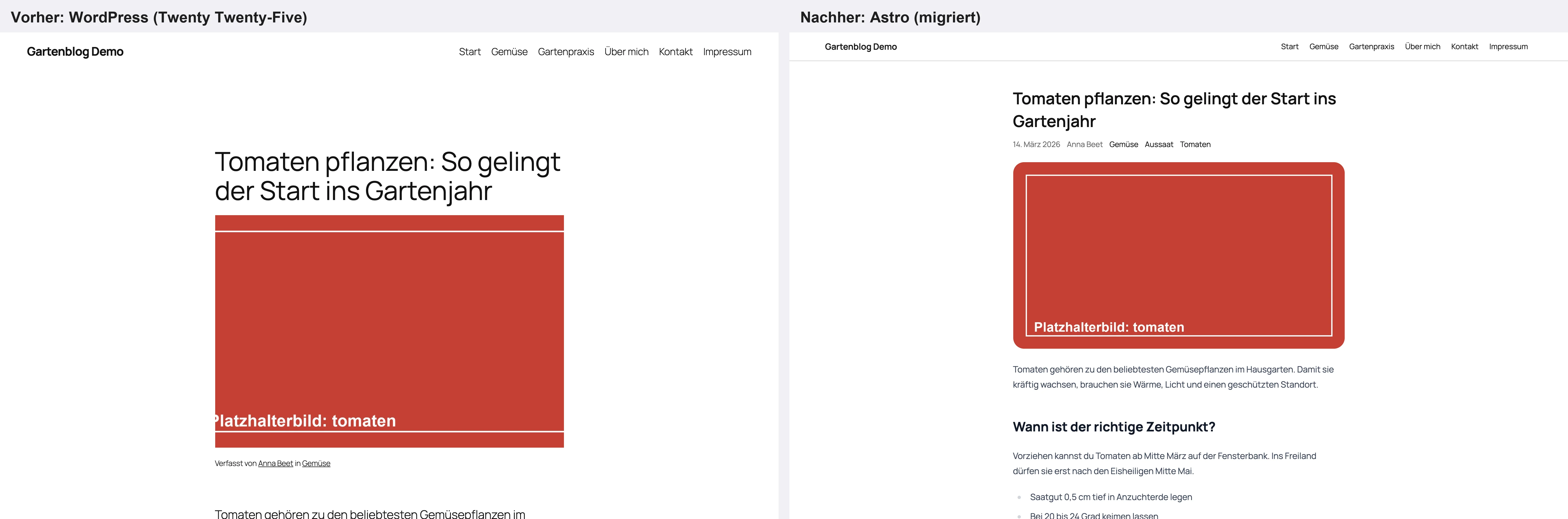
And these are the measurements:
| Metric | WordPress | Astro |
|---|---|---|
| JavaScript files | 8 | 0 |
| JavaScript (uncompressed) | 114 KB | 0 KB |
| HTML (uncompressed) | 82 KB | 16 KB |
| Total requests | 14 | 5 |
Measured on November 16, 2026, on a local demo with WordPress 7.1.4 and Astro 7.4.12, median of three runs.
So the WordPress demo loaded eight JavaScript files even though the post consists only of text and images. Two of them belong to Contact Form 7. In my demo, that plugin loads its JavaScript even on pages that have no form at all.
That said:
My demo is a very lean WordPress site. It uses the default theme Twenty Twenty-Five and only two active plugins. A WordPress site with a page builder and lots of plugins usually loads more.
The HTTP Archive data shows how big the difference is on the real web. Every month, the project evaluates how many websites per system pass Google's Core Web Vitals. The Core Web Vitals are three metrics for loading time, responsiveness, and layout stability.
Websites with good Core Web Vitals (mobile)
Share of measured websites per system, October 2026 (latest month of the Core Web Vitals Technology Report when retrieved on November 17, 2026).
In October 2026, 72.2% of the measured Astro websites passed the Core Web Vitals on mobile. For WordPress, it was 49.0%.
Don't get me wrong:
You can get WordPress fast, too. I show you how in my guide how to speed up WordPress. With Astro, though, you get the lean site out of the box, while with WordPress it depends heavily on theme, plugins, and hosting.
4. Security and maintenance
WordPress needs care. The core, the theme, and every plugin get updates, and you should install them promptly.
Patchstack's security report shows why that matters. In 2025, 11,334 new vulnerabilities were found in the WordPress ecosystem. 91% of them were in plugins, only 6 in the WordPress core.
So the risk lies less with WordPress itself than with what you install on top of it. How to secure your site is covered in my article on WordPress security.
A static Astro site offers less attack surface. What gets delivered are finished files, and the server runs neither a database nor a login.
Astro isn't maintenance-free either. There, too, you update new versions and packages. The HTML files already delivered don't change as a result, though, until you rebuild the site.
5. How you manage content in Astro
For most people, this is the biggest difference. In Astro, there is no dashboard where you click “Create post”.
You have two ways.
5.1 With Markdown files
The standard way is Markdown files. Markdown is plain text with a few characters for headings, lists, and links. Every article is a file in your project.
Astro manages these files in so-called content collections. These are folders with fixed rules for which details every article needs, for example title, date, and description. If a detail is missing, Astro reports it when building the site.
This is how a new article comes about:
- Create a new Markdown file in the content collection folder.
- Enter the title, date, and description at the top of the file.
- Write your text below it.
- Rebuild the site and publish it with your host.
Sounds cumbersome?
The good news:
You don't have to type this yourself. With Claude Code or Codex, you say in plain language what you want, and the agent creates the file, embeds images, and publishes the change.
5.2 With headless WordPress
Do you want to keep the WordPress dashboard? That works, too. You keep writing in WordPress, and Astro pulls the content from there. This is called headless WordPress.
Astro has its own guide for this. It uses the REST API that WordPress already ships with, so you don't need an additional plugin.
The catch:
You then run two systems instead of one. WordPress still needs hosting, updates, and protection. For a single blogger, that rarely pays off. It makes sense if several people without technical knowledge are supposed to write.
6. What does WordPress cost, what does Astro cost?
Both systems are open source and cost nothing as software. Hosting and extras cost money.
6.1 WordPress
For WordPress, you need hosting with PHP and a database. You can see what that costs in my WordPress hosting comparison.
On top of that, there are often premium plugins and themes. Yoast SEO Premium, for example, costs €118.80 per year excluding VAT.
6.2 Astro
A static Astro site consists only of files. At Cloudflare, requests for static files are free and unlimited. At Vercel, the free plan is intended only for personal, non-commercial use. Commercial projects need the Pro plan.
| Item | Price |
|---|---|
| WordPress (software) | €0 |
| Astro (software) | €0 |
| Yoast SEO Premium (example of a premium plugin) | €118.80 per year excl. VAT |
| Cloudflare Workers Free | $0, static files unlimited |
| Cloudflare Workers Paid | from $5 per month |
| Vercel Hobby (non-commercial) | $0 per month |
| Vercel Pro | $20 per month |
As of November 2026
In my assessment, Astro is usually cheaper to run. In return, you have to build the site once, or have it built, instead of installing a theme.
7. How to decide
The decision depends less on the technology than on what your website is supposed to do and how you want to work.
7.1 You run a blog or a content website
Then Astro fits if you can answer these three questions with yes:
- Your content is public, with no login and no shopping cart.
- You write alone or with people who can work with files.
- You are willing to work with Claude Code or Codex instead of a dashboard.
If you answer the second or third question with no, stay with WordPress or choose headless WordPress from section 5.
7.2 You run a shop or a members area
Then Astro isn't the first choice. There is no official solution for login, and payment runs through external services like Lemon Squeezy, Paddle, or Snipcart.
Here you have two better options. You stay with WordPress and WooCommerce, which has over 7 million active installations. Or you switch to Next.js, which is built for websites with login and checkout. You'll find more in my comparison WordPress vs. Next.js.
| Your website | My recommendation |
|---|---|
| Blog, magazine, company website, portfolio | Astro |
| Blog with several authors without technical knowledge | WordPress or headless WordPress with Astro |
| Shop with shopping cart | WordPress with WooCommerce or Next.js |
| Members area, courses, forum | WordPress or Next.js |
If you're still torn between the two frameworks, my comparison Astro vs. Next.js helps.
8. Moving from WordPress to Astro
Have you decided on Astro? Then comes the tricky part. During a move, old URLs, redirects, or SEO titles get lost easily.
For the manual route, Astro recommends the tool wordpress-export-to-markdown. It converts your WordPress export into Markdown files, which you may still have to rework afterward.
It's easier with my WordPress Migration Skill. The skill runs in Claude Code or Codex. It captures your public WordPress site, transfers content, menus, images, forms, SEO data, and redirects, and checks before the switch that no content is missing and no URL leads nowhere.
The WordPress Migration Skill costs €247 plus VAT, one-time. If you don't want to do anything yourself, I'll also handle the move for you completely, from €5,000 plus VAT.
You'll find all 12 steps with screenshots in my guide moving from WordPress to Next.js or Astro.
And if Astro isn't for you after all, my overview of WordPress alternatives also covers website builders and other CMSs.
9. Conclusion
WordPress isn't a bad system. It's just more than many blogs need.
If your website consists mainly of articles and pages, Astro gives you lean pages out of the box, and you can host them for free at Cloudflare. In return, you give up the dashboard and the plugins.
If you love exactly those two things, or you run a shop or a members area, stay with WordPress.
For my own blogs, I've made my decision. Two of them run on Astro.
Frequently asked questions
Is Astro better for SEO than WordPress?
Not automatically. You can get titles, descriptions, redirects, and structured data right with both systems. Astro has the advantage that its pages are lean out of the box. In October 2026, 72.2% of Astro websites passed Google's Core Web Vitals on mobile, compared with 49.0% for WordPress.
Can I keep using my WordPress plugins in Astro?
No. WordPress plugins only run in WordPress. In Astro, you build features like forms, search, or newsletter sign-up with code or connect an external service.
Does Astro have its own CMS?
No, out of the box your content lives as files in the project. But you can connect a CMS. The Astro docs have their own guides for this, including one for WordPress as a headless CMS.
Can I use WordPress and Astro at the same time?
Yes. You keep writing in the WordPress dashboard, and Astro pulls the content through the WordPress REST API. That means you run two systems, though.
Do I need to know how to code to use Astro?
You don't have to write code yourself if you work with an AI agent like Claude Code or Codex. You should be willing to work with a project folder and a terminal, though.





