
SEO has changed massively over the years.
It has long since stopped being enough to put lists of hundreds of keywords under your texts, mention a keyword often in the text or submit your website to 100 web directories to grab top positions on Google.
SEO has rather developed into a holistic marketing discipline in which search engine users are moving more and more into the foreground and in which there are fewer and fewer shortcuts.
This trend continues in 2026. Helpful content, a clean technical foundation and demonstrable experience are more important than mechanical keyword repetition.
Then there's AI search. With AI Overviews and AI Mode, Google answers many questions directly in the search results. The good news: according to Google, you don't need any special treatment for it. What works is still good SEO. I go into this in tip 5.
In this article I've put together 32 SEO tips for you that you should implement if you want to improve your Google ranking this year and beyond.
- SEO is a marathon, not a sprint. Patience and continuous optimization matter more than quick tricks
- Fulfilling the search intent of your target audience and creating valuable content is more important than keyword density or technical gimmicks
- Use free tools like Google Search Console and invest in good keyword research to achieve better rankings systematically
1. Don't give up so quickly!
The results of some SEO measures show up within a few weeks, days or even hours.
You'll find a few examples (and counterexamples) in my article How long does SEO really take (incl. 6 examples)?.
Still, the general rule is:
SEO is a marathon, not a sprint.
I'm not saying that to discourage you. What I want to tell you is this:
Give SEO time. Don't throw everything away right away if you don't see results after a certain time.
In the decade I've been doing SEO, I've seen hundreds of competitors come and go.
Some left because they got impatient and looked for shortcuts (e.g. buying links, redirected expired domains etc.).
And you can imagine where that led in the medium or long term...
Others left because they simply gave up. For example, because they dropped from position 1 to position 5 for their most important keyword, or because their entire website was once downgraded by a Google update.
Don't be like them. Analyze what your competition does better and adjust your approach. And if your adjusted approach doesn't get you back to position 1 either, adjust it again.
In the search results, those with the longer breath win.
2. Write for search engine users
I can't stand hearing sentences like these anymore:
“I don't do SEO, because I write for people and not for Google.”
“SEO is keyword stuffing, I can't do that to my readers.”
Sorry, but that's bullshit.
Writing for Google and people is not a contradiction (if you do it right).
Google's goal isn't to have thousands of SEO niche sites in the top positions either. It wants to show users the best possible content and offer the best possible user experience.
Keyword stuffing, meaning using the same keyword in every other sentence, is certainly not part of that.
In short:
Don't write for Google. Don't write for users. Bring both together and write for search engine users.
Which brings us to the next tip:
3. Fulfill search intent
Have you ever been in first or second place on Google? And then dropped back to positions 5-10 after a few days or weeks?
Then most likely you didn't give search engine users what they were looking for.
You didn't fulfill their search intent.
To measure how well a page fulfills search intent, Google probably uses at least one of the following two metrics:
- Back-to-SERP rate, meaning the share of users who click on a page and then return to the search results.
- Dwell time, meaning how long users stay on a page.
So for every page or blog article you optimize for search engines, ask yourself:
- What are the most pressing questions of users who type a certain keyword into Google?
- What goals and wishes do they have?
- What problems or worries are they looking for a solution to?
- Which aspects of the problem or topic interest them the most?
Also look at which pages are on the first page of Google for a keyword and let them inspire you. Because those are the pages that, in Google's eyes, fulfill the search intent best!
The first 10 results don't just help you answer the 4 questions above, they also contain a lot of other useful information, such as:
- What type of page do users expect (e.g. a detailed blog article, an online store, a price comparison)?
- How long does the content have to be?
- How does the content have to be structured?
- What do users want to see first?
- How do users want to be addressed?
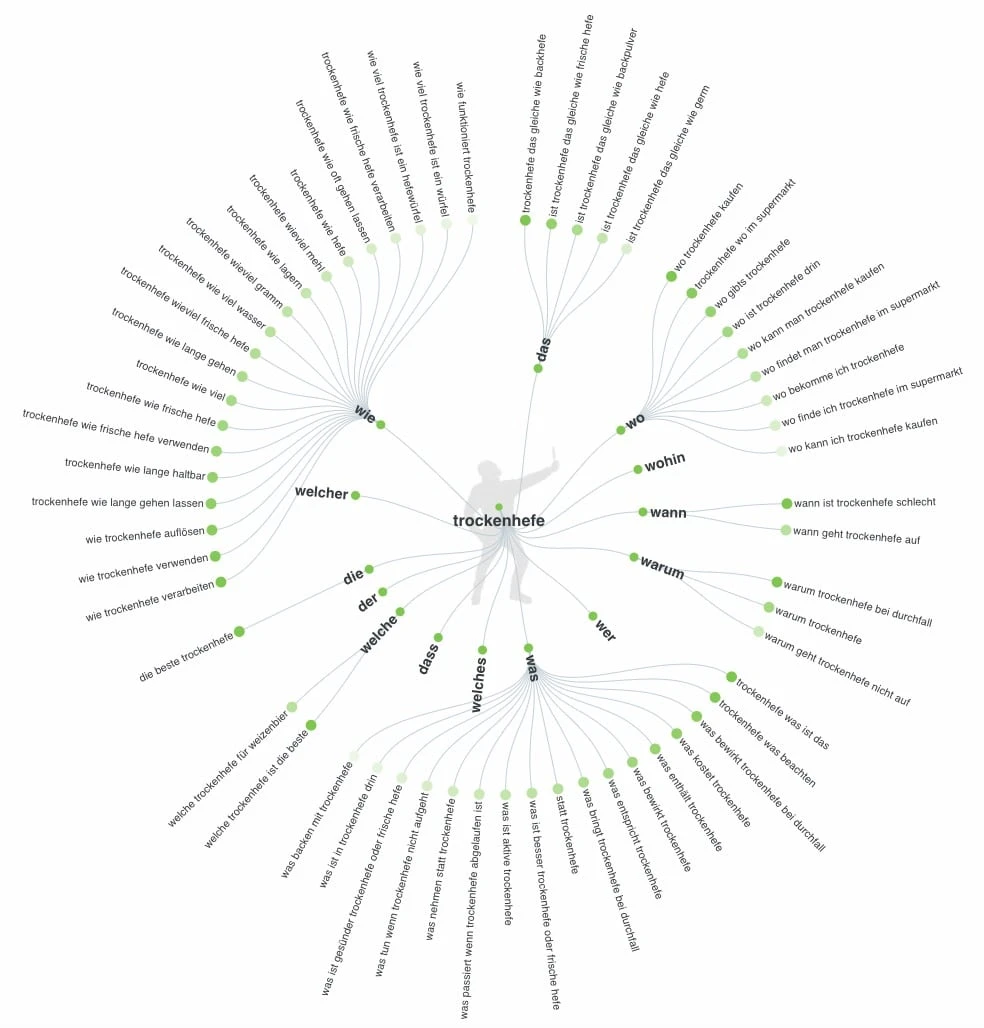
The tool Answer The Public can also help you find out the search intent for a keyword, by the way.
It shows you, in a graphical layout, all the questions users type in for a certain keyword.
That way you find out which subtopics you need to cover in your text:
4. Improve your E-E-A-T
Relevance isn't everything.
Google wants to show helpful and trustworthy content in the search results. How much demonstrated experience or expertise is required depends on the topic and the search intent.
The concept behind this is called E-E-A-T (Expertise, Experience, Authoritativeness, and Trustworthiness) and became known through Google's Search Quality Rater Guidelines.
E-E-A-T is not a single measurable ranking factor. The quality raters use it to assess whether search results match the quality characteristics described by Google. Their individual ratings do not feed directly into the ranking of a specific page.
So you shouldn't optimize a supposed E-E-A-T score. Instead, show demonstrable experience, name qualified authors, back up important statements and make it transparent who is responsible for the website and its content.
The following factors, for example, might possibly be or become additionally important for E-E-A-T:
- An About us page
- Positive external reviews (e.g. on Google MyBusiness)
- Brand mentions without links
- Detailed information about the author (e.g. in the form of an author box at the end of a blog article or by linking an author profile)
5. Use AI wisely
AI plays a role in SEO on two sides: in writing and in ranking.
When writing, an AI text generator like Jasper or Neuroflash can help you draft texts and find ideas for article structures and new blog articles.
That said:
Google evaluates the content, not the tool. AI texts are allowed. But pages mass-produced with AI to manipulate rankings violate Google's spam policies (scaled content abuse). And texts without any experience of their own that only repeat what is stated everywhere anyway have a hard time too.
No, an AI text generator doesn't replace a human writer. You have to bring your own experience, your own examples and your own opinion yourself.
On the ranking side, Google now shows AI answers in many search results (AI Overviews and AI Mode). Since May 2026 there has been an official guide from Google on this. Its most important statements:
- Optimizing for AI search is SEO. There are no special requirements beyond the normal technical basics: the page has to be indexed and eligible for a snippet.
- Unique content with your own perspective and expertise is more important than generic summaries.
- You need neither an llms.txt nor special markup or Markdown, because Google Search doesn't use them.
- Breaking content into small bites (“chunks”) isn't necessary. There is no ideal page length either.
- Structured data isn't necessary for AI answers, but it still makes sense for regular rich results.
You should be skeptical of offers that sell “GEO” or “AEO” as secret knowledge. Google itself advises examining such advice critically.
The best GEO tools show you how to monitor your ranking in AI answers.
6. Find a mentor
One of the biggest mistakes I made in my career as an SEO and blogger is that for the first few years I tried to figure everything out on my own.
I had only read a few e-books on the topic and then started right away and tried everything out myself.
Don't get me wrong:
It's extremely important to do SEO in order to learn it.
But I would have had a much flatter learning curve, built my SEO expertise faster and avoided many mistakes if I had had a mentor.
7. Look at the keywords in “People also search for”
In Google Search, a small box headed “Andere suchten auch nach” (“People also search for”) is displayed below individual search results:

Maybe you've already noticed it, maybe not.
The box only appears if you click on a web page and then jump back to the Google search results using the browser's back button.
But this inconspicuous box packs a punch:
It shows you what users search for on Google after they've visited a page.
And that in turn allows conclusions about the information that is missing on that website or isn't easy enough to find!
A simple and effective way to reduce your back-to-SERP rate and overtake your competition!
8. Write the best content on a topic
Have you ever wondered why some articles or pages are in position 1 and others aren't?
The reason is often simpler than you think:
Because they deserve it and they are really good.
Of course that doesn't always apply, but often enough. Good articles are shared more often, linked more often, have a low back-to-SERP rate etc.
So here's a simple SEO tip:
Look at the pages or articles in the top five positions. And write content that is even better. Content that, for example, goes into even more detail, solves problems faster and more easily, is more entertaining, moving or exciting, or contains information and insights you can't find anywhere else.
9. Use Google Search Console
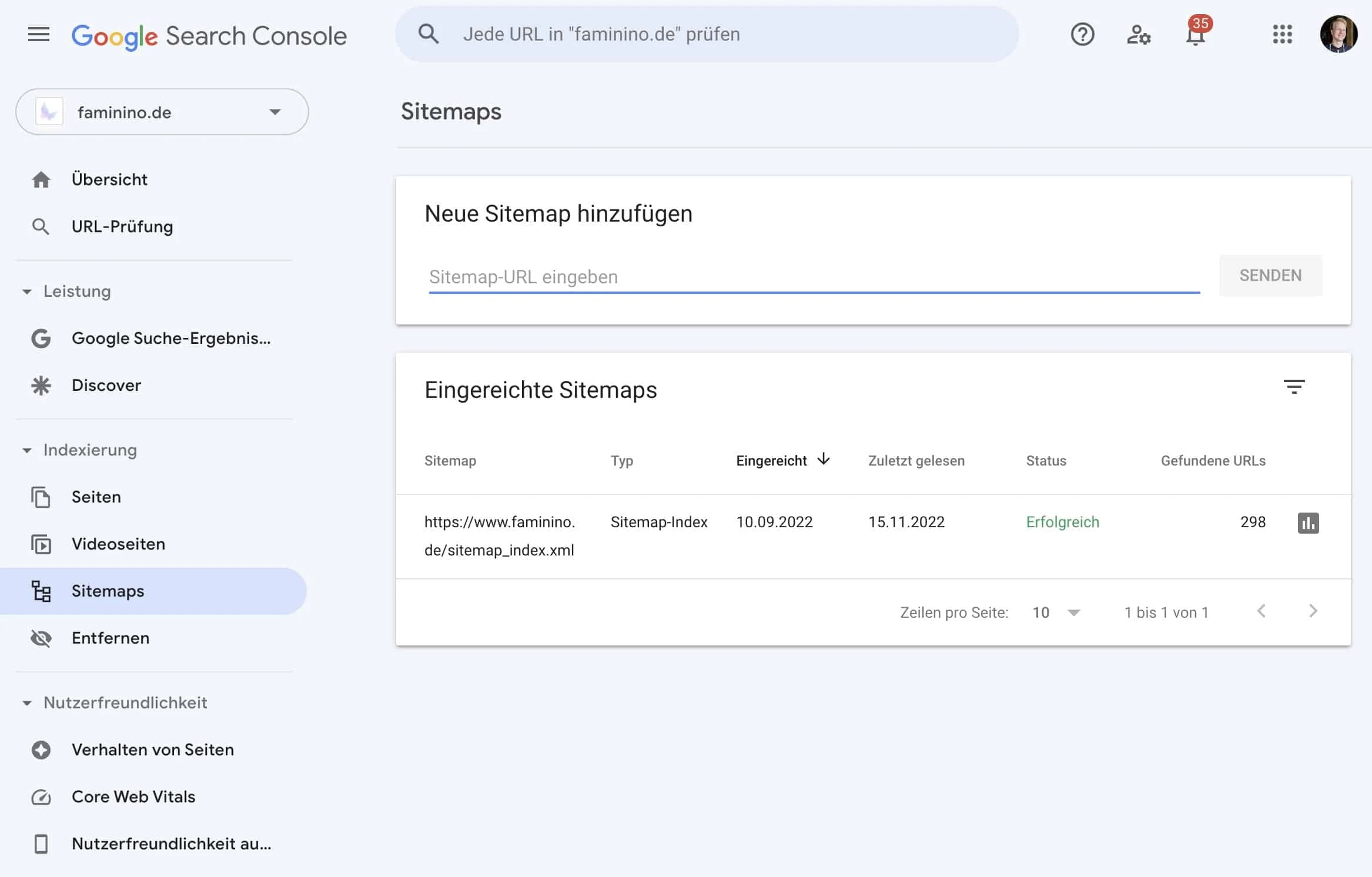
With the Search Console, formerly Webmaster Tools, Google itself provides a powerful tool for the SEO analysis of your blog.
And completely free!
With the tool you can, for example:
- send a sitemap to Google (which, by the way, you should definitely do!).
- check whether there are problems with the indexing of your website
- see who has linked to you
- see exactly which keywords your visitors come from on Google, which is super valuable for your keyword research
So here's one of the most important SEO tips for you:
Use Google Search Console!
Right now.
10. Finally switch to HTTPS!
HTTPS has been a ranking factor since August 2014. One of the few that Google communicates so openly.
HTTPS remains a technical prerequisite for secure websites and is part of the page experience. On its own, though, it doesn't produce a good ranking.
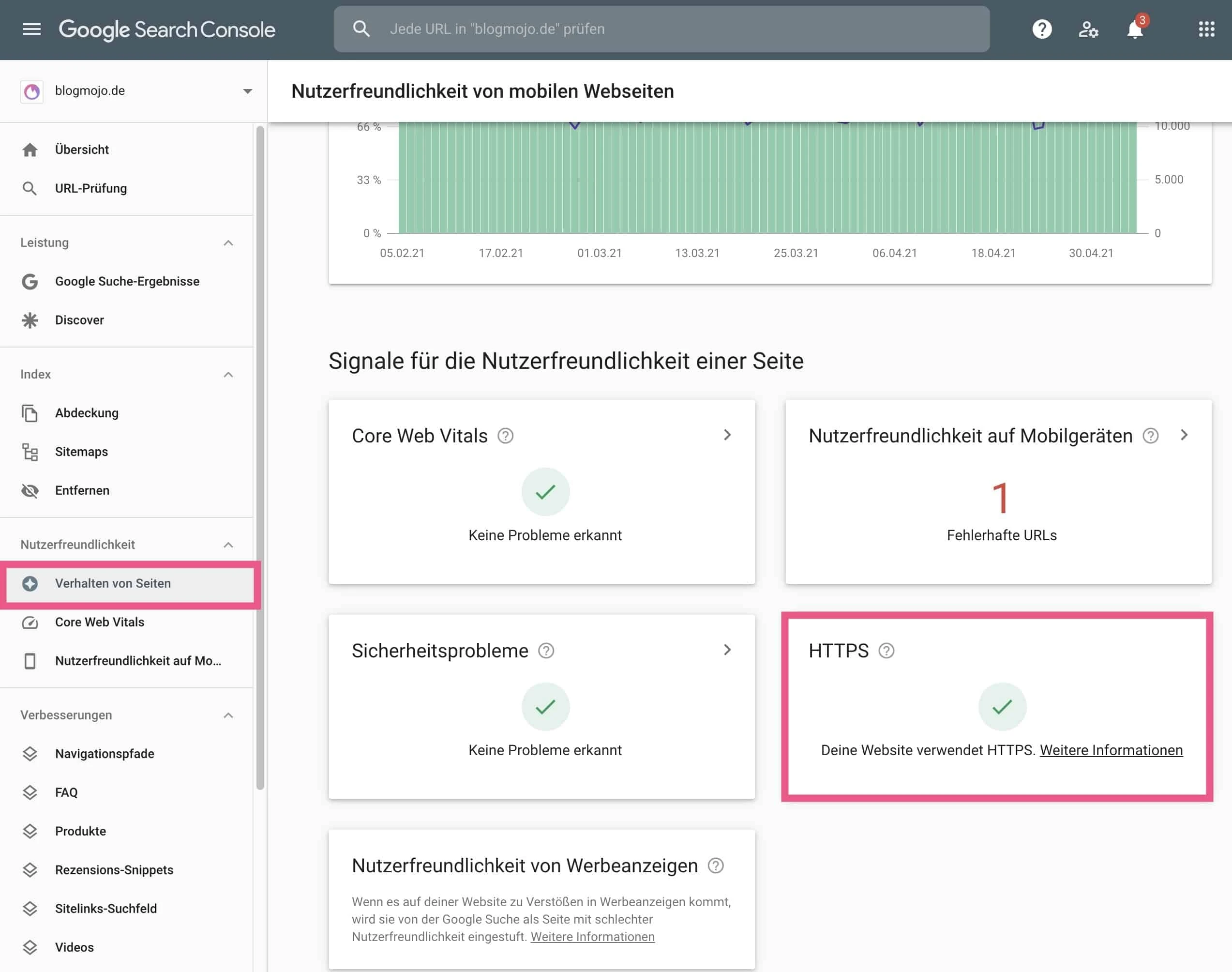
You can check whether there are problems with HTTPS on your website with the “HTTPS” report in Google Search Console (in the sidebar under Experience). Google shut down the former overall page experience report in November 2024. The individual reports on HTTPS and Core Web Vitals still exist:
There's another compelling reason to use an SSL certificate:
Unencrypted websites are flagged as insecure by the most widely used browsers:
In Firefox, for example, forms or login pages without HTTPS are displayed as not secure:

Chrome has gone one step further. Since Chrome 154, the setting “Always use secure connections” has been active by default. If you open a public website that is only reachable over HTTP, Chrome first shows a warning that you have to click away deliberately. All websites without HTTPS are also displayed as not secure:

If your WordPress website isn't SSL-encrypted yet, definitely take a look at my comprehensive guide on it: How to switch WordPress to HTTPS in 8 easy steps
11. Do keyword research (seriously!)
Backlinks, great content and a great user experience make sure that you show up in the search results.
With keyword research, you determine which searches you show up for.
You should make use of this power.
So start getting to grips with it. Take the time to learn keyword research and apply it to your blog articles.
It's worth it. Trust me.
A great starting point for this is my detailed guide to keyword research. There I show you step by step how to find good keywords and what actually makes a good keyword.
But watch out!
It doesn't help to overdo it with keywords either:
12. Screw keyword density!
It still makes sense to focus on one main or focus keyword when optimizing your blog articles.
You work it into the most important places, e.g. the post title (H1 heading), meta title, meta description, the body text and the permalink.
But:
Don't ruin your text or the perfect headline just to squeeze a keyword in somewhere! And don't work your main keyword into every other sentence just to reach a keyword density of such and such a percentage.
Keyword density is very likely no longer a ranking factor, and maybe it never was one.
What you should do instead:
Work in relevant keywords. Use synonyms. Or break your main keyword apart and use its individual parts.
Google is now very good at matching texts to specific keywords. Even if they don't appear 100 times in them.
13. Use a good keyword tool
Using a good keyword tool is indispensable in search engine optimization.
The quality of the tool is a decisive factor for the quality of your keyword research.
There are many free tools you can use:
- Google Trends (to see the interest in a keyword over time)
- Google Search Console (to see which keywords you already rank for, and to find opportunity keywords)
You'll get further, though, with paid SEO tools. They not only have a larger and more accurate database, they also offer even more features.
For example, you can look at which keywords other websites rank for. And with exactly which blog articles or pages:
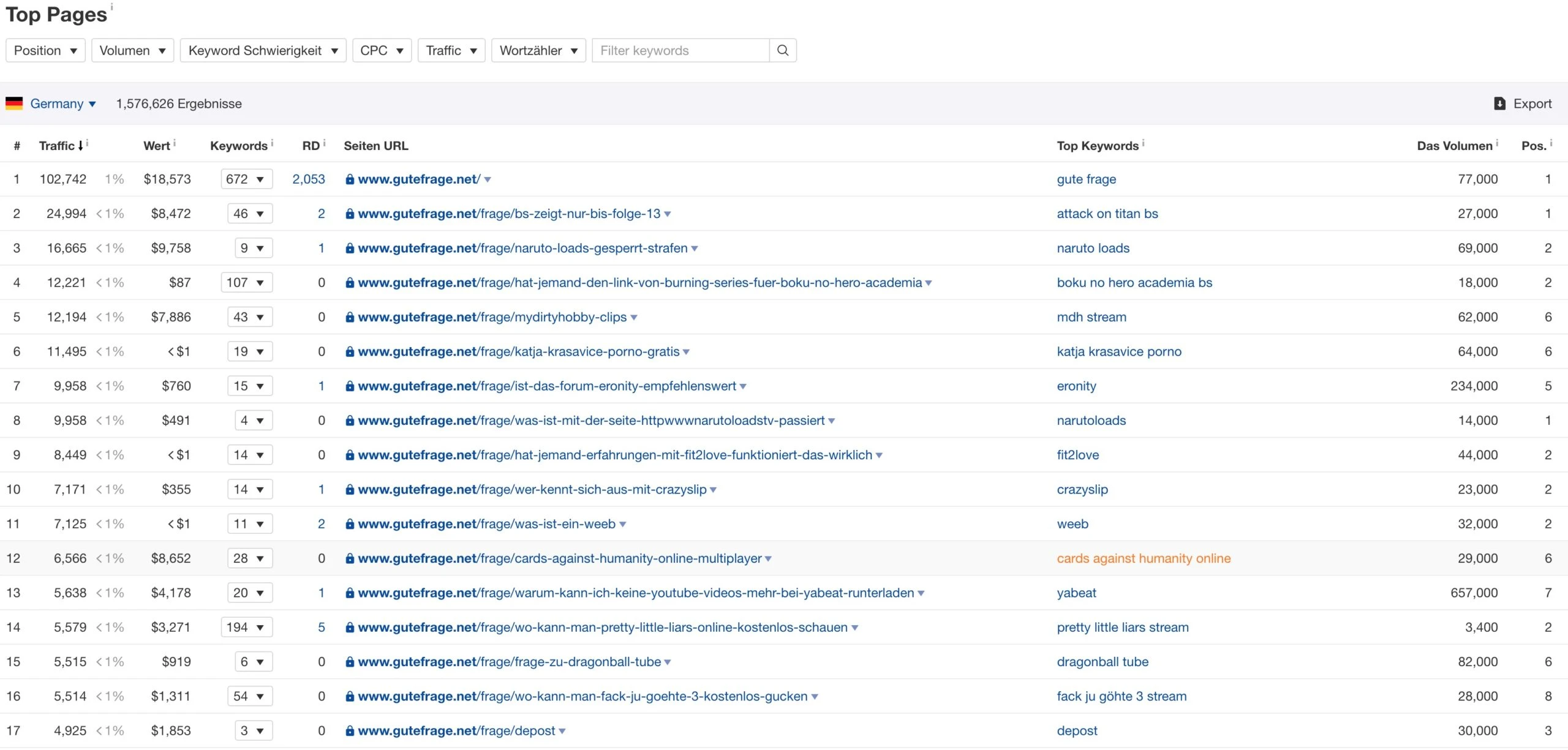
I recommend the following tools:
- KWFinder (my favorite tool for keyword research)
- SE Ranking (my main tool for rank tracking, competitor analysis and AI visibility, more in my SE Ranking review)
- Semrush (very good for competitor analysis and general keyword research with the Keyword Magic Tool)
- Ahrefs (the Swiss Army knife of SEO with a huge database)
You'll find more useful tools and more detailed descriptions of the tools mentioned in my overview of the best keyword tools as well as the best SEO tools.
14. Look at the competition for keywords (not just the search volume)
Found a keyword with a high monthly search volume?
That's good. But it won't do you any good if you can't at least reach the first page for it (better yet the top five positions).
Because otherwise you'll get about as many visitors as a boat rental in winter.
When the lake is frozen.
It's at least just as important to look at how strong the competition is.
Remember:
It's better to rank first for a keyword with low search volume than to land on the second page for a keyword with high search volume.
An example from practice:
Say you manage to get to the top of the second page with your blog article about dry yeast for the keyword trockenhefe (German for dry yeast, with about 4,000 monthly searches).
Then you might get 40 visitors per month through this keyword. If you're lucky.
It's better to optimize for an easier keyword like trockenhefe statt frische hefe (dry yeast instead of fresh yeast).
It only has about 880 monthly searches. But you can get to second or even first place much more easily.
And that will bring you not 40, but 300 to 500 visitors per month.
15. The traffic light in Yoast SEO or Rank Math doesn't always have to be green!
What applies to keyword density also applies to the traffic light in Yoast SEO, Rank Math or other SEO plugins.
Having all the lights on green shouldn't be your goal.
The traffic light is useful and helps me too with keyword optimization. But the recommendations are partly outdated, inaccurate or don't take the readability of an article into account:
- Yoast SEO and similar plugins don't always include the different spellings of a keyword (for example with or without a hyphen), the keyword in an inflected form or synonyms in the analysis.
- The main keyword doesn't always have to be in all the places SEO plugins recommend. It's often better to leave the keyword out of the first paragraph, subheadings or the main heading if that looks strange to readers. Use synonyms there instead, or break the keyword apart.
- Putting the keyword at the beginning of the main heading or meta title does make sense. In practice, though, it ruins your headline in many cases.
The analysis by Rank Math for the German version of this article, which is optimized for the keyword seo tipps, only gives it 44 out of 100 points:
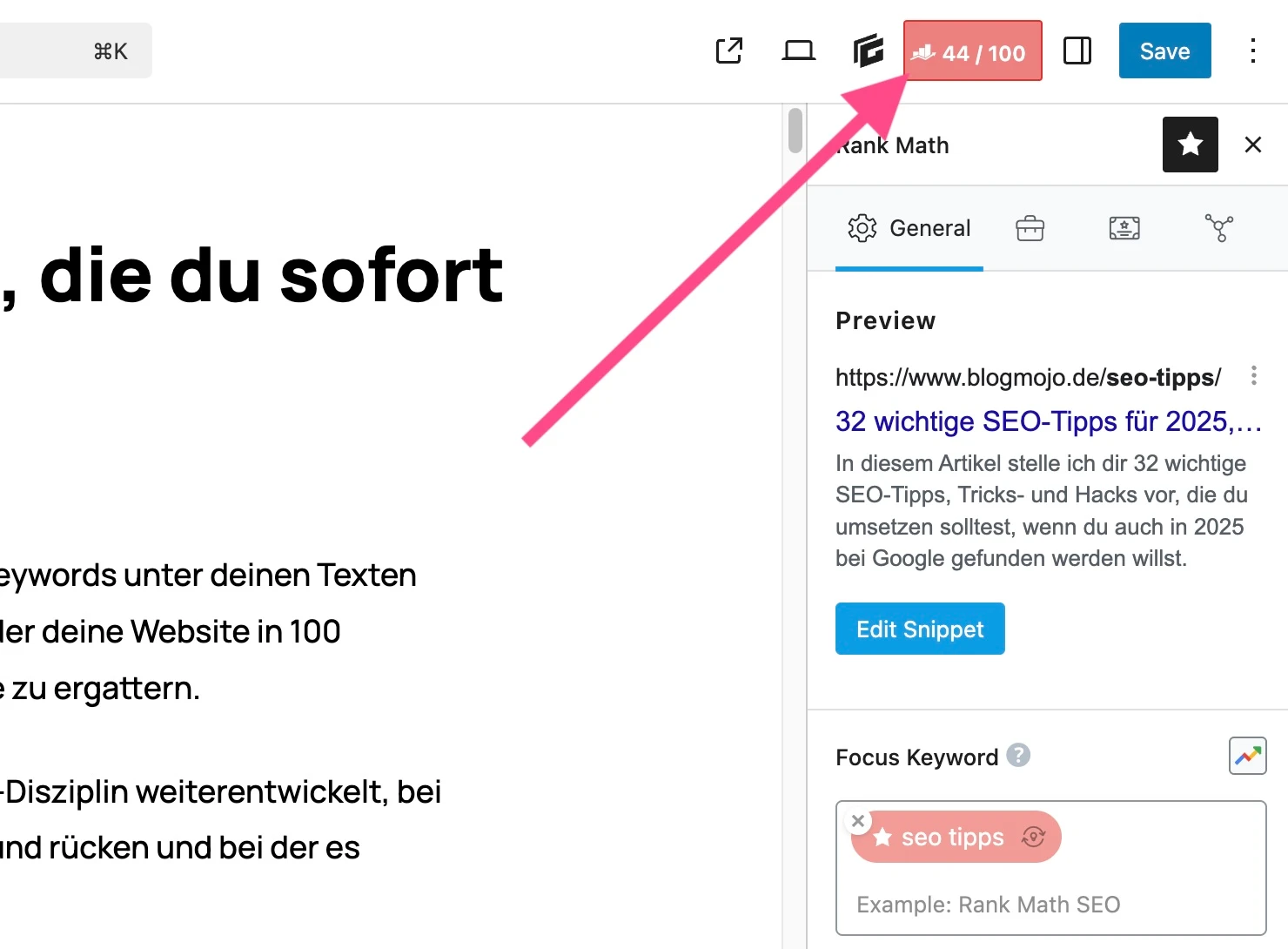
But it has still been ranking in the top 10 for the keyword for quite a few years.
16. Use hyphens!
Google has become an indispensable source of visitors for many companies, blogs and online magazines.
And since everyone optimizes their articles for keywords, the use of the “idiot's space” (Deppenleerzeichen) has also increased sharply.
You no longer see “SEO-Tipps” and “SEO-Grundlagen” (German compound words, which are normally written together or with a hyphen), only “SEO Tipps” and “SEO Grundlagen”.
Please stop that!
It looks unprofessional. And it offers no advantages for your Google ranking.
17. Update your pages regularly
The internet moves fast. And that's reflected in the search results on Google too:
Freshness is an important ranking factor for many search queries.
What I keep noticing:
Pages or blog articles that haven't been updated for a while eventually slip a few positions. Even if they've been in the top positions for months or years.
Pages that rank for highly competitive keywords or dynamic topics (e.g. product comparisons, current world events or trending topics) in particular benefit from regular updates.
My tips for this:
- Update your most important pages or blog articles at least every 3 to 6 months
- The best way to find out how often they should be updated is by trying it out (freshness isn't important for all keywords)
- Take the date out of your permalinks, otherwise the URL changes every time you update a blog article!
- Make your pages or blog articles a little bit better with every update!
- Also change the publication date in WordPress from time to time (usually a mere update is enough for Google to adjust the date in the snippet, though).
18. Check your visibility regularly
Regularly check how the rankings for your target keywords and your overall visibility are developing.
That's the only way to tell whether your SEO measures are bearing fruit. And to fix possible problems quickly.
You can use Google Search Console for this, or a keyword monitoring tool like SERPWatcher from the mangools suite.
The Search Console now also shows you how your content performs in Google's generative AI features: in the report on performance in generative AI features. Clicks from AI Overviews and AI Mode also count toward regular web traffic in the performance report.
19. Use short permalinks!
I keep seeing URLs like this one:
https://www.meinblog.com/2017/10/12/mein-super-toller-blog-post-mit-sehr-langer-ueberschrift-die-fast-die-laenge-des-fliesstextes-erreicht/
Sorry, but that's not user-friendly!
Try to use permalinks that are as short as possible, with 2 to 5 words:
https://www.meinblog.com/dein-hauptkeyword/
That has the following advantages:
- Your URLs are easier for users to remember
- Your URLs are easier for you to remember (I can tell you off the top of my head which permalink I used for each of my blog articles!)
19.1 Do you need date and category in the permalinks?
Consider leaving the date out of the permalinks.
If you run a classic diary blog or a news site, the date of course makes sense. But if most of your blog articles have no time reference, you should take the date out.
First, it makes the URLs of your blog articles unnecessarily long, so they're harder to remember. Second, the URL changes every time you refresh a blog article.
And third, fewer people may click on it in the search results if they see a date from a while ago in the URL. Here's also a nice post by Yoast on this.
You should also be careful about including categories in the permalinks. Only do it if you've thought very carefully in advance about which categories you want to split your blog into.
Because every time you change a category, the URL of all articles in that category changes too (which in turn creates unnecessary redirects).
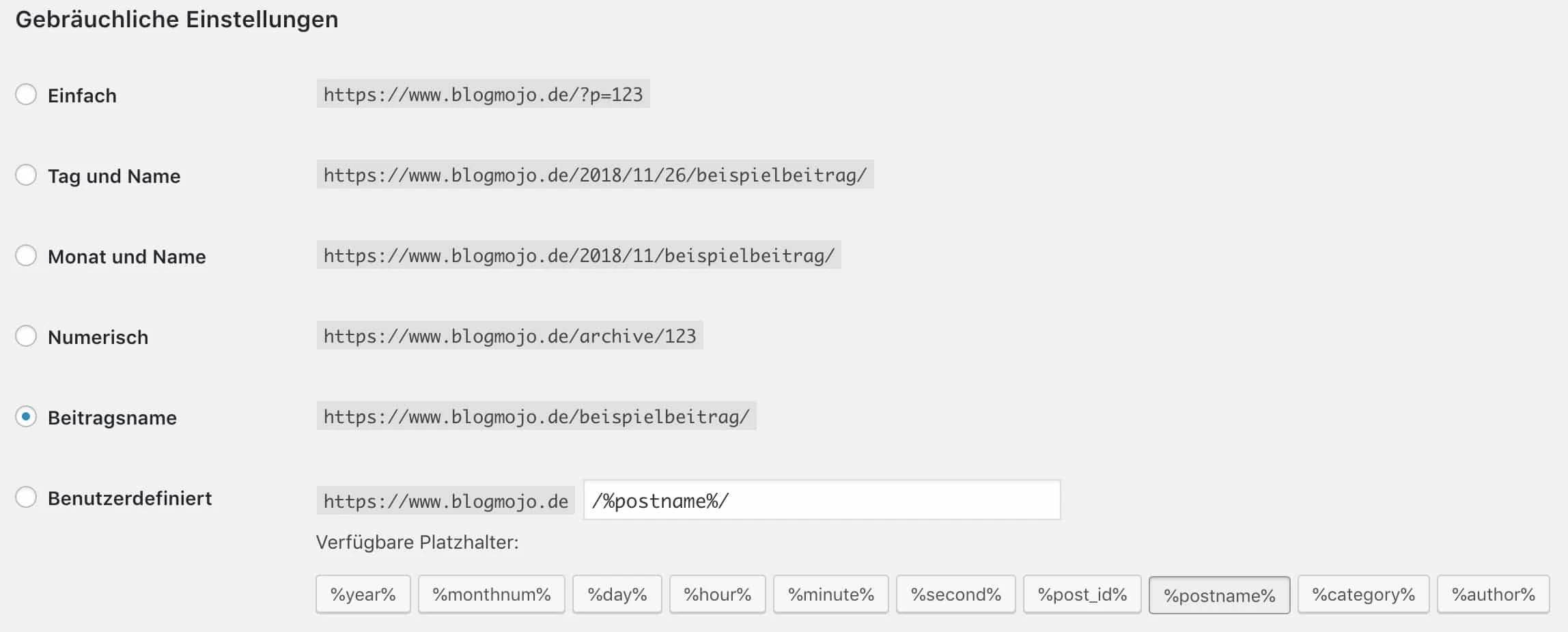
The preferable permalink setting in WordPress (found under Settings > Permalinks) is therefore Post name:
19.2 How do I switch the permalink structure safely?
Please don't make the mistake of just switching the permalink structure like that. It can severely hurt your visibility.
It's important to redirect all articles properly (with a 301 redirect) and to change old links.
I recommend the following procedure:
- Create a backup (just to be safe!)
- In WordPress, switch the new permalink structure to “Post name” (
/%postname%/) - Use the Yoast Permalink Helper to create a redirect code and paste it into your
.htaccessfile - Resubmit the sitemap to Google via Google Search Console (not strictly necessary, actually, because Google fetches the sitemap automatically on a regular basis anyway)
- Run the Broken Link Checker over it once and replace all redirected internal links (with the old permalink structure).
20. Use meaningful file names and alt tags for images
Definitely use meaningful file names and alternative texts (alt tags) for your images.
In WordPress this applies to both the featured image and all images embedded in the article.
That way you can, first, increase the relevance of your blog article for certain keywords or topics. Second, you increase the relevance of the images themselves. That's important for getting visitors through Google image search.
Why this is a ranking factor has to do with accessibility, among other things:
Blind people can't see your images and therefore use screen readers, which read out the alt tags and possibly also the file name of your images.
My 4 SEO tips for images:
- Use the most descriptive names possible for image files (ordnung-im-kuehlschrank.jpg instead of 98shf979121k2.jpg) and
alttags - Avoid umlauts and special characters in the file name
- Try to include the main keyword and relevant keywords in file names,
alttags and possiblytitletags too - Compress your images and use them at the right scale (to reduce the file size)
You'll find out how to get high-quality images with the right licenses in my article on the best image databases.
21. Mobile first!
The share of mobile users worldwide has been larger than the share of users with desktop PCs for many years now.
This also matches my own experience.
On most of my blogs I have over 80% mobile users, on some even over 90%.
Blogmojo is an exception, though. Most of my visitors are bloggers or solopreneurs. And they mostly work on a desktop PC.
That means:
It can be worth looking in Google Analytics or Google Search Console to see which devices your readers mainly use. And adjusting your design accordingly.
For Google, though, the motto “Mobile first!” has applied since November 2016.
As part of that, the Google algorithm was switched step by step to primarily look at the mobile version of a website instead of the desktop version. According to Google, this switch has been completed since October 2023.
What that means for you: if content, structured data or internal links are missing on the mobile version of your page, Google doesn't know about them.
22. Link your best articles internally with keywords
Internal linking is important for your Google ranking.
Very important, in fact.
Internal linking with keywords makes blog articles more relevant for those keywords. Because when a blog article is linked in many places on your website, you're telling Google: “Hey, this blog article is important!”
So you should always link very well internally to the articles you definitely want to rank for on Google.
I recommend linking your blog articles not only within other blog articles, but also globally on your website.
You can, for example, place a list of your best articles in the sidebar, in the footer or in the menu.
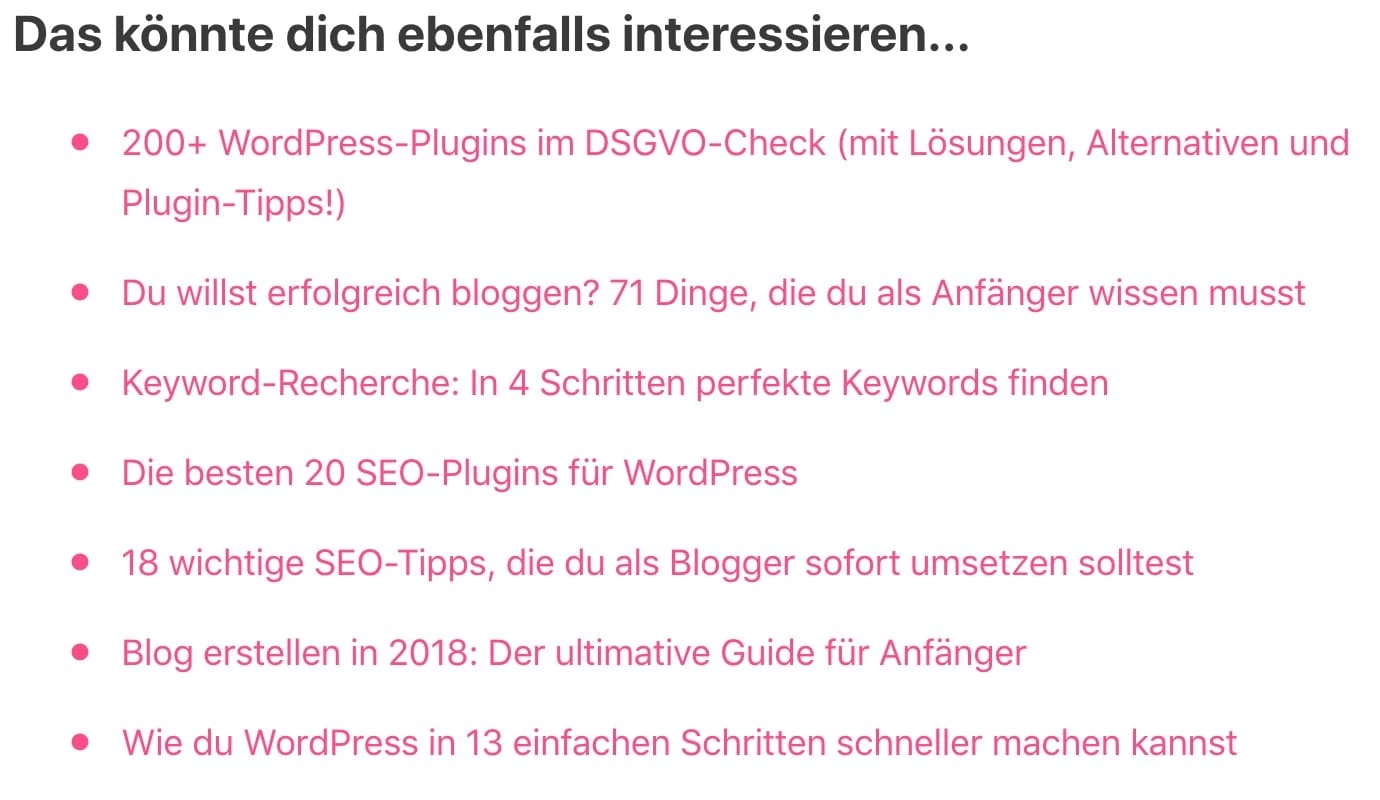
Showing related posts under every blog article also makes sense, e.g. with a WordPress plugin like Contextual Related Posts:
23. Only optimize content where it pays off!
I keep seeing bloggers and website owners who optimize in the wrong place.
And waste their time that way.
It's pointless to optimize every single page on a website or every blog article for keywords.
For many types of blog articles, keyword optimization simply makes no sense, e.g. for weekly recaps, diary entries or best-of posts.
Why?
Because nobody searches for them on Google.
For WordPress taxonomies (categories, tags, product archives etc.), too, it's often a pure waste of time to set meta titles and descriptions individually or to add 500 words of pointless SEO text at the beginning or end.
24. Link earning instead of link building
Link building is dead. Long live link earning!
To put it in plain English:
Stop trying to wangle links and start earning links instead.
That's the only method that will make you rank on Google in the long run.
Avoid the following strategies:
- Links from spam-heavy blog, RSS and website directories
- Links from self-created Web 2.0 sites (Blogger, Tumblr etc.)
- Links from social bookmarking sites
- Links created in bulk from forums, forum profiles or question sites
- Links from expired domains
- Bought links (especially if you don't know what you're doing!)
- Links from blog networks (especially if you don't know what you're doing!)
- Blog comments that are only posted for a link (e.g. with a keyword in the name)
- Links from mass-distributed press releases
- Links from article directories
- Links from guest articles with lousy SEO content
Do the following instead:
- Produce truly great content that helps people.
- Build a community, e.g. in the form of a Facebook group or an email list.
- Position yourself as an expert.
- Build relationships with influencers in your niche who help you spread your content.
- Do targeted outreach
25. Remove broken links
Your website or blog is a work in progress.
You delete posts or pages. You change categories and tags. You change the permalink structure. You activate or deactivate plugins and themes.
That can lead to certain pages no longer working and visitors seeing an error page after clicking a link.
That also applies to links to external websites. Content gets deleted, there are technical problems or websites are abandoned altogether.
And boooom.
Visitors run into a dead end.
Broken links create a bad user experience and are therefore at least an indirect ranking factor.
So check your links regularly and remove all broken links!
You can find broken links with our free broken link checker.
Checking all your internal and external links manually is unnecessarily time-consuming, though. That's why I recommend using a browser-based “broken link checker” (just search Google, there are many free tools), Screaming Frog or the WordPress plugin LinkWhisper, for example.
26. Use lists and tables
Google loves lists and tables.
Why?
Because they're helpful for users. They present complex matters or extensive data clearly and in a more digestible way.
Google doesn't just reward that with a better ranking. Lists, whether numbered or unnumbered, also increase the chances of getting into a featured snippet.
27. Write meta titles that get clicks
It isn't only the ranking on a search results page that decides whether someone clicks on it or not.
You can strongly influence the click rate through the meta title.
Say you want to write an article about how to improve your Google ranking (with the main keyword “improve google ranking”).
The headline “Improve Google ranking” alone sounds boring, doesn't it?
So let's spice up the headline:
Trick #1: Use numbers
Example: 5 steps to improve your Google ranking
Trick #2: Address your readers directly
Example: 5 steps to improve your Google ranking
Trick #3: Use power words
Use emotionally charged words, e.g. easy, fast, free, instantly, simple, guaranteed, proven, safe, great, impressive etc.
Example: 5 essential steps to improve your Google ranking
You'll find a list of power words for every occasion and writing style here: 1,000+ power words that instantly improve your texts.
You can see what your title looks like in the Google search results in our free SERP snippet preview.
28. Use structured data
You can also increase the click rate in the Google search results by adding structured data to your pages or articles.
That's because it can make your search results show up as so-called “rich snippets”. That's a search result that is “enriched” with additional data.
For our egg waffles recipe, an image and the preparation time are displayed in addition to the star ratings:

Adding structured data is dead simple. You don't have to add it manually, you can simply use one or more WordPress plugins for it:
For recipes we use WP Recipe Maker. For adding simple star ratings, the plugin Yet Another Stars Rating works very well.
A good all-purpose solution for pretty much all structured data that can be displayed in Google is offered by Rank Math (with the Advanced Schema Generator in the Pro version).
You can then check whether your structured data is recognized correctly by Google with the Rich Results Test.
29. Avoid thin content
“Thin content” refers to pages with little content that don't help anyone.
And Google has little tolerance for that.
It doesn't matter whether you created these pages to deliberately deceive Google or whether they came about through a technical error or wrong settings in your SEO plugin.
In 2018, for example, some websites crashed in Google Search because there was a bug in version 7.0 of Yoast SEO.
This bug meant that attachment URLs were not redirected to the attachment file (the setting in the image was set to No although users had selected Yes):
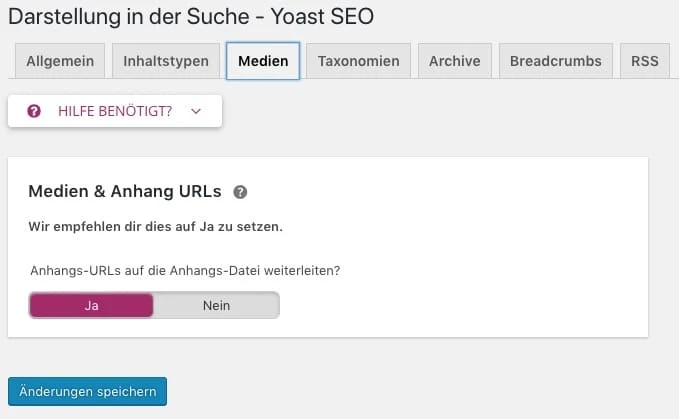
As a result, hundreds or even thousands of useless URLs ended up in the Google index, which Google rated as spam.
Here are three tips to avoid thin content:
- Set categories, tags and other taxonomies to noindex (especially if you have a lot of them)
- Always redirect attachment URLs in Yoast SEO to the attachment URLs
- Delete, merge or expand very short or poor blog articles and pages (especially if you have a lot of them)
30. Build a brand!
Google was able to establish itself on the market through a unique selling point:
Factoring backlinks into Google Search, which led to much better results than with other search engines.
It is very likely, however, that Google now uses further factors to determine the reputation of a website or an individual web page and to be able to tell trustworthy brands apart from unknown non-brands.
These could include, for example:
Branded searches
Branded searches are keywords that contain your brand. For me, e.g.:
- gradually ai
- gradually ai seo
- gradually ai dsgvo
- gradually ai blog erstellen
The logic behind it is simple:
The more often someone types your brand name into Google, the higher the probability that your content is high-quality and helpful. From the additional terms entered, Google could also tell which topic areas and keywords your website is relevant for.
Implied links
Implied links are unlinked mentions of your brand, e.g. the mention of Blogmojo or me, Finn Hillebrandt, in a blog article:
31. Keep up with changes to the Google algorithm
Google constantly makes changes to its own search algorithm and to the look of Google Search.
In 2022, according to its own figures, Google ran 800,000 experiments that led to more than 4,000 improvements to Google Search (unfortunately there are no figures for 2023, 2024 or 2025, but it can be assumed that there were a similar number of changes).
In 2026 alone there have been three core updates so far (March, May and November) and four spam updates (March, June, August and September). You can find out which updates there were and what they meant in my overview of all Google updates.
That makes it extremely important to stay up to date!
32. Avoid website builders
Our big website builder comparison showed:
The vast majority of website builders only offer basic SEO features, such as adjusting the meta title and description of individual pages.
If you're looking for advanced SEO features, you're out of luck:
- Customizing the robots.txt? Only possible with 3 of 8 builders.
- Adding custom structured data? Only possible with Wix.
- PageSpeed? Catastrophic. 6 of 8 have a PageSpeed score below 60.
- Sitemap individually customizable? Not possible with any builder.
- 301 redirects? Can only be set individually with 2 of 8.
So here's my SEO tip for you:
If you're serious about search engine optimization, use WordPress. With Jimdo, Wix and the like you won't be happy. At least not in the long run.
It's different if you want to create an online store. You'll find more information on this here: The 13 best e-commerce platforms compared 2026
FAQ
Here I've put together answers to common questions about SEO:
How long does SEO take?
There is no blanket answer to that question. Asking how long SEO takes is like asking “How long does driving take?”.
Depending on the SEO measure, and how and on which website it is implemented, it can take hours, days, weeks, months or years until it delivers results.
You'll find an overview of common SEO measures and how long it takes until they take effect here: How long does SEO really take (incl. 6 examples)?
How do I optimize my website for AI search (AI Overviews and AI Mode)?
In its official guide to generative AI features, Google says that no special optimization is needed for this. AI Overviews and AI Mode build on the same ranking and quality systems as regular search.
Your page has to be indexed and eligible for a snippet. Beyond that, unique, helpful content with your own perspective counts the most. You don't need special files like llms.txt or special markup for Google.
More on this in tip 5 and in Google's guide.
What is the best SEO tool?
It's hard to say which SEO tool is the best. SEO is a very broad field with hundreds of measures, problems and different subdisciplines.
On top of that, there is no tool that covers all possible measures and problems. I use between 10 and 15 tools myself to optimize my websites, and about half of them are keyword tools.
Can I learn SEO?
I'm firmly convinced that anyone can learn SEO. SEO isn't witchcraft or dark magic, it's a craft.
In most cases it's less technical than you might think or than it seems. Promise!
If you want to learn SEO, take a look at our collection of free SEO tutorials.
Should I do SEO myself or hand it over to an agency right away?
I would always recommend doing SEO yourself. At least in the beginning. For these three reasons:
- Good SEO agencies are expensive. Depending on the type of your website, comprehensive support can cost four or five figures per month.
- Without theoretical and practical SEO knowledge, it's hard to check the quality of the measures an agency carries out for you.
- In-house SEO can be much more efficient, because coordination and communication are easier when no third party is involved