
[Last update: June 4, 2018] As a website owner, blogger, or online entrepreneur, you can hardly get around Google and its many services these days. Almost every website has embedded YouTube videos, Google Maps maps, Google Fonts typefaces, and other Google services.
Many of these services collect personal data, so there's quite a bit to consider under data protection law when you use them.
You need a data processing agreement (DPA) here
- Web hosts
- WordPress hosts
- Website builders
- Newsletter services
- Online course platforms (cloud)
- CMS (cloud)
- Landing page software (cloud)
- Google Analytics & alternatives
- Shop systems (cloud)
- Cookie consent tools (cloud)
- Cookie plugins (cloud)
- external print service providers
- archiving service providers
- document shredding service providers
- cloud storage
- CRM systems
- accounting software
You don't need a data processing agreement (DPA) here
- AI text generators
- AI image generators (if you don't upload images of identifiable people)
- Cookie consent tools (self-hosted)
- Cookie plugins (self-hosted)
- Image databases
- Keyword tools
- WordPress shops (self-hosted)
- Amazon Associates program
- Shop systems (self-hosted)
- Landing page software (self-hosted)
- Online course platforms (self-hosted)
- Membership plugins (self-hosted)
- LMS plugins (self-hosted)
- Google AdSense
- affiliate networks
- tax advisors
- lawyers
- postal service providers
Here I want to give you an overview of which Google services can be used in line with the GDPR and which can't, how far Google has come with its efforts in this area, and what requirements Google itself places on the use of its services.
Like many of my articles on the GDPR, this one is a work in progress. I'll update it regularly to keep you up to date on changes to Google services. I'll also add more services over time.
Feedback and additions are, as always, very welcome!
- Google Analytics can be used in line with the GDPR with a data processing agreement, IP anonymization, and an opt-out. An opt-in is needed for the advertising features.
- Google AdSense doesn't need a data processing agreement, but you have to comply with the EU User Consent Policy and ask users for their consent.
- For Google Maps and YouTube videos, a two-click solution (e.g. with Borlabs Cookie) is recommended, because otherwise cookies and data are transferred.
This blog post is not legal advice!
In my work as a blogger and WordPress service provider, I have looked into the applicable data protection rules and the GDPR in depth, but I am neither a lawyer nor a data protection expert. Accordingly, I can't accept any liability for the completeness, timeliness, or accuracy of the content I provide.
1. Blogger
Google's Blogger service can currently not yet be used 100% in line with the GDPR, because a data processing agreement is missing. On top of that, some features that load personal data in the background can't be turned off yet.
I collect solved and unsolved problems with Blogspot in my separate checklist Blogspot & GDPR: Checklist (and unresolved questions!).
2. Gmail
To my knowledge, the free version of Gmail can't be used in line with the GDPR, because Google doesn't offer a data processing agreement. It isn't known yet whether there will be one or not.
The only way to keep using Gmail right now is to book the paid GSuite (from €4 per month), which lets you sign a data processing agreement.
3. Google AdSense
Using Google AdSense is not entirely unproblematic, because Google uses cookies and other tracking methods to follow user behavior beyond the website and build user profiles from it. These profiles are then used for remarketing or to show personalized ads.
It is still not entirely clear how Google AdSense can be used in line with the GDPR.
In general, use would be conceivable under Art. 6(1)(f) GDPR (legitimate interest). As a website owner, you certainly have a legitimate interest in earning money with your website. The question is whether the users' interests outweigh it in this case. You might be able to weaken the users' interest by not showing personalized ads (see item 4.2).
Google itself apparently relies on Art. 6(1)(a) GDPR (consent) as the legal basis and, as of May 25, 2018, requires its publishers to integrate an opt-in for Google AdSense into their own website or app (see item 4.1). This can also be seen as preparation for the upcoming ePrivacy Regulation.
3.1 Opt-in
According to the AdSense program policies, using Google AdSense requires you to comply with Google's new EU User Consent Policy, which took effect on May 25. That means that as a publisher, you have to get users' consent before they are served AdSense ads.
According to the article Tools to help publishers comply with the GDPR, Google will provide various tools for collecting this consent.
Let's hope Google actually delivers them on time, because time is slowly running out. If necessary, you can also set up an opt-in with the recommended plugin Borlabs Cookie.
3.2 Personalization
Google has offered the option of turning off ad personalization for quite some time. You can do this in your AdSense account under Allow and block ads > Content pages > All my sites > Personalized ads.
However, according to AdSense support, cookies are still set in that case. On top of that, consent will still be required under the upcoming ePrivacy Regulation:
Although these ads don’t use cookies for ad personalisation, they do use cookies to allow for frequency capping, aggregated ad reporting, and to combat fraud and abuse. Consent is therefore required to use cookies for those purposes from users in countries to which the ePrivacy Directive’s cookie provisions apply.
3.3 Data processing agreement
According to this article in the AdSense Help Center, users of Google AdSense don't need a data processing agreement, because both parties count as data controllers independently of each other:
Across our publisher suite (DoubleClick for Publishers (DFP), DoubleClick Ad Exchange, AdMob, and AdSense), both you and Google operate as independent controllers of personal data. We operate as a controller because we regularly make decisions on the data to deliver and improve the product, for example, testing ad serving algorithms, monitoring end-user latency, and ensuring the accuracy of our forecasting system.
4. Google Analytics
Google Analytics can still be used in line with data protection law under the GDPR. However, according to Diercks Digital Recht and datenschutzbeauftragter-info.de, you have to observe several points:
- Print out the data processing agreement with Google, sign it, and send it to Ireland
- Accept the data processing amendment (under Admin > Account settings), and please note the notes on this from attorney Schwenke
- Anonymize IP addresses
- Offer an opt-out, e.g. with a plugin or by extending the tracking code
- Limit the data retention period to 14 months (under Admin > Select property > Tracking info > Data retention)
- Deactivate the User ID feature (under Admin > Select property > Tracking info > User ID)
- Adjust your privacy policy
It is also possible that an opt-in for Google Analytics will become mandatory in the future. A position paper by the DSK (the German Data Protection Conference) dated April 26, 2018 suggests this.
4.1 EU User Consent Policy
As part of its EU User Consent Policy, Google itself requires an opt-in for using Google Analytics. However, only if you use the advertising features (remarketing, reports on performance by demographics and interests, etc.).
5. Google Drive
To my knowledge, Google Drive and all the services linked to it, such as Google Docs, Google Sheets, Google Slides, or Google Forms, can't be used in line with the GDPR in the free version (similar to Gmail), because no data processing agreement is available.
That's why the only way to keep using Google Drive is likewise to book the paid Google GSuite (from €4 per month), which lets you sign a data processing agreement, or to not store other people's personal data through the service.
For storing your own data or data with no personal reference, such as blog articles or e-books that you write in Google Docs, Google Drive is of course still a good fit.
6. Google Fonts
Opinions differ on whether Google Fonts can be used on your own website in line with the GDPR or not.
According to the Google Fonts FAQ, no cookies are stored and no information about the Google account visitors use is passed on. So no user tracking takes place this way.
What is still unclear, though: whether Google Fonts causes IP addresses (and possibly other information such as operating system, browser used, approximate location, or referrer) to be stored on Google's servers, which in theory would make user tracking possible.
The question is whether use is possible on the basis of Art. 6(1)(f) GDPR (legitimate interest) or whether the protection of users' privacy outweighs it in this case.
If you can believe the privacy policy template from eRecht24 Premium, it does not:
[...]Google Web Fonts is used in the interest of a consistent and appealing presentation of our online offerings. This constitutes a legitimate interest within the meaning of Art. 6(1)(f) GDPR.
I can't fully agree with the argument that you can easily load Google Fonts from your own server and that this undermines the legitimate interest.
After all, as a website owner you do have advantages when you load Google Fonts from Google's servers: It takes load off your own server and can improve your website's loading time, since the fonts you use may already be in the user's browser cache.
Of course, I can't say whether using Google Fonts is 100% legally safe. But I consider the risk very low and don't think it's really necessary to remove Google Fonts or store them locally.
7. Google Maps
I consider embedding Google Maps in a website problematic under data protection law, because it stores a so-called NID cookie on the user's computer:

According to Google's own information, this cookie is used not only to store preferred settings for Google Search (such as language or the Google SafeSearch filter), but also to personalize ads in Google products such as Google Search.
In addition, embedding loads Google Fonts and sets up various other connections to Google servers in the background, which transmit IP addresses and other data, such as browser and operating system, to Google. That is to be expected, though, with a connection to a third-party service.
However, Google apparently is still working on making Google Maps GDPR-compliant, as you can see from a post in the Maps help forum:
You can rely on Google being committed to complying with the EU data protection directives for all products, including the Google Maps API. We are constantly working on complying with the directives, which also makes compliance easier for you. We are also committed to building robust privacy and security measures into our services. We know that security and privacy are important to you and to many users, as well as to us. For Google, it is a priority that private information is safe.
Personally, I'm going to remove Google Maps maps from my websites entirely or embed them so that they only load after the user has confirmed this with a click.
You can implement this with the plugin Borlabs Cookie, for example, which has an add-on feature that lets any iframe open only after a click. If you use the page builder Elementor, the free plugin Extra Privacy for Elementor is also an option.
The most privacy-friendly option is to use a simple text link to the map in question. Please keep in mind that embedding a screenshot of Google Maps can be problematic under copyright law!
OpenStreetMap or Leaflet are also good alternatives to Google Maps.
7.1 EU User Consent Policy
As far as I could determine, the EU User Consent Policy does not apply to simple embedded Google Maps maps. At least I found no reference to it in the Google Maps APIs Terms of Service or in the Additional Terms of Service for Google Maps/Google Earth.
However, according to item 9.3 of the Google Maps APIs Terms of Service, you have to comply with the EU User Consent Policy and provide an opt-in if you use the Google Maps API for embedding and the maps access cookies or other data on the user's computer:
Cookies. As noted in the Documentation, certain Maps API(s) store and access cookies and other information on end users’ devices. If you use any of these cookie-enabled Maps API(s) in your Maps API Implementation, then for end users in the European Union, you must comply with the EU User Consent Policy.
8. Google Search Console
As far as I know right now, the Google Search Console can be used without restriction under the GDPR, because it doesn't store any personal data on your own website or make any visible to the user.
9. YouTube
Similar to Google Maps, embedding YouTube videos in your own website is not entirely unproblematic either.
That's because embedding sets up various connections to Google servers, which store several cookies in your readers' browsers and send information about them to YouTube and Google's advertising service DoubleClick:
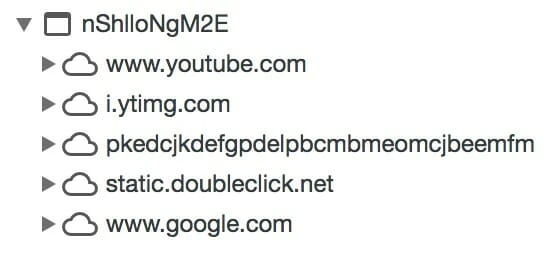
You can find out how to use YouTube videos anyway in my detailed guide YouTube & GDPR: Embedding videos in a privacy-compliant way.
9.1 EU User Consent Policy
Item 9.2 of the YouTube API Services Terms of Service contains a passage that points to the EU User Consent Policy:
Notice to EU Users. For users in the European Union, you and your API Client(s) must comply with the EU User Consent Policy currently located athttp://www.google.com/about/company/user-consent-policy.html.
Unfortunately, it doesn't say explicitly whether this also applies to videos that you embed on your website without an API key (that is, with the normal embed function). Since YouTube tells you that by embedding you agree to the YouTube API terms of service, it very well might.
10. AMP
Whether Accelerated Mobile Pages (AMP), which strip down websites in mobile Google Search so they load faster, can be used in line with the GDPR is still unclear at the moment.
In theory, AMP requires a data processing agreement, because your website is loaded via the AMP CDN rather than from your own server. No such agreement is available, however.
On the positive side, according to my research, AMP pages loaded via Google don't store any cookies on the user's computer and therefore aren't used for tracking this way.
Google also already provides a consent tool for AMP, which can be used to show opt-ins for Google advertising services.