
First things first:
Storing commenters' IP addresses can make perfectly good sense. So please think it over before you blindly apply all the steps explained here.
I personally decided against storing them on Blogmojo.
You need a data processing agreement here
- Web hosts
- WordPress hosts
- Website builders
- Newsletter services
- Online course platforms (cloud)
- CMS (cloud)
- Landing page software (cloud)
- Google Analytics and alternatives
- Shop systems (cloud)
- Cookie consent tools (cloud)
- Cookie plugins (cloud)
- External print service providers
- Archiving service providers
- Document shredding service providers
- Cloud storage
- CRM systems
- Accounting software
You don't need a data processing agreement here
- AI text generators
- AI image generators (without personal images)
- Cookie consent tools (self-hosted)
- Cookie plugins (self-hosted)
- Stock photo sites
- Keyword tools
- WordPress shops (self-hosted)
- Amazon Associates program
- Shop systems (self-hosted)
- Landing page software (self-hosted)
- Online course platforms (self-hosted)
- Membership plugins (self-hosted)
- LMS plugins (self-hosted)
- Google AdSense
- Affiliate networks
- Tax advisors
- Lawyers
- Postal service providers
I moderate all comments here on the blog, and I don't need IP addresses to fight spam either. On top of that, in 10 years as a blogger, nobody has ever insulted me or threatened me with violence in a comment.
So get rid of them!
Data minimization, exactly in the spirit of the GDPR. Yay!
In this article I want to show you different ways to prevent IP addresses from being stored, delete existing IPs from the database and, as a middle ground, limit how long they are kept in your WordPress database (e.g., to 7, 14, 30 or 60 days).
1. Prevent IP addresses from being stored
It's relatively easy to stop WordPress from storing commenters' IP addresses.
All you have to do is install the plugin DSGVO Tools: Kommentar-IP entfernen (“GDPR tools: remove comment IP”) or, if you prefer, add the following code to the functions.php of your child theme:
function bm_remove_ip( $comment_author_ip ) {
  return '127.0.0.1';
}
add_filter( 'pre_comment_user_ip', 'bm_remove_ip' );
This replaces the IP address of every commenter with 127.0.0.1 (commonly used for localhost).
However, this only prevents IP addresses from being stored in the future. How to remove existing IP addresses from the database is covered in the next step:
2. Delete existing IP addresses from the database
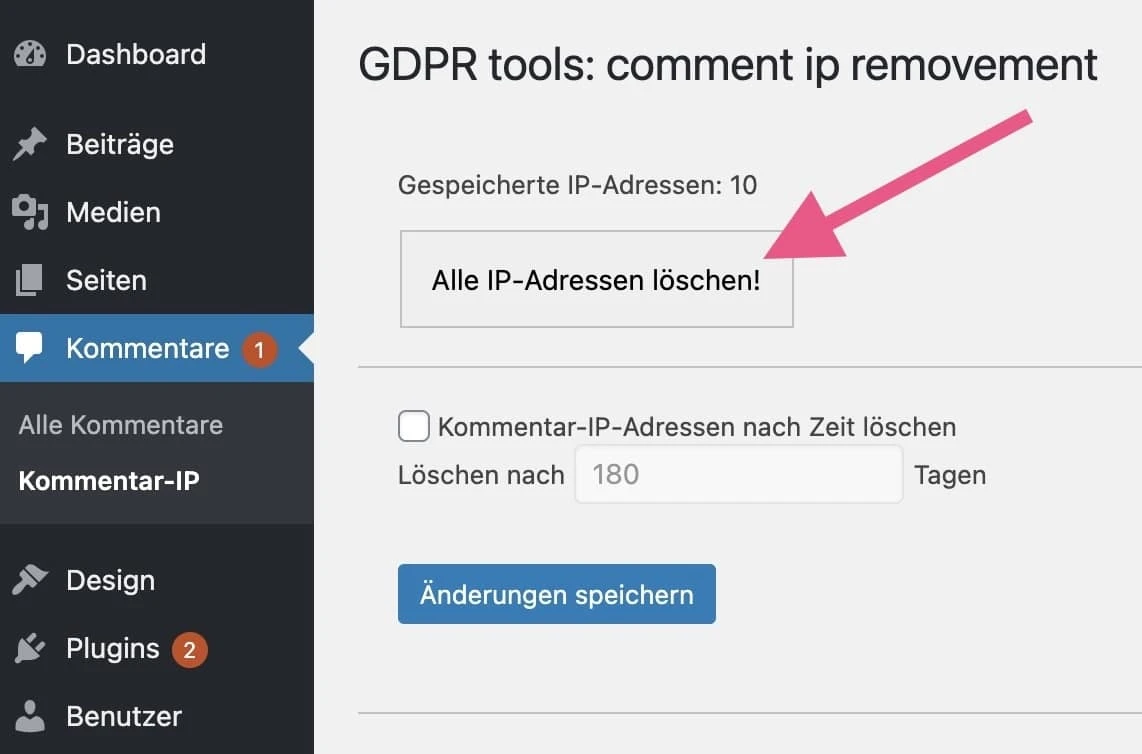
To remove existing IP addresses, you can also use the plugin DSGVO Tools: Kommentar-IP entfernen.
Go to the plugin settings (you'll find them under Kommentare > Kommentar-IP, i.e., Comments > Comment IP) and simply click the button provided:
If you're comfortable with MySQL databases and prefer to do it yourself, you can also do this with a simple command in PHPMyAdmin:
UPDATE wp_comments SET comment_author_IP = ''wp_, you should replace it in the command accordingly!3. Limit the storage period to X days
As protection against spammers, it can make sense to delete commenters' IP addresses only after a certain time (e.g., after a week).
The plugin DSGVO Tools: Kommentar-IP entfernen can do that too. In the plugin settings, simply tick the box next to Kommentar-IP-Adressen nach Zeit löschen (delete comment IP addresses after time) and set a deletion period:





